To use this macro with a calendar in another folder (such as to move appointments to a hotmail or iCloud calendar), you need to use the function found at Working with VBA and non-default Outlook Folders. Instructions to use other calendar folders in your default data file are there also.
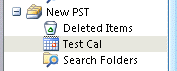
Replace pst-display-name with the name as seen in the folder list.
For a version of this macro that copies new appointments that have Show time as set to Busy to another calendar, see Copy new appointments to another calendar using VBA
To use with Contacts, use olFolderContacts instead of olFolderCalendar.
Create Tasks from Email and move to different Task folders
VBA: Move Appointments to a different calendar
To use, check your Macro security setting; it needs to be on low while testing. Press Alt+F11 to open the VBA Editor. Expand the project folder and paste this into ThisOutlookSession. If you are moving the appointments to a different pst or data file, you will need to get the function from this page. It can be pasted at the end of ThisOutlookSession or you can insert a Module and paste it into the module.
To test: Click in the Application_Start then click the Run button. Open the default Inbox and create an appointment. Check the Calendar folders. Is the appointment in the desired folder?
Dim WithEvents newCal As Items

Private Sub Application_Startup()
   Dim NS As Outlook.NameSpace
   Set NS = Application.GetNamespace("MAPI")
   Set newCal = NS.GetDefaultFolder(olFolderCalendar).Items
   Set NS = Nothing
End Sub

Private Sub newCal_ItemAdd(ByVal Item As Object)

Set CalFolder = GetFolderPath("datafile-display-name\Calendar")
Item.Move CalFolder
End Sub
Move contacts to a different folder
The same method can be used with contacts. Don't forget, if you are moving the appointments to a different pst or data file, you will need to get the function from this page.
Dim WithEvents newContact As Items

Private Sub Application_Startup()
   Dim NS As Outlook.NameSpace
   Set NS = Application.GetNamespace("MAPI")
   Set newContact = NS.GetDefaultFolder(olFolderContact).Items
   Set NS = Nothing
End Sub

Private Sub newContact_ItemAdd(ByVal Item As Object)

Set ContactFolder = GetFolderPath("datafile-display-name\Contacts")
Item.Move ContactFolder
End Sub
Move Tasks to a different folder
Don't forget, if you are moving the appointments to a different pst or data file, you will need to get the function from this page.
Dim WithEvents newTasks As Items

Private Sub Application_Startup()
   Dim NS As Outlook.NameSpace
   Set NS = Application.GetNamespace("MAPI")
   Set newTasks = NS.GetDefaultFolder(olFolderTasks).Items
   Set NS = Nothing
End Sub

Private Sub newTasks_ItemAdd(ByVal Item As Object)

Set TaskFolder = GetFolderPath("datafile-display-name\Tasks")
Item.Move TaskFolder
End Sub

Kevin Brisebois says
Hi Diane,
i'm working on a small macro to create new appointments in Outlook Calendar based on Microsoft projects Tasks list.
Here is my working code so far:
How can i use this code to insert in another calendar based on a combobox filled with calendar names
Diane Poremsky says
This uses the default calendar
Set olAp = ol.CreateItem(olAppointmentItem)
to save to a new calendar, you need to use items.add - if you are selecting a name from a list, use the variable in the path (this uses a subfolder of the calendar)
Set calFolder = Ns.GetDefaultFolder(olFolderCalendar).Folders(calName)
Set olAp = calFolder.Items.Add(olAppointmentItem)
paulanthony says
Hi Diane. Like a true engineer, you really want this to be right ;-).
I tried the /resetfolders command and it didn't work. Just for fun I tried /resetfoldernames as well which also didn't work.
I am happy to say that blowing away my cached .ost did the trick!
So, that was the good news. Now for the bad. It would seem that the default Contact folder setting didn't work. Changing the code back to: Set newContact = NS.GetDefaultFolder(olFolderContact).Items threw the same error as before.
However, hard coding the path like this: Set newContact = GetFolderPath("[my_default_profile\Contacts (This computer only)").Items does work. It's annoying that the default setting didn't work (I hate hard coding) but at least all of the folders are now in the right place and the code is working as designed.
paulanthony says
As soon as I click Start in Application_Startup(), I get:
---------------------------
Microsoft Visual Basic for Applications
---------------------------
Run-time error '-2147024809 (80070057)':
Sorry, something went wrong. You may want to try again.
---------------------------
OK Help
---------------------------
Diane Poremsky says
That often means the path in the startup macro doesn't exist. What are you using for this line:
Set newCal = NS.GetDefaultFolder(olFolderCalendar).Items
paulanthony says
Hi Diane. I am trying to use the Contacts move functions. For that line I have:
Set newContact = NS.GetDefaultFolder(olFolderContact).Items
I think it's a problem with my Outlook though. I was trying all kinds of different things to get Outlook to use my iCloud Contacts as the default and somehow my native Contact folder is now in the Trash and I cannot move it out of the Trash or restore it. The good news is that it won't permanently delete either. I am guess that since it's not in the default location, the macro can't find it.
Diane Poremsky says
I had a client a few weeks ago that was using iCloud and the contacts folder somehow got moved to the trash. We signed out of iCloud and signed back in.
You can't set the iCloud contacts to be default - outlook needs the default data file to be either a pst or ost - something that has an outbox.
paulanthony says
I found the issue and fixed it. The root cause is the fact the my default contacts folder was moved. Here's my working code in case it helps someone else:
Dim WithEvents newContact As Items
Private Sub Application_Startup()
Dim NS As Outlook.NameSpace
Set NS = Application.GetNamespace("MAPI")
Set contactFolder = GetFolderPath("[my default profile]\Trash\Contacts")
Set newContact = contactFolder.Items
Set NS = Nothing
End Sub
Private Sub newContact_ItemAdd(ByVal Item As Object)
Set contactFolder = GetFolderPath("iCloud\Contacts")
Item.Move contactFolder
End Sub
Function GetFolderPath(ByVal FolderPath As String) As Outlook.Folder
Dim oFolder As Outlook.Folder
Dim FoldersArray As Variant
Dim i As Integer
On Error GoTo GetFolderPath_Error
If Left(FolderPath, 2) = "\\" Then
FolderPath = Right(FolderPath, Len(FolderPath) - 2)
End If
'Convert folderpath to array
FoldersArray = Split(FolderPath, "\")
Set oFolder = Application.Session.Folders.Item(FoldersArray(0))
If Not oFolder Is Nothing Then
For i = 1 To UBound(FoldersArray, 1)
Dim SubFolders As Outlook.Folders
Set SubFolders = oFolder.Folders
Set oFolder = SubFolders.Item(FoldersArray(i))
If oFolder Is Nothing Then
Set GetFolderPath = Nothing
End If
Next
End If
'Return the oFolder
Set GetFolderPath = oFolder
Exit Function
GetFolderPath_Error:
Set GetFolderPath = Nothing
Exit Function
End Function
Diane Poremsky says
While changing the code to look at the trash (Set contactFolder = GetFolderPath("[my default profile]\Trash\Contacts")) works, you really need to get the contacts out of the trash.
Try restarting outlook using the /resetfolders switch. Close Outlook, press Ctrl+R to open Run, type or paste
outlook.exe /resetfolders
and press enter to restart outlook. This *should* put the folder outside of the trash folder, where it belongs.
Or, since you are apparently using imap, delete the ost and let outlook resync it.
thomann061 says
I am getting an error: It seems that the function GetFolderPath is not defined...
Diane Poremsky says
You need the GetFolderPath function from https://www.slipstick.com/developer/working-vba-nondefault-outlook-folders/
mmiguana says
Hi, is there a way to do this if one doesn't know how to program in VBA? THanks.
Diane Poremsky says
You can use the Move > Move to folder command instead of Save and Close.