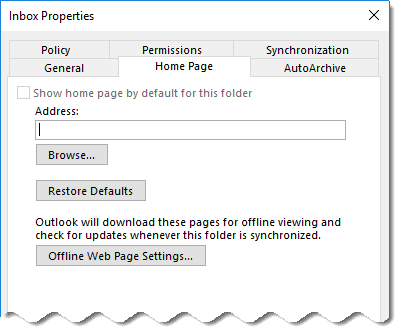
October 12 2017 A security update released on October 10 2017 removes the Home Page tab from Outlook 2010, 2013, and 2016. This change was made for security reasons but because so many applications use Folder Home Pages, Microsoft has a registry key available to re-enable folder home page support.
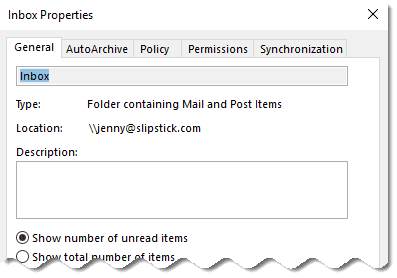
An earlier update, back in 2011, removed folder home pages from non-default data files. If you need to use a folder home page in a non-default folder, you'll also need to set the NonDefaultStoreScript value at the bottom of this page.
Remember: if a registry key doesn't exist, you'll need to create it!
Outlook 2016
HKEY_CURRENT_USER\SOFTWARE\Microsoft\Office\16.0\Outlook\Security
DWORD: EnableRoamingFolderHomepages
Value: 1
Outlook 2013
HKEY_CURRENT_USER\SOFTWARE\Microsoft\Office\15.0\Outlook\Security
DWORD: EnableRoamingFolderHomepages
Value: 1
Outlook 2010
HKEY_CURRENT_USER\SOFTWARE\Microsoft\Office\14.0\Outlook\Security
DWORD: EnableRoamingFolderHomepages
Value: 1
Do it for me
Outlook 2016 Outlook 2013 Outlook 2010
Relevant KB articles are Outlook 2016: KB4011162; Outlook 2013: KB4011178; Outlook 2010 is KB4011196.
Folder Home Pages in Non-Default Data files
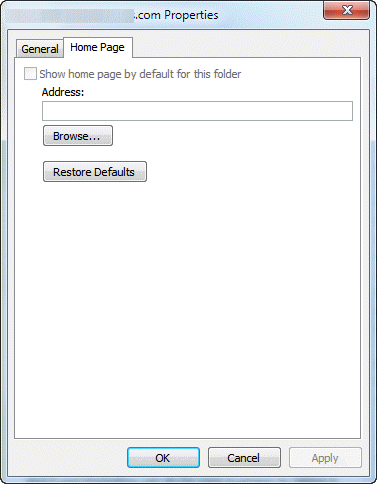
Problem: When you right-click on any of the folders that are listed down the left hand side in Outlook and choose Properties and then Home Page tab, the Home Page feature is disabled, preventing you from changing the address.
The home page setting is disabled in non-default data files "by design", beginning with Outlook 2007. If you want to use a folder home page in other data files and the URL field is grayed out, you'll need to configure a registry key to enable it.
You need to edit the following registry key and add the NonDefaultStoreScript value:
Outlook 2016
HKEY_CURRENT_USER\Software\Policies\Microsoft\office\16.0\outlook\security
DWORD: NonDefaultStoreScript
Value Data: 1 (Hexadecimal) to enable.
Outlook 2013
HKEY_CURRENT_USER\Software\Policies\Microsoft\office\15.0\outlook\security
DWORD: NonDefaultStoreScript
Value Data: 1 (Hexadecimal) to enable.
Outlook 2010
HKEY_CURRENT_USER\Software\Policies\Microsoft\office\14.0\outlook\security
DWORD: NonDefaultStoreScript
Value Data: 1 (Hexadecimal) to enable.
Outlook 2007
HKEY_CURRENT_USER\Software\Policies\Microsoft\office\12.0\outlook\security
DWORD: NonDefaultStoreScript
Value Data: 1 (Hexadecimal) to enable.
After setting the registry value, you may need to restart Outlook for it to take effect.
Note that the Show folder home page checkbox is disabled (grayed out) until you enter a URL in the Address field.
Do It For Me
If you don't want to edit the registry, download and run the appropriate reg file for your version of Outlook.
Outlook 2016Outlook 2013Outlook 2010
Outlook 2007
More Information
You cannot add a URL to the Address box on the Home Page tab in Outlook 2007 MSKB (also applies to Outlook 2010)
Outlook does not support rendering all types of folder home pages

Andrew says
Thanks Diane,
I have tried the above registry fixes but it does not seem to work for 64-bit operating systems (W7/W10) with 32-bit Office installations? I have tried restarting Outlook as well as the entire computer with no luck. It does work for 32-bit operating systems with 32-bit Office installations. It does work for 32-bit operating systems with 32-bit Office installations.
Are there any other registry tweaks needed for 64-bit OS'?
Diane Poremsky says
It's working here on 64bit windows/ 32 bit outlook. (I used the ready to use reg file for outlook 2016.)
Charlie says
The most recent update to the Oct 2017 KB was perfect. FYI, you must close Outlook, add the missing DWORD and then re-open Outlook for this to take effect. Thank you sooooo much!
Phil says
Does not work for me, windows 7 here. Tab "Homepage" is missing on folder properties
Diane Poremsky says
Did you restart Outlook or Windows? Policies keys are only read at startup.
jeff white says
the registry key fixes didn't work for me. i did find the Microsoft security update that's causing this. you just need to uninstall the update. KB4011178 this is for office 2013 for office 2010 you need to uninstall KB4011196 and the homepage tab will re-appear
Diane Poremsky says
Did you restart Outlook? That is required with policy keys.
Ian says
I am glad that this was added to Outlook 2010.
Jan van Veldhuizen says
I found a solution in a Microsoft Technet forum.
Add this Registry key:
[HKEY_CURRENT_USER\SOFTWARE\Policies\Microsoft\Office\16.0\Outlook\Security]
"EnableRoamingFolderHomepages"=dword:00000001
Just tested it, and it works !!
Diane Poremsky says
Was just coming to post the suggestion to try that key. Damn Microsoft. :)
I'm not sure if they are removing it for good (suspect so) but it's working in the insider build without the key.
Jan van Veldhuizen says
Additional info: I tried to solve it programmatically, but the folder properties WiebViewOn and WebViewURL in the folder object throw an exception now. Have they been removed in the end?
Does that really mean that there is now only one place left to plug an HTML page into Outlook? (The Outlook Today page)
Diane Poremsky says
I'm using a folder home page in build 1710 - it's my sharepoint home page. (I set it through properties & the key on this page is not set) I don't know if it makes a difference, but it's set as a trusted site in control panel, Internet Options, Security tab.
i used the sample code at https://msdn.microsoft.com/en-us/library/bb176545(v=office.12).aspx with Outlook 2016, version 1708 (current channel) and it works fine. (Microsoft.com is not on the trusted list on the test computer).
Diane Poremsky says
oh, BTW, i am using the default store. That is probably why its working here... will test with a none-default store.
Diane Poremsky says
ok... with a non-default store and using slipstick.com as the FHP url, it works, but the page has some scripts that cause errors. I used the macro from msdn to set the microsoft page as a FHP - it works fine, no errors.
(They tightened Outlook security some over the summer, but FHP are not blocked completely.)
Jan van Veldhuizen says
The registry key is still read in the latest version (according to Procmon), but it doesn't do nothing anymore, apparently
Jan van Veldhuizen says
The registry fixes don't work for me after the latest update :(
DonPick says
known issue due to latest update: https://social.technet.microsoft.com/Forums/office/en-US/5bdfb74a-1799-480d-a8b1-7256e04c6d0a/outlook-2016-on-version-84312107-oct-11-17-removed-home-page-from-folder-properties?forum=outlook
Regi says
Very helpful, thank you.
FYI, I am using Outlook 16.0 (2016), and had success when I used the key:
[HKEY_CURRENT_USER\SOFTWARE\Microsoft\Office\16.0\Outlook\Security]
Ricardo Remis says
What to do after this , please?
Diane Poremsky says
Run this reg file: https://www.slipstick.com/doit/nondefaultstorescript2016.reg then restart outlook. Folder home pages should work in any data file outlook 2016 once you do this.
Jan says
Outlook Options -> Trust Center -> Trust Center Settings -> Email Security -> Allow script in Public Folders
Ricardo Remis says
I followed your instructions, but nothing changed in Outlook. Home page option still grayed out. Can you help please?
Diane Poremsky says
Which version of Office do you use? Did you restart Outlook?
Diane Poremsky says
BTW, the script in public folders setting applies only to Exchange public folders.
John Panicci says
Hi, quick question, how would I do this for a MAC on outlook 2011?
Diane Poremsky says
Folder home pages are not supported on Macs. afaik.
Peter Kundrat says
Actually the path listed in the article mentions common/security, while the attached reg file contains the correct one - outlook/security (confirmed by quick procmon session).
Actually outtlook reads HKCU\Software\Policies\Microsoft\Office\14.0\outlook\security\NonDefaultStoreScript first then HKCU\Software\Microsoft\Office\14.0\Outlook\Security\NonDefaultStoreScript.
Interestingly enough, even though the setting was read by outlook, it still does not work for secondary Exchange mailbox, but it does help for non-default pst store.
Sujay Ghosh says
Hello Diane,
Thanks for the useful information.
However after changing the setting , still the home page was not enabled for the non default folder.
I am on Windows 7 / Outlook 2007 .
Please let me know what should I do.
Thanks
Sujay