Updated for the new Outlook on the web feature.
Another user had a question about Outlook on the web:
In Outlook on my desktop, I can drag the message to the Calendar to create a new appointment that contains the text of the email. After I create a new appointment, I can select "Insert Item" to insert the contents of a mail message. I haven't found a way to do the same thing using Outlook on the web. Is there a way to do it?
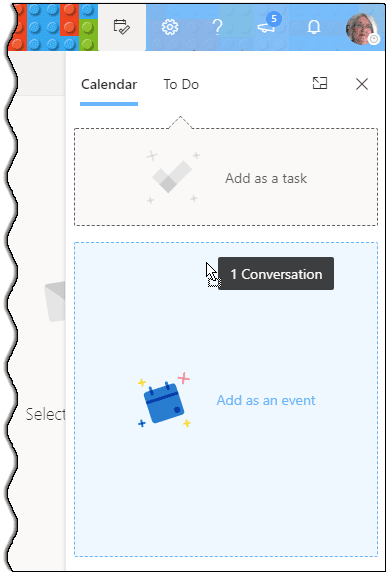
With Outlook on the web or Outlook.com, you can now drag messages to create appointments or tasks. To create an event from a message:
- Click the To-Do icon to display the Task pad on the right

- Drag the message and drop it on the panel.

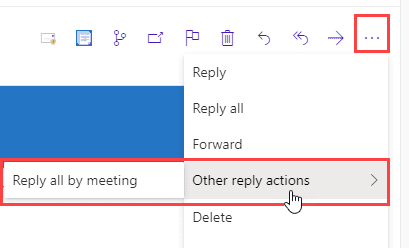
If you're sending a meeting request, you can do that from the message in Outlook on the web. Click the 3 dots to display the menu and choose Other reply actions, the select Reply all by meeting to create a meeting to all recipients. (Unlike in Outlook desktop, you can't cancel the meeting and turn it into an appointment.)
In Outlook on the web for business accounts, you'll have options to reply with a meeting, by IM, or Like the message.

In Outlook.com, you'll only have the option to reply with a meeting.
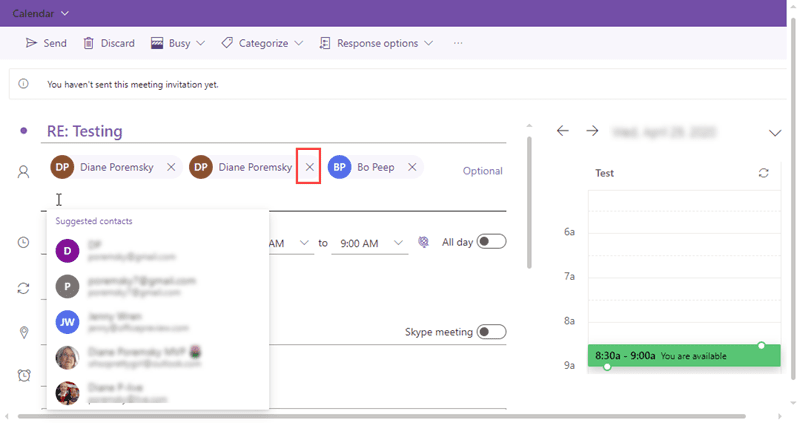
Add or remove recipients to the meeting request. (If you are presented with a dialog to Send or Edit, choose Edit to make the changes before sending.)
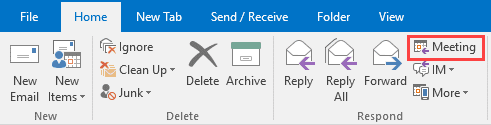
TIP: Outlook desktop has the same feature, it's triggered by the Meeting button on the ribbon.
More Information
See the following macros to create appointments or tasks from incoming email in Outlook desktop (on Windows OS)
"Create an Outlook Appointment from a Message" (uses entire message body)
"Create Task or Appointment and Insert Selected Text" (pasts selected text into appointment or task body)

Konstantin says
This is great!
Thank you!
Adel Moufti says
Perfect !!
Thank you for sharing these time-saving tips.
Matthew Erb says
Wow this is a really good tip, I wish Microsoft would make it more obvious that this is an option!
Dean says
Thanks for the tip. I was trying to drag the message to the calendar icon. Had not thought about using the pane.
DaJo says
Microsoft doth suck. Never consistent.
basementdc says
It doesn't work well at all still - It CC's everyone on the email (including listservs!) and doesn't let you drag/drop on the day/time. A ton of labor - going back to desktop app and will look at alternatives.
Quentin Henry says
Wow, how embarrassing for Microsoft. Yahoo mail can do this, I guess I am going to use Yahoo professional from here on out...
Diane Poremsky says
They are working on adding the ability to drag and drop mail ot the calendar, until then you can use the menu.
RhRa says
which menu do you use to add an email to the calendar? So far I have only found a setting that will automatically add events in emails from a select group of ticket/reservation websites, nothing that will allow me to create a calendar entry from any email.
Diane Poremsky says
In Outlook on the web, open the Task pad, choose Calendar tab then drag he message to it -
DaJo says
Of course Microsoft can't just enable this in order to make things easy on users and standardize functionality between desktop and web app.
That would be too sensible, practical and time-saving and Microsoft just doesn't believe in any of that.
Antonio says
Thank you for posting this! I was looking for an option in the reply to button, but couldn't find it because I was looking for "move to meeting" or "convert to invite". LOL
Tilo says
Hi, could you please link the MS Feedback hub, idea page (uservoice) so people can vote on it.
Diane Poremsky says
Do you have a link to a request that was posted? I checked uservoice but couldn't find it (it doesn't help that many suggestions have the same title. :()