Many users are easily confused by Outlook's contact options - you have Contacts, the Address Book and the auto-complete list. Add Outlook 2010's Suggested Contacts and there is a lot to be confused about.
Contacts
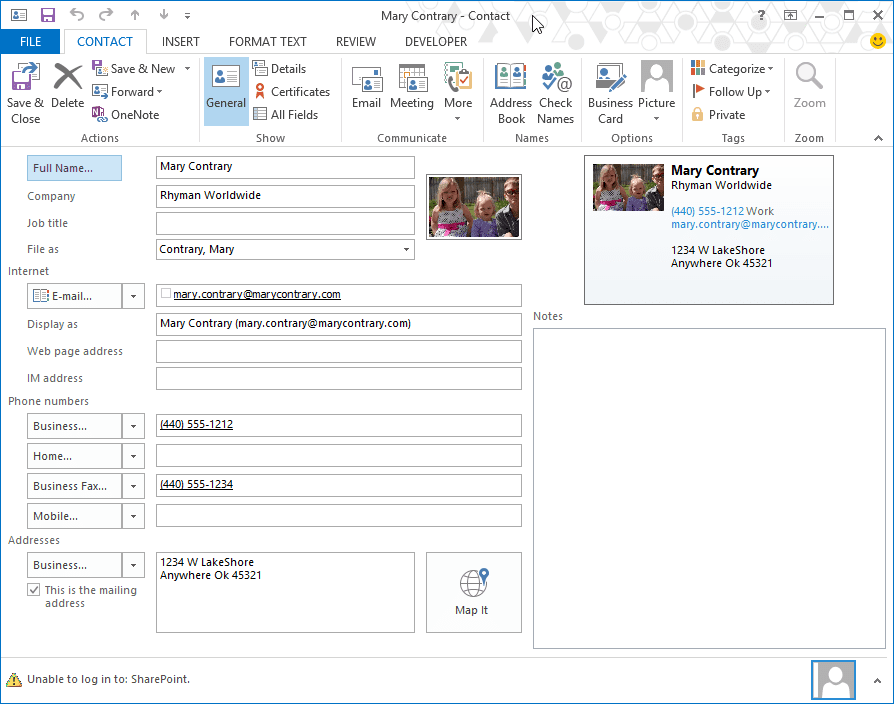
Contacts is a folder to hold addresses & phone numbers - email addresses, snail mail addresses etc - and personal information like spouse's name and birthday. Basically all the stuff you'd write in an address book or on a Rolodex card in years past.
Address Book
The address book contains a list of all Contacts who have electronic addresses (a Fax number is an electronic address). It's not a "real" folder or contact list, but a virtual view of all contact lists available to Outlook.
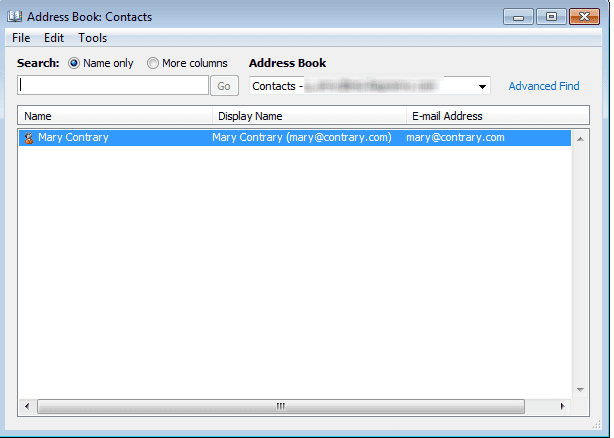
I like to compare Outlook's Address Book to a shoe box or desk drawer where, in the past, we kept address books, business cards, and scraps of paper with addresses or phone numbers. The Outlook Address Book is a container that holds all your sources for addresses. Outlook Contacts folders and GAL (for Exchange users) are the address books, cards, and scraps of paper containing addresses stored within the drawer.
Note: The top level listing "Outlook Address Book" is the container that holds all address lists (for many people, Contacts is the only list).
When you select Outlook Address Book, it will say that there are No entries in this Address Book. This is expected, since it's just the "box" your other address lists are stored in.

Auto-Complete List
The Autocomplete list contains the addresses that come up when you begin typing in the To field. It's just a cache of recently used list of addresses.

In older versions of Outlook, a lot of users stopped creating contacts and just used the auto-complete cache as their address book. Except the autocomplete list corrupted easily. Suggested Contacts was created for this group of people - they won't lose their addresses and the automatically saved addresses won't clutter up the "good" Contacts folder.
When I start to enter a name in the To... field, I am offered several possible names and addresses starting with that letter in a pop-up under the field, that do not correspond to ALL the ones that start with that letter in the contacts cards.
That is the auto-complete list offering names of people you recently replied to (well, the last 1000 people, so some might not be recent). You can disable this in options if you don't want to be offered any names. If you want to add all of your contacts to this list, open a new message and click To. Select all addresses and add them to the message. Close the message without sending and the addresses should come up when you start typing.
If you want to see a list of the addresses in the autocomplete cache, or import them into Outlook Contacts, you'll need to use a utility. See Autocomplete Cache utilities for a list.
Video Tutorial
https://www.youtube.com/embed/HTNrcmB6m5U
Suggested Contacts (Outlook 2010 only)
Suggested Contacts are contacts Outlook created for you and are email addresses only. This is a feature saves all addresses you send email to, automatically adding the addresses of people you send mail to, to the contacts folder. These are people you sent email to who are not in your contacts folder (or who Outlook couldn't find in your contacts - the look up is not very good and you may end up with duplicates).
Note: Suggested Contacts is only in Outlook 2010. It was removed from Outlook 2013. When upgrading from Outlook 2010, the Suggested Contacts folder is left in the data file but Outlook will not add new contacts to it. You can delete the Suggested Contacts folder if desired.

Ron says
I am trying to import names and email addresses from Windows Live Mail into Outlook 365 for one of my clients. There are something over 3000 names and addresses. She would like to have the function in Outlook 365 similar to what she had in WLM. In a new email. start typing the name in the 'to' field, and have Outlook show a list of matches from the Contacts folder. All the names show in the 'Address Book' displayed when clicking on the button on the Ribbon, and will fill in if you click in the next address field, but not display a list to choose from.Is there any way to do this besides a registry edit or starting an email and putting all 3000+ names in the 'To' field? I tried your 'disable auto complete.reg fix from an earlier post, but it doesn't seem to restore the old behaviour.
Diane Poremsky says
There isn't a registry edit. The list is populated as you use it. You can prepopulate it by addresses a message and saving it in drafts - you shouldn't need to send it. But note that Outlook only saves the most recent 1000 addresses you sent mail to - so you won't want to add all 3000 names to the list.
Outlook uses autoresolve - if the name is unique, outlook will find the match. If not, it will underline the name and a right click will list all for you (the client) to select from. The next time you type it, outlook will use that entry, so for example, if you have 6 Ron's or Ronald's you'll want to type enough of the name to be unique, not just Ron, or it will default to the first Ron you send to.
Ron says
So, it looks like there is no way to get the functionality she had in Windows Live Mail, where the whole address book was available to look up addresses in as you type!
I guess I will have to install Thunderbird for her. It still works well!
Thanks for your reply.
Diane Poremsky says
Correct, the address book is not available for "type ahead" but names will resolve automatically, so you don't need to click To to open the address book.
In re-reading this - i'm not sure what you mean.
>>All the names show in the 'Address Book' displayed when clicking on the button on the Ribbon, and will fill in if you click in the next address field, but not display a list to choose from.
>>
You can click To then type the name in the search field - if you use the name search it jumps down to the display name that begins with those letters. double click to add to the To field at the bottom of the dialog, then click Ok. A More columns search will search other fields too, not just the name field. It's not as convenient as WLM method, but it does show you all names.
Ron says
Understood. Thanks again for your reply.
Lynn says
Hi Diane,
I have suddenly found in my Apple Mail product that it is creating contact cards for every single person I send or receive mail from - No name - just the email address. I have spoken with Apple and they suspect it is a Microsoft Exchange issue - Any thoughts? Is there a way for me to turn it off?
Diane Poremsky says
Well, exchange will create entries in the autocomplete cache. What is the name of the folder these contacts are created in? Are you using Outlook desktop or Outlook on the web?
You can turn off the autocomplete feature in Outlook but you may not be able to delete the folder.
Scott says
Hi Diane - I'm using Outlook 2016 on a Windows desktop. Do you know if it's possible to add Contact Groups to the list of Auto-Complete options? It seems to be only suggesting 'People'. We've tried emailing the Contact Group once but they don't appear in the Auto-Complete options after that. Thanks!
Diane Poremsky says
Hmmm. groups should be in the autocomplete list (in either the new recent people or suggested people) if they are in your contacts folders, but it looks like only exchange server groups are. I will check on it.
Diane Poremsky says
BTW, if you type enough of the group name to be unique, the name will auto resolve. Not quite autocomplete, not also not forced to pick from the address book.
Diane Poremsky says
Apparently this is a bug - microsoft is aware of it and are working on it. Support repros this issue on version 1710.8625.2121 (I have 1711 and repro it too), but not on Build 8201.2200 and Build 8431.2107. If you really need this feature, roll back to either build.
hoss says
Diane, I send emails via outlook 2010 using vba. The user is on a company Office 365. I recently found that for one user that had multiple email addresses for a single contact the emails would fail with not resolved error. After tossing the extra email addresses in Contacts all are now able to send - except for one of them. That contact had the most email addresses of the group. I find that if I log in to Office 365, many of the old, removed email addresses are still visible; some show source as "contacts" and most don't show a source. Can you think of any way to clean up the addresses for this one person so that the emails won't fail?
Diane Poremsky says
>> most don't show a source.
if the contact card doesn't have a source, it is probably from the autocomplete list. If those 'bad' addresses come up when you type in the to field, delete them.
hoss says
I did delete the entry that was 'bad' that came up when typing in a name; it didn't change anything. After deleting from outlooks autocomplete, they still appear in Office 365, as email addresses for those People.I did that days ago, just couldn't include all of the things I'd tried.
Diane Poremsky says
see if that address has contacts in the suggested contacts folder - delete them if found.
Michael Wolfes says
I hope you can help me, Diane. Very recently purchased Outlook 2016 for my
also recently purchased HP 2017 Windows 2010 computer. It appears that the
Outlook program's Address book is either not functioning at all or I just don't know how
to Import my 2 Address Books from Outlook 2010 from my old computer. Is there a
glitch in 2016 or a "fix" still to come...or can you guide me as to how to make it work
properly?
Going crazy!
Diane Poremsky says
What exactly is happening? The contacts are stored in the data file if you use pop; in a pst or ost with imap, and in the mailbox on the server with outlook.com. For a pst, you really just need to copy it from the old computer. Imap's 'this computer only' folders need to be exported.
Ron Faulkner says
Diane, Your knowledge is much appreciated. I do have a question that I do not know how to correct. I am using MS Office 365 just installed this year. I was using MS Office 2010. When I type my name I like it to auto fill i.e. I type Ron F, it will fill/complete Ron Faulkner. Problem: I do not know where to edit this feature in Word or in Outlook when emailing. Currently it auto completes as Ronald Faulkner. Any ideas? Thanks, Ron Faulkner
Diane Poremsky says
That is in Quick parts > autotext I believe.
R Stanley says
I have been adding new contacts in Outlook but sometimes when I put in a Company name the information can randomly disappear. Even when I have saved it I will go back and find that the company has gone leaving just the job title, phone number, email and the persons name. Can anyone help me with what I may be doing wrong? Many thanks,
Diane Poremsky says
This is a known issue with some outlook.com accounts - they are working on it. Are you syncing with a phone? It seems to be more of a problem with android.
Sarah says
Is there a way to link a company name to an email address so that when I type the company name in the "TO" field their email address auto populates?
Diane Poremsky says
You would need to put it in the full name field.
bob says
I just did the "select all" contacts in my outlook from 365 and closed out and auto complete now works wonderfully, thanks for posting this
Matt says
We have some users that just use OWA 2010 and don't have access to Outlook. Is there a way we can make a copy of their OWA autocomplete?
Diane Poremsky says
No, sorry, it's not accessible.
bob says
Using Office 365 - if I have an email address in my autocomplete list but don't have an an email from that person any longer how do I create a real contact. If I hover over the eamil address I get a pop-up with an Add button - but clicking that doesn't seem to do anything...
also - if I just try to manually create a new contact record I can't use autocomplete to enter the email address. I have to delete the address from the autocomplete list and then type the address into the email box...
Diane Poremsky says
you should be able to click Add on the little contact card that pops up to create a contact. It brings up the Contact card, not the full contact form but saves as a contact.
Otherwise, you'll need to retype the address or copy it from the address field of a new message.
Mike S says
hey there, office 365, some contacts are missing, but they show up in autocomplete. What is going on here? thanks!
Diane Poremsky says
Are they really contacts or just addresses in autocomplete? (Autocomplete is included in search results but you'll only see a contact card, with no additional address data.)
Helen Sandalls says
When I hover over "Address Book" in Outlook 13, this message pops up:
"Open the Address Book to look for names, phone numbers and email addresses."
There are NO phone numbers!
Why can't I see phone numbers in my Outlook 13 address book?
Diane Poremsky says
That only shows you electronic addresses - email and fax numbers - if you are looking at the contents of the contacts folder. So you should see anyone who has a fax #. If someone doesn't have either and email address or fax #, they won't be listed at all.
If you have an Exchange Server business account, you'll see business phones numbers for entries in the GAL - which are generally coworkers but can be outside contacts if an admin adds them to the GAL.
Julie says
I am using Outlook 2013 on an exchange server. I tried the method suggested to add Suggested Contacts (I know it is not being added to anymore with 2013) to the Autocomplete list but it didn't work. Any other suggestions? Thank you.
Diane Poremsky says
Sorry, i missed this earlier. if the methods above don't work, you don't have much of a choice - either move them to the contacts folder or set suggested contacts folder as an address book and outlook's auto resolution will find them when you type partial names.
Dave says
Thank you for this useful forum and video.
I have Outlook 2010 and Windows 7. Within Outlook I have three email addresses. A couple of days ago I converted my Hotmail account/address from MAPI to Microsoft Exchange per directions from MS/Outlook.com. I am able to send/receive emails in all three accounts. So far, so good. Today I tried to send an email to a new address and was unable to do so (from any of my three accounts). I get an Operation Failed message. Any suggestions that you have would be greatly appreciated. Thank you.
Diane Poremsky says
Sorry I missed this earlier (I'm WAAAY behind!) I'm assuming this is now working? There were issues with this that are now fixed.
Mickie Fox says
I did what you stated to have all my contacts come up as autocomplete, but it only autocompleted the email addresses and not the names. I work for a school and have setup my own contacts with the student's name and then their parents email address. I would want to be able to start typing the student's name into the "to" section and the name will appear. But right now only the email addresses that start with that letter of the student's name pop up. How can I fix this?
Diane Poremsky says
Which name is in the Email address display name field? That is the name that is used in autocomplete.
Mickie Fox says
When I changed their name to the "display name" field, it worked. Is there anyway I can do that quickly for all my contacts or do I have edit each one individually?
Diane Poremsky says
I have a macro at https://www.slipstick.com/outlook/contacts/bulk-change-outlook-contacts-email-display-name-format/ that will change it for all contacts.
Mickie Fox says
I did what you stated to have all my contacts come up as I start typing in the "to" section of an email. But my problem is, I want to type a name, say "John Miles," but only emails that start with "J" come up. How do I get it to also bring the name of the contact up rather than just emails that start with that letter?
Thanks
Diane Poremsky says
it should bring up either first letter of email or first letter of display name (which might be last, first)

This isn't the best shot (had to gray out names) but as you can see it goes for first letter of either the display name or address. I didn't have any examples using last, first format but it would use the last initial.
Iain MacPhail says
Thank you, Diane. That's helped a great deal, leaving one small annoyance. I'm dealing with the Address book in Outlook 2016. Since my service provider migrated my account from POP to IMAP, I've had to hunt for my Contacts lists and add them (as you've shown above) to what had become an empty contacts pop-down window. The annoyance that remains is that the list under 'Contacts - (my account address)' reads, 'Contacts' (this is empty), and a second 'Contacts' (this one is my old list). I can't delete the empty one.
Diane Poremsky says
You can't delete the default folders in the default data file. You can either move the contents of the second contacts folder into it or ignore it and set the second folder as the default when you click To. (Address book > Tools, Options - select the second contacts folder at the very bottom) There is a 3rd option: set the old pst as default data file.
Tarra Frazier says
Our firm uses Outlook 2010 and we also use Outlook Web App. Does the auto-complete cache to OWA.? Or do you have to use the "Check Name" button.
Diane Poremsky says
OWA has an autocomplete cache but AFAIK, it doesn't sync with Outlook 2010's. Depending on your version of Exchange, OWA's autocomplete might be prepopulated with addresses from your mailbox or contacts.
Tarra Frazier says
Thank you for replying Diane,
We are using Exchange 2010 sp3 ru10. The reason I asked the previous question is I have an end user who uses Outlook Web App. His issue is when he begins to enter a contact that is saved in his Contacts, it does not auto populate. I know if you use Check Name the first time, the next time you enter the contact it remembers. I believe he is assuming that should be the case when he does it when using OWA.
Pradnyana says
Thank You
this really make a logic
Kelly Baker says
Hi Diane, I have a question. through a comedy of errors starting with the installation of a CRM system, I had to reload all of my contacts (over 2900) in Outlook 2010 from an excel comma delimited file. Everything appears to have transfered fine but I'm having a problem in email.
If i have opened a contact and push the email button, the email window opens just fine and I'm able to send it without issue. but, if I highlight the contact in the main contact page and press on New Email, it comes back with an error "You must first enter a valid email address for this contact before Outlook can sen mail to it."
Any idea why it would do this, and if there is a fix?
Thanks, Kelly
Diane Poremsky says
Are the contacts listed in the Address book if you click To? It sounds like they are not resolved properly - and if this is the cause, they won't be listed in the Address book.
Femi says
Thank you very much. This solved the problem
Dennis Brown says
My Outlook Express Contacts folder(s) won't let me add or delete contacts, or even change (edit) existing contacts. This is new and is becoming a problem.
Ernst Ghermnn says
After upgrading to Windows 10, Outlook 2003 email no longer copies contact email address into the TO line, although it shows it in the drop down list
Claire Farquhar says
Hi Diane
I had an exchange account on Outlook for Mac. Autocomplete for contacts seemed to be working then. I then got a PC - Windows 7 - with Office 365 and Outlook 2016. All I want is for everyone I send an email to to be added to the Autocomplete list, without having to add them as a contact (pain in the ass) - is that no longer possible?
Thanks
Claire
Diane Poremsky says
It's supposed to work in Outlook on windows. Are addresses added to the list during the session then it clears when you restart outlook or are names never saved to the list?
Keith c says
don't know if this has been discussed already, but addresses keep disappearing from my outlook address book. I don't see any other folders such as contacts. Can you help someone who is not computer savvy?
Diane Poremsky says
I can try. :) Do you know what version of Outlook you have?
Which address book are they disappearing from?
Do you see the Contacts folder if you use Ctrl+6 to switch to the folder list?
Ashley C. says
I recently started to create a customer database through Outlook and Windows 10 and have noticed that as of yesterday, the address box that pops up when you try to type in it, stopped appearing all of a sudden and I'm not sure how to get it back.
I can't seem to find a setting to hide this pop up box (the one that lists line by line: Address line one, Address line two, city, province/state, country). I have updated to the most recent version of Outlook, checked everywhere I can think of and cannot find an online forum to help me. I'm hoping your expertise might help me out.
Thanking you in advance for your time.
Diane Poremsky says
Where was this address list popping up? I'm not exactly sure which dialog it is. Oh, I bet its the check address dialog.
You can bring it up by clicking on the Address button (Business..., Home.. ) - then you can uncheck the don't show again box.
Don Newman says
Imported contacts to Outlook from Gmail. Outlooks says added to address book. I cannot find "address book" or the email addresses I imported.
Diane Poremsky says
Go to people (contacts in older versions) and open the contacts folder. Can you find them? If they are not showing up when you click To, its possible the email addresses weren't recognized as addresses or if they are in another folder, it's not enabled as an address book.
Ro says
Why when I have previously emailed someone who is not in my address book, then enter them in the address book, their email will not stay in the new contact I have created?
Diane Poremsky says
What exactly happens? Do you get any error messages? Does it work better if you delete the entry from autocomplete?
Benamin says
Hi thanks for all the information above!
I wonder, is there a way to convert massively the autocomplete names into contacts?
Diane Poremsky says
Nirsoft has a utility that can read it and export to csv and possibly directly to contacts.
https://www.nirsoft.net/utils/outlook_nk2_edit.html
there are other, similar tools here - https://www.slipstick.com/outlook/email/understanding-outlooks-autocomplete-cache-nk2/
Al says
My old laptop is Windows 7 with Outlook 2003. My new laptop is Windows 8 with Outlook 2013. I have only ever used auto-complete. How do I get the auto-complete data from one computer to the other?
Diane Poremsky says
Copy the NK2 file from the old computer to the new one then load it using a startup switch.
To import .nk2 files into Outlook 2013, follow these steps:
1.Make sure that the .nk2 file is in the following folder:
%appdata%\Microsoft\Outlook
The .nk2 file must have the same name as your current Outlook profile. (By default, the profile name is “Outlook.”)
2.Press Windows Key + R to open the Run dialog.
3.In the Open box, type (or paste) outlook.exe /importnk2, and click OK to import the NK2 into your profile.
Debra Crossman says
I'm looking everywhere in your info, forums, etc. for my problem but don't find a solution. I also can't find out what version of Outlook.com that I'm using, on a Mac OS 10.8.5. My problem is that I've changed an address in the People category, even combined 2 versions of this same contact, but when I go to send a new email and just enter his name, all 3 of the addresses ever known are in the list! The old ones are not in the People list, but I don't find any other location to delete them. I've tried hitting delete when they are in the email To box but that doesn't erase them. How can I completely eliminate the old addresses? Thanks.
Diane Poremsky says
You are probably using Outlook 2011 for mac. Is the Outlook icon a yellow O? (Outlook 2016 has a blue icon.) I haven't used outlook 2011 in a very long time but will look into it.
Mary Rouse says
Diane,
Recently migrated to Office 365 mail. Users are having an issue with contact lists. User has imported a list, but when he tries to add to the list another one is created below it. Any ideas?
Mary
Diane Poremsky says
How is he adding the names to the list?
Daniel Halenko says
your whole site has just taught me so much info let along solved the absolute pain I was having for AGES!!!! You help plenty of people daily, I just wish it was easier to find your site and hope my comment helps Google realise how invaluable your site is to anyone needing outlook help!!! Thanks again. Daniel
Eric B says
No, unfortunately that did not work.
Diane Poremsky says
i think the autocomplete list is corrupt, but clearing it should fix it.
dave says
am using outlook 2010 on a windows PC, Outlook.com and my Blackberry.....they all sync perfectly.....outlook to outlook.com using connector and outlook.com to blackberry using exchange sync......however one issue when i create a new contact in outlook a few mins later its in my Blackberry all good....but if later I edit the contact in outlook the edit does NOT sync up to outlook.com nor Blackberry.....why would this be ? I can create new address but editing later that address wont sync the edit
Diane Poremsky says
Hmmm. It usually works with the outlook connector - if you used outlook 2013, the contact would duplicate after editing it (and deleting the dupe would delete both). I'm not sure why its not syncing, but Outlook.com is moving to office 365 exchange servers later this year and that will solve your problem.
Eric B says
Correct, they are not getting saved now. If you mean the "Empty Auto-Complete List" option under the File tab, yes I did try that as well. It did not work either.
Diane Poremsky says
does autocomplete work if you change the default address book back to outlook?
Eric B says
Hi Diane, I recently started using iCloud to store my contacts. In Outlook 2010 the iCloud address book is set as the default. Now the auto-complete feature does not work. I’ve tried renaming the RoamCache file as instructed by Microsoft support, but that didn’t correct the issue. Can you help?
Diane Poremsky says
Autocomplete should continue work -autocompete is tied to the email account, not the address book. Are addresses you send messages to not getting saved since changing the default address book? Did you try resetting the autocomplete cache in File, Options?
Jean Rubach says
Using windows 7 and outlook 2010- When composing an email my address book icon opens and only shows my 1 gmail address- I had about 100 email addresses in my address book. I called HP and after 2 hours on the phone, the tech couldn't help me. On the page when I compose a new email there's not even the address book icon with the words next to it. If I set a new restart point would that bring them back? Simple instructions I can follow. Thank you so much.
Diane Poremsky says
A new restore point won't help and I'm not sure that rolling back to an old point would fix it, it really depends on what caused it. My guess is no, it won't help. If you have gmail, you have a pst file for your contacts, so they should be safe unless you delete them. (I dislike the option to empty deleted items on exit for this reason.) Can you find the missing contacts if you search?
Lyn says
When e-mailed a contact it gets saved in suggested contacts. How do I save to contacts instead?
Thanks
Diane Poremsky says
You'll need to right click on the name in the message and choose Save as Contact or go into Suggested contacts and move the contacts to your default contacts folder.
Greg Gav says
Hi,
In all previous versions of Outlook (before 2013), if you were reading an eMail (either open or just in the preview pane) you were able to right click on a name/address and a menu would pop up giving you the option to "add to address book" (or something close). Super simple. That option seems to be gone in 2013 version. Do you know how to do this?
Diane Poremsky says
They changed the behavior. You should see Add to Contacts if a contact for the person doesn't exist, but if you use the social connector, you might see edit contact. But... you won't see the outlook contact form, Add to contacts opens the new contact card. You can revert back to the old behavior by editing the registry. See https://www.slipstick.com/outlook/use-outlooks-contacts-contact-cards/ for instructions.
Rick McCormick says
Hi Diane,
Did you ever find an answer to my request? - from Rick McCormick January 5, 2015 at 4:09 pm ?
Diane Poremsky says
A script is here - https://gallery.technet.microsoft.com/office/Export-Contacts-from-OWA-9f8cc0f2 - you need to use the exchange web service api with it.
Kai says
Hi, what happened to the good old CTRL + K?? When I type that the contact don't come up anymore. Thanks! Is there any other shortcut now?
Diane Poremsky says
Try Alt+K... Ctrl+K should work as long as you are in the To/CC/BCC fields, but brings up the insert hyperlink dialog if in other fields. Alt+K should work everywhere.
anderson says
thank you soooo much it worked
Rick McCormick says
Hi Diane,
This is wonderful to be getting a reply from you.
Using a Powershell to export to a csv would be fantastic. I would do this once a month for all users. Getting contacts and autocomplete would be ideal. Do you know the syntax for such a powershell command?
I am already copying the .dat file for the autocomplete per user per login (example: Stream_Autocomplete_0_.dat) however my goal is to have something in readable fashion.
Thanks very much.
Rick McCormick says
Thank you Diane.
Getting users to do backups is like .... well, lets say, not so reliable. What is another way, that does not involve the user, that I can get Contact backups on a regular basis? Have you heard of a powershell command that can do it? We, as systems administrators, have access to all Office 365 accounts.
Thank you.
Diane Poremsky says
"not so reliable" is being charitable. :) Do you want to backup their contacts or the autocomplete cache? With Exchange online everything is recoverable during the retention period (which is 30 days or longer by default). You can use powershell to export to a csv, but can't export to a pst or copy to another mailbox with office365.
Rick McCormick says
We use Office 365 email. We all have multiple devices that sync contacts to the Office 365. Many of us have mysteriously lost contacts. Is there a way to backup our Contacts folder on a regular basis to somewhere other than Office 365 so that if a device connected to Office 365 accidentally deletes a Contact there is a way to get that Contact back? Thank you.
Diane Poremsky says
You can export them to a pst file regularly, which is generally a good idea every now and again anyway.
Tang Chanrith says
thank you very much
Hugh says
Can you change the default State and/or Country that is used in Contacts? I am doing business in the USA but live in Canada. It is defaulting every contact to Canada and I have to go in and change it. Would be much easier if it defaulted to the USA. Any suggestions are appreciated.
Thanks!
Diane Poremsky says
it picks up the default from Windows settings.
Phone default: Control panel, Phone and modem.
Address Default: Control panel > Region (or Regional, the name varies with windows). The Formats tab sets the country, and outlook uses this for the address default.
Rick McCormick says
We want to use the Offline Address Book as our primary Address book for our company which uses Outlook 2013 from Office 365. Is there a way to add the Offline Address Book to the Contacts folder? Clicking the 'Address Book' in the toolbar does not show mobile phone numbers until you go into the properties of a user and then go to Phone / Mobile which is kind of a lot of clicks just to get to the person's mobile phone number.
Diane Poremsky says
You can add the GAL contacts to Outlook contacts but it's not automated - however, once added, one feature of the social connector is to keep the contacts updated if the gal entry changes.
You can select several GAL entries, right click and Add to Contacts. I don't know if there is an optimal number to do at a time - but it might be slow to do the entire gal at once. :) The duplicate contact checker will popup if there is a match, so it's not something you can start before a meeting and let run unattended, unless you turn Check for duplicates off.
There are a couple of utilities here that might be able to automate it.
Bryan says
Thanks. I've made a copy of them as an Archive folder.
Bryan says
The Ctrl+6 shortcut worked! I can now see it in the folders list but I still can't see it on the Contact/People page in the list of contact folders. I'm not sure why? By the way, I recently upgraded from Outlook 2010 to 2013. Thanks for your help.
Diane Poremsky says
Suggested contacts is a feature that was new to outlook 2010 and widely hated. I'm not sure why its not on the contact page - but Outlook 2013 doesn't create suggested contacts so you could go through the contacts in it and either move them to contacts or delete them then delete the folder.
Bryan says
The problem though is that it doesn't show up as a folder but only as an address book. How do I get it to show up as a folder or just delete the address book? Thanks
Diane Poremsky says
That's odd. It should be in the folder list and if enabled as an address book, be listed when you click To in a message or click the Address book command. It's not anywhere in the folder list? (use Ctrl+6 to open the folder list, click the Mail link or icon to get out of it)
Bryan says
How do I delete the old Suggested Contacts address book from showing up in Outlook 2013?
Diane Poremsky says
You can delete the entire folder if using Outlook 2013. If you want to keep the folder but remove it as an address book, right click on it and choose Properties, then Outlook Address Book tab. Untick the option to display as an address book.
Travis says
Excellent Instructions!!!
Pete Nayler says
Thanks Diane, I'm not particularly fussed about you finding it for me, but I would think that it should be documented given the importance of the feature for most users and consultants.
Pete Nayler says
OK that's good news. Do you think I can find that information anywhere? Documentation is strangely lacking (or at least, very hard to find).
Diane Poremsky says
I'm not sure it's well documented - if it is, it's probably in MSDN. I'll see what i can find.
Pete Nayler says
Whilst I agree that Suggested Contacts wasn't ideal, at least it aggregated contacts into the mailbox. Only one file to deal with, if at all - in the case of an Exchange server. Every single one of my clients use autocomplete and every single one of them need it transferred when they change computers. Outlook 2010 made that simple. It's just the method of implementation that was clunky. It was tough for people to fix if the autocomplete cache was corrupted - but I only came across that once or twice. Definitely a step backwards, in my opinion.
Diane Poremsky says
In the new autocomplete, its stored in the mailbox as a hidden file and cached in the stream dat file. The mailbox copy should travel with the account - when an exchange mailbox is opened on another computer, autocomplete works - no need to mess with the file.
Pete Nayler says
So another step backwards for Microsoft. The Office pre-2010 NK2 file was in the %appdata% folder, and Office 2010 Suggested Contacts folder was stored in the mailbox itself. Now to migrate settings fully, we have to grab a file out of %localappdata%.... a file that has proven to be far less reliable than NK2, and harder to identify as well.
Diane Poremsky says
I wouldn't necessarily say it was a step backwards - the dat file is not as fragile and there are less problems with it. Suggested Contacts folder is gone, but that feature seemed to go over like a lead balloon - many people hated it, so they removed it. Because the stream is less likely to become corrupted, suggested contacts is not needed as backup to the autocomplete cache.
Pete Nayler says
All of my clients use autocomplete. When I upgrade their computers, I either move the NK2 file or know that Suggested Contacts will save their addresses. Now that they are using Outlook 2013, which has neither of these features, how do I restore autocomplete?
Diane Poremsky says
Outlook 2013 has a dat file, Stream_Autocomplete_*.dat. It's in %localappdata%\Microsoft\Outlook\RoamCache. You should be able to restore it if you change the file name ot match the new one, or use a utility to recover the names - some of the NK2 utilities can read it (i like the one from nirsoft).
John Reidhar says
If you want to add all of your contacts to this list, open a new message and click To. Select all addresses and add them to the message. Close the message without sending and the addresses should come up when you start typing.
Worked for me.
Jim Fouss says
still not sure how to remove the suggested contacts folder -- keeps popping up when I just want contacts folder in my address book
Diane Poremsky says
You can disable the ability to create suggested contacts and disable it as an address book, but deleting it is harder. See How to Hide or Delete Outlook's Default Folders. Hiding is better than deleting as Outlook doesn't seem inclined to unhide it.
anitahorowitz says
How do I move contacts from suggested contacts to my icloud contacts? Or move any contact from one list to the other?
Diane Poremsky says
Select and drag. To move all, select all (Ctrl+A) and drag - right click drag for move or copy options. You can also use the move to folder (or copy to folder) command.
Alex Davidson says
Diane,
Do you know of a way I can 'import' a bunch of addresses into a bunch of people's AutoComplete .NK2 file?
Thanks,
Alex
Diane Poremsky says
Depending on your version of Outlook, you can add the addresses to a new message and save it to drafts. Otherwise, one of the tools at understanding nk2 should do it.
Bruce says
How do I put suggested contacts into a group in my contacts folder
Diane Poremsky says
you want to make a Contact Group aka DL? You may want to move the contacts to the main contacts folder first (select all, drag or cut and paste). To create a Contact Group, open a new group then click the Members button. Select the contacts. You can also create a list view in Suggested contacts that shows only the email addresses, select all then paste into the members field. Instructions are here - https://www.slipstick.com/tutorial/how-to-create-a-distribution-list-from-a-list-of-addresses/