This is a version of the macro and userform from Select from a list of subjects before sending a message and uses a userform to display a list of templates to select from to create a new message to the selected contact.
Create the Userform
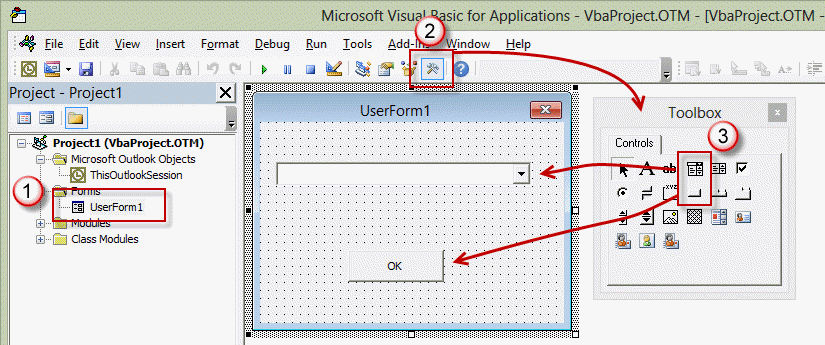
- Right click on Project1 and select Insert > UserForm
- Open the control Toolbox and select a ComboBox and add it to the UserForm.
- Add a Command button.

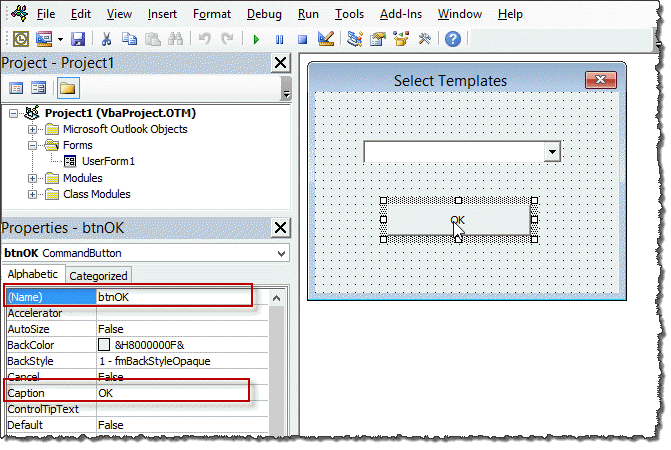
- Right click on the Command button and choose Properties.
- Type OK (or Use Template) in the Caption field.
- Type btnOK in the (Name) field.
- Right click on the UserForm and choose View Code.
- Paste the code below into the code window.
- Change the Template display names as desired. This list is for your reference only, not the actual template file name. The filename is set in the VBA macro code.
Private Sub UserForm_Initialize()
  With ComboBox1
    .AddItem "Potential client"
    .AddItem "New client welcome letter"
    .AddItem "Work order approval"
    .AddItem "Existing client"
    .AddItem "Payment overdue"
    .AddItem "Invoice"
  End With
End Sub

Private Sub btnOK_Click()
    lstNum = ComboBox1.ListIndex
    Unload Me
End Sub
Note, you will need to have a reference to the Forms library in Tools, References.
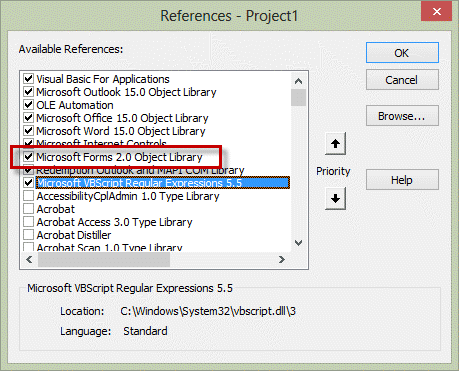
If you receive a "User-defined type not defined" you are missing the reference to Microsoft Forms 2.0 Object Library. If its not listed, add C:\Windows\System32\FM20.dll or C:\Windows\FM20.dll as a reference.
Macro to call the UserForm
- Right click on Project1 and choose Insert > Module.
- Paste the code below into the Module.
- Change the template filenames in strTemplate.
Select a contact then run the macro to test it.
Public lstNum As Long

Public Sub ChooseTemplate()

Dim oMail As Outlook.MailItem
Dim oContact As Outlook.ContactItem

If TypeName(ActiveExplorer.Selection.Item(1)) = "ContactItem" Then
 Set oContact = ActiveExplorer.Selection.Item(1)

Dim strTemplate As String
   UserForm1.Show

    Select Case lstNum
    Case -1
'  -1 is what you want to use if nothing is selected
         strTemplate = "template-1"
    Case 0
         strTemplate = "template-1"
    Case 1
        strTemplate = "template-2"
    Case 2
         strTemplate = "template-3"
    Case 3
         strTemplate = "template-4"
    Case 4
         strTemplate = "template-5"
    End Select

    strTemplate = "C:\Users\me\Templates\" & strTemplate & ".oft"
    Set oMail = Application.CreateItemFromTemplate(strTemplate)

With oMail
  .To = oContact.Email1Address
  .ReadReceiptRequested = True
  .Subject = "My Macro test"
  .Body = "Hi " & oContact.FirstName & "," & vbCrLf & vbCrLf & oMail.Body
  .Display
End With
  End If
Set oMail = Nothing

End Sub
Video tutorial
Create a toolbar button
You can create a ribbon or QAT button for the ChooseTemplate macro so it's easier to start the macro.

Paul Rhoades says
Is there a way to use the drop down list and adding a macro to find a saved email template based on what the user selects from the drop down?
Patricia Amorim says
I am trying to find a way to do something similar but instead of drop-down list I wanted to use check boxes and when one option is chosen that it will open up the email template or form that was chosen within the email.
Jake says
hey hi, can any one tell me how to retrieve the mail id`s and info of the mail in the customized user form when we click on event send.
Doug says
I tried to copy your code but the form does not load with the drop down values. What might I be looking for>
Get Object required in the initialization code
RichardE says
hello Diane,
I would like to have 3 modules that each require access to the same form (frmStationery) to select an option from a list. I have been able to avoid 'Ambiguous name detected by making
each module having their own public string....Public stationery1 ....stationery3;
Form:-
Private Sub ok_click()
Stationery1 = filePath & Me.ListBox.Text
Stationery2 = filePath & Me.ListBox.Text
Stationery3 = filePath & Me.ListBox.Text
Me.Hide
End Sub
Module1:-
Public stationery1
Sub macroGetStationery()
frmStationery.Show
If Stationery1 = "" Then Exit Sub
Unload frmStationery
....
End Sub
I just can't work out how I can do it. Do you have any suggestions?
Richard says
hello Diane, thanks for all the code & how-to's you've provided thus far.
Is it possible to create 1 userform for more than 1 macro? If yes...how?
Thank you
Diane Poremsky says
Yes, you can call 1 userform from multiple macros - this line is all you need: UserForm1.Show. You will may need to use variables to pass a unique value to it.
Using the macro on this page as an example, instead of hard coding the template names, you could use global variables to set it, depending on which macro called the template. The macro sets the variable and they are passed to the form.
Private Sub UserForm_Initialize()
With ComboBox1
.AddItem strOne
.AddItem StrTwo
End With
and
Dim strTemplate As String
strOne = "Whatever"
strTwo = "Something else"
UserForm1.Show
Bhushan Gaikwad says
Hi Diane,
I am trying to create a macro for public folder in which I would be able to assign emails to Associates of my team. For eg. From non-assigned emails in sequence, I want to assign 4 emails to X, 5 emails to Y & 3 emails to Z.
Any assistance for this is greatly appreciated!!!
Joseph says
I am using office 365. Using VBA code is it possible to create 3 question form send to 10 customers and get their reply back from them. We didn't buy license for Microsoft forms or don't want to use survey monkey, would like to use via outlook and VBA. Please help me on this.
Dan S says
Diane
I am also having the problem where the value for lstnum is not getting passed back to the main macro. I do have "Public lstnum as long" at the top of the macro. I can see the value in the locals window but once i step back to the main macro, the lstnum variable is gone. Any ideas?
Les hunter says
Hi Diane.
I have Used your code to create a macro to call a list of templates and it works fine.
However I have a problem in so much as in my templates I have the email address and some greeting text in the body.
I can't get the macro to run from a button on the ribbon, how can I call the contact email address, which is already on the template, from within the macro,
Diane Poremsky says
you need to be able to find the address, either using mid/instr functions or regex. once you find the address and put it in a variable, you can use it in the to field.
Les Hunter says
Hi Diane
Thank you for your response everything works fine now,
Thanks again, have a good day
Les hunter
Michael-Javier Popig says
Hi Diane,
Your macro does not seem to work properly at my system.
Error code: Run time error'-2147352567 (80020009)': Array-Index out of range
Debugging in line:
If TypeName(ActiveExplorer.Selection.Item(1)) = "ContactItem" Then
Dou you have a tip?
Thank you!
Regards,
Michael
Diane Poremsky says
Did you select a contact before you ran it?
Michael-Javier Popig says
Yes I did. Unfortunately "nothing" happens. Macro security is set on low. I am working with Outlook 2013 (15.0.4953.1001)
Diane Poremsky says
Can you post the code you are using? The error comes up before any of the other code is touched - it really looks like there is no contact selected.
Ajinkya Rasal says
Hello Diane,
Same as what you demonstrated,I am trying to access the a values selected by the user in the combo box.
But for some reason I am not able to access the same.I followed the steps as follows
1.I have a userForm with comboBox and a module.
2.I initialized the combobox element in the module
3.In userform code,assigned the selected value to a varible ,"cValue", in btnOk_click() event without declaring it
4.Then in module I am trying to access the cValue variable but It's returning me empty nothing.
Thats the same thing what your video suggests.Could you please help
Diane Poremsky says
At the top of the module, use Public cValue As Long then use select case or if statements in the macro to match the cValue to what you want to do.
Bob Brown says
Hi Diane. Love your work and wondering if you can solve my problem. I'm using excel 2013.
I am using simple user form which puts customers and other data in separate columns in data base from col. 1 to col. 6
e.g. date, docket no, client, deposit, cost, delivery etc.
I want to put the same layout database on my interface and display all data relating to a single date vertically. I can do it with a vlookup function but it only returns the first value. I prefer not to use pivot tables if possible.
Many thanks
Bob
Diane Poremsky says
You want to do this in an userform or on the Excel sheet? In a userform, you'll need to use a multicolumn listbox. In Excel, i'm not sure why vlookup is not working, but it's an my area of expertise either. MrExcel forums would be a better place for help with Excel-specific questions.
Bob Brown says
Morning again. Many thanks for your prompt reply.
I will do as you suggest and post in Mrexcel.
Kind regards Bob
Pedro Alves says
Hi Diane, Is there any way to submit a form to a client, have him/her select radio options or write text in a text box, and send the results back to me?
Many thanks. PEdro
Diane Poremsky says
Not easily within outlook - it would be easier to send a link to a web form for them to fill out. This would work with any email client too. If you use an outlook form, you'd need to send the form definition (greatly increaes message size) but it would only work in outlook and may have restrictions due to security settings.
Gary Lewis says
Hi Diane;
I am trying to use your code example to populate the .TO with values from a string variable set in my macro, e.g.
strP0list = "List1-1@somewhere.com;List1-2@somewhere.com" I then insert your case statement with the following changes
Select Case lstNum
Case -1
' -1 is what you want to use if nothing is selected
strDistroList = "Please enter a valid email"
Case 0
strDistroList = strP0list
Case 1
strDistroList = strP1list
Case 2
strDistroList = strP2list
Case 3
strDistroList = strP3list
end select
I then call my code
OtlNewMail.HTMLBody = Signature
With OtlNewMail
.To = strDistroList
.CC = "someone@somewhere.com"
The problem is that I keep getting the same value back the string that is in my first defined variable strP0list no mater what item I pick on the form. I have posted all the code for this as "How do I create a custom pick list in VB for an outlook automated email?" on stackoverflow. Would you be able to take a look and tell me where I have gone wrong? BTW I am very new to this stuff and an old dog trying to learn new tricks...
Diane Poremsky says
Did you get this solved? Do you have this at the very top of the module?
Public lstNum As Long
and this to hold the count from the form?
Select Case lstNum
Case -1
-- snip --
Brent Schneider says
Hey Diane, Is there anyway that you know of that would alone you to share a create userforms among users in Outlook? I am solely trying to avoid having to recreate the form on other computers. Thoughts?
Take care,
Brent
Diane Poremsky says
You'd need to compile the project using visual studio then users would install it like any other addin. But... you don't have to completely recreate the userform on other computers, you can export it and the users can import it. If the form uses a macro in a module, you'll need to export that too. If no one is using macros, you could just copy the vba project - this takes about as many steps to use as importing though.
Chris says
Hi, I am working a macro to warn if a user is sending an email to a specific address. I would like to know if i can have the code check a text file instead of me just adding email addresses after CheckList = that has mulitiple email addresses in the text file and then give me a pop up if the address is listed in the text file.
Here is the code.
Private Sub Application_ItemSend(ByVal Item As Object, Cancel As Boolean)
Dim Recipients As Outlook.Recipients
Dim recip As Outlook.Recipient
Dim i
Dim prompt As String
Dim checklist As String
Dim lbadFound As Boolean
Dim badAddresses As String
lbadFound = False
On Error Resume Next
' use lower case for the address
' LCase converts all addresses in the To field to lower case
' checklist contains the names and email addresses of people involved in the Build Option
checklist = "cgallo2525@gmail.com"
Set Recipients = Item.Recipients
For i = Recipients.Count To 1 Step -1
Set recip = Recipients.Item(i)
If InStr(1, LCase(checklist), LCase(recip)) >= 1 Then
lbadFound = True
badAddresses = badAddresses & recip & vbCrLf
End If
Next i
If lbadFound Then
prompt$ = "The email address is listed in Ironport?" & vbCrLf & vbCrLf & bCrLf & " Is the message Encrypted???"
If MsgBox(prompt$, vbYesNo + vbQuestion + vbMsgBoxSetForeground, "Check Address") = vbNo Then
Cancel = True
End If
End If
End Sub
thankyou,
Diane Poremsky says
you need to do something like this (add after the last DIM line in the code above) - but it needs some tweaking
fn = "D:\Documents\list.txt" '< --- .txt file path txt = Space(FileLen(fn)) ff = FreeFile Open fn For Binary As #ff Get #ff, , txt Close #ff Dim myArray() As String 'Use Split function to return a zero based one dimensional array. myArray = Split(txt, vbCrLf)
Diane Poremsky says
This is the change you need to make
-- snip --
Dim badAddresses As String
Dim fn As String, ff As Integer, txt As String
fn = "C:\Users\Diane\Documents\list.txt" '< --- .txt file path txt = Space(FileLen(fn)) ff = FreeFile Open fn For Binary As #ff Get #ff, , txt Close #ff Debug.Print txt lbadFound = False On Error Resume Next ' use lower case for the address ' LCase converts all addresses in the To field to lower case ' checklist contains the names and email addresses of people involved in the Build Option ' checklist = myArray Set Recipients = Item.Recipients For i = Recipients.Count To 1 Step -1 Set recip = Recipients.Item(i).AddressEntry Debug.Print recip If InStr(1, LCase(txt), LCase(recip)) >= 1 Then
-- snip --
Dan says
Dear Diana,
Unfortunately, the code provided gives me error:
Compile error: Ambiguous name detected: lstNum
Private Sub btnOK_Click()
lstNum = ComboBox1.ListIndex
Unload Me
End Sub
I am using MS Office 2013.
Any ideas what my cause the error?
Diane Poremsky says
that means something, possibly the property lstNum, is used elsewhere publicly and the macro doesn't know which one to use. Do you have any other macros in the module?
Dan says
Ok, that is right, I double checked and rectified the error. Well now, when I run the coder, I am getting different mistake, which is as follows:
Run-time error ‘-2147287038 (80030002)’:
We can’t open ‘c:\@MS Outlook templates\External.oft.oft’. It’s possible the file is already open, or you don’t have permission to open it.
To check your permissions, right-click the file folder, then click Properties.
Diane Poremsky says
That error means either the template is not in that folder, the template name is not correct, or it's already open (close outlook & reopen to fix the last)
‘c:\@MS Outlook templates\External.oft.oft’ leads me to believe it's the template name - two extensions. The code ads the extension:
strTemplate = "C:\Users\me\Templates\" & strTemplate & ".oft" - either remove & ".oft" from this line or use only the template name earlier in the code.
Dan says
Hello Diana,
I finally was able to run the macro. It works great. May I request for some additional help: how can the code be changed so that instead of selecting a contact, I need to select an email from inbox or any other folder (could be pst) and when I click over user-created button, something like Reply with Template, the macro fires off? Basically, I need to use this macro for replying to incoming messages.
Diane Poremsky says
it just a few modifications to change it to use mail item - it should work with any selected message, in any folder.
change this line - you can change oContact to something else - if you do, replace all instances with the new object name.
Dim oContact As Outlook.mailitem
Remove this and the matching End if:
If TypeName(ActiveExplorer.Selection.Item(1)) = "ContactItem" Then
change this to
.To = oContact.senderAddress
.Body = "Hi " & oContact.displayname & "," & vbCrLf & vbCrLf & oMail.Body
Dan says
Thanks! Worked like a charm!
Dan says
Dear Diana,
Yes, I removed the oft extension from the strTemplate, now I am getting another mistake. It is as follows:
Run-time error ‘91’
Object variable or With block variable not set
Diane Poremsky says
Did you copy the macros exactly and change only the template names? if so, did you delete any lines?
Did you set the reference to the Forms library in Tools, References? (The error message for not doing that is usually something different tho).
Add msgbox strTemplate right after the template is set in Set strTemplate line. Is it showing the correct path. (This is another one that is usually a different error)
Jenna says
I am new to VBA. I bought the book Mastering VBA for Microsoft Office 2010 and it has been very helpful in how to code the VBA. What it does not tell me is how to get my User Form into my Outlook developer. I am trying to utilize the Custom Dialog Box I created in Visual Basic as my "Choose Field" under the "Value" tab in "Properties" to assign to my command button. I am sure it is an easy thing to do but I have been unsuccessful in figuring it out. I have looked everywhere online and have found that if I insert a module and assign it with a macro name I can get it into Developer, however I still can not access it in "Choose Field" in the "Properties" etc... I am wondering if it is a macro to call user form or if I can export my user form into a certain folder and it will come up under "Forms" "Personal Forms" (under the "Choose Field" drop down)
I am basically trying to imitate the VBA for "Address.." whose "Value" is "Check Address" command button that is already in outlook but customize it. If there was a way to look at that code I would be happy to just follow that and not start from scratch but I have been unable to view the code list for outlook?
I have spent hours on this so any help is GREATLY Appreciated!
Thank you,
Jenna
Diane Poremsky says
Fields are fields; properties and user forms are not listed in fields. I'm not are of any way to hijack the check address function.
sandra says
Hello, please I need some help!
I have an email template that I want to automate parts of with drop-down options.
However, I do not want to create the template again from scratch, as I have some of the html format already done for it.
I just need someone who knows how to do it, and it would take 5 minutes! But impossible to find the right person so far!
Many thanks, your help would be hugely appreciated!
Sandra
Diane Poremsky says
There are two ways to move html templates into Outlook - open it as stationery or open it in a browser, select all, copy and paste into a new Outlook message. The problem you'll have is that Outlook does not allow active content in email messages, so dropdown selectors won't work.
If the message is only only to be used with internal users on an exchange server, you could create a custom form and send it - but it will not work to internet addresses.
marius says
Hi,
I used your code but it makes only case 0 - no matter what I choose from the drop-down. Any help is welcomed.
Thank you.
Diane Poremsky says
Do you have Public lstNum As Long at the very top, outside of the macros?
marius says
I am trying to replace de body of the reply emails. Here is my code:
Public lstNo As Long
Public Sub ChangeSubjectOnReply()
Dim x As String
Dim y As String
Dim StrBody As String
Dim StrBody1 As String
Dim objItem As Object
Dim oMail As Outlook.MailItem
Set objItem = GetCurrentItem()
Set oMail = Application.ActiveExplorer.Selection(1).Reply
StrBody = " " & "text1" & "text1" _
& " " & "text1" _
& "text1" _
& " " & "text1" _
& " " & "" & "text1" & "" _
& "" & "link1" _
& "" & "link1"
StrBody1 = " " & "text2" & "text2" & "text2" _
& "text2" & "text2" & "text2" _
& " " & "text2" & "text2" & "text2" & "text2" _
& "text2" _
& " " & "text2" _
& " " & "text2" _
& " " & "" & "text2" & "" _
& "" & "link2" _
& "" & "link2"
oMail.Display
UserForm1.Show
' MsgBox "user chose " & lstNo & " from combo" & oMail.HTMLBody
Select Case lstNo
Case -1
oMail.Body = objItem.Body
Case 0
oMail.HTMLBody = " " & "text1" & "text1" _
& " " & "text1" _
& "text1" _
& " " & "text1" _
& " " & "" & "text1" & "" _
& "" & "link1" _
& "" & "link1" & Signature & oMail.HTMLBody
Case 1
oMail.HTMLBody = " " & "text2" & "text2" & "text2" _
& "text2" & "text2" & "text2" _
& " " & "text2" & "text2</b
Zachary says
hi Diane Im trying to make a quick tool so I can enter some data and quickly apply it to filtered excel sheet I put together., if possible could you reach out to me at the provided email address?
Diane Poremsky says
Are you working in outlook or excel? Excel vba is not my strong point. I'm also booked up with projects until late September.
Martin Reiser says
Diane
Thanks again!
I am using Outlook 2010 and Office 2010. The path at the bottom of the dialog when I select Microsoft Forms 2.0 Object Library is C:\Windows\SysWOW64\FM20.DLL
Martin Reiser says
Diane
Thanks for your reply. "Microsoft Forms 20. Object Library is selected in Tools, References.
There must be some other cause.
Martin
Diane Poremsky says
What version of Outlook and Office? What is the path in at the bottom of the dialog (when you select the forms object library) ? I'm wondering if its not the 'right' one. There are several on the computer - in my case with win8 64-bit, I use one in the SysWoW64 folder. (I may have put it there from another location.)
Martin Reiser says
I tried your macro "Select from a list of templates", I got the Compile Error: Method or data member not found" when it tried to execute the "Sub UserForm_Initialize".
What do you suggest?
Diane Poremsky says
Sounds like you are missing the reference to Microsoft Forms 2.0 Object Library. If its not listed in Tools, References, add C:\Windows\System32\FM20.dll or C:\Windows\FM20.dll as a reference.

Tim Oliver says
Hey Diane, I have been creating macros for me and several coworkers for a few months now. I have just began utilizing userforms and think they're great! Could you tell me what the best way to create downloadable files for userforms and macros that can be shared? Is there some software (free or paid) that can handle both macros and userforms?
Diane Poremsky says
I'm not aware of any automated way to share macros and user forms. Of course, if they are embedded in a custom form, you can share the template or, if using exchange, publish the form to the org library to share. Because you can't automatically insert macros into the VBA project, text files containing the macros is generally the easiest way to share. You could put them in onenote and make the notebook accessible.
Ernie Faulkner says
Hi Diane, first time contacting you but I have followed you on and off over many years :-)
I believe you put me onto a company called email templates way back. Been using them for a long time but can't get any support now out of them which is a shame.
I have been trying to follow one of your VBA examples but failed, kept getting an error Compile error - Ambiguous name detected:
Private Sub CommandButton1_Click()
lstNo = ComboBox1.ListIndex
Unload Me
End Sub
This is what I am trying to achieve, I have a list of templates, I want a dropdown list box to display when I click a macro from my Ribbon (Outlook 2010) select the template and it's loaded.
Sounds simple,
I have been following this on https://www.slipstick.com/developer/code-samples/vba-userform-sample-select-list-templates/
Any help you can give would be appreciated.
Diane Poremsky says
Ambiguous name means there is another macro with the same name and outlook doesn't know which macro you want to use.
Pierre says
Hi Diane,
Can I connect to SQL Server from outlook?
Any help would be much appreciated.
Thanks
Diane Poremsky says
You can, using VBA or an odbc connector. It's often easier to go through Access - it has an outlook connector (i think it's still in Access 2013, will need to double check).
Pierre says
Thanks for your reply :)
do you have any sample code or link ? this is my first time I use VBA and ODBC.
Any help would be much appreciated.
Thanks
Diane Poremsky says
See http://www.outlookcode.com/article.aspx?ID=25 for information.
Paul says
no need to apologise I am grateful for any help as and when it comes. I understand you must be very busy.
To answer your questions,
optionbutton then press ok will choose a template;
it will be different set of templates per project;
I think it will be part of the subject category i.e. " Document Issue:- " etc. (if that is want you mean)
I've had a look at the 2 combobox link and it looks quite involved. I am struggling to follow it all.
Maybe to keep the code simpler (correct me if i'm wrong) a main userform could only have a combobox selecting projects, so I can add projects to the combobox list when required and selecting an item from this combobox only needs to take me to project specific userform which I can create when a new project arrives.
Then the project specific userform will have 4 optionbuttons to select the template from the relevant template set.
How does this sound? Does this make it simpler?
Thanks, Paul
Diane Poremsky says
That would make it less confusing in use. It will probably be just as confusing to program though.
Userform1 would use
Private Sub UserForm_Initialize()
With ComboBox1
.AddItem "Userform2 project name"
.AddItem "Userform3 project name"
End With
End Sub
Private Sub CommandButton1_Click()
lstNum = ComboBox1.ListIndex
Unload Me
End Sub
The macro with the select case would be something like this - I have not tested it to see if it works to put userform.show in the case or if we need to use variables and call it later.
Public lstNum As Long
Public Sub ChooseTemplate()
Dim strForm as string
UserForm1.Show
Select Case lstNum
Case -1
' -1 is what you want to use if nothing is selected
strForm = UserForm2.Show
Case 0
strForm = UserForm2.Show
Case 1
strForm = UserForm3.Show
End Select
End sub
Then useform2 & 3 would basically repeat the process (and use the code in the original articles) with links to the templates.
Or....
select a project and that selection shows the available options. Unhiding the options would be better than enabling grayed out options because it's less confusion on the screen. But I don't know if its possible. Let me think on this one. If nothing else, it will make a good article. :)
Paul says
Hi Diane, I'm still working on this (albeit, slowly). After laying out the userforms I think using a combobox for selecting the project and then a project specific form with option buttons "For Information" etc. would work better.
I have a macro that opens an email template but cannot seem to make this work within a combobox or optionbutton.
Again, any help would be appreciated.
Thanks, Paul.
Diane Poremsky says
Sorry, I hadn't had time to spend much time on it. Will the option buttons choose a template? Will it be the same templates for each project or a different set of templates? Is the project selection going to the the subject, category etc? If so, two comboboxes will work. Not that option buttons won't...
Another user is working on a project that uses two comboboxes in the comments here. A working macro sample is at https://sdrv.ms/YrSLkx - the userform / combobox code would look like this:
Private Sub UserForm_Initialize()
With ComboBox1
.AddItem "Potential client"
.AddItem "New client welcome letter"
End With
With ComboBox2
.AddItem "whatever"
.AddItem "more whatever"
End With
End Sub
Private Sub CommandButton1_Click()
lstNo1 = ComboBox1.ListIndex
lstNo2 = ComboBox2.ListIndex
Unload Me
End Sub
Paul says
Hi Diane,
This code is very close to what I am trying to achieve.
I would like to have a Userform with 2 ComboBoxes, first to define the project, e.g. - "Boat-1", "Boat-2", Boat-3" etc. and a second to define the purpose of the email. I have 4 template emails for each project, "For Information", "For Provisional Comment", "For Construction" and "For Final Issue". Depending on the information selected in both ComboBoxes a specific template will be selected.
I have been trying to modify the code above but I have a very limited knowledge with VBA but am keen to learn. Maybe a simpler solution would be 1 Userform to select project and 1 for email reason.
Any help would be much appreciated.
Regards, Paul
Diane Poremsky says
I think one userform would be easiest. I'll try and make some time this weekend to put something together. It's really not hard to work with, once you get it started.