This is a collection of tools used to remove duplicates from your Microsoft Outlook Contacts folder. Some of these tools will also remove duplicates from other Outlook folders.
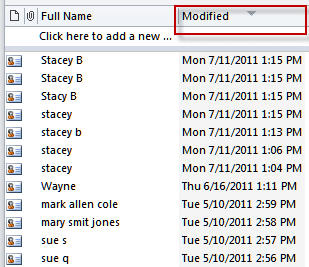
When the duplicates are the result of importing and all are duplicated, you can sort by the modified date field (you'll need to add the Modified field to the view), then delete all of the items with the same modified date and time. When the duplicates have assorted modified times, you'll need to delete the duplicates yourself or use one of the many duplicate remover tools to automate the process.
- If not using a list view, switch to a list view.
- Right click on the row of field names
- Choose Field Chooser
- Find the Modified field in one of the All <type> fields list.
- Drag the field to the row of field names and drop
- Sort by the Modified field.
Tools in the Spotlight
Outlook Duplicate Killer is an add-in for Microsoft Outlook. Find, merge and remove Outlook duplicates. Compare, assign the category, flag and move duplicates to selected folders. Find and remove duplicate contacts, emails, calendar events, tasks and notes automatically. Manage duplicates in any Microsoft Outlook folder, including Microsoft Exchange and Public folders. Preview duplicate search results prior to processing. New Duplicate Killer has improved user interface. Now account name and folder path are display. | |
Delete duplicate contacts, notes, tasks, journal and calendar items in Microsoft Outlook folders and Exchange Server folders. Duplicates can be marked, copied or moved to any folder. It supports searching across the folders. Supports all versions of Outlook, including Outlook 2007/2010. Version 2.6 | |
ReliefJet Essentials is a set of 162 utilities for Outlook, Office 365 and Exchange Server. It can backup, import, export and convert data into different formats. Perform personalized mass mailings. Save, remove and optimize attachments. Find and remove duplicate messages, contacts, appointments, meetings, and other items. Retrieve statistics on email usage and get reports on Outlook data and settings. You can run the utilities directly from Outlook, automatically in rules, via standalone app, or from the command line. |


Tools
More Information
Several other kinds of tools related to contacts are listed on their own pages:
- Contact Management Tools
- Telephony Tools -- including utilities to copy contacts to mobile phones and to use contacts with Caller ID
- Print Labels and Envelopes for Contacts
- Start a Letter from an Outlook Contact
- Microsoft Outlook Contacts Issues
- Distribution Lists
- Combine duplicate contact items
- Printing Microsoft Outlook and Exchange Address Books
- Updating User Information in the Exchange Server GAL
- Microsoft Outlook Contact Forms

Duper says
Any solution to delete duplicates within SINGLE contact, e.g. duplicated Email1 and Email2 fields?
I see another user was looking for solution here but no solution found.
Diane Poremsky says
I have some macros on the site that could do it - my bulk change contacts macro. Edit it to compare the addresses and delete one if identical
If .email1address = .email2address Then
.email2address = ""
end if
this version of the bulk contact macro just needs a little editing to do it.
https://www.slipstick.com/outlook/contacts/bulk-move-phone-numbers-to-a-different-phone-field/
Belinda says
Oh dear, what have I done? Downloaded Cosi for ipad, and saved Outlook 2007 calendar as it said as a pst file, then downloaded the Cosi toolbar to sync. All worked well. But then noticed all outlook appointments had blue square on them. So deleted Cosi off ipad, emailed them re my deletion, then deleted via Control panel Programs. Then reinstalled according to Cosi's directions and now I have a new calendar and an old calendar mixed up with old recurring appointments coming up all the time. I don't know how to remove them. I've tried deleting the old recurring appointments to no avail. Any ideas muchly appreciated?
Diane Poremsky says
In Outlook... is every thing in one calendar folder or in two? Normally, the best way to delete stuff from the calendar is using a list view but I'm not clear if the problem is in your default calendar in Outlook or with the sync process as I'm not real familar with the cozi app.