• Outlook User
  • New Outlook app
  • Outlook.com
  • Outlook Mac
  • Outlook & iCloud
  • Developer
  • Microsoft 365 Admin
    • Common Problems
    • Microsoft 365
    • Outlook BCM
    • Utilities & Addins

Embedded Objects are Blocked in Outlook Items

Slipstick Systems

› Problems › Embedded Objects are Blocked in Outlook Items

Last reviewed on February 13, 2018     6 Comments

Applies to: Outlook (classic), Outlook 2007, Outlook 2010

A user complained that Outlook was blocking access to a Word document attachment he sent to a Task using Word's Create Outlook Task command.

I'm receiving this message in Outlook when opening a task created by Microsoft Word:
"Outlook blocked access to the following potentially unsafe attachments"
I tried the Level1Remove registry fix but this did not work. I disabled Protected View (in Trust Settings) within Word. Still no go. Why is Outlook blocking attachments from its own software (Word)?

This security issue affects Outlook 2007 and up. The file is blocked because it's not a doc file, it's a *shortcut* to the doc file and shortcuts are potentially "dangerous".

Blocked shortcut to attachment

You need to configure the security settings to not block the file. In Outlook 2007 and Outlook 2010 you can use the following registry keys to change the Security settings. You'll need to restart Outlook for the keys to take effect.
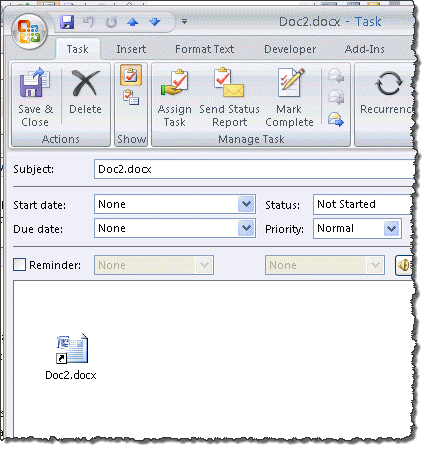
With the registry key set, the shortcut can be opened from the task.

Enabling ShowLevel1Attach will allow users to open or save potentially dangerous attachments. While an updated antivirus will catch older exploits if users try to save or open the attachment, it could miss new exploits not yet in it's virus definition file.

When you double click on an embedded object, a warning message may be triggered:

Some objects contain viruses that can be harmful to your computer. It is important to be certain that this object is from a trustworthy source.
Do you trust this embedded object?

trust embedded object

This dialog is controlled by the AllowInPlaceOLEActivation registry value.  Enabling it will allow the embedded object to open without triggering the warning message.

Outlook 2016

HKEY_CURRENT_USER\Software\Policies\Microsoft\Office\16.0\Outlook\security
DWORD: ShowOLEPackageObj
Value: 1
DWORD: AdminSecurityMode
Value: 3
DWORD: ShowLevel1Attach
Value: 1
DWORD: AllowInPlaceOLEActivation
Value: 1

Outlook 2013

HKEY_CURRENT_USER\Software\Policies\Microsoft\Office\15.0\Outlook\security
DWORD: ShowOLEPackageObj
Value: 1
DWORD: AdminSecurityMode
Value: 3
DWORD: ShowLevel1Attach
Value: 1
DWORD: AllowInPlaceOLEActivation
Value: 1

Outlook 2010

HKEY_CURRENT_USER\Software\Policies\Microsoft\Office\14.0\Outlook\security
DWORD: ShowOLEPackageObj
Value: 1
DWORD: AdminSecurityMode
Value: 3
DWORD: ShowLevel1Attach
Value: 1
DWORD: AllowInPlaceOLEActivation
Value: 1

Outlook 2007

HKEY_CURRENT_USER\Software\Policies\Microsoft\Office\12.0\Outlook\security
DWORD: ShowOLEPackageObj
Value: 1
DWORD: AdminSecurityMode
Value: 3
DWORD: ShowLevel1Attach
Value: 1
DWORD: AllowInPlaceOLEActivation
Value: 1

Do It For Me

I have a reg file to unblock all attachments and OLE objects (containing the values above). Download and run the .reg file for your version of Outlook.

Network users may be blocked by group policy, so this should only be used by SOHO users - everyone else should speak to their admin.

ShowLevel1Attach 2016 ShowLevel1Attach 2013
ShowLevel1Attach 2010 ShowLevel1Attach 2007

You'll need to restart Outlook for the key to take effect.

More Information

Information for administrators about e-mail security settings in Outlook 2007
You cannot open linked file attachments in Outlook: "Outlook blocked access to the following potentially unsafe attachments"

Embedded Objects are Blocked in Outlook Items was last modified: February 13th, 2018 by Diane Poremsky
Post Views: 107

Share this:

  • Share on Facebook (Opens in new window) Facebook
  • Share on X (Opens in new window) X
  • Share on Reddit (Opens in new window) Reddit
  • Share on Bluesky (Opens in new window) Bluesky
  • Share on Mastodon (Opens in new window) Mastodon
  • Email a link to a friend (Opens in new window) Email

Related Posts:

  • Change Outlook's Programmatic Access Options
  • Outlook Email Security Update
  • Outlook and the latest RTF Exploits
  • Disable the Unsafe Hyperlink Warning when Opening Attachments

About Diane Poremsky

A Microsoft Outlook Most Valuable Professional (MVP) since 1999, Diane is the author of several books, including Outlook 2013 Absolute Beginners Book. She also created video training CDs and online training classes for Microsoft Outlook. You can find her helping people online in Outlook Forums as well as in the Microsoft Answers and TechNet forums.

Comments

  1. Joy says

    January 28, 2019 at 10:42 am

    Worked perfectly. Thanks!

    Reply
  2. Richard says

    March 14, 2018 at 6:11 pm

    Great work, as usual! Thanks.

    Reply
  3. Philip says

    July 9, 2017 at 7:18 am

    Figured it out; for some reason if you put the .display it keeps the attachemnt; how bizare :-)

    Reply
    • Diane Poremsky says

      July 10, 2017 at 2:46 pm

      Definitely odd, it must be something with the "hidden" message. I'll have to test it.

      FWIW, i think the message was probably telling you the attachment might not be visible to the recipient but it would still be attached.

      Reply
  4. Philip says

    July 9, 2017 at 6:30 am

    Hello, Firstly thanks for your site - its great.

    I've been able to create a task from an email and add an attachement (which shows up in outlook.com) however,
    you get the security outlook has blocked on the client. I know Clearcontext can create a task with an email so it may possible not be
    a registry setting that prevents creates the security warning as when I use clearcontext it works fine.

    Any ideas "-)

    Reply
    • Diane Poremsky says

      July 10, 2017 at 11:46 am

      the message sounds like you are using a version of outlook with the june 13 2017 update - it causes that message (intentionally!) under a few circumstances.

      Reply

Leave a Reply Cancel reply

Your email address will not be published. Required fields are marked *

Visit Slipstick Forums.
What's New at Slipstick.com

Latest EMO: Vol. 31 Issue 8

Subscribe to Exchange Messaging Outlook


Support Services

Do you need help setting up Outlook, moving your email to a new computer, migrating or configuring Office 365, or just need some one-on-one assistance?

Our Sponsors

CompanionLink
ReliefJet
  • Popular
  • Latest
  • Week Month All
  • Deleting Auto-Complete Entries No Longer Works
  • Use Classic Outlook, not New Outlook
  • How to Remove the Primary Account from Outlook
  • How to Hide or Delete Outlook's Default Folders
  • Change Outlook's Programmatic Access Options
  • Removing Suggested Accounts in New Outlook
  • Reset the New Outlook Profile
  • Understanding Outlook's Calendar patchwork colors
  • Disable "Always ask before opening" Dialog
  • This operation has been cancelled due to restrictions
  • Deleting Auto-Complete Entries No Longer Works
  • Sync Issues and Errors with Gmail and Yahoo accounts
  • Error Opening iCloud Appointments in Classic Outlook
  • Opt out of Microsoft 365 Companion Apps
  • Mail Templates in Outlook for Windows (and Web)
  • Urban legend: Microsoft Deletes Old Outlook.com Messages
  • Buttons in the New Message Notifications
  • Move Deleted Items to Another Folder Automatically
  • Open Outlook Templates using PowerShell
  • Count and List Folders in Classic Outlook
Ajax spinner

Recent Bugs List

Microsoft keeps a running list of issues affecting recently released updates at Fixes or workarounds for recent issues in classic Outlook (Windows).

For new Outlook for Windows: Fixes or workarounds for recent issues in new Outlook for Windows .

Outlook for Mac Recent issues: Fixes or workarounds for recent issues in Outlook for Mac

Outlook.com Recent issues: Fixes or workarounds for recent issues on Outlook.com

Office Update History

Update history for supported Office versions is at Update history for Office

Outlook Suggestions and Feedback

Outlook Feedback covers Outlook as an email client, including Outlook Android, iOS, Mac, and Windows clients, as well as the browser extension (PWA) and Outlook on the web.

Outlook (new) Feedback. Use this for feedback and suggestions for Outlook (new).

Use Outlook.com Feedback for suggestions or feedback about Outlook.com accounts.

Other Microsoft 365 applications and services


New Outlook Articles

Deleting Auto-Complete Entries No Longer Works

Sync Issues and Errors with Gmail and Yahoo accounts

Error Opening iCloud Appointments in Classic Outlook

Opt out of Microsoft 365 Companion Apps

Mail Templates in Outlook for Windows (and Web)

Urban legend: Microsoft Deletes Old Outlook.com Messages

Buttons in the New Message Notifications

Move Deleted Items to Another Folder Automatically

Open Outlook Templates using PowerShell

Count and List Folders in Classic Outlook

Newest Code Samples

Open Outlook Templates using PowerShell

Count and List Folders in Classic Outlook

Insert Word Document into Email using VBA

Warn Before Deleting a Contact

Use PowerShell to Delete Attachments

Remove RE:, FWD:, and Other Prefixes from Subject Line

Change the Mailing Address Using PowerShell

Categorize @Mentioned Messages

Send an Email When You Open Outlook

Delete Old Calendar Events using VBA

Repair PST

Convert an OST to PST

Repair damaged PST file

Repair large PST File

Remove password from PST

Merge Two Data Files

Sync & Share Outlook Data

  • Share Calendar & Contacts
  • Synchronize two computers
  • Sync Calendar and Contacts Using Outlook.com
  • Sync Outlook & Android Devices
  • Sync Google Calendar with Outlook
  • Access Folders in Other Users Mailboxes

Diane Poremsky [Outlook MVP]

Make a donation

Mail Tools

Sending and Retrieval Tools

Mass Mail Tools

Compose Tools

Duplicate Remover Tools

Mail Tools for Outlook

Online Services

Calendar Tools

Schedule Management

Calendar Printing Tools

Calendar Reminder Tools

Calendar Dates & Data

Time and Billing Tools

Meeting Productivity Tools

Duplicate Remover Tools

Productivity

Productivity Tools

Automatic Message Processing Tools

Special Function Automatic Processing Tools

Housekeeping and Message Management

Task Tools

Project and Business Management Tools

Choosing the Folder to Save a Sent Message In

Run Rules on messages after reading

Help & Suggestions

Submit Outlook Feature Requests

Slipstick Support Services

Buy Microsoft 365 Office Software and Services

Visit Slipstick Forums.

What's New at Slipstick.com

Home | Outlook User | Exchange Administrator | Office 365 | Outlook.com | Outlook Developer
Outlook for Mac | Common Problems | Utilities & Addins | Tutorials
Outlook & iCloud Issues | Outlook Apps
EMO Archives | About Slipstick | Slipstick Forums
Submit New or Updated Outlook and Exchange Server Utilities

Send comments using our Feedback page
Copyright © 2026 Slipstick Systems. All rights reserved.
Slipstick Systems is not affiliated with Microsoft Corporation.