Problem: after importing messages from Windows Mail to Outlook, you receive the following error message when reading email:
The custom form cannot be opened. Outlook will use an Outlook form instead. The object could not be found.
This shows up with each message imported into Outlook 2010 from Windows Live Mail. After clicking OK the popup disappears and you can read the email, but the popup is annoying.
Clearing the forms cache should fix this problem.
In Outlook 2010 and newer:
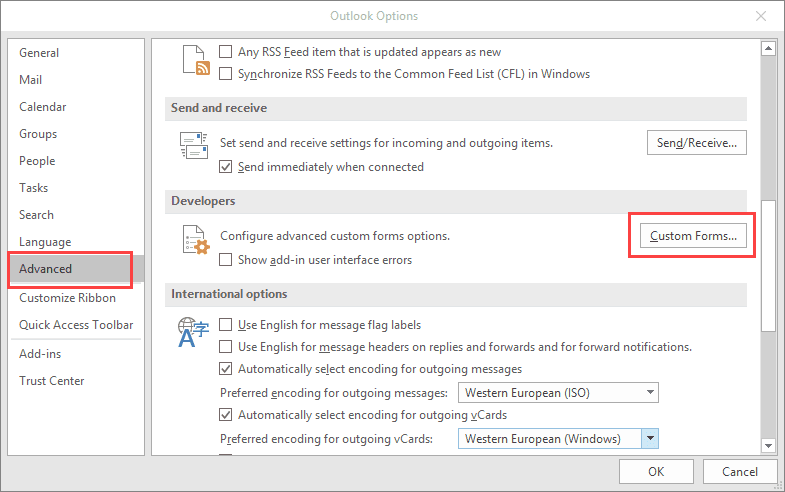
- Go to File, Options, Advanced.
- Click Custom Forms (about halfway down).

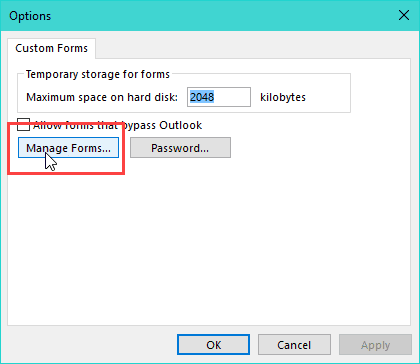
- In the Custom Forms dialog box, click Manage Forms.
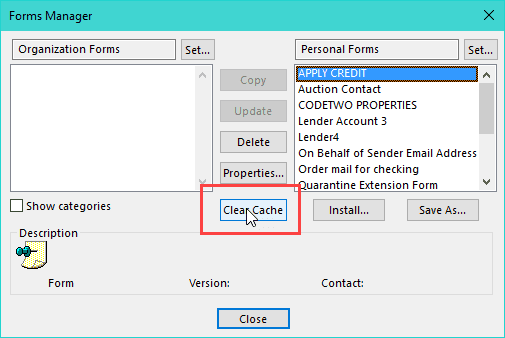
- In the Forms Manager dialog box, click Clear Cache.
It can also be helpful to rename (or delete) FRMCACHE.DAT to FRMCACHE.old. Outlook will recreate this file when needed.
Type or copy & paste the line below into the address bar of Windows Explorer and press Enter.
%localappdata%\Microsoft\FORMS
Then rename the frmcache file.
If the problem continues, change the form (message class) associated with the messages to the IPM.Note. To do this, download DocMessageClass and run it on the Inbox (and any other affected folders).

Bob H says
Yes contacts only. I finally got a fix from 3rd level Apple support by opening a new user account in Windows -- which brings its own set of problems. The whole thing has been very annoying...
Diane Poremsky says
There should be a fix within the same user account - especially since it's a PITA to move everything over. I'd probably start with signing out of iCloud (don't let it create local copies in outlook), delete the apple folders under %localdappdata% and %appdata% (then reinstall iCloud and sign back in.
Albert Nijdam says
Thank you very much. This solved my problem. After a crash of windows live mail 2012 I managed to import most of mail folders into outlook 2010. I did not use outlook because I was used to WLM. The move worked, only I got a very annoying window complaining about forms which could not be found. Not any more. Thanks again.
Javier says
happens in Icloud CONTACTS nothing is wrong with calendars
Bob H says
Javier/Diane -- I have exactly the same contacts problem -- I had a ticket open with MS for a month before that cut me loose and sent me to Apple and now after 2 visits to the Genius Bar and the last hour on the phone with Apple senior support they are sending me back to MS. Can anyone help? Thanks
Diane Poremsky says
So it's only the contacts that are affected? I'll try to repro again.
Javier says
hello
When i try to collapse the categories in outlook 2013 shows up the same message
"The custom form cannot be opened. Outlook will use an Outlook form instead. The object could not be found."
I am using (Contacts - iCloud) Outlook 2013
Please HELP Thank you so much
Diane Poremsky says
I'm not able to repro it - so I'm guessing the form is corrupt or something.
Do all of the appointments have the little calendar icon? (some may have people or recurring overlay in the corner) iCloud should use the standard ipm.appointment form (mine does).
Trevor Waters says
Thank you so much! I was banging my head against this and had tried clearing the Outlook forms cache, removed and reinstalled Office, deleted and re-imported the email and I couldn't get this issue to go away. Thanks again for this wonderful program!