Beginning with Outlook 2003 you can view the header and message source code source together in the options dialog, provided you edit a registry key.
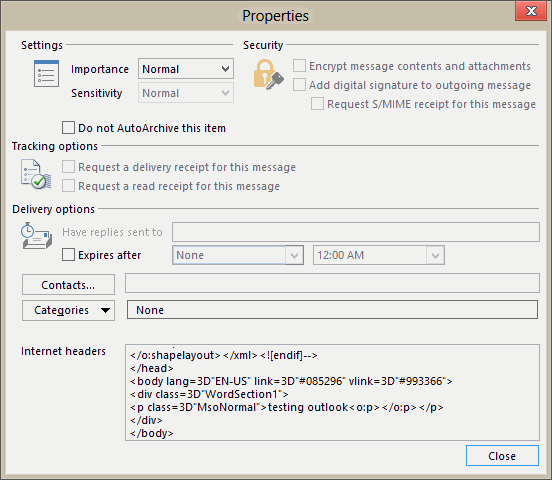
This works on mail downloaded from Internet mail transports only, meaning it works with POP3 and IMAP accounts only, not Exchange server mailboxes or Outlook.com accounts.
To learn how to open the Message options dialog so you can view the Internet Headers, see How to View Internet Headers
Note that setting this registry value will result in larger messages stored in your data file. For this reason, you may want to use this key only when you need to troubleshoot issues. If you delete the key (or change the value to 0), the source code will not be removed from messages already downloaded.
Set the SaveAllMIMENotJustHeaders registry value
Open the registry editor and navigate to the correct key for your version of Outlook, then right click on Mail in the right pane and choose new DWORD, naming it SaveAllMIMENotJustHeaders. Set a value of 1.
Outlook 2016
HKEY_CURRENT_USER\Software\Microsoft\Office\16.0\Outlook\Options\Mail
Parameter: SaveAllMIMENotJustHeaders
Value: 1
Outlook 2013
HKEY_CURRENT_USER\Software\Microsoft\Office\15.0\Outlook\Options\Mail
Parameter: SaveAllMIMENotJustHeaders
Value: 1
Outlook 2010
HKEY_CURRENT_USER\Software\Microsoft\Office\14.0\Outlook\Options\Mail
Parameter: SaveAllMIMENotJustHeaders
Value: 1
Outlook 2007
HKEY_CURRENT_USER\Software\Microsoft\Office\12.0\Outlook\Options\Mail
Parameter: SaveAllMIMENotJustHeaders
Value: 1
Outlook 2003
HKEY_CURRENT_USER\Software\Microsoft\Office\11.0\Outlook\Options\Mail
Parameter: SaveAllMIMENotJustHeaders
Value: 1
After editing the registry, restart Outlook then view the message headers of messages that were downloaded after you restarted Outlook.
Do It For Me
Download the correct file for your version of Outlook, then double click to add it to the registry.
Outlook 2016 Outlook 2013 Outlook 2010
Outlook 2007 Outlook 2003
Remember: This works only with POP3 and IMAP accounts and only for messages not yet downloaded. To view the source for POP3 accounts where messages are left on the server, create a second account in Outlook and re-download the messages.

Clas Engström says
How about Outlook 365 2019 version. I sent you the header and the only ip found in it was the loopback address.
Regards
Clas
Dev says
Hi Daine, is there any way, by which I can see raw mime source of mail also ? By view source, I am only able to see html mail source. I want to access raw mail source in code (by my add in) but it keeps giving me unauhorize access exception (I am accessing it using . Can you please suggest some way around.
Diane Poremsky says
AFAIK, no you can't get the raw mime. You can get the source and the full internet header. The reg key - SaveAllMimeNotJustHeaders - is for POP/IMAP only and only works on messages downloaded AFTER the key was set. It is the same as getting the body source and header...
Dev says
Hi Diane, Thanks a lot for your quick reply. Is it some limitation in outlook 2013 or it related to windows ? I have outlook 15.29 version on Mac and it gives you option "view source". When you click on it, it displays raw mime source. what is your take ?
Diane Poremsky says
It's a windows thing. It's always worked like this on windows.
Paul Leech says
What about Exchange accounts? Is there any way to view the message source with that protocol?
Thanks in advance,
Paul
Diane Poremsky says
In Exchange, you can only see the HTML message source you get by right clicking on the bottom of the message and choosing View source and the separate internet header.
David Karasiewicz says
Many Thanks,
This works. Okay they are call "Keys", not folders as I called them.. :)
Also adding the properties (Message Options) to the tool bar works nice for my needs too.
Thanks
dk
David Karasiewicz says
HI Diane,
Thank you for post. It seems that I've missed something because I do not see the ...\options\mail. Once I get to ...\options there are four other folders: Calendar, General, MSHTML and Spelling. Has there been one or more changes since your post? I'm using IMAP protocol.
Sinerely
dk
Diane Poremsky says
If the folder does not exist, create it. They are only added ot the registry if you make a change to options that writes to that key. If you change some settings on the Mail options page, it should add the Mail key for you.
Sherri says
How would you view the source when the email is received via Exchange?
Diane Poremsky says
If the mailbox can be accessed using POP3 or IMAP, you can use the method on this page - it's not that it doesn't work with Exchange mailboxes, but that it only works when you use the POP3 or IMAP protocol.