This question comes from a user migrating from Eudora but is useful to anyone who needs to send an email message to a contact's three email addresses.
Some of our contacts have more than one email address, and in Eudora we can save one contact with two addresses, then when we select that one contact from the address book, both addresses are included in the To field. How can we do this in Outlook?
The Outlook version of this feature is available only when you view the contact in the Contacts folder.
In Outlook 2010 and 2013, find the contact in the Contacts folder, select it and click the Email button on the ribbon. This will open a new message addressed to all of the addresses entered in the contact.
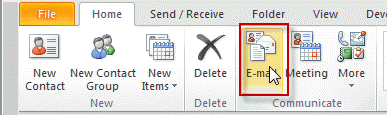
If you prefer to right click on the contact, choose Create, New message to contact. In older versions, you'll use the Actions, New message to contact command.

Unfortunately, this only works when you select one contact. If you select two or more, only the default email address is added to the message.
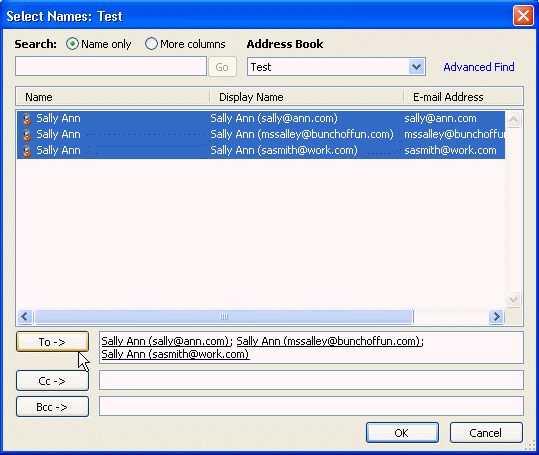
If you use the To button to open the address book, you'll need to select each address from the address list.
Send email to all addresses macro
This VBA macro will get all email addresses on the selected contacts and prepare an email message with the addresses in the BCC field.
See How to use Outlook's VBA Editor if you don't know how to use macros.
Public Sub SendToAllAddresses()
Dim Selection As Selection
Dim strDynamicDL As String
Dim obj As Object
Dim objOutlookRecip As Outlook.Recipient


Set Selection = ActiveExplorer.Selection

For Each obj In Selection

 If obj.Class = olContact Then
     strDynamicDL = strDynamicDL & ";" & obj.Email1Address & ";" & _
     obj.Email2Address & ";" & obj.Email3Address
     Else
     strDynamicDL = strDynamicDL & ";" & obj.DLName
 End If

Next


Dim objMsg As MailItem
Set objMsg = Application.CreateItem(olMailItem)

  objMsg.To = "myself@here.com"
  objMsg.BCC = strDynamicDL

For Each objOutlookRecip In objMsg.Recipients
    objOutlookRecip.Resolve
Next

  objMsg.Display

Set objMsg = Nothing
Set obj = Nothing
End Sub

Alex says
Hi, it happens that when I have a contact with multiple addresses in my contacts, one hosted on the exchange and an external address, no matter what i pick, the mail allways is sent to the exchange address.
How can that happen?
Thanks for any Sugestions.
Hans says
Hi, your macro seems very useful to me. I'm not sure how to assign/run the macro in Outlook. How do I assign the macro to the Outlook send button (if possible at all) so that all e-mail addresses for one person are bing addressed?
Diane Poremsky says
You can't, you need to create a new button for the ribbon and click it top run the macro.
Lyn says
Just reading this now and i'm guessing if you have multiple emails for one contact, when you add that contact to a distribution group it will only choose the primary or "default" email address. How can you get the distribution group to send to all the email addresses in each contact??
Diane Poremsky says
All 3 addresses should be listed in the address picker. If you want to send to all three addresses, add the contact 3 times, selecting each address. When you add the contact it will (or is supposed to) use the address you select.
Lee Conwell says
Am I correct in thinking the only way to send to all email addresses for a contact is to either select them each time using the address book from the "to" field or create a Contact Group (a new name for Distribution List) which has to be updated each time there is a change in the contact?
Diane Poremsky says
If you want to use the Address book to select the address, yes, those are your options. If you are working in Contacts, you can select the contact, then Email.
Mostafa Lourhmati says
You can just use the E-mail Button mentionned at the begining of this article( if this button is not avaliable add-it from Customize ruban), but you have to change Contacts view to list (From Current view ruban select list or from Viwe MenuChange ViewList).
i hope that can help
Diane Poremsky says
As an FYI, I just added a macro to the page that will get all addresses of all selected contacts.