Do you want most of your new appointments to use Free (or Tentative or Out of Office) as the default for the "Show as time" instead of Busy?
Outlook doesn't have an option to set the "Show time as" default but you can create a custom appointment form with "Show time as" set to Free, Tentative, or Out of Office, then publish it and set it as the default appointment form.
You can use a macro to set the Free/busy (or other fields) when opening a new appointment form or adding a new appointment to the calendar. See Change the All Day Event Default Free/Busy for code samples.
How to create and publish a "Free Time" custom form
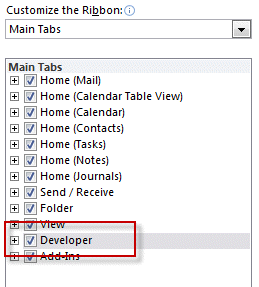
First, go to File, Options, Customize Ribbon and add a check to Developer ribbon on the right.
Step 1: Go to the Calendar folder
Open the calendar folder you want to publish the form in. This makes it easier to publish the form because it gets published to the folder you are "working" in.
Step 2: Create custom appointment form
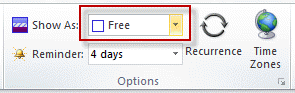
Open a new appointment form and change Show as time as desired.
Step 3: Publish the form
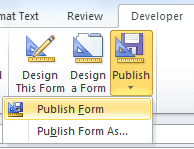
Publish the form using the Publish form command on the Developer ribbon
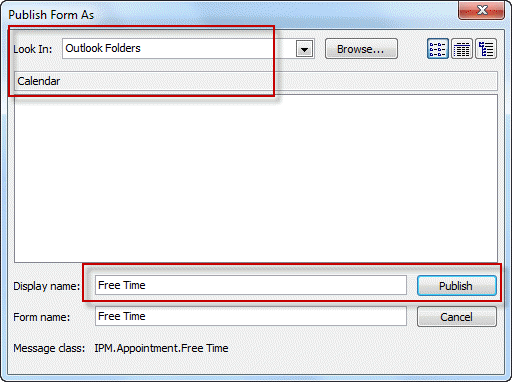
The default location should be calendar so you just need to enter a name for your form.
Step 4: Set the new form as default for new appointments
Right click on the calendar folder, choose Properties and select the form from the dropdown to set it as default.
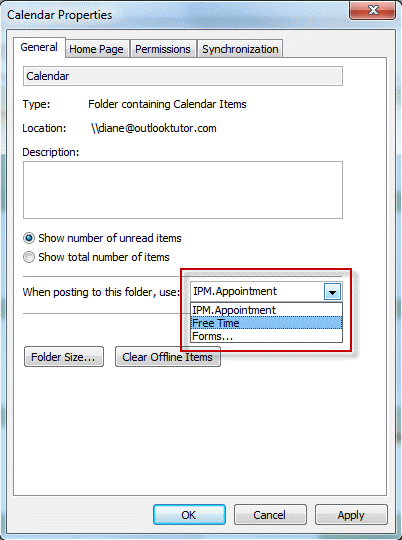
Now when you create a new appointment, the Free/Busy time will default to your desired setting, Free in this example.
Video Tutorial
Multiple Calendar folders
The form is published to a Calendar folder and the default applies only to that Calendar. If you use multiple calendars you need to set the form as default for each calendar.

Omar J. Salaam says
When I un-check All Day "Show As" goes from "Free" to "Busy." How do I prevent this, so it remains as "Free"?
Diane Poremsky says
You need ot changei t manually - timed appoiuntments default ot busy, all day events default to Free. Sorry.
Adam Koutny Wrak says
thank you so much! outlook is very good apk, but If I want some absolute normally functions - I must be a programmer (or use thunderbird - setting for new events is std.function in setup)
Kevin says
FYI. Using the words "Calendar Folder" is confusing. Perhaps say "Select the desired calendar (if you have more than one) from the 'My Calendars' selection on the left."
Bob says
Great.
In addition, how can I set the default duration to "0 minutes" in this form?
Diane Poremsky says
If its set to free, the time won't matter... it will always default to your default reminder setting in File > Options > Calendar. The only way to change that is by using code behind the form.
If you want all events to have a 0 min reminder, change it in Options - you don't need a custom form for that.
Simon says
Yes, very useful! Thank you
Brittany says
Exactly what I needed. Thanks!
Dawid says
SUPER, thank you!!!
Matt West says
Should this work for an exchange online room calendar? (I see "Peter" commented in 2012, below)
Diane Poremsky says
It would need to be published in the room calendar and set as default. But I'm not sure if it will be picked up on invitations - will need to test it to confirm.
Friedemann says
Thank you for enlightening me on "Free Time" setting! It works fine, so far.
Karl says
What a perfect answer. So simple!
Adrian Holtham says
Hello - great site by the way!
Is it possible to change the default "Show As" for incoming meeting requests to "Available" as appossed to "Tentative"?
This will stop my calendar looking busy where most of the invites I get I don't actually need to attend (I have to manually set them to available).
Thanks !
Diane Poremsky says
No, you can't change the default. You could use a macro - https://www.slipstick.com/developer/code-samples/change-the-all-day-event-default-freebusy-to-busy/ - instead of outlook.appointmentitem, you'd use outlook.meetingitem.
Timothy says
Worked great, thank you!
Ken says
Worked perfectly on my strictly-controlled work computer
Dan says
Great article.
How would you publish the form to a resource calendar in Office 365? We want the default show as to be set to Busy and have the 'all day' check box checked off. By default, when you check off 'all day' in an appointment the default show as is set to Free.
Thank you.
Diane Poremsky says
An owner of the calendar could copy it to the folder... but you should be inviting resource calendars, not direct booking on the calendar.
Anne says
How do you UN-publish a form after you have published one this way?
Diane Poremsky says
Go to File, Options, Advanced, Custom forms, Manage Forms - find the form and delete it.
https://www.slipstick.com/developer/publishing-custom-forms/ has instructions and screenshots - the video tutorial shows how at about the 1 minute mark.
Anita C says
Thank you! Worked and easy to follow.
Emma says
Thank you very much - so easy to follow and it works.
hey says
Thank you so much! just what I needed
Maggie says
Perfect - thank you! That was helpful - it really works :-)
Adriana says
Very helpful!!!!
Kevin says
Diane,
Your article is outstanding. I ran into a snag that has the start time for example on 9/1/2015 but the end time is 9/2/2015. Ideally we want it to be 9/1/2015 for the end time and not 9/2. The template that was created from your article reflects the correct start and end time within the day it is created. After you save and publish the template it reflects the correct time and date until you change it to a different day, say 1 week later example and reverts back to having the end time 1 day later rather than ending on the same day. Any ideas?
Angelina Noccetti says
thank you :) I understand now
Angelina Noccetti says
the reminder time that is set to 18hours by default does not change even if I put 15 min and publish the setting. The free busy change does...but not the time
Diane Poremsky says
18i hours is for the all days events - it's hard coded by microsoft (in some cases it's 12 hours reminder, depends on how you open the event).
Zelma says
How does one add in another option to the calendar, i.e. on top of "Free", "Busy", "Out of office" and "Tentative" I want to add in "Working from home" to allow others to recognise I am available, but just not in the office?
Diane Poremsky says
You can't edit that list - but if you upgrade to Outlook 29013, you have the option for Working elsewhere. If upgrading is not in the cards, I usually recommend coding the subject or using categories to help people know 'out of office' is really 'working from home'.
Michael McElhinney says
Thanks you
Saves me hours of time
Rosanne says
This worked for me, however the "show developer" option for me was under "tools", "Options", "Mail Format", "editor options". Other than that difference, it worked great. Thank you.
Diane Poremsky says
Yeah, if you use Outlook 2007, everything is on the Tools menu, not File.
Conny says
Thank you! Exactly what I was looking for.
Gert says
This is particularly useful when you use an app on your smartphone that mutes the phone whenever your calendar is marked busy. I was currently having way too many mute times and thus missing phone calls, whereas I really only need to mark a few meetings as busy-do-not-disturb.
katie says
I've been trying to figure this out for way too long. Your instructions were simple and easy to follow. Many thanks!
Mary Fetsch says
Thanks so much, Diane! This was very helpful - very easy to follow.
Kathy says
Excellent! This worked like a charm with great directions.
Doug Fawley says
I'll add to the thanks. I've tried to crack this nut for a long time - I never would have figured it out if I hadn't found your article. THANK YOU.
Steve Ward says
Can I change the default entries in the Options section of the Event Tab in MS Oultook Calendar from: 'Free - Tentative - Busy - Out of Office'
to: 'Free Time - Work Busy - Personal - Tentative - Out of Office'?
Diane Poremsky says
No, the Free/Busy entries are not configurable at all. Outlook 2013 adds a new FB option - Working Elsewhere.
HarleyDavis says
I use a department calendar (equipment calendar set up with permissions by group to act like a corkboard calendar) to book events, then add the rooms. In order for the events to show up as the desired value by default, you must publish the form on the calendar booking the event. This has proven a masterful sort of addition for me. I now set it to show the time as either out of office or busy. I set users to the Out of office form.
Sarah says
THANK YOU for showing me how to do this.
Peter says
Hi Diane, Thanks for the article, quite helpful!
However for my purposes I need the custom form applied on an Exchange level on a Room Mailbox, basically I want all appointments in the Room Mailbox to be shown as Free. I've tried logging on as the mailbox and following your instructions, it works great when creating appointments directly in Outlook. However, when I invite the Room to an users appointment, or directly create the appointment from a users Outlook in the Room calendar, it still says busy. Even if I create a custom form for the shared room calendar in a users Outlook, it doesnt make any difference.
Can you think of another way I could do it?
Diane Poremsky says
I'll see what i can find out - but I think the organizer would need to use the same form.
BTW, if you are doing this so the calendar will accept conflicting meetings, you can set it to allow conflicts with the Set-CalendarProcessing cmdlet:
Set-CalendarProcessing "Room Name" AllowConflicts $true