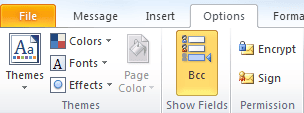
Bcc = blind carbon copy. You use the Bcc field (Options | Bcc Field) to enter addresses when you don't want recipients to see who the message was distributed to. The person receiving the message will see only those addresses that you put in the To or Cc box.
Display the BCC field on messages
If you click the To button to select names, you can select the names then click on the Bcc button to add those names to the BCC field. After the first name is added to the BCC field, you can double click on additional names to add them to the BCC field as the last used field stays active until you click another button or compose a new message.

If the BCC field was not yet enabled (by clicking on Options, BCC), adding names to the BCC field using the address book will show the BCC field on the message form.
View the BCC field on Sent messages
Note: The BCC field will not display in the Reading pane.
To see the Bcc addresses for messages that you sent, open the message from the Sent Items folder. In newer versions of Microsoft Outlook you should see the BCC field automatically when it contains names.
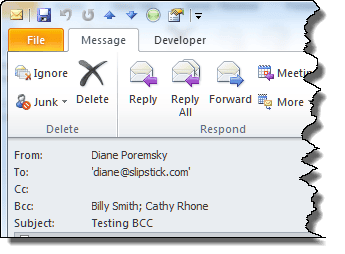
In older versions, open the message and enable the BCC field on the Options dialog.
You can also add the BCC field to the message list to see the names. You may not be able to see all Bcc recipients using this method if there are many names on the BCC.

Note: When you use Gmail IMAP accounts and save the sent items on the Gmail server, you may not see the BCC names on sent items. If you can't see the BCC when you add the BCC field to the view, you need to save sent items locally if you want to see the BCC names. Other IMAP servers may behave the same way, but in the servers I have access to, only Gmail accounts don't show the BCC addresses. Gmail accounts in Outlook 2016 show the BCC entries in the message list (after you add the field to the view.)
Printing the BCC addresses
Printing the message with the BCC field visible is more difficult - to print the BCC field in you need to customize the message form to allow printing.
The easiest way to print the BCC'd addresses is to hit Forward then copy the BCC list from the sent message and paste it into the message body in the Forward, then print and close the message. Alternately, you can open the sent message and go into Edit mode, paste the names into the message body and print.

Pedro says
Hi Diane, hope you are doing well. I would like the other way around, I do not want my outlook displaying the BCC in the messages I have sent. Any way to achieve this?
Greeting!
Diane Poremsky says
They won't display to the sender, only in your sent folder. I'm not aware of a way to avoid that - but have seen the BCC entries not visible in IMAP accounts. Sorry.
Sally says
how can I retrieve Bcc in outlook yahoo 2016?
sarah says
Hello, i want to know the hidden BCC,
this method didn't work with me to know who is in all of may emails.
please modify this article and show us how to find the hidden BCC in All the Sent or Received Emails.
Thanks a lot...
B.R
SKH,
Charles Cohen says
I've tried everything. I created an email with 65-70 bcc addresses and can't retrieve them to cut and paste into another email. I did it before with an email I sent through gmail but this one was sent through Comcast (all Outlook though) and I can't see the bcc addresses. Any help would be appreciated.
Diane Poremsky says
Sp you dont see the addresses when you open the sent message?
Is the account configured as an IMAP account? There have been cases where the BCC is not preserved when you sync with an IMAP server. If this is the addresses can't be recovered.
Jolthor Engellson says
NO! This does not work. If you have basic level of computer skills you have gone that far without having to Google the solution but the field is shown empty...
Diane Poremsky says
What type of email account do you use in Outlook? It does work... but may not work with imap accounts.
Wendy Plotkin says
I found the "bcc" names & email addresses by going to "File" and examining the "Properties" of the Email message.
Sorry if someone else already mentioned this.
Diane Poremsky says
Yopu *shouldn't* have to do that - and if they are listed there, adding the BCC field to the view should work.
Wendy Plotkin says
I am using Outlook for an IMAP account channeled through Gmail.
I thought that you acknowledged that this was an exception that
explained why bcc was not showing up in the "Sent" folder in my account.
After I posted this, I sent an email with bcc to another recipient,
and in this case, bccs showed on message in Sent box. I am going to
investigate the differences.
Diane Poremsky says
It was, but it's possible they fixed it since I tested it and wrote the article. It may only apply to older outlook versions... it is working correctly in Outlook 2016.
Dirgster says
I have the same problem as described above. The recipients of my sent messages are not listed in the "Sent" message. Please tell me how to add the BCC field to the view. I use IMAP in Outlook 2016, channeled through AT&T. Thanks very much!
Sophie says
THANK YOU! This is all I needed.
Dani says
Thank you for your feedback. Unforch it didn't work for me.
nousheen says
it is always shown in the inbox, in 'to' address write your own address, then in 'bcc' address write other addressess you want to sent an email, this way you will get am email in inbox it also contains al the ist of adressess you bcced
Dirgster says
No matter what I do, I am unable in my "Sent" folder to view the recipients of BCC: e-mails. Even though I had not addressed myself as a recipient, my name shows next to "To" but not the names and addresses of the actual recipients.
Also, IMAP messages, Hide messages, Group messages, and Preview are shown under "Change View", not "List".
Anita says
No matter what I do, I cannot seem to see my bcc field in my sent messages. It seems to be available to everyone else in my office and is available od shared mailboxes. Just not my personal email sent inbox. It is very frustrating!
Diane Poremsky says
What type of account is configured in Outlook (POP, IMAP, Exchange) and which version of Outlook do you use?
Dirgster says
I have the same problem.
Wanda says
Why does a bcc message created on my computer in Outlook reveal those bcc recipients on my iPhone? They are not revealed on my computer.
Diane Poremsky says
it's something with the gmail account in outlook - it won't show in opened messages but (at least in outlook 2016) is visible in the message list if you add the field to the view (works best if you don't use the compact view).
John Kenney says
Diane's suggestions don't work when the email is sent from Outlook desktop where the account used is an Exchange ActiveSync account, such as Outlook.com. At least that's what I am seeing. I read elsewhere that if you send the email directly from the web (Outlook.com in my case), the bcc is readable to the sender, but not if you send it from Outlook desktop. I have found no way to see my bcc's even though I am the sender
Diane Poremsky says
If your outlook.com account was moved to the new server, you should remove the active sync account and add it back using auto account setup. Then you can see the values in the BCC field in outlook.
Irene says
Dear Diane,
I am apparently not very good at the whole Bcc thing. And it makes it feel a bit better to see that I am not the only one lost.
When sending out Bcc emails today, I was told to include my own name in the "To" part. The email that came to my inbox, showed all of the Bcc recipients, freaking me out ever so slightly.
Any particular reason why it is doing that?
Thank you so much for taking the time to answer!
Irene
Diane Poremsky says
You definitely shouldn't see the BCC names on messages sent to yourself, you would only see it on messages in yours sent folder. You do want to put your name in the To field - it helps avoid problems with spam filters.
Was this with your Hotmail account or a different email provider?
Purushotham says
Hi, Can you please clarrify the below described query.
Example : "A" has sent a mail to "B" keeping him CC and "C" in cc.
Now "B " Wants to know the mail received from "A" , contains any mail id's in bcc.
Diane Poremsky says
B would have to ask A that - the BCC recipients are not visible to anyone but the sender.
Bertil says
I would like to have a copy of every cc recipients msg in the sent folder. One row for each cc recipients, cc recipients expanded.
Diane Poremsky says
?You would need to create a custom field and read the recipients field, pulling out the ones with the olCC property. If you just need a list and don't need it one name per line, then adding the CC field to the view would not require and customizing, other than adding the field to the view.
AI says
How would you do the same thing (view the BCC field on Sent Messages) in Outlook for Mac? Any help would be much appreciated.
Vijay Mhatre says
Hi,
Thank you for posting in Microsoft Community. As per the issue description you are unable to view BCC field in Outlook 2013 sent items folder.
I would like to ask you a question regarding the issue:
What is the type of email account configured in Outlook (POP, IMAP, Exchange or Exchange Active Sync.)?
If the email account is configured as IMAP account and saved the sent items on the server, you will not be able to see the BCC names in Outlook sent Items. You have to save the sent items locally on your computer if you want to view the names in BCC field.
I hope the above information helps. If you need any further information you can always reply and I’ll be happy to help you.
Thank you.
Diane Poremsky says
Not sure why you think this is the Microsoft community - this is the Slipstick Systems website. We're an independent company that provides support for Outlook and Exchange.
Frankie Lee says
To view the addresses you sent in BCC in Outlook 2010, do this:
* Open the Sent email
* There's a box called Tags (left of box called Editing)
* Click the tiny box with arrow in SE corner of the box called Tags
* Up pops a box called Properties.
* In the Properties box is a box ... at the bottom ... called Internet headers.
* The BCC list is in there among other details.
John Rags says
OK, this is weird. I opened the email and now the BCC list shows up. It looks like when you look at in the viewing pane it will not show up. You actually have to open the full email.
John Rags says
Hi Diane, I am hoping you can help! Suddenly I can no longer see the BCC recipients that I sent emails to in my sent items folders. To be clear, I usually BCC parents in my group and then when i want to replicate that email quickly, I go to my sent items foler, open the email I sent, and then copy the entire list again. It suddenly stopped doing that. I am using Office Pro Plus 2007 with Outlook Connector. Hotmail is my email provider. I would greatly appreciate some help on this.
scottmeyers says
I withdraw my last comment. It turns out that I was viewing the message I had received as a result of sending to myself and the bcc'd people. Viewing the original sent message does show the bcc list as you've described. I apologize for not noticing this before posting my comment.
scottmeyers says
I'm using Outlook 2010. I don't use gmail. I don't store my messages on a server.
I recently sent a message to myself with several other people bcc'd, and I know that the message went out with the bcc's, because I have received replies from some of the bcc'd people. However, opening the sent message (not just in the reading pane) shows no bcc list, and choosing "resend this message..." brings up a message with no bcc list.
I really need to see the bcc list for this message. There must be *some* way to force Outlook 2010 to show it to me. Any ideas?
SherB852 says
I see MY email address next to BCC on my Nook - an email someone sent to me.
SherB852 says
In Outlook 2013, how can I see my bcc name when I receive an email? I know the person sent an email to some people and included me as bcc but I don't see bcc and my name beside it like I have in previous versions of Outlook. Is there a setting for this? Thanks
Diane Poremsky says
Your name should never be in the BCC field on incoming mail. The mail server drops the envelope as it hands off the message, creating the BCC. If your mail was not in the To or CC field, then it was Bcc'd.
SherB852 says
Something intetesting - my Nook shows the bcc field but not Outlook. The last Outlook I used before 2013 was 2003 and it also showed my email beside bcc. Guess that is something they changed since then. Thanks for your response. Now I know.
Diane Poremsky says
The Nook shows the BCC recipients on incoming email?
You can show the BCC field when you compose mail and see it in sent mail (in any version), but not see it on incoming mail in Outlook (any version).
Beach Living says
Thank you for your responses. Please let me know either way what you find out about the code and redemption (i will need some guidance on that). Completely understand about the appoval/answer and things getting lost :)
Beach Living says
My previous responses are not showing again... I tried editing but it only allows email body text edit, not recipients. Do you know if others with a different MS Office Outlook product ID number will be able to see who my product ID has as bcc's on emails generated from my product ID?
Diane Poremsky says
They wont show until I approve them and I usually wait to approve until I'm ready to answer, because otherwise they get lost in all of the other comments. :( If you can see the BCC, others will be able to.
a bit helpless says
I'm using gmail and in the middle of discovery for a legal case. I DON'T want BCC addresses to show on the email documents that I am providing as they are not being requested. When I print the gmail email, the BCC addresses print out as well. Is there a solution to hide them? Assistance will be greatly appreciated!
Diane Poremsky says
Are you printing from gmail interface or outlook? Normally, Outlook won't include the BCC field in the print out.
Beach Living says
I replied last night to your last response but it doesn't show now... sorry about that. When I selected edit in the saved email from the hard drive it would only go into the body of the email and allow edit of text only, not to the recipients (to, cc, or bcc) or to the sender. I am not familiar with macros and would fear losing important data when attempting to tweak. Can macros be used for MS Office Outlook 2007 email messages that are saved to external hard driver folders?
Diane Poremsky says
Macros can be used on the messages, but I'll have to test some things to see if they can remove the BCC. I totally forgot you can't edit certain fields.
Beach Living says
When I tried the edit function it would only allow me to go into the body of the saved email, not edit any of the recipients or the sender. I don't really know how to use macros and could likely wipe out important data. Do macros work on saved emails in folders on hard drives when they are not in the Outlook folders of Outlook?
Diane Poremsky says
Oh. Yeah, i forgot about that. I think you can remove it using code if you use redemption. I'll check on it.
Beach Living says
In saving Outlook 2007 email messages to an external hard drive for back up and for others in the organization to have, is there a way to remove BCC recipients on the saved/stored emails so that only I know who was BCC'd and others in the organization won't? Thanks so much.
Diane Poremsky says
You would need to edit the message to clear the bcc - this can be done using a macro if there are a lot of messages to check.
Beach Living says
I tried editing the message saved to the external hard drive folder (not pst file) but it would not work. Will a macro work on an external hard drive that the Outlook messages are being saved in named folders not unlike 'My Documents' or 'OLEmail'? There are many in several named folders.
Diane Poremsky says
What happened when you tried to edit it? It should work.
I have a macro that can remove attachments here - https://www.slipstick.com/developer/open-outlook-messages-stored-filesystem/ - it would need a little tweaking to remove the olBCC field.
Nick G says
Hi Diane
Just switched to Outlook 2013 with Exchange ActiveSync. Was using an older version with Outlook Connector for my hotmail/msn.
I send a regular email to friends using bcc. In the past I simply found my last message, chose resend and edited it.
Now I cannot see the bcc recipients in sent items from hotmail although they are visible deep in the email properties.
(Outlook.com sent items shows the bcc fine but I cannot find a resend option there.)
When I use my other account (POP/SMTP) on Outlook 2013, the BCC show fine.
Help!
Nick
Diane Poremsky says
The BCC field doesn't display in the sent folder of EAS accounts - instead of doing a resend, create a quick step containing the addresses - it will save you from going to the sent folder to find the message.
Vs says
Hi Diane
I am using outlook 2013 which is configured for my gmail account. In my sent items I can't see list of people who were included in my bcc list while I send emails. While I used checked with another person using outlook 2013' they didn't face similar problem with bcc. Is there a problem with any settings or issues with gmail being configured outlook 2013 or is it the conflict with operating system. Other issues faced by me are that outlook 2013 does not correctly reflect whether the email has an attachment or not! When I open the email I can see attachments but before opening it the attachment symbol is not be seen always in emails with attachments. It is quite random. Thirdly, the outlook 2013 when it serves all the emails it doesn't show the path in the field where the email is, whether in a particular folder or sub-folder.
Can you please guide me. I'm quite puzzled and thinking of downgrading to outlook 2010.
Diane Poremsky says
It's gmail. You need to keep the sent messages in outlook, not on the gmail server, to see the addresses in the BCC field. I haven't spent a lot of time testing the attachment problem, but i believe that is an imap issue - once the message is synced and fully cached, you should see the attachment icon. Outlook has never been good about showing the path - there is the
In folder field that tells you the folder name, otherwise you need to use VBA or Advanced find to get the path. See https://www.outlook-tips.net/how-to/find-folder-path-in-mailbox/ for the tricks.
Barbara says
Will the ability to print a message with the bcc field showing a fix that Microsoft will be making in upcoming versions? For businesses, it is often useful to have a record of EVERYONE an email was sent to, even if you don't want all of the recipients to see everyone who was copied. It seems that recent changes to various Office programs (2007-2010) have eliminated some very useful/user friendly functions that we enjoyed in past versions. This is just another one.
Diane Poremsky says
I don't know, but will ask. I usually recommend opening the message for editing, then paste the BCC line in the message and print. Close the message without saving to retain the untouched original.
Bill says
Dianne, hi.
I've made use of Bcc for some time, but came across a new issue. I sync my Windows Office files between my pc and my laptop (I use SyncToy, if that helps). I've just realized that Bcc mails are only visible in the mail on the device used to send the message. [So, in the instance that I select and Bcc people from my pc...close Outlook...sync...leave the office with my laptop...open the sent message to follow up: the Bcc field is completely empty!] This leaves following up on projects on the go ...umm....unworkable! Any ideas to solve or work around this?
Diane Poremsky says
You could use a itemadd macro to add the bcc names to the for follow field, add them as categories, or insert the names into the message body so you have record of who you sent it to.
Diane Poremsky says
@Veer - Just to clarify, you can only see the BCC'd addresses for messages you send. You can't see if people were BCC'd on messages your employees send to you. If they are delegates and sent mail on your behalf, you should be able to see the BCC addresses in your sent folder.
Veer Singh says
Hi Diane....I'd really appreciate some direction on this one....
How do I SEE all Bcc addresses included in mail sent by my employees(ms outlook 2003,2007) using my account ??
I used your custom VBA code (https://www.slipstick.com/outlook/email/automatically-bcc-all-message/) and it worked like a charm but it doesn't expose the BCCs...
Thanks!!
Diane Poremsky says
You need to add the BCC field to the view or open the message. Right click on the row of field names and choose Field Chooser. Find the BCC field and add it to the view. You'll need to open the message to see more than 1 or 2 names in the bcc field, but it will help you see which messages were BCC'd.
Simon CS says
I am using Outlook 2010 and have both Exchange (work) and POP (home) mailboxes set up, each to their own files (Exch -> .ost & POP -> .pst), but the bcc's don't show up in my POP/pst Sent Items folder. It seems that you have to open the sent email to see tme. However, this MAY show the bcc's. If not, you then select 'Actions / Resend this message...' which will now have the bcc's listed.
Terry says
I changed settings to "save sent items...on this computer." I still dont see bbc's. It says its in the "local" folder...wouldl that be in the gmail folder?
Thanks!
Diane Poremsky says
No, they won't be in the Gmail folder but in the pst file that is set as default in Account Settings, Data file. If you only have the gmail account in your profile, the default is the other pst file.
Howard Perry says
I am using Outlook 2010 and I have a Gmail account for my email address. The bcc: field does NOT appear when I view Sent messages. (However, I could see them before I switched my email address from ATT to Gmail a coup[le of months ago.)
Diane Poremsky says
Yes, that is a side effect of your sent folder settings. If you save sent items to the imap sent folder, you won't see the bcc names. If you use a local sent folder, you'll see the BCC field.
See https://www.slipstick.com/outlook/2010/messages-ar...
and https://www.outlook-tips.net/outlook-2010/tip-890-...
Note that some people say messages are sent twice when they save messages to the gmail sent folder. I could not repro it - i think gmail just makes a copy of the sent item but doesn't send it twice.