Bcc = blind carbon copy. You use the Bcc field (Options | Bcc Field) to enter addresses when you don't want recipients to see who the message was distributed to. The person receiving the message will see only those addresses that you put in the To or Cc box.
Display the BCC field on messages
If you click the To button to select names, you can select the names then click on the Bcc button to add those names to the BCC field. After the first name is added to the BCC field, you can double click on additional names to add them to the BCC field as the last used field stays active until you click another button or compose a new message.
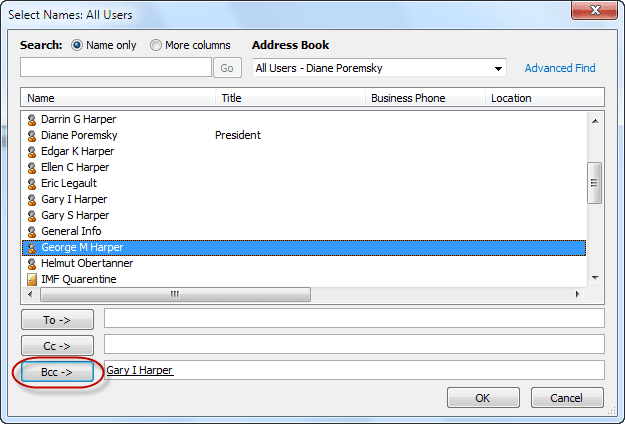
If the BCC field was not yet enabled (by clicking on Options, BCC), adding names to the BCC field using the address book will show the BCC field on the message form.
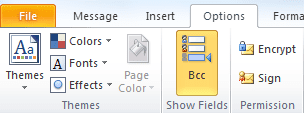
View the BCC field on Sent messages
Note: The BCC field will not display in the Reading pane.
To see the Bcc addresses for messages that you sent, open the message from the Sent Items folder. In newer versions of Microsoft Outlook you should see the BCC field automatically when it contains names.
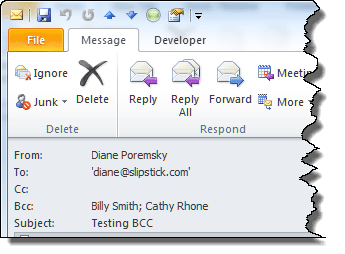
In older versions, open the message and enable the BCC field on the Options dialog.
You can also add the BCC field to the message list to see the names. You may not be able to see all Bcc recipients using this method if there are many names on the BCC.

Note: When you use Gmail IMAP accounts and save the sent items on the Gmail server, you may not see the BCC names on sent items. If you can't see the BCC when you add the BCC field to the view, you need to save sent items locally if you want to see the BCC names. Other IMAP servers may behave the same way, but in the servers I have access to, only Gmail accounts don't show the BCC addresses. Gmail accounts in Outlook 2016 show the BCC entries in the message list (after you add the field to the view.)
Printing the BCC addresses
Printing the message with the BCC field visible is more difficult - to print the BCC field in you need to customize the message form to allow printing.
The easiest way to print the BCC'd addresses is to hit Forward then copy the BCC list from the sent message and paste it into the message body in the Forward, then print and close the message. Alternately, you can open the sent message and go into Edit mode, paste the names into the message body and print.

how can I retrieve Bcc in outlook yahoo 2016?
Hello, i want to know the hidden BCC,
this method didn't work with me to know who is in all of may emails.
please modify this article and show us how to find the hidden BCC in All the Sent or Received Emails.
Thanks a lot...
B.R
SKH,
I've tried everything. I created an email with 65-70 bcc addresses and can't retrieve them to cut and paste into another email. I did it before with an email I sent through gmail but this one was sent through Comcast (all Outlook though) and I can't see the bcc addresses. Any help would be appreciated.
Sp you dont see the addresses when you open the sent message?
Is the account configured as an IMAP account? There have been cases where the BCC is not preserved when you sync with an IMAP server. If this is the addresses can't be recovered.
NO! This does not work. If you have basic level of computer skills you have gone that far without having to Google the solution but the field is shown empty...
What type of email account do you use in Outlook? It does work... but may not work with imap accounts.
I found the "bcc" names & email addresses by going to "File" and examining the "Properties" of the Email message.
Sorry if someone else already mentioned this.
Yopu *shouldn't* have to do that - and if they are listed there, adding the BCC field to the view should work.
I am using Outlook for an IMAP account channeled through Gmail.
I thought that you acknowledged that this was an exception that
explained why bcc was not showing up in the "Sent" folder in my account.
After I posted this, I sent an email with bcc to another recipient,
and in this case, bccs showed on message in Sent box. I am going to
investigate the differences.
It was, but it's possible they fixed it since I tested it and wrote the article. It may only apply to older outlook versions... it is working correctly in Outlook 2016.
I have the same problem as described above. The recipients of my sent messages are not listed in the "Sent" message. Please tell me how to add the BCC field to the view. I use IMAP in Outlook 2016, channeled through AT&T. Thanks very much!
THANK YOU! This is all I needed.
Thank you for your feedback. Unforch it didn't work for me.
it is always shown in the inbox, in 'to' address write your own address, then in 'bcc' address write other addressess you want to sent an email, this way you will get am email in inbox it also contains al the ist of adressess you bcced
No matter what I do, I am unable in my "Sent" folder to view the recipients of BCC: e-mails. Even though I had not addressed myself as a recipient, my name shows next to "To" but not the names and addresses of the actual recipients.
Also, IMAP messages, Hide messages, Group messages, and Preview are shown under "Change View", not "List".
No matter what I do, I cannot seem to see my bcc field in my sent messages. It seems to be available to everyone else in my office and is available od shared mailboxes. Just not my personal email sent inbox. It is very frustrating!
What type of account is configured in Outlook (POP, IMAP, Exchange) and which version of Outlook do you use?
I have the same problem.
Why does a bcc message created on my computer in Outlook reveal those bcc recipients on my iPhone? They are not revealed on my computer.
it's something with the gmail account in outlook - it won't show in opened messages but (at least in outlook 2016) is visible in the message list if you add the field to the view (works best if you don't use the compact view).