Use the following steps to add an Organizational Forms Library to Exchange 2010.
Create an Organizational Forms Library in Exchange 2013 or 2016, or Office 365
Step 1:
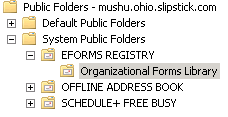
Create a public folder named "Organizational Forms Library" under the EFORMS REGISTRY folders.
Use the New-PublicFolder cmdlet in the Exchange Management Shell to create the organizational forms library folder:
New-PublicFolder -Path "\NON_IPM_SUBTREE\EFORMS REGISTRY" -Name "Organizational Forms Library"
Or create the folder using Exchange Management Console > Toolbox > Public Folder Management.
Step 2:
Get ExFolder.exe, place it in the C:\Program Files\Microsoft\Exchange Server\V14\Bin folder. Run the reg file that is included in the exfolder.zip file before using ExFolder for the first time.
In ExFolders:
- File > Connect, select Public Folders.
- Select the Global Catalog server you want to use.
- Select the public folder database.
- Click OK and the public folder hierarchy will appear.
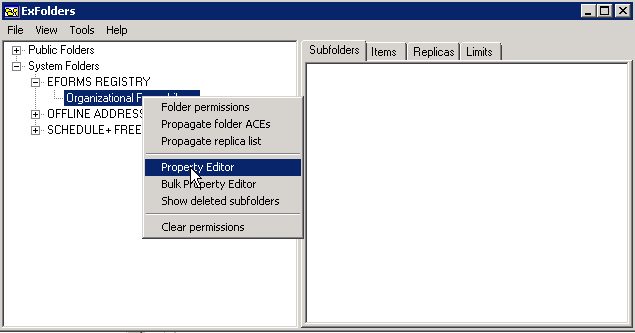
- Expand System Folders, EFORMS REGISTRY, right-click on the public folder you created for the organizational forms library, and then click Property Editor.

- Go to Property > Add Property To View.
- In Add Property To View, enter 0x6707001E. Click OK.
- Find the PR_URL_NAME property you just added.
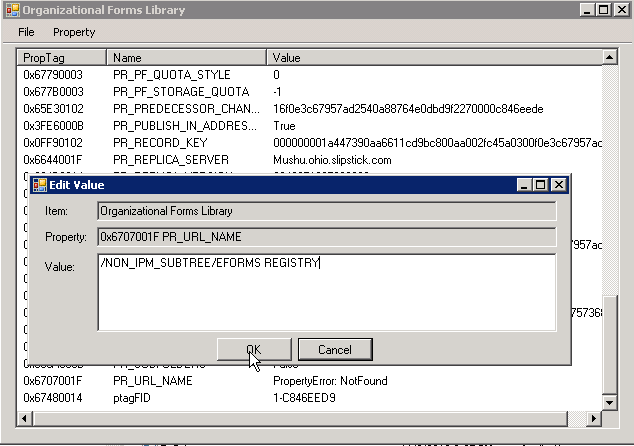
- Right-click on PR_URL_NAME and click Edit Value.
- Enter /NON_IPM_SUBTREE/EFORMS REGISTRY; click OK.

- Close ExFolders.
Step 3:
Download MFCMAPI on a computer that's running the 64-bit version of Outlook.
Note: these instructions were updated to use the January 2013 version of MFCMAPI.
- Open MFCMAPI. Go to Session > Logon and select your profile.
- Session menu > Advanced Logon > Display message store table.
- MDB menu > Public Folder > Open Public Folder Store, and then click OK to open the Public Folders window.
- Expand Public Root > NON_IPM_SUBTREE > EFORMS REGISTRY, select Organizational Forms Library.
- Find PR_URL_NAME in the Property column.
- Property menu > Additional Properties.
- In the Additional Properties dialog, click Add.
- In the Property Tag Editor, click Select Property Tag button.
- In Property Selector, click PR_EFORMS_LOCALE_ID, and then click OK.
- Click OK to close Property Tag Editor, then click OK to close Additional Properties.
- Locate the PR_EFORMS_LOCALE_ID property in the Property Name(s) column. (It has a red exclamation point (!) icon.)
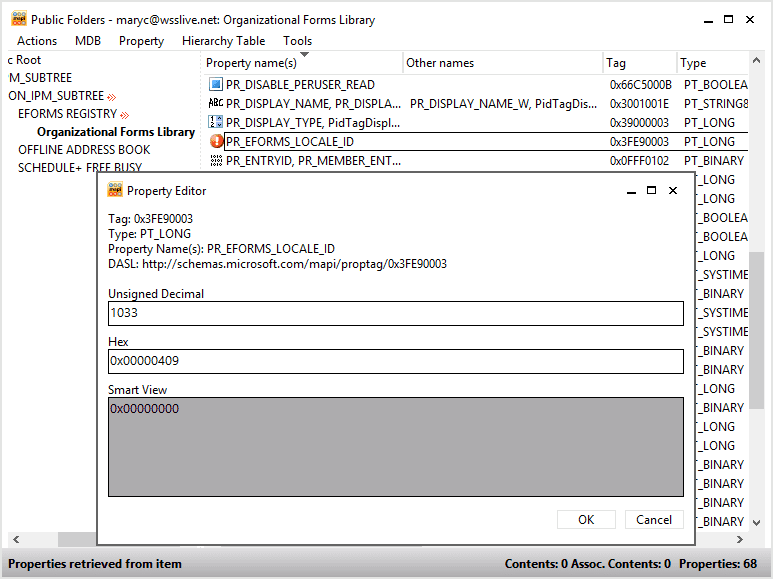
- Double-click PR_EFORMS_LOCALE_ID to open the Property Editor.
- In the Unsigned Decimal box, type the desired locale ID, and then click OK. (English = 1033)
- Close MFCMAPI.

The Organization Forms Library will now be listed in the Choose Form dialog. If users don't see it, they should restart Outlook.
Use or Publish forms
By default, users should have permission to the Organizational forms library, but if a user does not have permission to the folder, the administrator needs to give the person or group at least Read permission. This can be done using the Add-PublicFolderClientPermission cmdlet.
Add-PublicFolderClientPermission -identity "\NON_IPM_SUBTREE\EFORMS REGISTRY\Organizational Forms Library" -user maryc -AccessRights ReadItems
To publish custom forms to the Organizational forms library, the user needs CreateItems permission.
Add-PublicFolderClientPermission -identity "\NON_IPM_SUBTREE\EFORMS REGISTRY\Organizational Forms Library" -user maryc -AccessRights CreateItems
Outlook 2013 users will have access to the Organizational forms library but cannot publish to it.
Form Failed to Load error
Outlook 2010 and above caches the names of the forms in the Exchange Organizational Forms Library. The cache expires every 24 hours. If a new form in the Organizational Forms Library has not been cached, Outlook displays the error. The form is not cached in the Names File cache until the cache expires or times out.
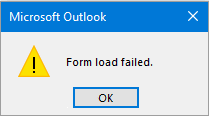
To eliminate the error, lower the timeout or disable it. If using Outlook 2013, change 14 to 15 or, for Outlook 2016, change 14 to 16.
HKEY_CURRENT_USER\Software\Microsoft\Office\14.0\Outlook\Forms\ClassNamesCache

DWORD: Timeout
Decimal Value (in hours): 1 - 24

DWORD: Disabled
Value: 1

Mike says
How can I make the form I have created, accessible in a public folder?
Diane Poremsky says
Do you want it set as the default? If it's published to the org library, it can be used in any folder or you can publish it to the public folder (browse to find it) to use it just in that folder and set it to default, if necessary.
https://www.slipstick.com/developer/publishing-custom-forms/
yannik says
Thank you for your help. My OFL is no almost up and running.
Strangely I cannot save any forms to the OFL even though my current user (on the computer and on Outlook) is an owner of the OFL folder. At least that's what my EMS tells me. As soon as I want to save my form I get the message form Outlook that I need to be an owner to the folder to save it.
Does anybody know what the issue might be?
Diane Poremsky says
Sorry i missed this earlier. Did you resolve it? It should work - with 2 exceptions: there can be a delay in permissions propagating - allow up to 24 hours if the permissions were just changed. if not, there is an issue with outlook 2013/2016 saving directly to the org library - you need to save to personal folders and copy. That doesn't trigger an error message tho.
tisa says
Excellent post . I Appreciate the points - Does anyone know if my business would be able to find a blank 2012 UK VAF1A version to type on ?
Diane Poremsky says
I don't know, but maybe another reader does.
bran says
Hi I have bit of a strange issue where I have a couple of users who cannot view the organisation form tab on there outlook profile. its seems to follow them over the network and any pc they login into. any ideas I've deleted profiles reinstalled office etc.
Diane Poremsky says
Did you check their permissions to the org library?
frank says
Alright, I think i figured it out... At first i was trying to use Oulook 64 with MCFMAPI 64 on the exchange server itself and it result in subfolders disapeering after 5-6 seconde. Then i tried with a PC with Outlook 64 and it result with a MAPI_E_CALL_FAILED. The same happen with Outlook 32 and MCFMAPI 32. Note that both were using an account that has domain admin, Public Folder Management and Organization Management rights.
Turn out that I added that account to the permission of the "Organizational Forms Library" folder and set it to OWNER from the EMC and it worked this time but it didn't change the fact that is not working directly from the Exchange server itself.... Hope this can help someone
Thank you
James says
Thank you. This fixed the issue I was having.
Frank says
It's an Exchange profiles... I have try on another system with MCFMAPI 64 bit and Outlook 64 bit. I'm able to get to the last step but when I press here is the error:
I have tried also 32-BIT MCFMAPI and 32-BIT Outlook, same error.
Problem array:
Index: 0x00000000, ulPropTag: Tag: 0x3FE90003
Type: PT_LONG
Property Name(s): PR_EFORMS_LOCALE_ID
DASL: , scode: 0x80004005 = MAPI_E_CALL_FAILED
In file PropertyEditor.cpp
On line 720
frank says
Not working for me..., MFCMAPI will display the subfolders of NON_IPM_SUBTREE for about 10 second then after they are gone... I have Outlook 64-bit with MFCMAPI 64-bit. what is going on!??
Diane Poremsky says
what type of email account is it? I'll try to repro.
Oliver says
Yes for the moment I always try with my own address and get an empty message. The form is published in my "Personal Forms Library".
I have no idea why the message is empty. I also don't use a seperate read layout.
Oliver says
Yes the message is empty if I send it to myself. It's based on the email form. For all manually added fields the values are not visible in the mail.
Steve says
Thank for your post.
I want to create 4 Org forms for 4 language associate to 4 language codes . After following your steps., I created and pasted right desired locale ID in Unsigned Decimal box.
So, I wonder how to know the current setting on my Exchange 2010Sp3 support these languages or not ?
Besides, the third-party application provide to 4 *.fdm forms associated to 4 language i created as above. But the problem, when accessing to FORM MANAGER, press install button, I cannot store multiple forms to Org Form Library.
Could you please tell me how to do ?
Also, find a question in Microsoft look like me:
https://social.technet.microsoft.com/Forums/office/en-US/a0cc4a22-75fd-465b-bc13-766acf676393/outlook20072010-how-to-publish-an-existing-form-with-extension-fdm-from-local-disk-to?forum=outlook#a0cc4a22-75fd-465b-bc13-766acf676393
Diane Poremsky says
AFAIK, all Exchange servers will support the extra languages - but you need to use Outlook configured for one of those languages to see the folder. Each form (or the appropriate form) needs to be published to each language folder.
so, you need french outlook to install the form for France, Japanese outlook to install the Japanese form etc. I *think* if you have the language packs installed, you can change outlook's language and install the forms, you don't actually need to install the french version of Outlook.
BTW, i have no idea why the publish button is missing.
William says
Thanks for this article. Is it the same process for Exchange 2013 ?
Diane Poremsky says
Assuming you have public folder mailboxes configured, you only need these two cmdlets to set it up (changing the localeid as needed)
New-PublicFolder -Path "\NON_IPM_SUBTREE\EFORMS REGISTRY" -Name "Organizational Forms Library"
Set-PublicFolder "\NON_IPM_SUBTREE\EFORMS REGISTRY\Organizational Forms Library" –EformsLocaleID EN-US
Oliver says
How can Outlook 2013 users publish forms for the organization? I have created a nice form but the recipient always gets an empty mail. The text fields are not transmitted. Is there a need to publish the form for the whole organization or could there be a mistake elsewhere?
Diane Poremsky says
They need permission to publish to the Org forms library and that is necessary if you want coworkers to see/use the form.
If you send it to your own address, do you get an empty message?