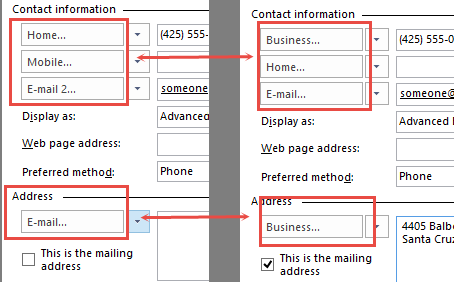
After months saying “soon”, the long awaited update for BCM was finally released. This update fixes a number of issues plaguing BCM users, including the incorrect labels for address and phone numbers, that affected BCM after the September 2013 Office update was installed.
BCM is no longer available from download from Microsoft. Users can download the full 64-bit BCM installation file from BCM for Outlook 2010 or Outlook 2013 (368 MB).
Users can download the full 32-bit BCM installation file from BCM for Outlook 2010 or Outlook 2013 (368 MB).
Uninstall BCM
- Open Control Panel's Programs and Features
- Select Business Contact Manager for Outlook and click Uninstall/Change
- Choose Uninstall, then click Next
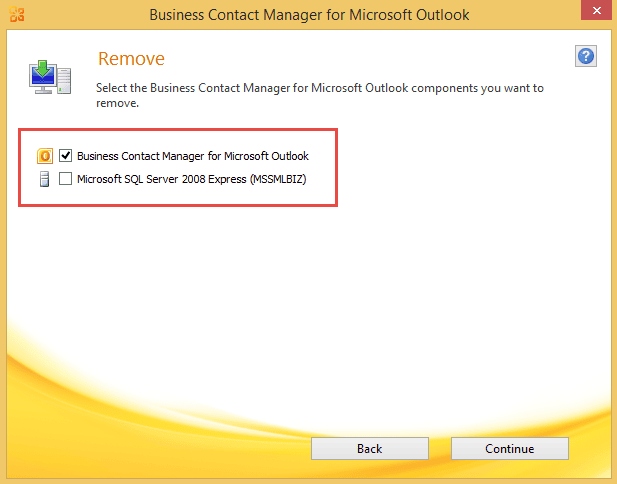
- You want to uninstall only BCM, so deselect Microsoft SQL Server.

- Click Continue to uninstall BCM.
More Information
BCM Errors after Upgrading to Windows 10
Business Contact Manager displays incorrect form label values

Patrick says
Diane - I am absolutely stumped, have tried everything I can think of, including reinstalling BCM. Please help! The tabs & buttons inside BCM are cutting off to the point I cannot read them. This is not the ribbon - that's fine. It's inside each screen. This happened after I resized my screen to try something and only Outlook BCM won't return to normal. And, each time I open a tab it resizes the columns. PLEASE HELP!
Gregg B -Oklahoma says
Diane, I am using Win 10 and 2010 BCM.
Did you ever make this work. I am having the same issue. How did you adjust the screen size?
Tripp says
Ms. Poremsky,
i just installed BCM 2013 this morning and am having the same problem with mismatched phone fields that other users have experienced. I ran into this thread while trying to research the issue and appreciate your involvement.
The build version I installed was 4.0.12929.0 (368 MB) according to Properties > Details and has a digital signature of 9/30/14.
The build version listed on the above link while labeled on the website as 4.0.12006.0 (also 368 MB) is actually the same 4.0.12929.0 (368 MB) and has the same digital signature of 9/30/14.
I am confused as to how to obtain the later version and would appreciate your support with this.
Thanks in advance!
Diane Poremsky says
As long as you got the version from https://www.microsoft.com/en-us/download/details.aspx?id=36513, its the correct one. It's my understanding that only new contacts created after the upgrade that have the correct labels, but i can't confirm as i no longer use bcm (since it won't work with 2016).
Steve Holderness says
Ms. Poremsky, my apologies if you've already answered this question in the 52 previous threads. I'm clicking on the URL above to install BCM 2013 but to no avail. After clicking the URL it appears to be searching but nothing happens. No new site, nothing. Is there something else I should be doing?
Thanks,
Steve
Diane Poremsky says
it should be working and take you to https://www.microsoft.com/en-us/download/details.aspx?id=36513 - try copying that url and pasting it in the address bar.
Jack says
Hi,
I going to kill myself...
It's look like that all my templates from BCM 2013 are missing (for projects, business contacts etc.)
When I look into tempates management there is no even one tempate listed.
I have Outlook 2013 and BCM 2013. It was working OK since I upgraded my Win7 to Win 8,1.
I done already MSChart and BCM uninstall and install again.
Problem still exist.
Any sugestions?
Hugh says
I run Windows 7 Professional on my Laptop with Office Home & Business 2013. I have made several attempts to download and install BCM 2013 with absolutely no success. BCM 2013 will download, but it will not install. Can you please help ?
Kurt Simmen says
Fixed it!
Apparently it's the same glitch encountered by many when they installed 8.1. The solution below was found at:
https://answers.microsoft.com/en-us/office/forum/office_2013_release-outlook/business-contact-manager-windows-81/74449ee1-e9ac-40bf-a504-5fa49a7dd3fe?auth=1
I was almost didn't even try this because the installed version of Chart Controls on my machine was already 3.5.0.0 but it took about two minutes and BCM is working great now.
1. uninstall Microsoft Chart Controls for Microsoft .Net Framework 3.5 from the control panel.
2. download the cart controls from this location: https://www.microsoft.com/en-us/download/details.aspx?id=14422
3. install the chart controls
Diane Poremsky says
Thanks for sharing!
André Laurence says
Thank you for the information. Last night I found another solution which is more complicated, but solved my issue. Answer at the bottom of the thread below...
https://answers.microsoft.com/en-us/office/forum/office_365hp-outlook/business-contact-manager-crashes-outlook-after/4409dae2-6e0a-4736-b26e-68192de40e7e?auth=1
KRasi says
HI, I tried this advice , BUT after reinstalling MS Charts I 've received
a message that I have to click on to open outlook. "MS Chart Controls, a critical component of Business Contact Manager for Outlook 2010 is missing, Reinstall "
I have uninstalled and reinstalled outlook but message still stays. I would really like to get rid of it. I cannot see BCM in my outlook, which I do not need but would use if it was there. It should be there but not sure where. Please help, Thanks
Diane Poremsky says
I'm assuming you rebooted? Try repairing BCM.
Kurt Simmen says
Hi Diane,
I'm having the same issue with Windows 10 Home. Outlook loads fine but when you click on "Contact Management", Outlook quits and you get an error message stating:
"Microsoft Outlook has stopped working"
"A problem caused the program to stop working correctly. Windows will close the program and notify you if a solution is available."
This issue started right after installing 10. I uninstalled and reinstalled BCM from the above link but that didn't do the trick.
André Laurence says
There were no error messages in the event viewer, just information logs, but they indicate a crash. I have the crash dump, if I post it here can you help me?
Diane Poremsky says
Try kurt's suggestion to uninstall the chart controls and reinstall them.
André Laurence says
Hello. Since updating to Windows 10 Pro, BCM crashes Outlook 2013 when accessing Contact Management. I have uploaded the crash log to a thread in MS Community, but so far no news from the MS team. Do you have any insight? Everything was working fine prior to the upgrade.
Diane Poremsky says
Any error messages? It could be permissions issues on the files.
Charlie Quackenbush says
I have found the latest download and also checked that the services are running - no change. In my Event Log, I see message "Windows cannot load the extensible counter DLL SQLAgent$MSSMLBIZ. The first four bytes (DWORD) of the Data section contains the Windows error code." And another with same wording about MSSQL$MSSMSBIZ.
Diane Poremsky says
Is SQL Server Agent running? I think that error is related to the agent.
Charlie Quackenbush says
Also frustrated with trying to get BCM installed. Running Win 8.1 pro and 64-bit Office 2013 (O365). We are NAV development shop, so many different versions of SQL already installed. When BCM is installed, consistently get "database creation unsuccessful" message. I suspect it is an SQL issue, but I cannot just uninstall all my SQL versions and start over. Any advise?
Diane Poremsky says
Check the services applet in control panel, admin tools - is SQL Server (MSSMLBIZ) service running?
Dennis Rak says
Hi Diane, and thanks for your prompt response.
I checked the downloaded exe properties, and it is indeed Version 4.0.12929.0 that I have installed, though the version date is not shown in Properties.
If MS forgot only to update the Version number on their Download Center page where the Date Published is shown as 2014-11-07, it would appear I have installed the latest update version.
I can't help but think that such details as having published the correct update version number, and about the BCM edition and how it relates to Outlook editions has unnecessarily caused confusion and frustration among users and would-be users about an otherwise very useful product that is, sad to say, little known about.
Would it make most sense to call it BCM 2010 for Outlook 2010/2013?
Thanks again. Much appreciated.
Dennis
Diane Poremsky says
We pointed out the version # wasn't updated but they are really slow at updating it. They normally put up a new page for newer updates but choose to replace the older, original file with this one. That makes it easier for users because the link doesn't change.
Dennis Rak says
Hello Diane, and thank you for the clear instruction on how to solve for the problem with BCM field labels.
From your "Download the BCM update..." link, above, I successfully installed the update on my DELL XPS12 Ultrabook running MS Windows 8.1 with Media Center (64-bit OS), and MS Office Home and Business 2013.
I have these follow up questions:
1) Is there such a thing as BCM 2013 per se? I'm asking because you make reference to it in the title of this webpage, while the update download file I installed is BCM2010-BCMSetup-x86-en-US, which is BCM version 4.00.12006.00.
2) In the comments string, above, you confirmed that the latest version of BCM is 4.0.12929. Where can I find this version for download and install?
3) Is MS still actively supporting BCM?
4) May we expect another edition of BCM in the future?
5) Other than the BCM 2010 for Dummies publication, can you recommend other print or electronic resources?
Thanks!
Dennis
Diane Poremsky says
1. The newest BCM works with*** both 2010 and 2013 but it was called BCM2010. As long as you have the version dated 11/2014, it is the newest and correct version. ***with as in either 2010 or 2013 - you can't share a database with mixed versions of Outlook.
2. Check the downloaded exe's properties or if its installed, the installation files. It should be the right version - Microsoft just forgot to update the page.
3. Define "Active" and "Support". :) The status hasn't changed - it's the same (generally poor) support we've had for a few years now.
4. I have no idea. I hope so... but I really don't know yet.
5. No, I don't have any other suggestions. There isn't a big market for BCM books. (Or books in general.)
Phillip Hurst says
Follow up/FYI: I actually ended up spending an hour or so being bounced around between various Microsoft Office 2013/Outlook/BCM support techs trying to resolve this.
Everything was tried - uninstall/reinstall BCM/.NET 3.5, SQL 2008, etc.
They would not support (except paid enterprise support) my installation with an Exchange server in my profile, so I replaced it with a clean profile for them to troubleshoot.
In the end it took a clean Windows reinstall. Inconvenient solution, but now the updated BCM is installed and working with my Exchange host profile.
Phillip Hurst says
I have BCM 4.0.12006 installed, and would like to update to the new version.
I'm using Win 7 Ult 64 SP1 and Office 2013/365.
I'm trying Control Panel>Programs>Uninstall/Change BCM
If I choose "Remove" the Remove window does not display BCM or SQL choices - it's blank and the continue button is inactive.
If I choose "Repair" I get "Component MS Chart Controls for MS .NET Framework 3.5 could not be repaired. Please run Setup from the original installation folder or disk"
Please advise me how to through this issue. Thanks!
Phillip Hurst says
Forgot to mention:
Office v15.0.4693.1001 32bit
The Outlook profile connects to a hosted Exchange 2013 server.
Diane Poremsky says
It sounds like the cached installation files are corrupt - find the BCM folder on your hard drive (under Program files (x86)) - there should be an uninstall.exe file there. Run it.
Olivier says
Hello,
I am working with BCM since a while, and I cannot find a way to solve a small problem. In the Opportunities, when you set a product, the price of it can only have 2 digits after the comma. for my products, Ineed to work with 3 Digits. Do you know a way to parameter it ?
thanks a lot
Diane Poremsky says
The cents value is limited to 2 digits and AFAIK, it can't be changed.
Pat says
Hi, I have tried installing the BCM for Outlook 2013 32 Bit for the last 3 days and no luck, this is very frustrating...
I constantly get the same error:
Business Contact Manager for Microsoft Outlook failed to install. If you have another version of SQL Server Installed, try uninstalling it. Restart the Computer and run Business Contact Manager setup again.
I have seen that others had this as well, but I saw no resolution... Any thoughts.
Feeling quite discouraged...
Diane Poremsky says
Not to discourage you more than you are already discouraged... but when i had problems installing BCM, I only got it working after I refreshed Windows 8.
Is another SQL server version installed?
Pat says
I tried the 32 bit and 64 bit and none of them worked, got different messages for both tries
Brittany says
That's what I thought, but when I downloaded and attempted to install it, it said that I did not have Outlook installed. I thought perhaps it was looking for Outlook 2013?
Diane Poremsky says
Which office 2010 suite do you have? In Office 2010, you can't use C2R with BCM. Did you get the correct bitness of BCM - if you have 32bit office, you need 32 bit BCM (the error message should be different if the bitness is different though)
Brittany says
Diane,
I have Microsoft Office Home & Business 2010 (32-bit) installed.
Diane Poremsky says
Home & Business includes Outlook, so it should work. Do you have another version of Office installed - one that doesn't include Outlook?
Brittany says
I didn't realize/notice it, but I do have the Office 365 "trial" on this computer. I will remove it and see if that solves the problem!
Brittany says
Still no luck...is there any other way to determine if there's another version of office installed that I'm missing?
Brittany says
Is there a way to download BCM for Outlook 2010?
Diane Poremsky says
The updates that were released for 2013 also work with 2010.
Pat says
Hi,
I have tried installing many times and just cant get there, I get a message as soon as I start the install that says: 'Business contact manager requires that Outlook be installed on the computer'. I am all out of ideas at this point, help! I am running Office 2010 Pro Plus 32 bit
Pascal Borocco says
Ok. Thanks. I won't alter anything!
Pascal says
Hi Diane,
Great post. I found it by chance. I have now subscribed to EMO.
I use BCM for my very small business and I need to get complete sync between 4 elements: Contact lists in Outlook 2013 and BCM on laptop, Outlook.com on the web and Contacts on my Windows Phone. I found a proper way to get it work but I was afraid that this BCM update would create duplicates (when restarting sync from BCM to Outlook 2013). I'm happy to report no issue... at least so far.
Three related questions please. I run MS SQL server 10.4.600.29. If I understand correctly this a 32 bit version and (from Elisabeth above) not the latest update.
(a) Should I upgrade SQL server to latest number? (if yes, how?)
(b) As both my PC and my Office are 64 bit, should I use a 64 bit version SQL server ? (if yes, where to get it?)
and (c) Why BCM uses SQL server 2008 instead of 2012 which seems to be latest upgrade?
Diane Poremsky says
Don't break what is not broken. :) If it's working with the SQL you are using, leave it alone. Install updates as windows update offers them, but don't upgrade SQL.
BCM uses 2008 for backwards compatibility.
Elizabeth says
Hi Diane,
I have been having ongoing problems with running BCM. I am using BCM Version 4.0.12929 and the SQL Server 2008 version 10.51.2500.0. When I attempt to launch BCM by opening it and creating a new database, I get an error says "It cannot retrieve the list of SQL instances" and that I need 2005 SQL or greater installed and running. Any suggestions for making it work?
Diane Poremsky says
Check in Services (Control panel, Administrator Tools, Services) and verify the SQL services are running.
Ruth says
Still didn't work. I tried rebooting, uninstalling and reinstalling using https://www.microsoft.com/en-us/download/details.aspx?id=36513
As well as creating a new database.
And still the same problem. I have 32-bit Office running on a 64-bit OS.
Diane Poremsky says
I'll see what I can find out. Oh, Check the version # of BCM. It's possible, although unlikely, that the server you used had the old build. (They kept the same url and replaced the file.)
Ruth says
BCM Version 4.0.12929. It installed the SQL Server 2008 version 10.1.2531.0
Diane Poremsky says
That is the latest version. I'll look into it.
Ruth says
It is a database thing? I just created the database but I guess I can make a new one if I have to.
Diane Poremsky says
If it's a new database, then no, it's not the database.
Ruth says
Thanks for the quick response. I am trying out this BCM and this is the only thing I noticed that bugs me.
When I click on an account to edit it, there are drop down fields for email, phone numbers, and addresses. For instance, if I select "Business" from the drop-down, the field shows "Home". I uninstalled and made sure I was installing the latest version. I just tried shutting down and rebooting my computer. To no avail.
Diane Poremsky says
That was fixed in the update. This is with a new database?
Ruth says
Have you tested this out? First time trying BCM, downloaded the most recent version and still having the drop down error. Wondering if this was actually fixed or not.
Diane Poremsky says
I have checked it out and tested for issues I was aware of. By drop down error, you mean the wrong labels? Make sure all updates are installed then reboot (that worked for an person who said it didn't fix 1 of 5 computers in their network.)
tsherm2013 says
Diane,
Thank you so much for staying on top of this issue and posting easy instructions to replace the other version of BCM. New version works like a charm!
Carrie Lique says
I am looking to use BCM for outlook 365. is this possible? if so can you please provide directions. I have tried downloading but it asks for Microsoft CD. I do not have any since we have 365. any help would be appreciated. :-)
Diane Poremsky says
it will work with Outlook installed on the desktop. Do you have the most recent build of BCM, released Nov 2014?