I love conversation view, most of the time. It makes it easier for me to follow message threads as all previous messages in the thread are together, regardless of which folder each message is stored in. Not everyone likes it and finding where to disable it isn't necessarily intuitive.
Conversation view (IMHO) is a most annoying & confusing feature. Please share with us on how to disable it in Outlook.com.
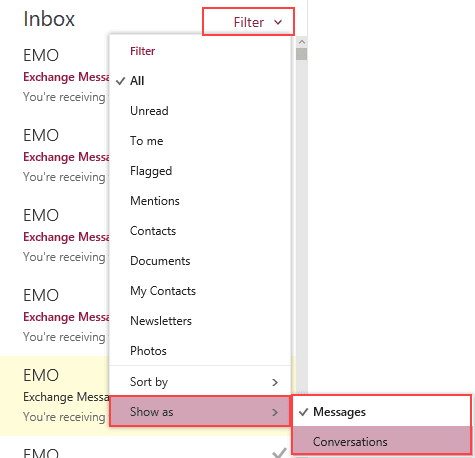
If you are using the new Outlook.com or an Outlook on the web in your business account, you can control how the message list sorts, set some predefined filters, and turn conversation groups off and on by clicking on Filter at the top of the message list to expand the menu. Select Show as > Messages at the bottom of the menu to turn off Conversations. Select Conversations if you want to group by Conversations. Note, Conversations is not a toggle, you need to select Messages.
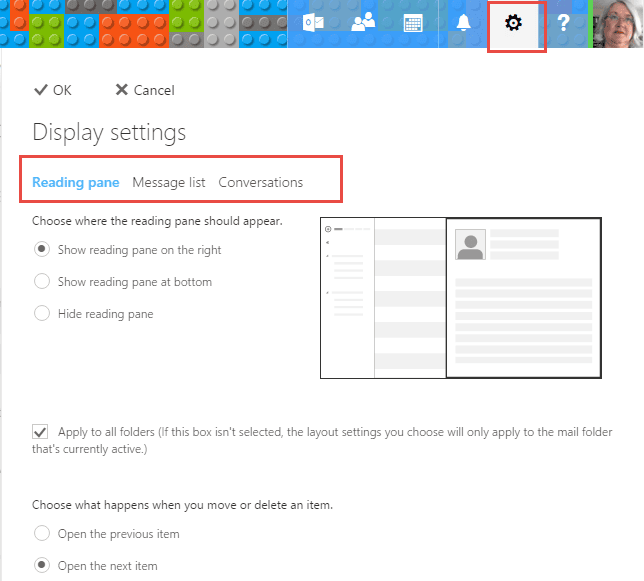
If you want to change the reading pane position (or turn it off), preview text, change the order of the subject and sender's name in the message list, or change how the conversations sort (newest or oldest on top), click on the Gear icon then Display Settings.

Amanda Jones says
Holy cow! Thank you for posting this. I have been at my wit's end trying to figure this out. The options others tell me I should see just aren't there. You are awesome!
max says
God bless you for this! I was hating Outlook's webmail. This makes *so* much difference to using it!
(ok, maybe I still am hating it, but for other reasons. Like why do they hide this "Filter" menu item over on the right, nowhere near any other menu item? And what does filtering have to do with showing as a conversation? Nothing gets filtered out, it's just a different view of the same stuff. And why all the wasted white space. And...)
But thank you!
bairdskii says
thank you so much for showing how to disable conversation view in outlook.
I had months of frustration with it, which you have ended!
: ))
David Barr says
Don't know if this subject is still being monitored, but is it possible to do this for all folders, without having to go into each individual folder? I've got dozens of folders and hate the conversation mode!
Diane Poremsky says
On the web, no. Outlook desktop will offer you the option.
Karine says
New Outlook face and can't seem to find the way to turn off the conversation view. I have the filter option next to my focused and other boxes but doesn't give me the option to switch off the conversations. And add on top the new Beta version! So frustrating!
Diane Poremsky says
This is outlook on the web or outlook installed desktop? In Outlook on the web with the beta enabled, you can either turn off the beta to get the old options back or go to calendar then options - this brings up the old options.
Liz says
I don't see where this Filter drop down menu is. My version of the web app only has Undo at the top of the message list. There's no drop down menu. Where is this menu supposed to be found?
Diane Poremsky says
What browser are you using? I haven't been able to repro this problem - the menu should be right at the top of the message list in Outlook on the web.
Suriyakumar says
thankyou verymuch your answer is very userful
Travis says
The actual way to do it is to click on Filter to the right of the Inbox then click Show As
Diane Poremsky says
They keep changing the design of the interface. :(
Kelly says
THANK YOU FOR THIS!!! Been searching for how to turn off conversations in Outlook web access with no success until I found this page. Thank you!
TheGreenGorilla says
I hate the conversation view, over complicates a tidy inbox.
As mentioned already this little blog was the only place that I could find to change the setting. Thanks.
eric says
THANK YOU
this is the first page i've been to that told me exactly how to turn off that blasted conversation view.