We're seeing a rash of errors with the To-Do Bar lately. This following message appears at the bottom, where the Task List is:
"The operation failed. An object could not be found."
Also, in the To-Do List in the Tasks module, the error message is
"Cannot display the folder."
Depending on the cause, it may be easily fixed by closing Outlook and reopening it using the /resettodobar switch then restart Outlook.
When it's caused by a corrupted profile (often due to using Easy Transfer or copying and pasting a *.pst file over the current *.pst file), check for duplicate *.pst files in your profile and delete the extras. If this doesn't help, you'll need to make a new profile.
How to use the /resettodobar switch
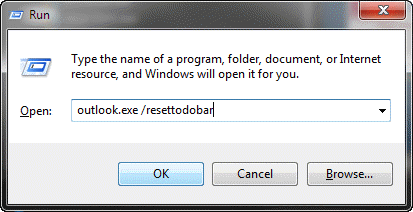
Close Outlook. At the Start search field on Vista or Windows7 Start menu or in the Start menu, Run command (Windows key + R), type
outlook.exe /resettodobar
Then press Enter (or OK) to restart Outlook.
Note: Make sure there is a space between the words.
Delete duplicate *.pst files
Close Outlook
Go to Control Panel, Mail, Data Files. This will open the Account settings dialog to the Data Files tab. (Search for Mail after opening the Control panel, if its not visible).
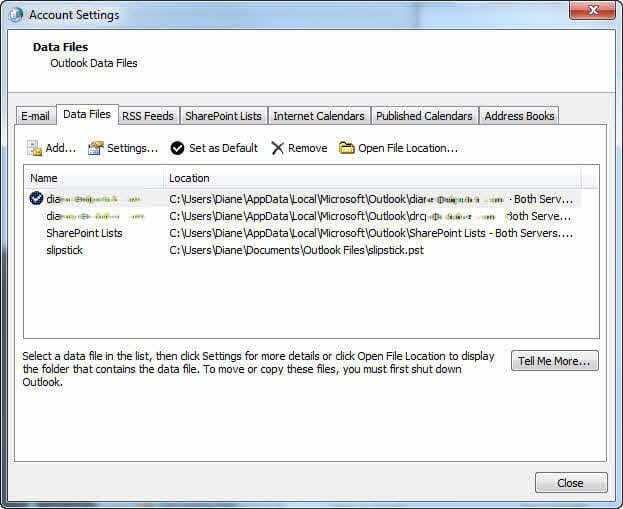
Do you have 2 identical *.pst files listed? If so, select one of them and click Remove then re-open Outlook.
Tip: While this procedure will not delete your *.pst file from the hard drive, if you don't have a backup of your *.pst, now is a good time to make one. Before removing the duplicated listing, select the *.pst file and click the Open Folder Location button. This opens Windows Explorer to the location where the *.pst file is. Make a copy of the *.pst.
More Information
How to start Outlook in safe mode
Outlook's Command Line Switches
Where Are My Files?
See Error Message: Cannot start Microsoft Office Outlook. if the error is "Cannot start Microsoft Office Outlook. Unable to open the Outlook window"

Krishna says
Thanks a lot ..the command actually solved my problem.
Lynn says
Thanks very much. Using the resettodobar action seems to have solved this for me.
Jesus says
Thanks! Still works this solution!!
jay says
tried cleanviews but northing happened. i have an equal problem as Jon.
Diane Poremsky says
Do you have more than one data file in your profile? If so, try setting a different pst file as default and see if it works, then set the original one back as default.
David says
Wow, the cleanviews switch fixed my task pane issue. Before I only had the message "Operation Failed" where the task pane should have been. (Outlook2010)
Kalala says
thank you! thank you! thank you!
battled for months with this on an old laptop and was very frustrated to have it happen again.
Jon says
I have the problem of being unable to display To Do list or tasks in my main Outlook view, and when I bring Tasks to the screen by clicking on the lower left hand Tasks tab, the To Do list cannot be displayed. I tried running outlook.exe /resettodobar but this had no effect. I had multiple .pst files but deleted the extras, still with no effect. This problem began after I copied one of my Outlook mail folders as a .pst file to an external drive. Please suggest what to try next. thank you.
Diane Poremsky says
Close Outlook and restart it using the /cleanviews switch.
Stefan says
My problem was two .pst fiels. After removal of one and restarting outlook the error disapeared.
Thank you!
David P says
I did the usual Google to find a solution.
I even did the Help-Office Diagnosics routine (why didn't that check pick up the error?)
My problem was, as you suggested, "2 identical *.pst files listed".
I followed your instructions and now
1. my Tasks appear in my To-Do Bar (again), and
2. my Reminders are displaying as expected (without giving me an error indication).
Many, many thanks!
Dave
darla griffin says
unable to log in under this account
TimR says
We've had this problem in our environment since migrating from Exchange 2003 to Exchange 2010. The problem though, is that even after running Outlook with resettodobar, after the user closes outlook, the next time they open oulook, the problem comes back. So far the only thing that we can find that fixes the issue is to create a PST backup of their mailbox, delete the mailbox, then create a new mailbox and import the PST. However, this can cause other problems with other users due to Exchange caching email addresses. Also, an upgrade to Outlook 2010 fixes the problem.
There has to be a more permanent fix for this than the resettodobar fix. Hard deleting the ToDo and Reminders using MFCMAPI also often results in a short term fix with the problem coming back next run of Outlook.
Ryan Over says
Thanks for the fix!
Greg.D says
Awesome!! Works like a charm. I had too many .pst files. Thanks again!