When you receive this error message:
Could not complete the operation. One or more parameter values are not valid.
while addressing or sending an email message, meeting request, or assigning a task, or saving a new contact, your auto-complete list may be corrupt. Some users also report getting this error when they save an appointment or task.
The solution: clear the auto-complete list cache.
Outlook 2010: Clear Names from the Auto-Complete List
To remove single addresses, select the name using the arrow keys then press Delete. In Outlook 2010, you can also click the x beside the name to delete it or use the Backspace key.
In Outlook 2010, you can clear the cache using the File, Options, Mail dialog, Empty Auto-complete List button.
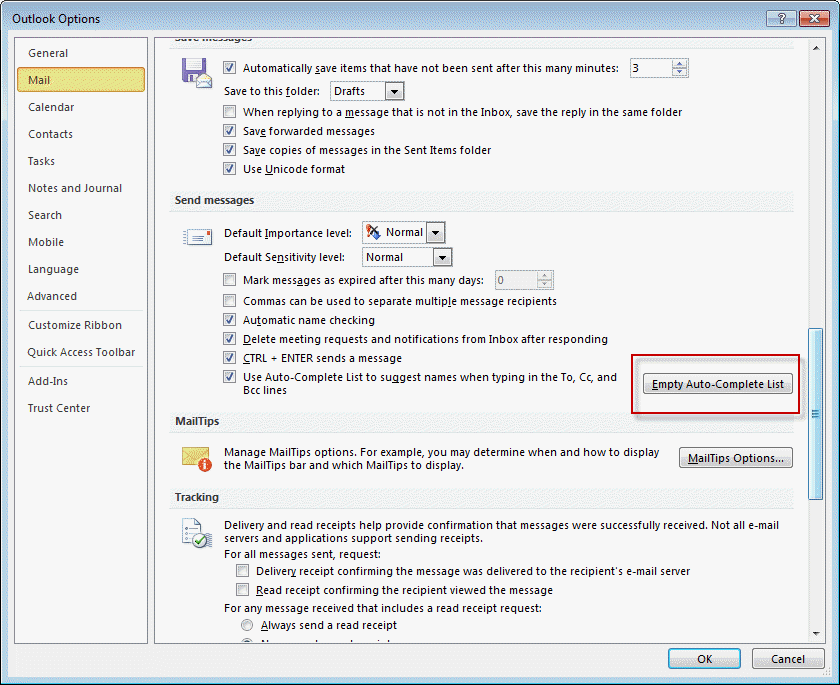
You can also close Outlook and use the /cleanautocompletecache startup switch. To use, press Windows key + R to open the run command then paste
outlook.exe /cleanautocompletecache
in the Open field and press OK.
Outlook 2007 and Outlook 2003
To remove single addresses from the list in Outlook 2007 or Outlook 2003, select the name using the arrow keys then press Delete.
In Outlook 2007 and Outlook 2003, you can remove all of the addresses from the autocomplete cache, either by deleting the NK2 file (at %USERPROFILE%\Application Data\Microsoft\Outlook ) or by opening Tools, Options, Email Options, Advanced Email Options and deselecting the option to suggest names near the bottom of the dialog.
More Information
For a list of utilities you can use to edit the auto-complete cache, see Understanding Outlook’s Auto-Complete Cache (*.NK2)

Atul says
Thank you Diane, it worked for me. I tried all other options but it was your which finally solved the issue after almost 2 hrs of trying. Even my IT Personnel could not help :)
Ginka says
I get this message when I try to print a message.
Diane Poremsky says
Find and delete outlprnt. it's at %appdata%microsoftoutlook
Anna says
Thank you Diane! It really worked!
kristen says
What do you do if it says that "received field is not valid"
Diane Poremsky says
I would try clearing the autocomplete cache.
Nelson says
I have a problem where the tasks do not appear in the To Do Bar. I tried /resettodobar on startup and nothing. Also /resetnavpane with similar results.
Diane Poremsky says
Do you have any filters set? What do you see where tasks should be?
Mark says
They are opening a message they have received then entering a name in the To: field. After that they try to move the message to another folder and get the error.
Mark says
Hi Diane,
My users get this error when doing a very specific process in Outlook 2010 on Win7.
Open an email they have received.
Enter a name in the To: field
Move the email to another folder.
Apparently this works in Outlook 2007 but they are running XP (if that makes any difference).
Diane Poremsky says
I don't think the Windows version matters. Are they adding names to the To field of Draft messages or of messages they received?
heha Ha says
I face this problem today when sync my hotmail a/c on Outlook 2003 with server (MAPI connection). All folders cannot be sync.
By same Outlook profile, I have another Live email account (also MAPI connection). There is no problem on sync between client side and server.
When lead to problem and how to solve? Please advise
Diane Poremsky says
Do you get any error messages in Outlook 2003? Look in the sync error folders and see if any of the messages hold clues.
jaya says
i have cleared the auto complete list, but still can not send emails
Diane Poremsky says
What exactly happens when you try?
Samuel Oguntunde says
Diane, thank you for your posts.
Malik says
i have same problem
when i reply to all
Diane Poremsky says
It only happens when you reply to all? Did you clear the autocomplete list?
Ge Ruigt says
It worked for me!
Thanks
Ge
Doc says
The only thing that fix this to me, was create an X500 address in all my users, update the cache in the server and update the cache in the client
Fred says
Same error but only when replying to all. Cleared the cache but no luck there as the message remains.
Is there a fix for this?
Thanks,
Fred
Diane Poremsky says
Does it happen with every reply to all or just when you reply all to certain addresses?
Peter Chisnall says
I am getting this error message when I try to send new emails.
I carried out the instructions above and cleared the cache but it still doesn't work.
Any ideas?
Thanks
Peter
gfdghdghfdgh says
same problem