We're hearing from many users: Outlook always prompts for permission to open attachments and the checkbox for "Always ask before opening this type of file" is grayed out. This is due to User Access Control (UAC) restrictions in Windows.
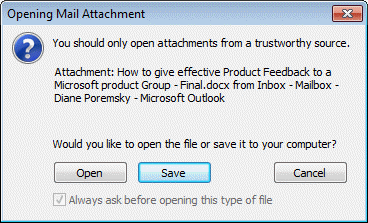
There are two ways you can address this:
1: Run Outlook as Administrator and open the attachments, removing the check from "Always ask before opening this type of file" box. After you set the desired file types to open without asking, you can run Outlook normally.
2: If you know the file types and are comfortable editing the registry or want to change it via policy, you'll need to identify the file type in HKEY_CLASSES_ROOT or (buried under) HKEY_LOCAL_MACHINE if Windows 10 64bit and Office 2016 32bit. After locating the key, create or change the EditFlags Binary value to 00 00 01 00.
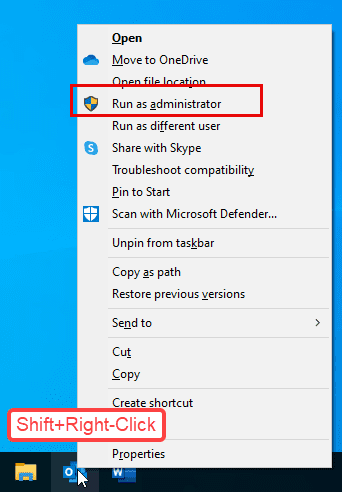
Run as Administrator
- Hold the Shift key and right click on the shortcut you use to open Outlook.
- Choose Run as Administrator.

Edit the Registry
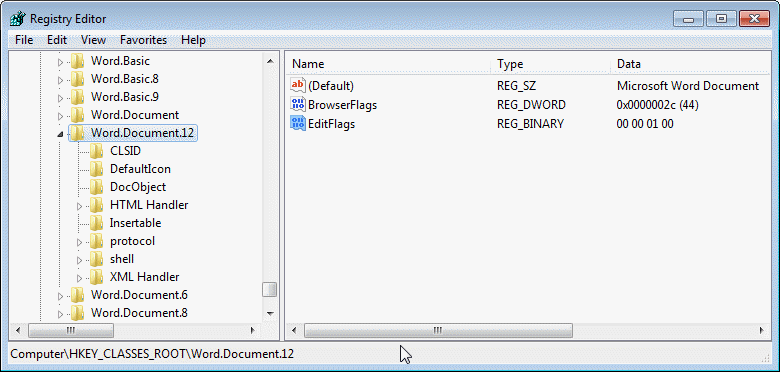
If you are using Windows 7 (and newer) with Office in the same bitness (both Office and Windows are 32 bit, or both are 64bit), the path is under HKEY_CLASSES_ROOT.
DOC: HKEY_CLASSES_ROOT\Word.Document.8
DOCX: HKEY_CLASSES_ROOT\Word.Document.12
PDF: HKEY_CLASSES_ROOT\AcroExch.Document
XLSX: HKEY_CLASSES_ROOT\Excel.Sheet.12
XLS: HKEY_CLASSES_ROOT\Excel.Sheet.8
PPT: HKEY_CLASSES_ROOT\PowerPoint.Show.8
PPTX: HKEY_CLASSES_ROOT\PowerPoint.Show.12
HTML: HKEY_CLASSES_ROOT\htmlfile

EditFlags: 00 00 01 00
To always ask before opening, either delete the EditFlags value or change the value to 00 00 00 00
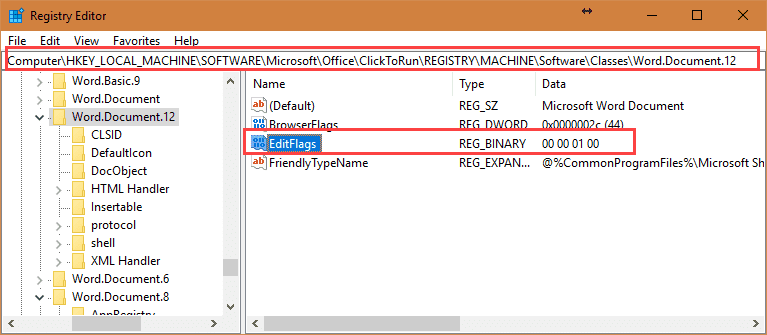
If you are using 32-bit Outlook on Windows 64-bit, the registry keys are now stored in a (crazy-long) path under HKEY_LOCAL_MACHINE. This is the path for 64-bit Windows and 32-bit Office:
HKEY_LOCAL_MACHINE\SOFTWARE\Microsoft\Office\ClickToRun\REGISTRY\MACHINE\Software\Classes\

DOC: Word.Document.8
DOCX: Word.Document.12
PDF: AcroExch.Document
XLSX: Excel.Sheet.12
XLS: Excel.Sheet.8
PPT: PowerPoint.Show.8
PPTX: PowerPoint.Show.12


EditFlags:  00 00 01 00 (Binary Value)
If you have more than one PDF program installed, you will need to edit the keys for each PDF program.
Outlook 2016 32-bit on Windows 10 64-bit:
See Restore (or Hide) the Open Save Dialog if you need instructions for older versions of Windows.
Identify keys for other file types
To identify other file types, look at the extension's key in the registry - most (if not all) will include a more descriptive name. Locate this name under HKEY_CLASSES_ROOT and change it's EditFlags value.
For example, this is the key for the .pptx extension (shown in the screenshots):
HKEY_CLASSES_ROOT\.ppt\PowerPoint.Show.12
So you would change the EditFlags value at HKEY_CLASSES_ROOT\PowerPoint.Show.12

The locate the key by that name. Double click on the EditFlags key to open it for editing.
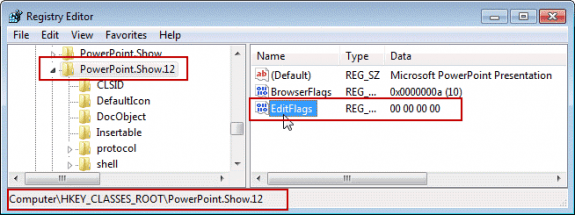
00 00 00 00 displays the Open or Save dialog
00 00 01 00 opens the file.
Do it for me
If you don't want to edit the registry, you can use this Registry file. It contains the EditFlag for Word, Excel, and PowerPoint listed above plus htmlfile.
Edit Flags registry keys 32-bit Outlook on 64-bit Windows
Download the file and double click to add the keys to the registry. Note that some browsers will save it with the .txt extension. You'll need to change the extension to .reg to use.
More Information
Restore (or Hide) the Open Save Dialog Instructions for older versions of Windows.

Tracey says
THANK YOU!!! This has been driving me crazy for far too long!!!
Yehuda says
For adobe reader - after comparing the classes before and after the change - you need to add this value:
Duane says
I think many people have this issue because the default PDF handler is only partially selected. I was able to fix the issue on 2 different PCs (one Win10 standalone, the other Win7 domain-joined). Simply open Adobe Reader, go to Edit -> Preferences -> General (scroll down if needed). Click on "Set as Default PDF Handler".
To explain... on both computers, Adobe Acrobat (Reader) was set as the default action when double-clicking a PDF to launch or when opening an attachment. However, there is more than just one setting, and the registry showed the ".pdf" extension as "MSEdgePDF" which was my clue. In both cases, simply using the built-in "Set as Default" in Adobe Reader fixed the registry entry.
tateetewter says
have to say you save me hahahaha
Josh says
I'm repeatedly having this issue, despite opening Outlook as an admin and unchecking the "always ask" box. It seems to reset either every time I restart the computer, or at some other interval. I just did this for .docx files least week, and now it's reverted back to asking every time. I've tried several registry paths I've found online, including this one, but I've never found any of them to work. Either the folder isn't where it says, or as happened with the one described here, I can find the folders but there's no "EditFlags" setting. I tried creating one, but I'm not able to edit the value, so it stays all zeroes. Also, the path here doesn't include file types I use regularly, such as .pdf, .jpg, and .dwg - What am I missing here? Microsoft's setup to protect you from yourself is incredibly infuriating. If they had it default to this but it was easy to turn off, fine. But to not even have an option that works to stop it is absolutely ridiculous.
Diane Poremsky says
>>
Also, the path here doesn't include file types I use regularly, such as .pdf, .jpg, and .dwg
>>
These aren't usually blocked.
You need to find the key for the extension under CLASSES and add or edit the editflag value.
Josh says
I've solved the issue with most of those file types, but pretty much everything was blocked, including .pdf and .jpg. That's one reason it was so infuriating. I did finally find the location of all those types in the registry from another source. It seems to have stuck.
Dan says
Could you please share those locations? Having same problem on .pdf files and there is not any Acroexch.Document folder.
Diane Poremsky says
What are you using to view PDF files? If you are not using Acrobat, the folder name could be different.
For example, from https://www.slipstick.com/problems/disable-always-ask-before-opening-dialog/#comment-220678
For adobe reader - after comparing the classes before and after the change - you need to add this value:
[HKEY_LOCAL_MACHINE\SOFTWARE\Microsoft\Office\ClickToRun\REGISTRY\MACHINE\Software\Classes\PDFPlus.Document]
@=hex(40000):
"EditFlags"=hex:00,00,01,00
MicrosoftSucks says
The stuff in this article sadly doesn't work. Neither administrator rights nor registry edits solve the issue. Now, after a lot of trying I finally found myself a working solution. (Tried on Windows 10, Office 2019)
Diane Poremsky says
Using compatiblity mode in Outlook is not needed (they removed the tab from the Properties dialog several versions ago so people wouldn't use it) because it causes more problems than it solves.
Stepehn says
Thank you very much - it is the only and therefore best way.
Gene says
Great information. Way better than MS online community.
THANK YOU !
Richard says
Hi Diane - Thanks for this. I've got the .docx extentions opening without hassle. ?
My PDF (and default) viewer of choice is Sumatra PDF. Sumatra doesn't appear as a key (that I can find) under HKEY_CLASSES_ROOT. (I've tried a search with F3). Also, the value name "Default" under "HKEY_CLASSES_ROOT\.pdf" is blank.
Any thoughts on how I could locate the Sumatra key?
Thanks, R.
Junia Melo says
Hi Diane.
Any more thoughts on why this problem keeps recurring? .MP4 attachments have reverted to Outlook not giving me the option to open them with a straight double-click, but rather throws at me that stupid, greyed out 'Always ask before opening...' window.
I had already 'fixed' this a few times in the past, by editing the Registry as recommended. The problem is back. The program associated with MP4 files is VLC. I have by now done the most thorough search of the Registry for any mp4, or .mp4 or VLC, and cannot find a single place where I had not already inserted the EditFlags key and its 00 00 01 00 value.
The only thing that has knowingly changed in my computer (Windows 10) setup is that, a few days ago, I installed another video viewing software (called HPC-MC x64) which 'took possession' by itself as the default for opening video files. I don't want this. Today, I reset the default app for videos as VLC, and the video attachment on the email message indeed shows the VLC icon. However, it does not open with a double-click.
Can you suggest anything? This is driving me mad!
fred says
Perfect solution, THANKS
Gavin says
Diane, thanks for this Computer\HKEY_LOCAL_MACHINE\SOFTWARE\Microsoft\Office\ClickToRun\REGISTRY\MACHINE\Software\Classes\.docx\Word.Document.12
helped me fix a problem, which was beyond me, and why MS doesnt have an option GUI to reset this i mean really...
Junia Melo says
I think Microsoft is trying to send us all on a crazy goose chase. The issue keeps recurring, after a variable period of time being fixed. But the real problem is that each time it reappears, the fix (i.e., creating or editing the EditFlags binary value to 00 00 01 00) has to be done on a different Registry key! I have already gone through all the possible locations. On a methodical basis of changing 'one variable at a time', for (e.g.) Word documents (.docx) I have had to deal with that EditFlags value at either: Computer\HKEY_CLASSES_ROOT\Word.Document, or
Computer\HKEY_CLASSES_ROOT\Word.Document.12, or Computer\HKEY_CLASSES_ROOT\.docx, or Computer\HKEY_CLASSES_ROOT\.docx\Word.Document.12, or Computer\HKEY_LOCAL_MACHINE\SOFTWARE\Microsoft\Office\ClickToRun\REGISTRY\MACHINE\Software\Classes\.docx, or
Computer\HKEY_LOCAL_MACHINE\SOFTWARE\Microsoft\Office\ClickToRun\REGISTRY\MACHINE\Software\Classes\.docx\Word.Document.12
So, after this sort of trial and error, the change on one of these keys works, so I leave it there. Then, when the problem recurs (days? weeks? months? As I do not reboot the PC often, it is difficult to ascertain the interval between 'treatments'), the EditFlags value is on the original key, but it is no longer doing what it was meant to do, i.e., to allow direct opening of a Word attachment from the email.
Total mystery to me!
Does it make any sense to you, Diane? Anybody else?
Diane Poremsky says
There is definitely something going on - and I hope you are exporting the keys and merging them into 1 reg file so you can quickly restore the entries.
I know the run as admin trick does not work on new versions... I suspect the key with the editflags DWORD are the issue and will test to see if only changing / adding the binary key to the other keys works (and leaving the DWORDs alone).
Gavin says
Computer\HKEY_LOCAL_MACHINE\SOFTWARE\Microsoft\Office\ClickToRun\REGISTRY\MACHINE\Software\Classes\.docx\Word.Document.12
didnt have the editflags, so i created it, and all is well now
Junia Melo says
Thanks, Gavin.
It is kind of you to send me a reply, but I had already tried this one as well - see the list (16 March) of all the keys where I had already created an EditFlags binary value (00 00 01 00).
And, because I sometimes also receive Word documents in the old .DOC (rather than the current .DOCX) format, I had to check and create the same EditFlags key on all those locations I listed.
However, at present, that key with the 00 00 01 00 binary value is working fine for .DOCX documents (i.e., I can open the attachment in Word directly from the email message), but... not for .DOC attachments (when I still get the annoying prompt for permission to open or save).
The whole behaviour and intermittent nature of this bug is very mysterious.
Have you done any further tests, Diane?
Bryson Nichols says
The location in the registry has changed for this (for me at least); it is now in HKEY_LOCAL_MACHINE\SOFTWARE\Microsoft\Office\ClickToRun\REGISTRY\MACHINE\Software\Classes.
My particular issue was with .wav files. Note; I have VLC player as the default program to open .wav files.
To find the default for .wav, I still had to look in HKEY_CLASSES_ROOT and find that the default was VLC.wav, but then I didn't edit the VLC.wav in this location, I edited the VLC.wav in the HKEY_LOCAL_MACHINE\SOFTWARE\Microsoft\Office\ClickToRun\REGISTRY\MACHINE\Software\Classes. There was not an Editflags, I had to add one.
This took care of my problem!
Jon says
How exactly did you add it? I'm trying to add the .oft file type and everything I seem to try is not working.
Diane Poremsky says
Change the edit flag here -
HKEY_LOCAL_MACHINE\SOFTWARE\Microsoft\Office\ClickToRun\REGISTRY\MACHINE\Software\Classes\Outlook.File.oft.15
(That works for 2016/2019/365 - should for for 2013 too.)
Jon says
FANTASTIC! That worked. Thank you very much Diane! :-)
Dee says
Hi Diane,
We're getting the same grayed out "always ask" for jpg's after installing Irfanview and making it the default photo viewer for Windows. Now even trying to go back to the previous photo viewer, we still get the open dialog box and the grayed out "always ask".
Can't seem to find the correct key to edit.
Junia Melo says
Hi Diane; Any new insight into this old, and recurring problem? Did you see my reply from 27th Jan?
Diane Poremsky says
No, not at the moment. Some people report ongoing problems, others have no problems.
Are you using 32 or 64 bit office?
Junia Melo says
64-bit Office on 64-bit Win 10
Junia Melo says
Hi Diane. Same problem again. As I said on my comment a little earlier today, the changes to the Registry seem to be 'erased' by any Win10 automatic updates. And now, even manually editing the Registry again, the addition of the EditFlags Binary string with the 00 00 01 00 value is not working! I have created this string (as before) on both HKLM and HKCR, but the messages with a .DOCX attachment still do not give me the option of opening the file, rather than the default saving it.
I confirm that I close the Registry and close Outlook and re-open it to test the issue. I have also rebooted the PC, but the problem persists.
Here are 3 screenshots demonstrating it.
Am I doing anything wrong? Is there anywhere else in the Registry where this can be controlled?
Or on any other settings in the computer?
I rely on receiving and opening dozens of attachments per day, and the impossibility of opening them directly from the Outlook email message is a huge waste of time!
Diane Poremsky says
I will see what I can find out. Mine is not changing - so something else is updating it.
Do you use any cleanup utilities, like CC cleaner? Have antivirus watching the registry for changes?
Junia Melo says
No, I do not use any cleaner utilities. And I do not have any third-party anti-virus installed on this machine, relying only on the (alleged) efficacy and sufficiency of the built-in Windows 10 Defender.
Any ideas? I am getting desperate with that problem!
Rod Bhurjee says
Worked great, thank you!
Shahin says
Hi Diane Poremsky,
You are a legend. I had 2 PDF programs. Turns out adobe was causing this mess.
I've done a lot of fiddling with the EditFlags and finally was able to resolve the issue.
Junia Melo says
Hi Diane; this problem has recurred, for nearly all types of attachments (PDFs open OK). Is the Registry editing supposed to be an 'intermittent solution' ? Is it 'destroyed' or better, rendered ineffective after some 'clever' Microsoft update?
Diane Poremsky says
well, it used to be a "one and done" but a number of users say it doesn't stick. It could be an update changing the keys.
Junia Melo says
To confirm this: it is indeed a recurrent problem. The Registry setting does not stick. The same problem reappeared yet again, probably after a recent (a week or so ago) MS update to Windows 10. How very annoying this manic attitude of MS to undo what the user chooses to do!
Nathan says
Hi Diane,
Firstly, thank you.
Secondly, I have a 64-bit version of office installed, but the pdf viewer I have installed is a 32-bit version.
I tried to no avail adding the registry value to the 64-bit reg keys. It took a bit of digging (and dumb luck) but worked out:
Once again, Thank you
Evan says
Thank you so much for these detailed instructions, including the "Identify keys for other file types" part. I needed that for pdf files -- even though Adobe is my default reader, BullZip pdf studio was listed as the default type.
Rob says
This worked for me. Thanks a ton. You are amazing.
Dennis says
I'm using w10 x64 and office 2019 x64.
I changed/added the values of the correct places under the HKEY_CLASSES_ROOT.
I tried 00 00 01 00, 00 00 00 00, 00 00 31 00 but, office still ask that annoying permission!
is there a newer solution for this situation?
thanks!
JHS says
Nope, doesn't do anything.
Diane Poremsky says
Do you have 32 or 64 bit office?
JHS says
To be honest, I'm not really sure. I don't even think I have Office. I use a stand-alone version of Outlook. but one of the comments that somebody else put may be a clue. I have two accounts on this machine I believe I had to set up the other one for some reason and that too is an administrator account so I'm going to log into that account and see if I can do a reinstall of Outlook as somebody posted worked for him.
JHS says
32 bit. It's really annoying how time-consuming this extra (and unnecessary) step is, not to mention the amount of time I have spent trying to figure out the registry, edit it, determine my system, etc. The programmers make things more and more difficult because, well, they have to do something or they won't get a paycheck.
HG20 says
Hi ,
I am having same issue, using outlook 32 bit office 365, windows 10 -64 bit.
Once is checked for regisrty uder hkey_local...classes cannot find AcroExch.Document. May i know how to add this?
Diane Poremsky says
For mixed bitness versions, the key is under HKEY_LOCAL_MACHINE\SOFTWARE\Microsoft\Office\ClickToRun\REGISTRY\MACHINE\Software\Classes\
JHS says
The only thing I have in this location is a file called default.
Junia Melo says
Hi Diane.
Again, with the same problem, now on a Windows 10 (64-bit) PC, with Office (64-bit): the annoying dialogue asking pernmission to open a file, and with the greyed out box.
The file type in question is MP4. I have already done option 1 (Open Outlook as Admin) and option 2 (added a Computer\HKEY_CLASSES_ROOT\mp4file new key to the Registry and modified its REG_BINARY value to it as 00 00 01 00). None work!
What am I doing wrong? Is there any other place in the Registry where such entry should be? Or does it require a different syntax?
Diane Poremsky says
On my computer, mp4's are 'WMP11.AssocFile.MP4'
So I'd edit the key at HKEY_CLASSES_ROOT\WMP11.AssocFile.MP4
Junia Melo says
Thanks, Diane.
In the meantime,since I wrote my question, I did some more experiments and one of them worked. In case it is useful for your info or other lost soul with this same problem, I am describing it here.
I created a new user (a local account, rather than the Microsoft Windows 10 account) under my name, with the same Admin privileges. Then, when I loaded Outlook for the first time for this user, and opened a message containing an MP4 attachment, the prompting for 'Always ask when opening this type of file' was NOT greyed out. Therefore, I could untick it and... Bingo! (or, as they say here in Australia, 'Bob is your uncle!'...). Attachments with MP4 files can now be opened straightaway from the email message, without the need to save them. And, what is even more bizarre, is that the original problem for my other user account was also cured (suggesting the instruction is now valid for any user on this PC?)
And one more thing: since you now sent me to that key, I checked it out: the EditFlags string has a (default, without any editing of mine) value 00 00 31 00, which is neither 00 00 00 00 nor 00 00 00 01 !?
Does any of this make any sense to you?
Diane Poremsky says
Mine has a default of the 00,00,31,00 - and opens right up. I don't know what the 31 signifies though. I don't receive mp4's by email, so its definitely not a key I set.
classes and local machine keys are global - so a change should apply to all users. local user is per user.
Philip says
Took me ages to find a solution to this and yours is the only one that has worked!!!!
THANK YOU
Shaun O'Connell says
30/7/20
I was still having problems. PDFs, excel and docx open fine but doc wouldn't open until I changed things here:
Computer\HKEY_LOCAL_MACHINE\SOFTWARE\Microsoft\Office\ClickToRun\REGISTRY\MACHINE\Software\Classes\Word.Document.8
I'm running Win 10 Pro 64 bit MS Office Pro Plus 2016
Dunno if it will last.
Can't seem to run outlook as an admin no matter how many different ways I try even though it's my machine!
Paul D says
Hi Diane, thanks for the instructions.
I am having the same issue, however only for .PDF files.
Check option on Outlook is grayed out even on admin mode. Not sure what to do?
Win 10 64-bit
MS Outlook Office 365 MSO V16 64-bit
Junia Melo says
Hi Diane.
Me again, with the same problem, but with a different file extension. I received 2 email messages including PPSX attachments. Clicking on them returns the silly 'You should open... from a trustworth...' window, with a greyed out 'always ask before opening' option. I know PPSX is under the PowerPoint file formats. However, I have already edited the Registry as instructed (creating a new EditFlags binary key with the 00 00 01 00) everywhere I could find a PPSX entry (both in HKLM and HKCR), without success.
Any ideas and suggestions?
Mark says
Antonio says
Hello Diane,
I used your registry tip successfully in the past. Thank you.
Now, after the most recent Windows 10 - 64 bit update I can't find the way to avoid the prompt in Outlook for .html files.
Any solution.
Thanks,
Antonio
Diane Poremsky says
Even after adding this to the registry?
HKEY_CLASSES_ROOT\htmlfile
Antonio says
It is working now. I added the EditFlags. Many thanks!
Charles Kang says
Hi Diane,
I've been searching for an answer for days. Your tip is the first one that worked! Thank you!
Charles
Junia Melo says
Hi Diane;
I have recently started to be affected by this problem, which came out of the blue (No Windows or Office update or other setting change on the PC to explain the sudden appearance of an issue which never existed before in over 6 years using Office 365).
This is a desktop PC, running on Windows 7 Pro (64-bit) and Office 365 (32-bit), on an Outlook Exchange account.
The first time the issue popped up, I did some Googling and came up with the 'Run as Admin' instruction, followed it for each type of attachment, and the problem was fixed. Hurray, said I!
However, a week or so later, it reappeared, and with a vengeance. Now, the 'Run as Admin" worked for MP4 and DOC or DOCX files, but not at all for PDF files! No matter how many times I close Outlook, re-open it as Admin, I cannot get the 'Always ask....' not greyed out. Tried to reboot the PC several times, but it still does not work.
So, I then went to the Registry key you pointed out (HKEY_LOCAL_MACHINE\SOFTWARE\Microsoft\Office\ClickToRun\REGISTRY\MACHINE\Software\Classes\), found the AcroExch.Document.20 key and added the new EditFlags Value. When editing (Modify Binary Data) this, it already contained a 0000, to which I added 01 00. Upon pressing OK, the only numbers which appear under the Data column are 01 00 (i.e., not 00 00 01 00 , which is different from your screenshot).
I attach the screenshot from my Registry.
I closed the Registry, started Outlook (tried both with and without ‘Run as Administrator’), but the problem persists: the dialogue box saying it cannot open the PDF attachment reappears and the tick box is still greyed out.
This is driving me mad! What am I missing?
Thank you in advance for your help.
Junia.
Diane Poremsky says
you need to type it in as 00 00 01 00 -
Junia Melo says
Thanks, Diane. I discovered that myself later on, after writing the long message to you... Typing in those 8 numbers to modify the binary data worked like a treat.
Forgot to come back to this forum after that to say you could ignore my question.
Anyway, our exchange may be useful to others who run into the same problem.
Let's see how long the fix will last, as it was both my and other users' experience here reported that it tends to reoccur out of the blue... Hopefully, not.
Rob DiSimone says
Good Morning Diane, I am having this same issue with PDF files. Run As Administrator has always worked for this, but something changed in the last week or two and the check box is greyed out, even when running as admin. I am willing to try changing the registry to fix this, but I'm not sure what to change.
I've gotten all the way to: Computer\HKEY_LOCAL_MACHINE\SOFTWARE\Microsoft\Office\ClickToRun\REGISTRY\MACHINE\Software\Classes, but do not see a .pdf option. The closest I see is AcroExch.Document.11, and the only thing showing there is: (default) REG_SZ (value not set). Is this the right place? Is there something I can add/change to fix this?
running Office 2016 32 bit on Windows 10 64 bit.
Thanks!
Diane Poremsky says
Try adding the edit flags key - I'll need to test it on a virtual machine that has the 32bit version.
Rob DiSimone says
OK Thanks, let me know. Plus, I'm not exactly sure how to edit the flags key if you could please explain when you find out. thank you!
Kristi Harbour says
Has anyone noticed that neither of these fixes work anymore? My laptop reboot itself last night (assuming from windows updates) and now, even as Admin, the check box is still greyed out. I also added all of the registry records (for the file types I receive the most) and it's not helping either.
Windows 10 (64bit) / Office 365 for Enterprise (v 2005 build 12827.20268 Click-to-Run)
Diane Poremsky says
It is apparently getting updated by office. Not sure if its daily or only with updates.
Albert Karaptian says
Hi Diane,
First, I would like to thank you for your post.
Your solution above worked perfectly for disabling the warning pop up for .doc attachments.
However, when I tried to change for .docx, I go to: Computer\HKEY_LOCAL_MACHINE\SOFTWARE\Microsoft\Office\ClickToRun\REGISTRY\MACHINE\Software\Classes\Word.Document.12
There is No "Edit Flags"
Can I add the "Edit Flags"? If so, could you provide me with the proper steps, as I'm very new to editing the registry.
Also, I need to perform this step for .html attachments, but am unable to locate that specific key. Do you know where its at in the registry?
Again, thank you so much for your help in advance.
Diane Poremsky says
If the value does not exist, you need to add it. I'll check on the key for html.
Albert Karaptian says
Thanks so so so much for the reply.
Would it be possible to provide me with the proper steps to Add this key?
Again, I'm very new to this and the one thing that I do know is that doing something incorrectly with the registry can cause some really bad problems.
Diane Poremsky says
it looks like This is the key for all HTML files
HKEY_CLASSES_ROOT\htmlfile
Mine has an editflag of 200000 hex value.
I deleted the entry (possibly should have renamed it) and added a binary value for EditFlags with 00 00 01 00 and the html file opened without the dialog.
Albert Karaptian says
That worked for the HTML file for me as well.
Again, thanks so much.
Would it be possible to provide me with the proper steps to Add the key for the .docx files?
Diane Poremsky says
DOCX are Word.Document.12
HKEY_CLASSES_ROOT\Word.Document.12
Remove .txt from the file after downloading them double click to run it. That will set the key.
G S says
This worked!! We recently had to upgrade to Windows 10. After upgrading, up also upgraded my Acrobat DC software. I now have a 2020 version of Adobe Acrobat DC with Outlook 2016. I have been trying all week to figure out how to get rid of that annoying warning in Outlook. It was only popping up for PDFs, Word docs opened fine. I went into the registry editor and copy and pasted HKEY_LOCAL_MACHINE\SOFTWARE\Microsoft\Office\ClickToRun\REGISTRY\MACHINE\Software\Classes\ from there I found Adobe.Document.DC which was missing "EditFlags" I created a new binary registry key, named it EditFlags and set the values to 00 00 01 00 This solved it!! Thanks guys!! :)
Eric says
Our experience is that with Click-To-Run installations bitness is irrelevant. You must edit the value under HKLM\Software\Microsoft\Office\ClicktoRun\Registry\Classes
Kdude says
It did not work for me, no effect
Diane Poremsky says
What version of Outlook do you use?
Ian Davidson says
Hi Diane, and thanks for this tip! That darn prompt was driving me batty. It worked fine for Excel & Word documents, however for pdf files, neither running as Administrator nor editing the Registry under the keys suggested had any effect. Then it twigged that maybe that was because I don't use Acrobat Reader for PDF's - I use Nitro. A quick check under HKEY_CLASSES_ROOT under the .pdf Key found "Default = NitroPDF.Document.8" (equivalent to AcroExch.Document). So I searched the Registry for the Key NitroPDF.Document.8, found it under HKEY_CLASSES_ROOT, added the EditFlags value of 00 00 10 00 and presto! Prompt gone :-) I'm running Office 2016 subscription on Windows 8.1. Hope this might help others who don't use Acrobat.
Cheers
Ian
Pascal B says
Hi,
Issue report
There must be some kind of "system reset to default" still going on. This morning a *.doc file would again generate the silly "Always ask before opening" box. I went to registry and, of course, the HKEY_LOCAL_MACHINESOFTWAREMicrosoftOfficeClickToRunREGISTRYMACHINESoftwareClasses was set back to 00 00 00 00, against my will.
I first tried your future test = delete the HKEY_CLASSES_ROOT...EditFlags Dword and replace it by a binary. No good.
Then I reset HKEY_LOCAL_MACHINESOFTWAREMicrosoftOfficeClickToRunREGISTRYMACHINESoftwareClasses to 00 00 01 00. It works without the nagging box. But I'm afraid it won't last long.
Pascal B says
Hi Diane,
Greetings from France
I hate these ever nagging "Always ask before opening".
Previously I used the "Run as admin" trick but this would hold maximum a month before some sort of system reset.
I have now tried the registry change. This would hopefully last longer.
However,
1/ for Word 12, despite having Office 32 bit on a 64 bit machine, the EditFlags that (definitively?) killed the issue was indeed under HKEY_CLASSES_ROOTWord.Document.12
I.e. as if Windows and office had same bitness.
My initial try with the long winded path (= HKEY_LOCAL_MACHINESOFTWAREMicrosoftOfficeClickToRunREGISTRYMACHINESoftwareClasses) did not stop the nagging box.
2/ On the other hand, Word 8 had existing HKEY_CLASSES_ROOT...EditFlags entry set as Dword, not reg_binary. Same for Powerpoint 12 and 8, and also Excel 12 and 8.
I changed their binary values to 00 00 01 00 but no impact.
Here the creation of a binary value in the long winded path helped the issue.
3/ For pdf, since the long HKEY_CLASSES_ROOT EditFlags did not exist. I did same as for Word12.
Outlook has become much too complex these days.
Regards.
Diane Poremsky says
Hmmm. #2 makes me want to test those keys as binary...
Pascal B says
I guess you mean deleting the Dwords and creating binaries instead.
I did not dare! But I admit it was close.
Diane Poremsky says
Yes - I'll probably try it on one of my virtual machines.
Pascal B says
Hi Diane,
I forgot to reply for ages, but unfortunately some kind of system reset killed all my attempts to avoid the "Always..." being ticked for Excel files. Both xlsx ans xls trigger the box to appear.
docx and pptx open nicely without the box.
Oddly enough the only setting that I did not tamper with (Acrobat pdf, just because I could not locate the registry key) is also one for which I do not get the nasty message.
Have you by any chance received any info on that topic in the mean time?
Regards, Pascal
Diane Poremsky says
I don't have any additional information at this time Sorry.
DougInAmbler says
The "Always ask before opening" dialog has been nagging and baffling me for over a year.
Yes, I am able to disable this for selected file types by running Outlook as Admin.
But my Win 10 install often goes into spontaneous reboot, I suppose equivalent to Blue Screen, which briefly names an NVIDIA driver, or sometimes just "memory" problem. After these reboots, all my "Always ask before opening" settings are set back to default, i.e. Always Ask.
I have Win 10 64-bit, running 32-bit Outlook 2016.
Laptop: HP Omen from 6/2016, with 8Gig RAM, not using OneDrive
External Monitor: Dell 24"
Your excellent explanation of Registry locations enabled me to find the following keys, AFTER I had admin-unchecked-always-ask:
So jpg and png files will open immediately, in my preferred IrfanView.exe viewer, from email attachments, as desired. These are the only ones I "enabled", and the only ones visible under that ClickToRun key.
Questions:
1. Any idea why my spontaneous reboots are trashing this setting, presumably reverting to defaults? They occur once/twice a week, typically upon awaking from sleep? Then I have to reset all the AlwaysAsk settings again. Note that my settings persist nicely across normal reboots.
2. I had spent many hours trying to locate where in the Registry these AlwaysAsk settings are stored, before seeing or grasping your 5/25/2017 post. I use RegScanner.exe, set to trap changes made in the last few minutes, and the keys you found under ClickToRun are never mentioned. Do you know why? It may have to do with when the settings are actually committed to the Registry, but I think I have tried the permutations (before or after exit from Outlook, etc).
3. Any suggested workaround when my settings are trashed? I suppose I could write a Registry utility, or import a hive into the Registry when needed, but I would like this to be a 1-click operation when needed, since the details are too geeky to remember when needed.
Thanks for your help.
Doug
Diane Poremsky says
1. No. But... i noticed in older windows versions that changes may not be saved if windows was waiting for a reboot. It was as if windows update reverted to a registry file created when it downloaded updates. My fix was more frequent reboots and tried to reboot ASAP after making changes in outlook. I haven't noticed this problem in Windows 10.
Following a crash Windows may revert to the 'last known good registry' - this could be what is happening. Solution: reboot more often.
2. They are new keys. I believe if found them when i ran outlook as administrator and ticked the never ask dialog. I generally close outlook before checking for registry changes because there are some keys that aren't written until outlook is closed.
3. I would first reboot soon after making the change, rather than wait for a crash or update waiting to reboot. If the problem continues, export the keys and import them as needed. (IMHO, it's better to export specific keys, not a broad swatch of the registry or an entire hive.)
DougInAmbler says
My problem persists: after successfully UN-checking "Always ask", then opening attachments works as desired, for a while.
But after an automatic Windows Update the PC reboots and now settings revert to "Always Ask". Very tiresome, and there must be many others with the same problem.
For now I give up and will workaround by Export/Import of the desired Registry Keys, which is working fine to open JPG, PNG, etc files.
Diane Poremsky says
Have you tried rebooting right after setting the key? (or do you reboot daily, so there is at least one no update reboot after setting the key.) This has helped in the past.
dhnish says
On a desktop Win7 pro OS, i installed Off2016-64bit. Could open all MS
application except MS-Outlook. So , i clicked on Outlook icon and
selected to "Run-as-Administrator", and then it was ok.
But, i realized now , each time i need to open Outlook, it asks for
Administrator password.
How can i avoid this ? i tried suggestion on this page but still same.
pls advice
tq
Diane Poremsky says
You only want to use that once, then pen each type of document you receive by email and untick 'always ask'. Next time, open outlook normally.
dhnish says
Hye, i dont understand. It asks Admin password ONLY
when i want to open Outlook. I dont see any place
for me to remove "always ask".
Sorry, hope you can advice. tq
Diane Poremsky says
Sounds like you have the outlook.exe file set to always run as administrator. You only want to do that the first time you run it, then open some attachments and disable the option to always ask. Open the properties dialog on the outlook shortcut you use to open it and untick run as administrator.
dhnish says
Hai,
Did as per requested but then when i click the outlook icon,
it says "Unable to open outlook data-files".
Then i need to put back Admin access, then ok.
Please advice, so stress.
Thank you indeed.
Diane Poremsky says
Did you create the profile while outlook was running as administrator? This is your gmail account set up as imap? If you don't have calendar & contacts in 'this computer only files' you could delete the ost file and let outlook recreate it (using normal mode).
dhnishsai says
Hye sorry for the delay, had to use Administrator in order to open
Outlook in the first place. Outlook client on desktop is connected to
our Exchange Online in Off365.
This user does not use calendar. Contacts not sure.
Thus, can i delete the OST file? Will it recreate since using Exchange online?
Thanks yah.
Diane Poremsky says
As long as you are using exchange and everything (new appt, tasks, contacts) synced up, yes, it is safe to delete the ost file.
Dhnish says
Hye, so sorry, tried that option too but still doesn't work.
Does this mean i need to reformat & reinstall Office?
thank you.
Diane Poremsky says
You deleted the profile and recreated it with outlook in 'normal' mode and it doesn't work? if so, I would repair office - the online repair in outlook 2013/2016 is an uninstall/reinstall and should be sufficient to reset the permissions on the folders- reformat is generally overkill.
Before you do that - find outlook.exe (somewhere under C:\Program Files (x86)\Microsoft Office for 32bit - subscriptions are under \root\Office16) - does the outlook icon have a little shield over it? If so, can you change the properties to remove run as admin?
dhnish says
Hye Diane,
Thank you very much. Managed to solve. Thanks again for your sincere assistance.
Thanks.
HJHStaff says
Hi, this seems to no longer work for Office 2016. We had these values from office 2010, but with Protected Mode turned off and this dialog being revealed the EditFlags value no longer turns off the prompt. Any suggestions?
Diane Poremsky says
I used RegShot to scan the registry before and after opening Outlook using run as administrator and changing the dialog to allow a word document to be opened directly - it this key for Windows 10 Office 2016 subscription:
HKLM\SOFTWARE\Microsoft\Office\ClickToRun\REGISTRY\MACHINE\Software\Classes\Word.Document.12\EditFlags: 00 00 01 00
The path would be the same for the other file types.
Rajeev Gupta says
Very useful. Saved from big headache.
Cetta says
Thank you SO much!
tuesdee says
it asks me for a username and password when I tru to run as administrator ?
Diane Poremsky says
That should be the computer's administrator account - what you use to log in to the admin account. If you account is the admin, you need to enter if. If it's an outlook dialog, then it wants your email account user and password.
Anthony says
The first computer I tried this on, it worked perfectly. Every other computer asks for the admin user and password. When I give it, it opens the e-mail for the administrator instead of the user. Editing the registry doesn't seem to help. The computers are Windows 10 and Outlook 2010 in a domain with Exchange 2010.
Felipe Siqueira says
Great answer. Exactly what i was looking for! This is the only piece i actually needed, but the other information was helpful in case this didn't work.
"To change make the change permanent or to use this setting for several restarts:
In the Search field on the Start menu, type Outlook.
Right click on Outlook and choose Properties
Select the Compatibility tab and enable Run the programs as an Administrator
When you no longer need administrator permissions you should repeat the steps to disable Run as Administrator."
Jawad Sabra (@JawadSabra) says
thanks a lot
mendy says
grate thank u .... u full halp me!!!!!
dsidler says
Thanks Diane. I used GP Preferences to deploy this setting to all Win7 clients. Works perfect.
Mercy Jacob says
Thank you Ms. Diane Poremsky
dsidler says
This nailed it. Many thanks Diane!
Chris Schroeder says
Edit the Registry one did not work but I ran as an admin and opened all the file types I wanted, then I run as a normal user and they were able to open.
Bruce S says
The Registry mod is exactly what I needed. I don't have admin privs on my work PC, but I got an admin to mod the registry (00 > 01) for .doc files. FTR: XP/Outlook 2010. Thanks.
Jonathon says
Thank you for the guidance on how to make these changes in the registry. Very helpful! THANKS.
Ian H says
Many thanks, that worked.
David says
Once I found out how to ask the question (using the entire popup message) the answer was perfect...
Laura H says
Thank you! This is just what I was looking for.