When you open an email attachment, Outlook displays the Opening Mail Attachment dialog with Open and Save buttons for some file types.
When the attachment is a Level2 attachment type, the "Always ask before opening" option is always disabled as part of Outlook's increased security. See "Block Additional File Types in Outlook" for information to block or unblock file types.
When you use Windows7 or newer, the Always ask before opening option may be disabled for file types normally considered safe.

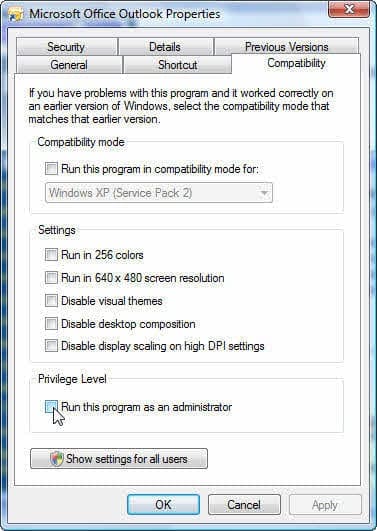
When this happens, you need to always respond to the dialog and choose whether to open or save the attachment. Whether its enabled or disabled is controlled by the UAC (user access control) and if you run Outlook as an administrator.
EditFlags Registry Key
The EditFlags binary value is the key. In Outlook 2007 and 2010, the EditFlags value may not exist but creating it with 00 00 01 00 data gets rid of the dialog and opens the message.
This example is for GIF extension:
[HKEY_LOCAL_MACHINE\SOFTWARE\Classes\giffile]
@="GIF Image"
"ImageOptionFlags"=dword:00000003
"EditFlags"=hex:00,00,01,00
HKEY_LOCAL_MACHINE\SOFTWARE\Classes\giffile\
EditFlags name value contains binary data of
00 00 00 00 = display 'always ask' dialog
00 00 01 00 = always open, no dialog
ImageOptionFlags controls whether its opened or saved.
Word 2007 DOCX extension is
HKEY_LOCAL_MACHINE\SOFTWARE\Classes\Word.Document.12
DOC extension:
HKEY_LOCAL_MACHINE\SOFTWARE\Classes\Word.Document.8
Excel's .xslx extension:
HKEY_LOCAL_MACHINE\SOFTWARE\Classes\Excel.Sheet.12
PowerPoint's .pptx extension:
HKEY_LOCAL_MACHINE\SOFTWARE\Classes\PowerPoint.Show.12
Adobe PDF
HKEY_LOCAL_MACHINE\SOFTWARE\Classes\AcroExch.Document
Find the Keys
In some cases, you can find the key for each extension by looking at the .extension key. Under the extension type, you may see subkeys for PersistentHandler and ShellEx along with one identifying the file type by name. Look for that name under Classes. Ie, .docx has a subkey for Word.Document.12:
HKEY_LOCAL_MACHINE\SOFTWARE\Classes\.docx\Word.Document.12
so the key you'll add an EditFlags value to is:
HKEY_LOCAL_MACHINE\SOFTWARE\Classes\Word.Document.12
Doc is HKEY_LOCAL_MACHINE\SOFTWARE\Classes\.doc\Word.Document.8
so the key you'll add an EditFlags value to is:
HKEY_LOCAL_MACHINE\SOFTWARE\Classes\Word.Document.8
Screenshots:
Registry for \.docx\Word.Document.12

Registry for Classes\Word.Document.12

Note that not all of the .extension keys have a key that identifies the file type by name.
Do it for me
If you aren't into editing the registry yourself, this registry file will add or change the edit flags setting for Word (docx, doc), Excel (xlxs, xls) and Powerpoint (ppts, ppt) files.
EditFlags for Word, Excel, and Powerpoint
IE's "Always Ask..." dialog
In Windows XP, the "Always ask" dialog is shared between IE and Outlook. If you set it to always open in one application, it will always open in the other.
In Vista the "Always ask" settings are stored in different keys. The settings for IE are stored under the following key. Delete the values for the file types you want to display the dialog.
HKEY_CURRENT_USER\Software\Microsoft\Windows\Shell\AttachmentExecute\{0002DF01-0000-0000-C000-000000000046}
More Information
Keep in mine that opening an attachment from the preview pane opens it in Read only mode while opening the message first opens the attachment so you can edit it and save changes.

yayin says
i join the others and bless you for this tip. so far i only knew the setting of administrator, but every windows update rolled it back and the annoying warning popped again. I hope this one via registry will survive the updates and stay permanent.
Sandy Kleinhenz says
this advice does't work for Windows 8?? there is not Comparability option when right clicking on: All programs/ Microsoft Office 2013/ right click/ properties/ shortcut/ advanced/ run as admin or:
All programs/ Microsoft Office 2013/ right click/ properties/ click "run as admin"
Diane Poremsky says
It works. If you don't see Run as Administrator on the right click menu, hold Ctrl+ Shift and right click.

Ashish Bhat says
Thanks Diane!
I was confused a bit by the steps to be taken while editing the registry. But your "Do it for me" Script worked like a charm! Simply merged it into my registry after taking a reg-back up. Now I can open my attachments without the annoying dialog.
Thank you so much!!!
-Ashish
Fritz (MVP) says
In Windows 7, the same effect could be achieved by launching Outlook as Administrator and unticking the relevant box when challenged. Unfortunately the tick returns on most automatic updates, which I consider quite nasty. Your solution is ideal: It lets me program and invoke the method for a large number of file extensions, just using a simple batch file. Thank you!