One of the new features in Outlook, beginning with Outlook 2013, is a missing attachment warning. (Users of older versions of Outlook will need to use an add-in or a macro.)
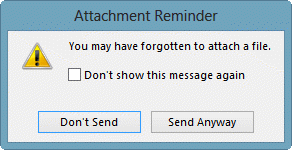
How does the attachment reminder work? Like the third party attachment reminders, it looks for a sequences of words in the subject and body of a mail. For example, the words "attached", "attachment" or "attaching" will only trigger the detector if the context they appear in makes sense for mentioning an attachment.
The other strings that are looked at are "Enclosed" ,"Going To Attach"," Here is", "Include", "Enclose", "See Snapshot", "PFA", "Print Attachments", "Sending You", "This Email" ,"Now Attach", "This is". As with the attach variations, the context that these strings appear in is crucial and if the context doesn't fit, the alert will not be triggered.
This can be enabled or disabled in File, Options, Mail - at the bottom of the Send Messages section, about halfway down the dialog.
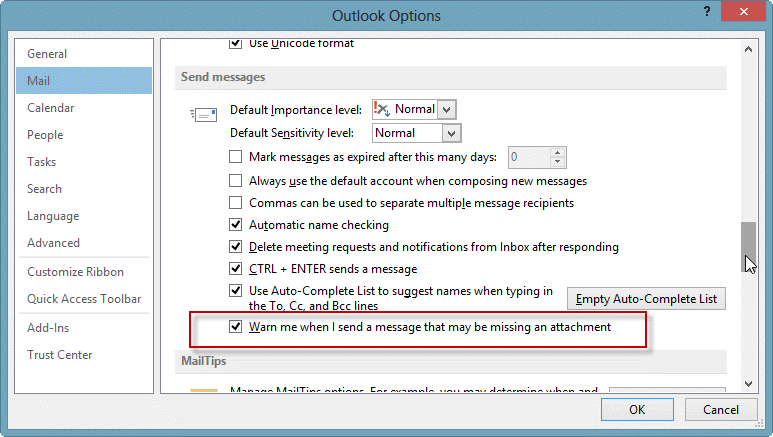
Administrators can control it using Group Policy.
Tools
The Attachment Forget-Me-Not Outlook add-in scans each outgoing email for phrases like "see attached" or "draft version". It then asks you if you meant to attach a file before sending the email, giving you a chance to insert the attachment. Version 4.0 is being released that works with both Outlook 2010 32-bit and Outlook 2010 64-bit. | |
Outgoing Email Checker for Microsoft Outlook will check your emails before sending them for conditions you specify in the rules. You can create a rule using a template or start from scratch. This reminder add-in will help you avoid most common emailing mistakes: Get a reminder to add attachment to your email in Outlook, Avoid sending large messages, Enable Reply All warning and make sure you use the correct account, Remember to fill CC or BCC lines when necessary | |
Send Guard will detect and prompt you whenever you make any of these mistakes and more: forget to send an attachment you promised in a message, Reply-to-All or forget to Reply-to-All, send emails using the wrong email account, send emails with blank or incorrect subjects, said something you oh-so-knew-better than to say. |

David Pearson says
This only works when you click the send button with your mouse - using the [Ctrl] + [Enter] key combination does not trigger this at all.
Diane Poremsky says
Doesn't appear to work with Alt+S either.
Diane Poremsky says
Hmmm. It worked on my last try before asking my support contact why it doesn't work but the blank subject warning works with Ctrl+Enter... and it works.
What phrase are you using? And what version of Outlook? (I tested it in the newest 2016 build for windows).
Nguyen Quang Hung says
Not working with outlook 2013 in Win 8.1 pro 64 bit. Try other tools (Sperry) also not work,
Any help please,
Diane Poremsky says
Do you get any error messages? Are you using 32- or 64-bit Outlook?
What keywords are you using in the message body?
Aleksandr Gorlach says
Algorithm details: https://www.mapilab.com/blog/outlook-2013-attachments-reminder-under-the-hood/
Drew says
This does not work when I use CTRL+Enter to send a message
Diane Poremsky says
By golly, you're right. I'll tell the product team. Thanks.
Robert says
Hi, after more than a year it is still not working when I use CTRL+Enter to send message. Can you please add to the next update?
Mike says
Hi Diane, is there a way to get outlook to always have a set attachment to be sent with any email I send out?
Diane Poremsky says
You can use a macro or a custom form to do that. If the file will be updated (such as a report) a macro is best, but if the file never (or very rarely) changes, saving it in a template will work.
Malcolm says
Thanks Diane. Do you know if there is any way of adding keywords to the list that Outlook will look for?
Diane Poremsky says
No, sorry, there is not.