If you have explored Exchange 2007 deployment or administration at all, you will have noticed many distinct differences from its predecessors. One of the more fundamental changes going from Exchange Server 2000/2003 to 2007 is the segregation of functionality into separate "server roles". The components of Exchange communication have been broken down to five distinct roles:
- Client Access
- Mailbox
- Hub Transport
- Unified Messaging
- Edge Transport
Where these somewhat modular roles are deployed provide some flexibility for different Exchange topologies.
Client Access
The Client Access role replaces the concept of the Front End server from Exchange 2000/2003, though it can be installed on a non-clustered mailbox server or on a separate server that is well connected to the mailbox server to offload processing formerly held by the backend.
In every Active Directory Site where there is an Exchange 2007 mailbox server, there must be an Exchange Server with the Client Access role installed. Its primary role is to provide non-MAPI connectivity to Exchange data. This includes Exchange web access called Outlook Web Access (OWA), internet standard client access protocols POP3 and IMAP4, as well as Microsoft's mobile access protocol Activesync. The Client Access role requires the World Wide Web service on the server and it hosts the new Autodiscover Service and Exchange Web Services.
Mailbox Role
When Exchange 2007 has the Mailbox role installed, it can host Exchange mailbox databases and if enabled, public folders. This is where storage and other hardware capacity considerations are most important. Backup and recovery considerations enter into storage determination as well, with local (LCR) and cluster continuous replication (CCR) options now available. Small, single server deployments would have the mailbox role installed with the other roles with the exception of Edge Transport. This role also requires Network COM+, Internet Information Services (IIS), and the World Wide Web service to be installed on the server.
Hub Transport
Every message needs to travel through an Exchange 2007 server running the Hub Transport role. Even if the Hub Transport role is installed on a mailbox server, messages sent to a mailbox on that server from a source also originating on that server must go through a hub transport. It is this requirement that opens up the possibilities for the Hub Transport role to provide some security and compliance controls for both internal and external e-mail communication with the organization. The Hub Transport role maintains a set of Message Transport Rules that can be applied to messages as they pass through the hub. These rules, bearing a passive similarity to Outlook rules on the client, can provide security and compliance by validating message content against certain requisite parameters. It can also limit messaging communication between members of specific groups in the company as a form of ethical wall.
The Hub Transport role is especially vital in larger Exchange topologies where specific message routing needs to be controlled, integrated in heterogeneous environments or where site connectivity issues exist. This role incorporates the bridgehead functionality known from previous versions.
Unified Messaging
The Unified Messaging role expands mailbox access beyond e-mail clients to include voice and fax. Exchange mailboxes provide a central repository for managing inbound faxes and voice mail messages through an AutoAttendant feature. In addition, mailbox content is accessible by voice as well. Of course, this functionality requires an appropriate IP-PBX or VoIP gateway installed and configured to work with Exchange 2007. The configuration components of Unified Messaging are stored as Active Directory objects, including the AutoAttendant controls and IP Gateway information.
A great part of the modular roles Microsoft has chosen to provide is that the roles can be added or removed at a later date. I am finding most Exchange 2007 deployments are not using the Unified Messaging role yet, but have chosen typical installations of the product and are investigating the benefits and value of this new functionality for their organization.
Edge Transport
The Edge Transport role is the most independent of the five server roles. As the name implies, it is intended for the perimeter of the network providing SMTP relay (or SmartHost) and message hygiene functionality for your Exchange organization. It can not be installed with any of the other Exchange server roles. The Edge has a set of transport rules similar to the Hub Transport rule set, but focused more to external communication. It performs various filtering for message hygiene, including connection filtering, recipient filtering, sender filtering, SenderID validation (SPF), and content filtering (formerly the Intelligent Message Filter - IMF). These steps help prevent unwanted content from reaching the mailbox stores or provide some level of message assessment for the benefit of e-mail clients.
Some of the information Edge needs for its functionality comes from Active Directory. To prevent perimeter access to Active Directory, Exchange uses a new function called EdgeSync on a Hub Transport server to perform a periodic, one-way directory synchronization of a subset of directory information to a local, specialized version of ADAM on subscribed Edge Transport servers. This information is referenced by the Edge Transport server to perform its security and message hygiene functions.
Summary
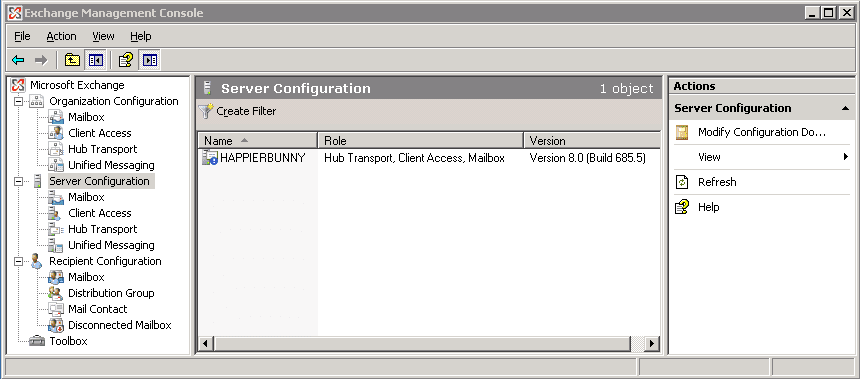
The granularity of these roles adds to the flexibility and design preparation of your Exchange organization. A typical, small business installation might maintain the Mailbox, Client Access, and Hub Transport roles on a single Exchange 2007 Server as shown in Figure 1. They may also opt for an Exchange 2007 Edge Transport server on the network perimeter as well. Larger companies may benefit from separating the various server roles to meet their network requirements and to maximize performance of their Exchange organization.
Figure 1:

Leave a Reply