The Microsoft Outlook Address Book is a container that includes the main Contacts folder and any others you add. It's used most often when you click the To button on an open message.
Outlook automatically makes the default Contacts folder available through the Address Book dialog, but you can also add other folders containing contacts to your address book.
Use the same procedure to remove Contact folders from your Outlook Address book, unchecking the option to use as an Outlook Address book.
Adding Other Contacts Folders | Automatic name checking | Notes | More Information
Adding Other Contacts Folders
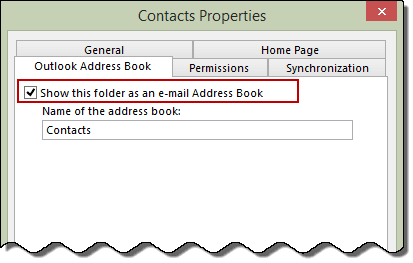
To add any folder containing Contact items to the Outlook Address Book:
- Right-click the folder, choose Properties from the pop-up menu, and switch to the Outlook Address Book tab.

- Check the box for Show this folder as an e-mail Address Book.

- You can enter a new Name of the address book to make it easier to distinguish from other Contacts folders. The name change affects only the address book display, not the actual name of the folder.
- Click OK.

Automatic name checking
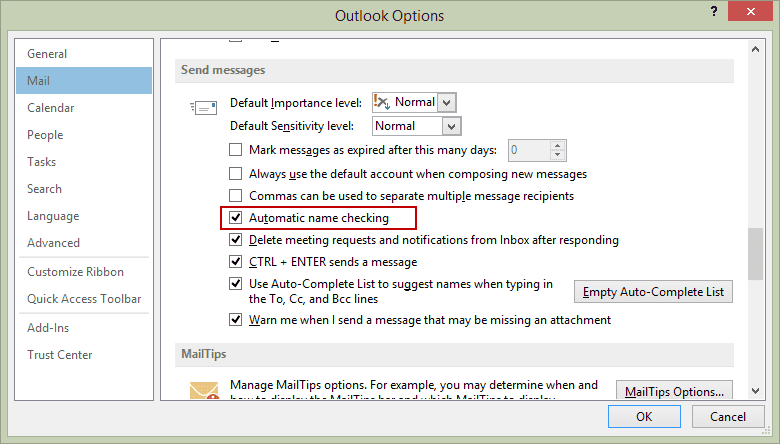
You can configure Outlook to look for matching contacts when you tab out of the To, CC, or BCC field. This is commonly known as Resolve contacts. Rather than clicking the To button and choosing names, you can type people's names (or part of names) and Outlook will match them to existing contacts. If it finds more than one possible match, the name is underlined. Right-click on the name and choose the correct person.
If this is disabled, Outlook won't look for a matching address until you click the Send button or press Alt+K.
In Microsoft Outlook 2010 or Outlook 2013, to enable auto-resolve go to File, Options, Mail, Send messages section and select Automatic Name Checking.
In Outlook 2007 or Outlook 2003, look for the Automatic Name Checking option in Tools, Options, Email Options, Advanced Email Options.
To show the Contacts folder from another user's mailbox in the Outlook Address Book, see Display Other User's Contacts in Address Book
Notes
The OAB behaves slightly differently in the two Outlook 98/2000 modes. In Internet Mail Only mode, it shows all contacts. In Corporate/Workgroup mode, it shows only those contacts with either resolved e-mail addresses or fax numbers. Newer versions of Outlook are all "corporate mode" and the Outlook Address Book works exactly the same in each.

Carol says
Autocomplete stopped working. I opened a case with Microsoft and they tolf me "External contacts not in autocomplete or search
This is across the board for all on all tenant send a new message the new external contact is not available in the auto-complete in OWA. Work around one need to add add them to the contacts list then they show up. "
Can you comment?
Diane Poremsky says
the contacts are added because they are contacts... but one-off addressing should work and be added to the autocomplete list, like every other address you send it. I'll test.
Jenn says
Hi Diane. Is there a way to select "Show this folder as an e-mail Address Book" for multiple contact folders. We have an attorney that has a separate contact folder for each client and we have since upgraded to Office 2016 and he wants it enabled for all folders without having to right-click each one. Thank you!
Diane Poremsky says
As long as they are in an account in his profile, yes. If they are shared contacts - no.
Ellen Lehnert says
Hi, Diane. I exported using .csv file from a laptop and imported the contacts directly into the Contact folder (Win 10, Outlook 16) and the contacts are not accessible from email. Option to make them accessible is grayed out. Ideas to fix this problem. You and I met at an MVP thing in Philly a few years ago. thanks in advance.
Diane Poremsky says
I'm assuming they were imported into the default contacts folder... if so, it sounds like the addresses didn't resolve when imported - its not uncommon, but if the addresses don't resolve, they won't be seen in the address book when you click To. Verify the first two things at https://www.slipstick.com/outlook/contacts/contacts-are-missing-when-you-click-the-to-button/ - and open a contact and retype the email address. Does it show up in the address book? if so, that confirms the address wasn't resolved. You can try clicking in the address then press Ctrl+K to force it to resolve. If you don't have a lot of contacts, you can do this with each one - or i have a macro at https://www.slipstick.com/problems/imported-addresses-missing-are-from-address-book/ that will fix it. (I want to tweak it a little - will try to do that tonight.)
Alfonso Samper says
Hi Diane. Is there a way to combine/sync two contactfolders in Outlook 2016. The contacts pane shows two folders under "contacts" and one under "icloud". They all have a different number of contacts. I just want one folder. Thank you
Diane Poremsky says
Sync, no. But you can move or copy the contents of one folder into the other. iCloud syncs to your iPhone, so you'll probably want to move or copy the ones in Contacts into iCloud. You can set the iCloud to be the default contacts when you open the address book or click the To button.
Milosz says
Hi, Diane, thank you for all the helpful info. I am facing the following challenge: when composing email and typing directly into the To field, Outlook 2013 does not reliably look up contacts in multiple address books (I am not talking about the Auto Complete function but check against address books for contact never before emailed). Sometimes I get the red squigly line but it suggests only some contacts with the same last name. If I use Ctrl K, I also can't get all contacts to appear in the suggestion box. This is all after adding the second contact folder to Address Book in Outlook. Any thoughts? Our users have at least two folders as address books but are struggling with reliable means of calling up those contacts when composing an email.
Many thanks in advance!
Brian says
In your instructions you fail to mention where you are to show this list of contact folders. Is that Explorer? How did you get the contact folders to only show?
Diane Poremsky says
The screenshots were made in the Contacts navigation pane (ctrl+3) but it will also work in the folder list (ctrl+6).
YL Mike says
in my outlook 2016 the check box for "show this folder as an email address book" is grayed out. How can I make it accessible??? (This is for an outlook.com account that is a part of a profile with my POP account for my email from my ISP.)
Diane Poremsky says
and it's unchecked? It's normal for it to be checked and grayed out in 2016 when it's the default data file. When it's grayed when it shouldn't be, tyhe profile is usually corrupt and you need to make a new profile.
Mikey says
I am having the same problem as YL Mike
Diane Poremsky says
If the contacts folder is in your main mailbox - not a shared Exchange mailbox - and is not checked, the profile is corrupt. You need to make a new profile.
If you have a business Exchange account and the Contacts folder is in a shared mailbox, you can't show it as an address book.
Lynne Smith says
I just want to know how to insert an address into the top of a
letter that is NOT a mail merge or set up an auto address loading
template. I’ve got the Address Book button on the ribbon already,
but it only inserts the name but no address comes out.
I’ve done it before but I can’t remember where I found the information
or how I did it and I’ve been looking for hours.
Diane Poremsky says
This is in the To/CC address field or in the message body?
If in the To/CC fields, is the name underlined? If you double click it, do you see the address? The address book will insert the contact's name as it appears in the Contact's Email Display Name field. In Exchange mailboxes, names in the GAL are entered as just the name.
Daniel B says
"Right-click the folder, choose Properties from the pop-up menu, and switch to the Outlook Address Book tab"
Yeah, that tab does not exist.
Diane Poremsky says
What version of outlook are you using? Is it a contacts folder you created?
Wee says
Hi, i have an issue with contacts folder.
Outlook 2010 has 2 accounts on 2 separate PST.
When i click Address Book i can see all my contacts from both PST.
When i click on Contacts folder i only see default account address book.
Second account address book is not shown.
Any advise would be appreciated.
Diane Poremsky says
So in the contacts navigation pane, you don't see the second contacts folder? if you switch to the folder list (ctrl+6), do you see a contacts folder in the second pst? (Typically, you'll only have one contacts folder in the default pst - the second account will use that contacts folder.)
pablo Loya says
I have two email account in my outlook 2016 and when i select new email i want to select witch email account to sent the email , I use select options and on the show fields select "from", But now the from is missing on the show field...how can i get it back
Diane Poremsky says
How many accounts are listed in File, Account settings? If there is more than one account, the from field is shown automatically.
pablo Loya says
It shows two account and the weird thing is that before it was there and now its gone
Diane Poremsky says
if you have two accounts, the button won't show on the ribbon because it is required to show in the new message header block. if it's missing in the header block, then try repairing office installation.
screenshot: https://www.screencast.com/t/y0e0kRm4Ba
pablo Loya says
The screenshot, That is exactly the way it shows on mine, But i do have two account and i try repairing office on quick repair and online repair but it did not work...
Diane Poremsky says
Does the from field show on the message form? You can't turn it off if you have more than one account. (You can customize the ribbon to add the show from field button, but it is disabled if you have more than one account.)
pablo loya says
When I remove the 2nd account, The "From" does show up on the header block, And if I add the 2nd account again, The " From" get's remove from header block , But I do see the from field button,, Thank for your info, I understand....
Margery says
Hello, I have found my Address Book has emptied itself and I cannot find a way to get them back, Can you help please.
Diane Poremsky says
Do you have contacts in the contacts folder? If so, it is one of two things - you have more than one contacts folder and the 'wrong one' is set as default or you have open More Columns selected at the top of the dialog.
Open the address book using the Address book button on the ribbon. Is the dot in from of Name only or More columns? Select Nome only. If they still don't show, click Tools, options. Select the contacts folder that holds the contacts.
Susan says
Hello, my Outlook doesn't show anything (even a default) in the Address Book. It is just blank. I tried creating a sample contacts folder and tried to assign it to an Address Book by right-clicking and going to Address Book but the box to check to have it show in Address Book is disabled. Help!
Diane Poremsky says
Greyed out either means the address book service is corrupt and you need to make a new profile or it's the default contacts folder. Since it's a folder you made, the service is probably corrupt but you can check for other contact folders first - Switch to the folder list (Ctrl+6) - do you have any other contacts folders? Do they contain contacts? If so, when you look at the address nook, is name only or more columns selected? (Name only will show all contacts that contain electronic addresses.)
Sarah says
PLEASE Help! I have been racking my brain trying to figure this out and it seems like such a simple task. I have created 200+ contacts in Outlook and all I want to do is share them with the 2 attorneys I support, in order for us each to have access to the SAME list of contacts. The contacts are not co-workers, within our domain name, they are clients with various email names. I clicked "share contacts" and Gary received the email and accepted. When he looks at the "People" tab in Outlook and clicks on my name (to the left) he can see the list of contacts I shared, BUT when he goes to draft an email (which is the whole reason we need a contact pool, we each email the same people) he is unable to pull the shared contacts into any To, CC,or BCC line. It works fine on my desktop, I can see my own contacts, but he has not been able to see my contacts that I shared with him, to draft emails. Any help will be greatly appreciated! thank you! Could global address book help solve this problem?
Diane Poremsky says
when you share contacts, they wont show in the address book. he can go to the folder and select the contact then click 'new message to' or put them in a public folder or global address book.
Sarah says
How does he put them in the public or global address book? My intention with all of this is to have a list of contacts that we all can access, and I will be responsible for updating/making changes. It seems like such a simple feature. I created the contacts, they have short-cut names that are easy for each of us to remember as we type into the address line.
Diane Poremsky says
Someone with write-access to the GAL can enter the contacts as contacts - it's usually the Administrator, but other users may have the necessary permissions too.
Patrick says
Just to clarify are you saying Shared Contacts including Office/Outlook 2016 cannot be viewed in the Address Book of the Outlook 2016 desktop client - The 'add to address book' check box is missing from the interface in my case
Diane Poremsky says
Correct, you can't use shared contacts as an address book source in the address picker dialog.
Anu says
Whollaa!! Found it. Thanks. It took almost 45 min to find out and search through internet. But finally this helped.
David Cook says
Why won't Outlook send emails to people in my address book. Messages are left in Outbox but never sent. Entering email address in full instead of using address book sends OK.
Diane Poremsky says
It usually happens because the addresses haven't resolved properly. Have you tried clearing the autocomplete cache?
Philip says
Hi Diane, I followed your instructions for adding other contacts folders but it does not allow me to select the option in the properties section. It is greyed out. Can you help? This is for Outlook 2016
Diane Poremsky says
Grayed out and unchecked? That means the address book service is corrupt. How many accounts are in your profile? The usual fix is to open the profile from control panel, mail and remove the accounts then add them back.
Frustrated says
This is BS how long does it take to move a few contacts? Nothing described here is working for me, I'm beyond frustrated with Windows 10.
On top of deleting & re-adding my email account not only was the contacts option not there from ur other post, but I also lost all my saved emails~~
Diane Poremsky says
What type of email do you use?
was the mail in a pst file? if so, you just need to reconnect it to your profile?
steve says
14 Feb 2016.
I've a concern about Address Books within Outlook 2003...
I have managed to create several Folders within the Outlook 2003 Address Book, & managed, via Properties, have them included in the listing of drop down as Address Books.
When writing an email, I drop down through the Address Books, select the new Folder which opens & permits me to select an address from it Result!
Er, not really, because after close down, when I want to repeat the operation, the new Folder/s no longer appear in the Drop Down! All that remains are 'Contacts' and 'Mobile'.
Why an I wanting to do this? Because it is easier to to make a new Distribution List by scrolling the addresses in (themed) Folders than it scroll through a huge listing in 'Contacts' Address Book.)
Obviously I am missing something! Help?
Diane Poremsky says
So setting the folder as an Outlook Address book isn't sticking? It sounds like the profile is corrupt and you'll need ot make a new profile.
steve says
tnx, but if I do make a new profile, how can I be sure of not losing contacts & emails, or, how can I transfer them over easily?
Diane Poremsky says
What type of email account do you use? As long as the calendar and contacts are on the server or in a pst and not in a folder named 'this computer only' they won't be lost.
Lee Haring says
I don't find Outlook Address Book Service. I don't find Global Address List. Outlook fails to make the default Contacts folder available through the Address Book dialog, Right-clicking on 'People' takes me nowhere. in short, I have a useless contacts list and an empty address book. I want to be more enthusiastic about Windows 10, if you can help.
Diane Poremsky says
The version of Windows doesn't make a difference - unless you are looking in the Windows Contact app, not Office Outlook. (These instructions are for Outlook.)
Which version of Outlook are you using? What email account types are configured in Outlook? If you right click on the Contacts folder (in Outlook's People module) and choose Properties, Outlook Address Book, is the checkbox grayed out?
johnp says
Hi Diane, I'm using Outlook 2016 for Mac and I am confused by the fact that the folder called "Address Book" in the navigation pane on the left side of the screen is apparently not the same set of addresses as the button called "Address Book" on the ribbon. The latter has some (many?) addresses that I want, but I can't figure out where it is. Also, the solution on this page doesn't work for Outlook 2016 for Mac because there is no Properties dialogue when you click on the ribbon Address Book button. I'd be grateful for advice.
Diane Poremsky says
Yeah, the solutions here are only for the windows version. The mac address book is just a search of your contact folders.The folders on the left are the contacts in your mailbox. It may also include addresses that are in your autocomplete cache, which are people you've sent mail to. Mine appears to also include addresses of people who recently sent me mail.
grechiphi says
I went to move my 850 contact within outlook 2013 to an address book. I rt clicked and got the properties option from the drop menu to come up but when I go to "outlook address book" the option to share the folder like your directions mention it is all greyed out and won't let me check mark it...now what?
jalor says
I haven't seen an answer to grechiphi. I have basically the same problem. Did it ever get resolved?
Diane Poremsky says
when the option to enable a contact folder as an address book it means the address book service is corrupt unfortunately the only way to fix it in current versions of outlook is to remove the accounts from the profile and add them back.
Emerson Staup says
Hi...I have Outlook 2007 and when I type a particular person's first name only partially it is resolved to the email address that I have in my contacts for the person. However if I spell out this persons first name entirely it resolves to the name with the underline. Clicking shows two entries. One for the correct email address and one for an old email address that I deleted from the contact months ago. How do I get rid of this old email address? Where is it coming from? I do not use AutoComplete. It is turned off.
Diane Poremsky says
I'm guessing there are either two contacts for the person or the contact has the address in email2 or email3 field.
This should still work in 2007: select the wrong one then double click on it (or right click and choose open contact). That should open the contact that has the wrong address in it. If it's a separate contact, click the Delete button. Then remove the name from the to field and try again.
Michelle says
Diane Poremsky - Thank you. so easy to follow.
Josh says
When going to send an email, my contacts do not appear even though they have been added. I type in 'd' to choose who to send an email to for example and as usually all my contacts beginning in d would appear, they now do not.
Diane Poremsky says
That means the autocomplete cache has cleared. Does any letter bring up an entry? If people you sent mail to recently (since you first noticed it wasn't working) are not on the list, I would clear the autocomplete cache and start fresh.
From https://www.slipstick.com/outlook/email/understanding-outlooks-autocomplete-cache-nk2/:
Clear the autocomplete cache using the File, Options, Mail, Empty Auto-complete list button.
You can also use the /cleanautocompletecache switch to clear the cache.
Lynne Jones says
I have Outlook 2013. I have an address book, with 3 contact lists. I would like to be able to drag names from one list to the other as I need. I was able to do this before by clicking contacts, opening the group i needed and dragging the person into a different group. Now I don't have the contacts tab on the side where the folders are. Please help.
Diane Poremsky says
You mean the Contacts Navigation pane? It's the two head icon or the word People, depending if you use compact navigation or not. Or just click Ctrl+3.
If you don't see the heads or the word People, click the 3 dots and open Navigation Options to change the settings.
Ricky says
Hi, I am using outlook 2013.
I shared contacts from User A to User B. I can see User A's contacts in User B's outlook however when I try to create a group using User A's contacts it will not show her 'Contacts' section in the address book.
Diane Poremsky says
That is expected since you can't set the shared account's contacts folder as an address book.
JC says
Doesn't work. Office 2010 Help is pretty much worthless.
Diane Poremsky says
What happens when you try? If the folder is enabled as an address book and its not working, then you profile is corrupt and you need to make a new profile.
SteveB says
And how does one do this with Outlook 2011 for Mac? Right clicking does not bring up the menu described.
Al Acevedo says
You're the best!
I just went from XP to Win 7 and had problems getting my Outlook files to the new computer. The last hurdle was that I didn't see all my specific "contacts" lists in the Address Book, only the Contacts list showed. I followed your instructions and now can pick and choose who gets the emails from within, not only the Contacts list, but within each and every Contacts Folder (specifically named) I added.
Cathy Dermody says
I have just bought a new computer and went from Outlook 2007 to Outlook 2013. My address book is all there, but when i type in part of an email address name-no choices pop up-it's like i've lost all my email addresses.
Diane Poremsky says
It sounds like you just lost the autocomplete list - are the addresses still in the contacts folder?
Find the NK2 files on the old computer and copy it to the new computer. Make sure that the .nk2 file is in the following folder: %appdata%\Microsoft\Outlook. The .nk2 file must have the same name as your current Outlook 2013 profile.
Press Windows key + R to open the command dialog. In the Open box, type
outlook.exe /importnk2
and then click OK. This should import the .nk2 file into the Outlook 2013 profile. After you import the .nk2 file, it's renamed with a .old file name extension on the first start of Outlook 2013.
https://www.slipstick.com/outlook/email/understanding-outlooks-autocomplete-cache-nk2/
jackie says
I have office 2013 and Windows 8.1. I imported my contacts from MS Live Mail, and they show up in Contacts, but this doesn't show up as an Address book,I have right-clicked, entered into Properties, and said to use it as an Address book. What to do now?
Diane Poremsky says
Do they have email addresses? If the contacts are in outlook and the folder is enabled as an address book, the problem is usually the address is not resolved. Add a contact to the folder or retype the email address of one of the existing contacts. If they show up, the problem is the address in the imported contacts.
Jim says
I am using owa version. All my information is in correctly but I keep getting an error message that I cant connect to the exchange server. I am using Outlook 2007. I am trying to enable the Exchange Address Book but I don't see it under administrative tools to start it. Do you have any suggestions?
Diane Poremsky says
Do you know what version of Exchange? Some of the latest updates caused problems with OWA.
Patty says
I had Outlook 2003 and was able to move my Contacts up to the top of the list in my Address book, but am also unable to move it up to the top in 2010. From the Home tab, click on Address book and that is where I want to be able to move my Contact list to the top. I can't figure it out. I have Windows XP currently but will be moving to 2007 soon. Please help
Diane Poremsky says
Did you choose Custom then select the book and adjust the order using the arrow buttons?
Lisa says
I have a contact folder that I have shared with others in my office. They do not have the same options under properties I do. The one I would like them to have is "show this folder as an email address book". Is there any way to share my contact folder with other and allow them to access it as an email address book? Currently they go to the folder via "contacts", right click on the person or distribution list and create new message. If they need to send this to multiple distribution lists, they have to send separate emails to each one... any thoughts?
Diane Poremsky says
Enabling shared folders as an address book requires several steps - see https://www.slipstick.com/outlook/contacts/display-other-contacts-in-address-book/ for details. That is the only way, short of copying the contacts to a mailbox folder.
Joe says
This is a great tip! I was wondering why only some of my contacts were available when I started typing in the "To" field.
Florian says
Maybe I was not precise, sorry! I have a powershell script which creates a new contacts folder in each exchange user mailbox and synchronizes the global address list contacts to them. But this newly created contacts folder is not marked as an e-mail address book. I want to change this setting with powershell, maybe during creation.
Diane Poremsky says
AFAIK, you can't set the folder as an address book using powershell (unless you can send keys with it).
Florian says
Is there a possibility to set this flag via Powershell for contacts folder at the Exchange User Mailboxes?
Diane Poremsky says
To the best of my knowledge, no, you can't use powershell to enable contacts as address books.
Jim Russell says
still does not work
Diane Poremsky says
I'm not sure what is wrong from the desciption, sorry.
Jim Russell says
I have 2 contact folders, not that I can see, having trouble finding folders list please help
Diane Poremsky says
Press CTRL+6 on your keyboard to switch to the folder list.
Diane Poremsky says
How many contacts folders do you have in Outlook? Are any listed as Address books? If you switch to the folder list, you should be able to see all of the contacts folder in your profile.
Jim Russell says
Microsoft Office 7
Using Free registry Cleaner
No Outlook is not listed
It used to be there and was o/k and now it won`t work
Jim Russell says
I have followed your instructions and it works but when I close outlook and re open the new contacts list has gone
Diane Poremsky says
What version of Outlook? Do you use a registry cleaner or anything like that?
After closing Outlook, check in Tasks Manager, Processes tab - is outlook.exe listed?
Karl Benson says
You instruct:
"Right-click the folder, choose Properties from the pop-up menu, and switch to the Outlook Address Book tab."
Question: Starting from a blank desktop with no programs running, EXACTLY where do I "right click?"
I tried right-clicking the "Contacts" folder in users/user-name, but I get no such pop-up as the one you illustrate.
Diane Poremsky says
You need to open Outlook and right click on the contacts folder in Outlook. The Contacts folder under your user account is used by the Windows Contact app, not Outlook.
Jason Zhang says
Very Helpful ! Issue solved. Thank you.
jennifer says
I'm unable to (Switch to your Contacts folder, then choose File | Folder | Properties. Verify that Show this folder in address book is checked.) becuase it's greyed out as unavailable. What can I do?
Diane Poremsky says
That means the profile or account is corrupt - you need to either remove the accounts from Outlook and add them back or delete the profile and start over with a new one.
Contacts are missing when you click To
Lynne James says
In Outlook 2007 I was able to put the folders in my Contacts/Address Book in the order I wanted, that is with the ones I accessed most appearing at the top of the list. I cannot figure out how to do that in Outlook 2010. Hints? Suggestions? Please help!
George Beury says
Still can't figure how to add a new email address from an email just received to contacts
Diane Poremsky says
Right click on the address in the message header and choose Add to Outlook Contacts. If you don't like working with the contact card, see https://www.slipstick.com/outlook/outlook-2010/turn-contact-cards/ - the legacygal key will cause outlook to use the contact form instead.
Pauline Romanowski says
Since a Microsoft tech worked on another Outlook Express 2007 problem I have 'lost' my list of contacts. Where do I find this folder?
Diane Poremsky says
Contacts are in a pst file. Did you also lose old email? If so, the contacts are in the old pst file. Go to Tools, Account Settings, Data Files and click Add - (hopefully) the old data file will be in that folder - if so, select it and click ok to add it to he profile. Open contacts in that folder and select all, then use move to folder command or drag to the new contacts folder.