Starting with Outlook 2000, if you create an entry in a Contacts folder that matches an existing entry, Outlook asks whether you want to merge the information, ignore the new contact or save it as a new contact anyway.
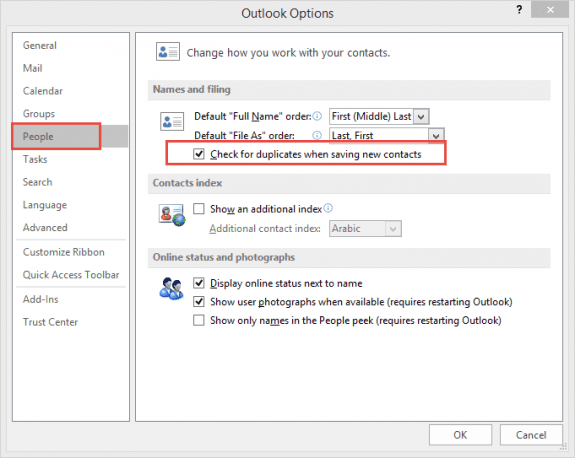
In Outlook 2010 and up, the setting to check for duplicate contacts is in File, Options, Contacts (People in Outlook 2016). The option to Check for duplicates when saving new contacts should be selected. This will check both new contacts and contacts moved or copied into the Contacts folder.
The tools listed below will merge the data on duplicate contacts to one contact. This is useful if you are combining contact lists from different computers and the data on the contacts are not identical.
Tools
1-click solution to remove duplicate mails, contacts or calendar items. Merges contacts automatically, has an undo function and a configurable advanced mode. Version 3.03 Now supports Outlook 2010 (both 32 and 64 bit). |

Sally Stanleigh says
My contacts are listed as a Contact file below the actual Contact file. When I search for names, it comes with a blank list. It doesn't search the sub-folder also called contacts. I want to delete this sub-folder (not certain how it got created) and put it into the main Contact folder. I have tried dragging it from the sub-folder into the main folder but it doesn't do anything. Any suggestions?
Jeff Jackson says
Ms. Poremsky,
Thank you for this excellent article. You've ended a long and often frustrating search to what I considered elementary questions. I look forward to reading the rest of your work.
Warm regards,
Jeff Jackson