Microsoft Outlook uses the Windows "long" date format to control some date formatting in the Calendar and Tasks. When the date format used in Outlook is not the desired date format, you can change it in the Control Panel, Regional settings.
If the screen width is too small to fit the date format, Outlook drops down to other formats.


To Change the Date format
In Windows 10 and 11:
- Start typing "Set regional formats" on the Start menu - open it when it comes up. This will open Settings to the Language & region formats page.
- Expand Regional format to see what they are.

- If long date format is not on a date format that has the day of the week, click Change formats button to change the date or time format.

Windows 7 and 8:
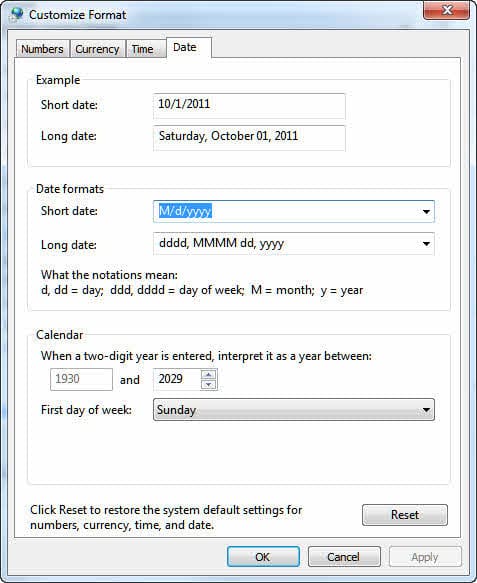
- Open the control panel Regional and Language Settings applet (Region and Language in Windows 7 or Region in Windows 8).
- Choose the option to customize the settings. In Windows 7, click the Additional Settings button.
- Select the Date tab and change the long date format so that it includes the name of the day.
If your regional settings don't offer a long date format that includes the day of the week you can type a new format into the field. Use a format similar to dddd, MMMM dd, yyyy. The set of four d's represents the full week day name; use ddd for the abbreviated form.
Keep in mind that any change you make here will affect all Windows applications.
Tip: You can use any format you want as long as it contains valid notations and separators.

Donna says
Thank you so much! I needed the days of the week to show on my Calendar and this solved the issue
Ismael Fortunato says
Thank You So very much Diane, it was very helpfull.One week trying to the days of the week back at the Calendar. THANK YOU
Jan Strnad says
Your example is exactly how my long date format reads, but I still don't get the days of the week on my weekly Outlook calendar. Any other ideas? Thanks!
Diane Poremsky says
What do you see for the days of the week?
Shaun says
Didn't work for me either. I see the day number at the top, then there is a blank row where the user says the day name used to be then below that is all of the appointments or empty cells for non-appointments.
Shoeb says
Thanks a ton! YOU ROCK!
John says
Thanks Diane, I was knocking myself out trying to get the weekday names back in my outlook calander view. I searched Google "How to get the days of the week in outlook calander" and yours was the first! Best Regards,
JM, Sao Paulo Brazil