While this is no longer a "PayPal problem" it is affecting more users in recent weeks: Google docs does not include http (or https) in embedded links and a number of users are reporting problems with other URLs.
If you see Outlook trying to connect to a URL formatted like this: //s.ytimg.com/yt/img, the problem is the missing http protocol. Any of the solutions on this page will fix the "s.ytimg.com problem" and other urls that are missing https: in the url.
Outlook users have experienced issues with Outlook hanging when they view email messages from PayPal, Google Docs, and YouTube. Outlook goes into a "not responding" state while it tries to process a web bug using a url that is missing HTTPS:.
In addition to the hangs, another concern is that Outlook is trying to connect to a web address, even though all external content is supposed to be blocked.
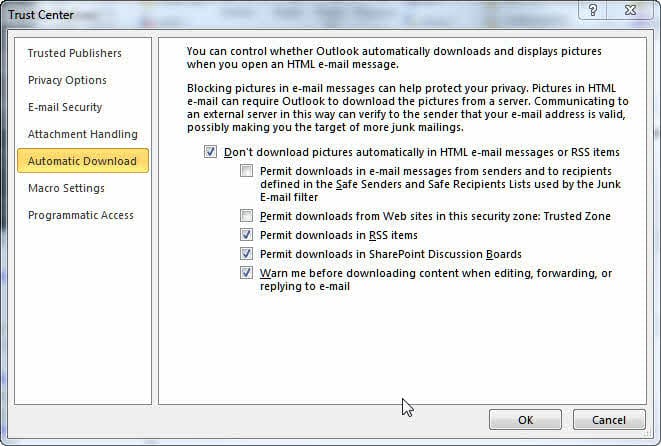
I don’t allow any automatic downloads, not even from trusted addresses, but Fiddler shows traffic to 102.112.2O7.net when I select a message that causes Outlook to hang.
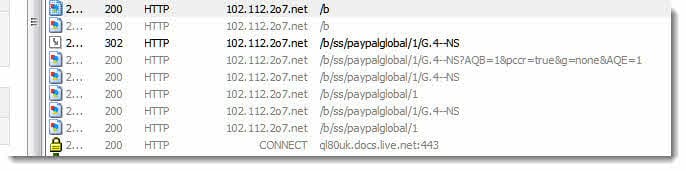
Bad Outlook! When I say "don’t download external content" I don't want you to contact the server. Outlook thinks the address is a local network address, and since it trusts local network addresses, it tries to connect. In this case, the URL is invalid, so Outlook hangs until it times out. But if the URL were valid, Outlook would happily download the content.
This bug needs fixed ASAP. it defeats the reason many people blocking web bugs in email: not being tracked when you read email.
Until its fixed, any marketer can defeat the blocked external content feature by leaving the HTTP off the URL and track what you did with the message, or display images.
Thanks PayPal and 2o7.net for bringing this bug to my attention!
If you are affected by this problem:
Be patient. Outlook will eventually display the message (it takes a minute or so here.) However, every time you select an affected message you need to wait for Outlook to time out.
Other solutions: edit the hosts file to point the offending domain to the local host. Outlook will time out faster with this entry in Hosts. Read all messages in plain text, or use a run a script rule to convert affected messages to plain text.
Run a Script Rule
Note: converting a message to plain text using this script will destroy the HTML part. You will not be able to convert it back to HTML later. Reading all messages in plain text will allow you to switch messages back to HTML.
To use, press Alt+F11 to open the VBA editor. Expand Project1 to locate ThisOutlookSession and paste the following code into the right side of the screen. Save and close the VB Editor.
Create a rule in Outlook with conditions that apply to the affected messages and select the Run a Script as the action. Select the script and complete the rule.
Sub ConvertToPlain(oMail As MailItem)
    Dim strID As String
    Dim objMail As Outlook.MailItem

    strID = oMail.EntryID
    Set objMail = Application.Session.GetItemFromID(strID)
    objMail.BodyFormat = olFormatPlain
    objMail.Save

    Set objMail = Nothing
End Sub
Edit HOSTS file
Type Notepad in the Start menu's Search field (or find it on the Start menu). Right click on Notepad and choose Run as Administrator. (You may need to enter your administrator password in Windows 7/8/10 or Vista.
Paste this line in the File, Open dialog then press Enter.
C:\WINDOWS\system32\drivers\etc\HOSTS
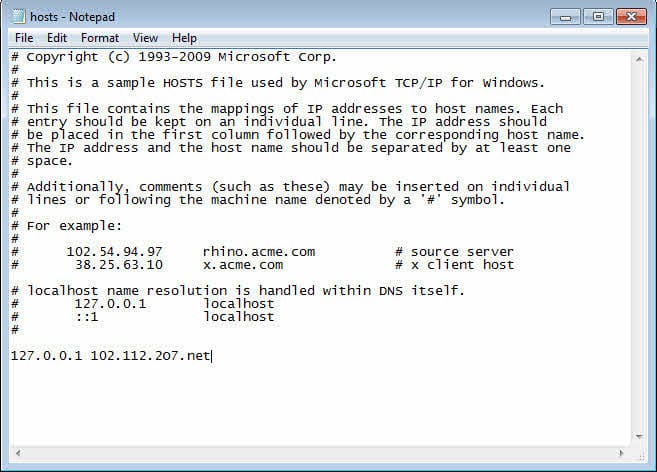
Type or paste a line formatting like the following lines, into the hosts file and save. To block other sites, use the same format: 127.0.01 hostname.com
127.0.0.1 102.112.2O7.net
127.0.0.1 s.ytimg.com
Save the file.
Note: if you don't open Notepad using Run as Administrator, you'll need to save the file to My Documents and copy it to folder. Using Run as Admin is so much easier. :) If you don't see Run as Administrator on the right-click menu of Notepad, hold Shift and right click again.
If you need to keep a copy of the message, you should convert it to plain text format or edit the message to remove the web bug (at the very bottom of the message).
Tutorial: Edit the Hosts File and Edit the Message to Remove the Webbug
This video tutorial shows you how to edit the Hosts file. It also shows you how to edit the message to remove the web bug.
To remove the web bug or convert to plain text:
Open the message and go into Edit mode. In Outlook 2007 and newer, you'll go to the Actions Command, Edit message.
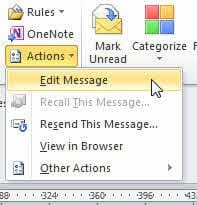
In older versions, look on the Edit menu in an open message.
Note: It may take a few seconds to enter Edit mode as Outlook will need to download external content.
Once in Edit mode either:
- Locate the line containing the offending link and delete it.
- Or switch to the Format Text ribbon and choose Plain text.
Save and close the message.

Elton Nunes says
same problem here
// ssl.gstatic.com/ui/v1/icons/common/x_8px.png
Outlook 2016 + Win10
I don't know what else to do
helpp
Diane Poremsky says
Add
127.0.0.1 ssl.gstatic.com
to the Hosts file. It will help.
If I have time, I will write a script to edit the message as it arrives - adding https to the url should work.
Elton Nunes says
Yes, but add ssl.gstatic.com in hosts file, have a problem
my services in google web, gmail, drive, not working =/
how i add https to url?
Diane Poremsky says
Try this - I have not tested it so {fingers crossed} it works as is
Public Sub AddHTTPS(Item As MailItem)
Dim b$, NewFont$, OldFont$
' check the message source code to verify this it how it shows up
' this is looking for src="//ssl.gstatic.com"
OldURL = "src=" & chr(34) & "//ssl.gstatic.com"
NewURL = "src=" & chr(34) & "https://ssl.gstatic.com"
b = Item.HTMLBody
b = Replace(b, OldURL, NewURL, , , vbTextCompare)
Item.HTMLBody = b
Item.Save
End Sub
To test it, use this macro - select an affected message and run this macro. It if works you can create a run a script rule to look for the phrase in oldurl in the body then run the rule or if oyu only have a few affected messages, use this to do it manually.
Sub RunScript()
Dim objApp As Outlook.Application
Dim objItem As Object ' MailItem
Set objApp = Application
Set objItem = objApp.ActiveExplorer.Selection.Item(1)
'macro name you want to run goes here
AddHTTPS objItem
End Sub
Zaid Al-Athwary says
Firstly, please do as follows:
Go to File Menu
Choose "Options"
Click on last menu "Trust Center" from left-hand side
Click on "Trust Center Settings" button
Check Off "Don't download pictures automatically in HTML e-mail message or RSS items"
If this didn't solve your problem like my case, that means Outlook already downloaded images which made this error.
and in order to solve this try these steps:
Open your email account online such as: Gmail, Outlook or any IMAP or POP3 email.
Put that email which cause the error in Trash (delet it temporarily)
Synchronize outlook folder, this will delete email from Inbox or Sent mails
Restore the email from Trash to the same folder it was in
Outlook will synchronize the email and image will get blocked
The 2nd part solved my problem :)
Diane Poremsky says
This will not work with the web bugs that are missing http/https - they (attempt to) download even if the download web content is disabled because Outlook thinks they might use file://.
Dennis says
Sorry, try this: https://groups.google.com/a/googleproductforums.com/d/msgid/drive/5e804475-12a3-4d51-8258-1c0485e492f8%40googleproductforums.com
Diane Poremsky says
Yeah, this is the problem: src="//ssl.gstatic.com/ui/v1/icons/common/x_8px.png" - twice.
What is your version/build of Office? I thought was addressed a while back but will check again.
Dennis says
Yep, that's the issue. They just need https: in front of that and problem solved.
2016 MSO (16.0.10228.20080) 32 BIT
They really need to change that screen to right click copy of the build! LOL.
Diane Poremsky says
Yeah, they should have all of the error messages and many other screens copyable, it would make life easier. :)
Dennis says
hi there - was this fixed in Outlook 2016? Still have same issue....
thanks!
Diane Poremsky says
I thought it was, but could be wrong. It's also possible they broke it again or the external url is malformed. I'll see what I can find out.
Dennis says
I posted exact issue here - it’s one stupid image link in there! https://productforums.google.com/forum/m/#!search/Outlook$20freezes$20protocol/drive/0EgUWZtG3Cg
Diane Poremsky says
sorry, the link isn't working here. :(
Sean says
I am getting this on Outlook 2016 / Win 10, and always in emails from the same EU based colleague. Sometime soon I will have to deep dive into this and submit a bug report...
Diane Poremsky says
Are there embedded images in the message? If so, look at the source code - how is the image url formatted?
Rob Nicholson says
Sadly two years later this bug is still present in Outlook 2016. Just received an email from Wickes in the UK which causes Outlook to freeze whilst it tries to fetch a bad graphic from Travis Perkins (parent company).
Tom says
I am looking for longer time for these path:
C:WINDOWSsystem32driversetcHOSTS
And Thanx for the video
Guus Brugman says
Diane, it may be helpful to add 'Fixed' to the title of this subject?
Diane Poremsky says
Yes, I'm going to update that next.
Guus Brugman says
PayPal just fixed it. Had no problem opening Receipt for your Payment to xxx
David Finley says
Thanks for the suggestions. For system admins who are faced with the Outlook hanging on PayPal messages, there is some notes in this post that may help too: https://www.interactivewebs.com/blog/index.php/gen...
Amieq says
Thanks very, very, very much for the hostfile fix! You've saved me a lot of time today!
Len Raphael says
Started getting it for first time from a client who loves sending me links to google docs or google drive. Crashes OL 2016 every time. Now I just open his mail in OWA or Win 10 mail.
Diane Poremsky says
I'm guessing the link doesn't have the HTTPS: part. At most, it should just cause outlook to hang for up to 2 minutes before it times out, but there could be other issues depending on your security software.