Quite a few users are reporting that Outlook is not saving options such as Mark as Read options in the reading pane, Send Immediately, and Save sent items. When the user closes Outlook and reopens it, the settings are changed.
A new Option in Outlook to sync settings with the cloud is responsible.
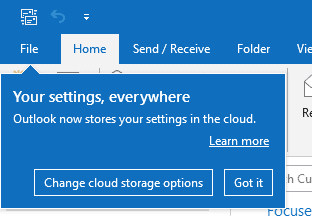
To stop Outlook from changing the settings, go to File > Options > General. In the Cloud Storage Options, remove the check from "Store my Outlook settings in the cloud"
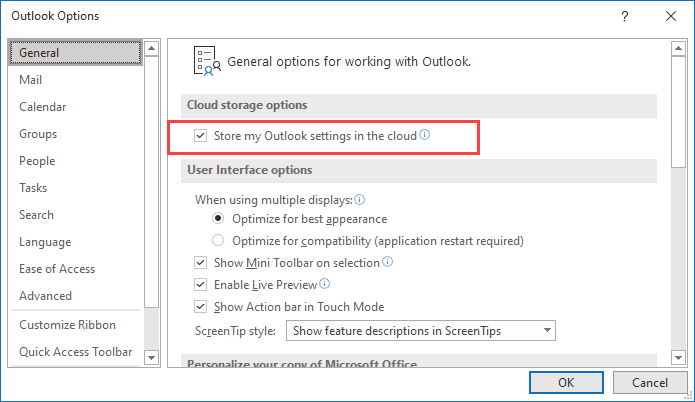
This option stores your settings in the cloud, so when you open Outlook on another computer, your settings sync.

Nicole says
I had the same issue. I was able to chat with a support team member and they said that in the back they could see that my account was not verified. They provided me with the links to verify the account and this appears to be working now.
Willem says
I think this bug is called Roadmap ID 63037 and since mid nov. 2021 it is being rolled out here in The Netherlands, telling from the e-mails and calls I get. I really wish MS would not roll out new features set as enabled. It would save me so much time and annoyance.
Rob says
This feature to Store settings in the cloud also interferes with REG entries pushed out by Group Policy.
Luckily the reg entry
HKEY_CURRENT_USER\SOFTWARE\Microsoft\Office\16.0\Outlook\Preferences
Reg DWORD 'EnableCloudSettings' set to '0' turns it off again.
Which reverts the settings to look to the registry.
Neal says
well done, Diane!
the user was going crazy
I am now a hero
cheers ?
Neal
Philip says
I echo all the sentiments of insane, ridiculous, nuts. Thank you so much for saving me yet more annoyance and cursing.
Nick says
Incredible how Microsoft has bothered me with this problem with outlook settings not being saved. How to make my customer angry
Jeff says
Thank you for this. There should be a class action suit against Microsoft for the mental damage done to people who have had to deal with this ridiculous bit of nonsense. About every week to ten days for the last month and a half I have had to go re-enter all of my settings into Outlook, all the time wondering, what the hell is going on??
Leif says
Been looking for this for months. Thank you.
Richard Miller says
Great tip driving me nuts!
Admin says
Thanks! This Bug nearly drove me insane. A dozen customers contacted me with this strange Problem. It's time to exchange outlook for reliaable software. New week new Outlook Problem at the moment ^^ On mobile Phones we stopped supporting Outlook already because it simply doesn't work....
Jeremy C says
Thanks for posting the solution that has been really annoying me (and apparently many others I see!) for weeks - I found that if I started Outlook, shut it down immediately, and then restarted it, it sometimes kept the settings / set them properly, but not the rest of the time. Good to have a solution!
Fix it MS!
hal says
give this guy a medal
Jake says
Thank you very much, Diane! This has been dodding me for several weeks.
Ian from Manchester UK says
You are an absolute genius - been looking for the solution to this one for a week!
Thank you soooooo much!
Kroy says
Maddening all of a sudden lots of settings always lost after restarting Outlook. I couldn't find the solution till now. THANK YOU!
Chr says
Thank you so much. This has caused days of trouble. A fresh installation went bananas after a few days (with all the errors: No Sent Immediatly, Missing Mails in the Sent Folder, no Autocomplete). We even reinstalled the profile. It was a simple t-online imap account, so there was also the discussion about the usage of inbox,INBOX as a possible cause. But in the end it seems to be this bug. It´s a very nasty one.
I wonder in which scenarios exactly this happen, to which accounts or installations. And why. Are there any deeper explanations somewhere?
Diane Poremsky says
Microsoft is still investigating the cause and they haven't added anything to the known issues list ay Fixes or workarounds for recent issues in Outlook for PC - Outlook (microsoft.com).
Jacek says
Thanks a lot, I've searched of this problem in Internet in Poland and didn't find any solution. Or any similar bug report. It's very strange that sometimes outlook works. I used outlook 2019 long time and it appeared in April, maybe some last updates made this bugs. Thank you very much Diane
Diane Poremsky says
It is a new bug - the feature was enabled in an update sometime in April.
Sauti N says
Thank You very much, it was very hard figuring out what was causing this. We have lost a number of emails that were sent when the setting SAVE COPY OF EMAIL was not checked because it was unchecking itself after every outlook restart.
Phil P says
Thanks for finding and posting this, has been an issue for me for several weeks
Ray says
Thanks so much. This just happened to me to day and I have spent hours trying to correct it. I did actually spot the Save in the Cloud option (Without knowing but suspecting it may be the issue) just before I found this article. Microsoft really need to get a grip on things as their updates have caused no end of problems in the last couple of years.
Karen says
THANK YOU. This has been driving me nuts
nuter says
Same problem with permanent delete option
Alex says
Also thank you so much, I've been searching for weeks to try and find a solution to this issue. Good job!!!
Edward says
When did this start happening? Is this new or did it go buggy recently? I been fighting this all day, thank you for the post.
Diane Poremsky says
The feature was added about a year or so ago in the beta versions, more recently in released versions - the bug is new.
T Johnson says
Thank you so much, I've been searching for weeks to try and find a solution to this issue. It was hard to even find the right words to put into Google as most searches brought up a bunch of unrelated issues.
For the few that were actually about something like this topic they suggested "create a new profile" or "start a new data file" but obviously since it was set to sync the settings from the cloud, those profiles/data files would eventually start doing the same thing.
Thanks again for posting this and I hope others are able to find it.