Many users ask about editing the subject line of messages, usually because they plan to save the make the subject more better reflect the content of the message.
This is possible - and simple - just open the message, select the subject and begin typing. You don't even need to do anything special, beyond opening the message. You can select the subject and type over it or backspace to delete all or part of the subject, or add to the subject.
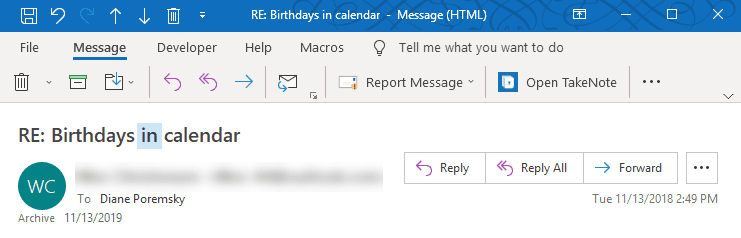
After editing, click Save to commit the changes, or click close and don't save to revert to the original subject.
You can also edit the subject when using a list view with in-cell editing enabled.
In an Open Message
Although the subject field doesn't look editable and appears grayed in older versions of Outlook, which usually means you can't make changes, you can click in the subject area and start typing.
When you use conversation groups, the subject in the message list will not change. The new subject will show in the reading pane.

In order to edit the subject in an open message in Outlook 2013, 2016, or 2019, you need to expand the header by clicking the caret in the lower right to expand the header for editing. For more information and to set the header to always be collapsed or expanded when Outlook is restarted, see Compact Header below.
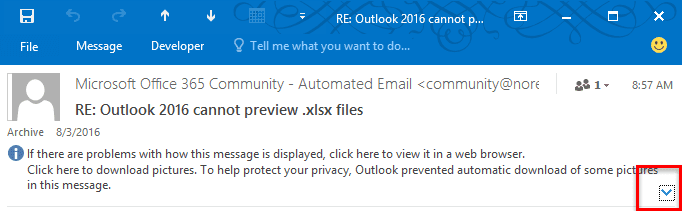
Microsoft made a change to the message header design in Outlook 365 (2016/2019). Rather than a compact header that can be expanded to edit, we return to one header size, which is editable. As with older versions of Outlook, all you need to do is type over the subject to edit it. (Then click Save, although you will be asked to save changes when you close the message.)
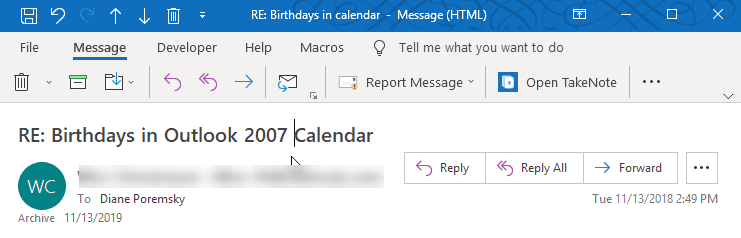
In an Outlook View
You can make the subjects editable in the Outlook message list when in-cell editing is enabled.
In Outlook 2010 and newer, look for the option in View ribbon > View Settings or click on the row of field names and choose Customize > View Settings. Click Other settings button to open the dialog shown in the screenshot.
You'll see an option for Allow in-cell editing. Check the checkbox, then click OK, and you'll be able to edit the subject of any item in the folder, without the need to open the item first.
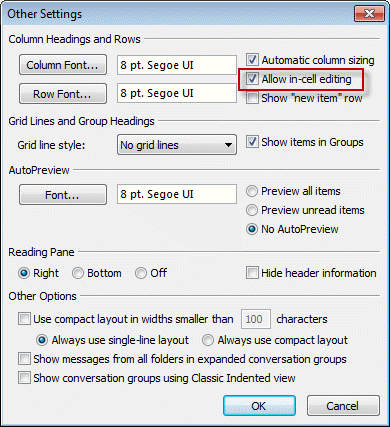
Note: In-cell editing works only when the message list is using a single line view. When you use Conversation view in Outlook 2010 or 2013, you'll need to have more than one message in the conversation to use in-cell editing. If there is only one message, turn off view by Conversation.
In Outlook 2007, go to View > Current View > Customize view > Other settings button or click on the row of field names and choose Customize > Other settings.
Outlook 2016 on Mac
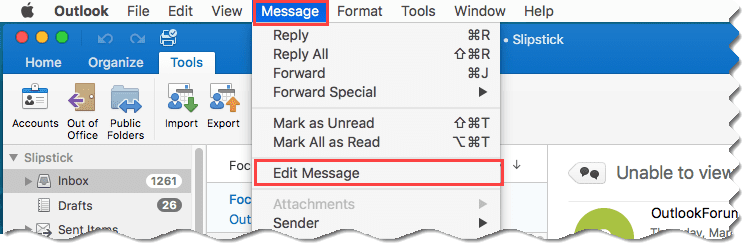
Outlook 2016 on Mac also supports editing the subject. You'll need to select the message in the message list then click Message, Edit Message from the the menu bar to open the message in Editing mode.
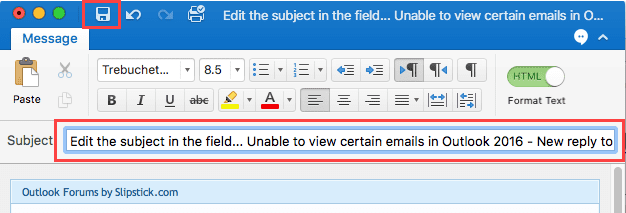
Edit the subject line as needed then click the Save button.
Video Tutorial
This video was created using Outlook 2010, however, it applies to all versions of Outlook.
View Edited Subject in Message List
In older versions of Outlook the Message list shows the edited subject:

In Outlook 2010 and newer, when you use the default view with the Date (Conversation) setting, you'll see the original subject in the message list:

As you can see, the edited subject shows in the preview pane but not in the message list, because you are only changing the subject, not the conversation title, and the new Conversation view uses the Conversation field.
When you turn off the Show messages in conversation view, Outlook will display the edited subject, just as it does in older versions of Outlook.
Disable Conversation View
To turn off Show messages in conversation either:
Switch to the View ribbon and deselect the Show in Conversation option
Or
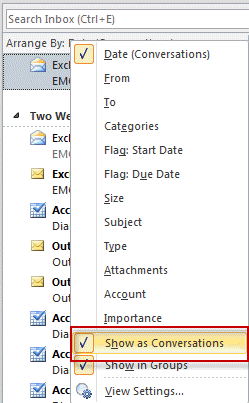
Right click on the row of field names above the message list and click Show message in conversation to deselect it.
Compact Header in Outlook 2013, 2016
Outlook 2013 SP1 and newer allow users to collapse the message header to a more compact size. When the header is collapsed, the subject field is NOT editable.
In Outlook 2013, the default is the expanded header while older builds of Outlook 2016 defaults to a collapsed header.
The default setting for Outlook 2016 is the collapsed header. Once expanded, the header should stay expanded until you click the caret to collapse it again. If you always want to start Outlook with a specific setting, you can set the MinimalHeaderOn value in the registry.
HKEY_CURRENT_USER\SOFTWARE\Microsoft\Office\16.0\outlook\options\mail DWORD: MinimalHeaderOn Value: 0 (expanded) or 1 (collapsed)
Administrators can use the Policies key
HKEY_CURRENT_USER\SOFTWARE\Policies\Microsoft\Office\16.0\outlook\options\mail DWORD: MinimalHeaderOn Value: 0 (expanded) or 1 (collapsed)
Outlook 2016
Outlook 2016 Policies
Changes can't be Saved error message
When you edit a subject field of a message that contains an attachment and the attachment is open, you'll receive an error message:
Your changes cannot be saved because you don't have permission to modify some or all of the items in this folder. Do you want to save a copy of this item in the default folder for the item?
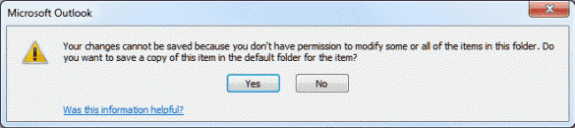
To avoid this, you need to close the attachment first, then save and close the message with the edited subject field.

Elizabeth says
I relied on this for a long time. Recently my organization got a different kind of subscription that doesn't include desktop apps and we have to use Outlook on the Web. It worked there for a while, but suddenly it doesn't any more. No warning, no documentation, no hits that I can find in help. Removal of functionality is bad enough, but when MS pretends that it never existed and nothing has changed that's when I really see red. Or have they just hidden it very thoroughly? I need this to assign unique case numbers to emails that are generated by a web form.
Noel Lang says
Hi, In the last week incoming messages began showing [Newsletter] or [Marketing Mail] in the subject line preceding the subject line description of each email. Where can I find a setting to change Outlook from adding these descriptions of each incoming email? I am using Outlook 10. Thanks in advance.
Anand Gujarani says
Fantastic...This actually helped to keep our mails further organised
Susan says
This does not work when I receive an email notifying me of a calendar appointment. I can't edit the email subject line. My computer was just tweaked and it looks different now. I used to click on the email to change the subject line, but I can no longer do this with a calendar appointment. I archive my payroll emails by subject line. Sometimes employees forget to put all the information in the subject line, so I have to change it to archive.
I've tried all the suggestions here. What are the NEWEST ways to do this?
Mark says
Thanks for this, I was struggling to get this to work as in 2016 the subject field is not labelled in a open mail and I thought it was hidden/locked when blank (until i used the in-cell editing option as a workaround, and voila "oh, there it is!" - of course if I had just opened any other email with a subject that would have also shown me).
Judie Talbot says
Here's how to open the subject line: At the bottom of the reply, there are "dots" (...) below the text that you see and just above the send button. Click it and the subject line open. Here's a screen shot. (On my Gmail, clicking the dots will allow me to see the rest of the email thread - in Outlook it opens the subject line.)
kathy says
clear and helpful thanks
Michelle says
Works for all email messages except one: is it because there is a note (when expanding the caret) "Please treat this as Private"? If so, workaround please?
Diane Poremsky says
I think it is because of the Sensitivity setting, but i will test it to be sure.
Abby says
Hi Diane,
I have Office pro 2016. the issue i have is that my emails are going into the Header which is my email address and Not into my inbox. i did a repair and now they are ok but I cannot move the ones from my header into my inbox nor delete them without iit saying i dont have permission to do that. How do i get permission?
Diane Poremsky says
They are in the top level folder and when you select all and try to move, they trigger an error? I don't recall seeing that error message when trying to move the messages.
What type of email account do you have configured in Outlook? POP, IMAP, Outlook.com, or Microsoft Exchange?
Michael Bunney says
This doesn't work in Outlook 2019 version 1810 build 11001.20108.
The subject line of an open message is not editable (just beeps) regardless of whether the message ribbon is expanded or collapsed. There is no caret in the right of the message header, regardless of the ribbon state.
Diane Poremsky says
Do you have coming soon enabled?
I'll checking my virtual machines to see if any still have 1810 - my 'current' install has 1811 and an update waiting. :( I am able to edit the subject in 1811.
Allan says
I am having this same issue. I cannot change the subject line without closing everything and opening it again.
Diane Poremsky says
Everything, as in Outlook? Ouch. That shouldn't be necessary.
Which version and build of Outlook are you using? See File, Office Account for the information.
Dan says
Hi, I have recently had a problem sending emails that I have amended the subject line and then forwarded them to another recipient. They appear in the sent items list but the recipient does not receive the email. I am using outlook 2007 and windows 7. I sometimes 'forward ' an email back to the original sender so any attachments which I sent further down the email chain remain. This sometimes results in the above. I would really like to know what I am doing wrong as it has lost me business in the past where customers have not received my email. I just want to be able to reply to send follow up emails (where customer did not reply to my original email) which still contain my original attachments. Thanks.
Diane Poremsky says
most likely a spam filter is catching it, but it may difficult to figure out whether its on your end of their end. Do they get other messages from you - are just these forwards affected?
What type of email account are you using? (IMAP, POP, Exchange)
Do you have a phone # in your signature? Try removing it. Or try sending the forward without a signature. (If you don't use a signature, this obviously won't apply.)
Higor Santos says
Perfect article. Congratulations.
Louis says
Great article. I'm trying to figure out how to create a rule or script to remove a word from a subject line of an incoming message (or outgoing message being composed). IT is adding the text "[EXTERNAL]" to incoming messages. I can remove it manually per your tutorial, but how can I script/rule it so I don't have to do it manually to each message, which is tedious...? I'm on Outlook 2016 for Mac. Thoughts? Thanks.
Diane Poremsky says
outlook for mac makes it difficult - I'm not sure if it still supports apple script, but i know it doesn't support VBA and that is the only way to automate it.
carl says
Any suggestions for how to do this in Office 365 on Microsoft Exchange? I had a VBA script that I ran from a rule/macro, but that eventually got shut down due to security risks. Then I shifted to an ItemAdd macro (as you describe in another post https://www.slipstick.com/developer/itemadd-macro/). That was before I was migrated to Office 365. Moving to Office 365, the code is no longer being executed. Any suggestions? Thank you, I'm very impressed with the info on your site.
Diane Poremsky says
The code works in Outlook 2016/19/365.. so its just figuring out why its not working. Do you get any error messages? (Remove any one error resume next) Does any code work?
ann says
Was this helpful...NO!
Diane Poremsky says
What is not helpful? (I will try to improve it - but unfortunately, i can't change the features. If you want to edit the subject line, you need to expand the header and you can't use conversation view if you want to see it in the message list.)
Leandro says
I would like to know if in a new email message using Outlook 2013, I can apply format as Bold to the subject line?
Thanks
Diane Poremsky says
not in the message, it only supports plain text.
The subject line in the message list can be bolded, but you only have control over that on your own computer, not the recipient's.
Michele reniff says
Typing over the subject line and saving did not change
in the list view. The change is only visible in the message view. I am using Outllo 2016 on Windows 7
Diane Poremsky says
Correct - if you are using a group by conversation view. If you turn off grouping, you should see the change in the message list. The article that applies to outlook 2010 and up is at https://www.slipstick.com/outlook/email/edit-the-subject-line-in-outlook/
raj says
Superb explanation.. Thank you so much :-)
qaro says
Thank you! That helped a bunch! :)
Lewis Maygru says
Could it be that messages marked "Private" are somehow locked in this regard? The message I referred to below is a private message, whatever that really means in Outlook.
Diane Poremsky says
Yes, it could be that - its one of the sensitivity levels.
Lewis Maygru says
Great stuff! I've read everything in this post carefully, and most of the time I'm able to edit the subject line without a problem - by ensuring the header is expanded. However today I encountered a message that is very stubborn and the subject line CANNOT be edited, no matter what I try - both the incoming message and my response. Is it possible that the original sender could implement some kind of special block (I'm an attorney, and the email is from opposing counsel)? Seems unlikely but conceivable.
Diane Poremsky says
IRM, a digital signature, setting the sensitivity are the only things that i can think of that could possibly affect it - just tested it with sensitivity set to confidential, and that still allowed me to change it.
I would restart outlook and try again - it could be just outlook being goofy.
karen says
My issue is my Inbox. I may receive emails from multiple people, or even the same people, regarding the very same subject. Often not with the same subject line. Staying in the ‘view by date’ keep them bundled in one folder for easy reference. I don’t want to move them to their own FILE because then they won’t appear in my current Inbox.
terrib says
I run WIn 10 and Outlook 2016. Lately when I edit the subject of a message in my inbox to make it more informative I get a copy of the email in the inbox. I end up with the un edited message AND the edited one. WHAAT?
Diane Poremsky says
This is in an imap account? The imap server sees it as a new message - you'll need to delete the one with the old subject after editing.
terrib says
Yes its a Comcast IMAP acct. Used to have POP3 but when I got Win10 and I loaded Office 2016 early in 2016 they set me up as IMAP. I don't really like it. I have not had this duplicate email issue after editing subject until this week. No one uses the PC except me and no changes have been made . This is a bit off topic but I am also getting duplicate messages in my inbox when I make edits to email contents...not the subject AND also messages I delete from inbox appear again as new with striketthoughs. Its all very bizarre.
Diane Poremsky says
Yeah, that behavior is no uncommon with imap. They are pushing imap as default because it is good for people with multiple computers or devices as the mailboxes sync changes. if you don't like imap, you can switch back to pop3 - you need to use manual account setup and will need the server names.
Alex says
It's weird Microsoft allow this. You're changing an incoming email/a record of the message.
No other email program allows this as far as I know.
Diane Poremsky says
Yeah, i wouldn't recommend doing it for messages which could be requested by eDiscovery, but only the display is edited - the underlying subject in the message header isn't changed.
terrib says
As an example I change incoming message subjects on birthday reminders because the subject line doesn't give the date and I need ot keep track of who and when....lol, Have done this for many years and never a problem before.
Juliette Calaf says
i can't change the subject in the way specified above. I have the expanded view enabled. also in view i don't have a place to see or change conversation view. Iam using Microsoft Outlook for Mac 2011 version 14.7.1.
Diane Poremsky says
As far as I know, this is not supported in the Mac version. I no longer have a mac running Office 2011, but it is not available in 2016. Sorry.
Daniel F says
None of the solutions I could find here or with google worked.
Finally, I found a way though !
1) select the message in the list
2) Select Message | Edit in the menu bar.
(running MAC , 365 an 2016)
Judy Charrie says
I am using Outlook Office 365 to keep in touch with my office emails. I want to rename the messages. I have read through all your posts. 365 looks different. I don' t see a claret to expand the header or know if that is what I need to do. I thank you in advance for your help.
Diane Poremsky says
Are you using Outlook for Windows? It should look similar to the older versions of Outlook - open the message, expand the header then type in the subject field.
Regan Barr says
I just upgraded to 2016 and it will not let me change subject lines on incoming messages. I am an instructor and often add students' names to certain types of emails so that I can find them quickly by scanning. The subject line has been uneditable since I upgraded.
Diane Poremsky says
You need to click the V on the far right of the heard to expand it - then you can edit the header.
Gloria says
thank you! I had the same problem with Outlook 2016 - this never occurred to me
Rodel Buena says
Please advise what's wrong with this code as it does not forward. I use it in a rule.
Sub OpenTicket(Item As Outlook.MailItem)
Set myForward = Item.Forward
myForward.Subject = "Open Ticket-" & Item.Subject
Item.Save
myForward.Recipients.Add "recipient@mailhost.com"
myForward.Send
End Sub
Diane Poremsky says
Does it do anything? It should work - you don't really ned the item.save line but it's also not affecting the ability to forward. Change myForward.Send to myForward.Display and see if the message comes up.
Hamza Bohari says
Thanks i had similar issue with Outlook 2016 and with the help of this post/article i manage resolve this issue.
Thanks
Sarah Kelly says
I am not able to edit a subject line in Outlook 2016, please help me
Diane Poremsky says
You need to open the message and expand the header - then it can be edited. You can't edit the new compact header.
Maryann says
Wow! Thank you for your posts Diane. Still, I can't believe that something that used to take one click now requires expanding the view, making the subject change and saving the item. Who makes these decisions to mess up what were really good improvements at one time?
Diane Poremsky says
they felt shrinking the header would be more useful to more people... if you edit the subject a lot, you can keep the header expanded or use a macro.
steve lorke says
Thank you! HUGE help!!!
nelo says
Diane, thanks for your wonderful service.
I have a copy multiple messages to client folder problem. I copy all of my emails to and from individual clients into their separate client folders contained in a main clients folder. If the subject line is the same on a new incoming email as it is on other emails in the individual client file, I get an error pop-up window telling me I cant copy into the folder. The pop-up window asks if I want to replace or not copy into the client file. What I want to do is copy all of the emails into the individual client files despite the fact that the subject line is identical. The way I work around this problem is to simply make a minor change on the subject line and , viola', it copies into the client's file no problem. the difficulty is I have about 250 emails a day, most of which have identical subject line, requiring me to change each one just so I can copy it into a client file. there must be a better way.
Diane Poremsky says
This is saving to a folder on the hard drive?
I have a macro that will add a keyword to the subject - it could add a date, sender name or other infor instead.
https://www.slipstick.com/outlook/email/add-a-file-number-or-keyword-to-the-subject-line-of-messages/
Anna says
I'm using Microsoft Office 365 ProPlus and still can't find a way of editing the subject line of an incoming email. It's driving me nuts!
Diane Poremsky says
Did you a) open the message (it's not editable in the reading pane) and b) expand the header? (click the V icon on the right - if it's Λ, then it is already expanded). If you use conversation view, you'll see the change in the reading pane when the message is selected but the message list will show the original header.
Nancy says
I used to be able to edit the subject line with the email open. Now, I suddenly have to edit it with the email closed by clicking in the subject line of the email in the IN box. Our IT guy can't figure out what suddenly changed to cause this problem. Do you have any idea?
Diane Poremsky says
What version of outlook? If Outlook 2013 or 2016, is the header collapsed? Click the V on the far right of the header to expand it.
Howard says
YOU ARE BRILLIANT!
Toni says
It's very strange but you can no longer edit the subject line with the email opened (at least I can't) but you can edit it from the list view.
Diane Poremsky says
is the header expanded? the collapsed header is not editable. Do you see a V or Λ in the lower right corner under the subject? If it's V, click it to expand.
JSP says
My ^ in just ABOVE the message on the right side.
Diane Poremsky says
if you have the caret pointing up, click to the expand the header - the subject will be editable (in an open message).
Ross Rhudy says
My Outlook 2010 will no longer allow the editing of the subject line when the message is opened. It used to let me do this. Does anyone know why ?
Diane Poremsky says
Is that the only thing it won't let you do? Are all messages affected or just some? If you are using Windows 10, it may be related to a recent Windows update - it also broke pasting into a message body... but editing the subject is working fine here in Outlook 2010 and Windows 10 with all updates installed.
Katherine Gale says
Awesome! Thanks for your easy to follow help!
Karen Carabio says
It worked but totally changed my View - can't Reset it, and now have to figure out how to get it to look normal to me again :-(
Diane Poremsky says
Not sure what you did - just editing the subject won't change the view of the folder.
Did you apply a different view? look on the View tab, change view. Any of the default views would have the Reset button disabled if there were no changes made to it. Oh... if you enabled in-cell editing, you'll lose the compact message list format - but Reset should fix it.
Yash says
Hi Diane,
Is there anyway that these changes may be synced to outlook.com as well and thereby synced to all devices?
Thanks in advance
Diane Poremsky says
Is your account on the old or new server? The changes should sync up to the new server and down to devices (but it might depend on the app you use on the device - if the existing mail doesn't refresh, then the change won't show up).
Yash says
Hi there! Thanks for the prompt reply. Ian an office 365 subscriber so have outlook 2016, which duly permits me to change the subject line. But the changes dont show in my onedrive outlook.com. Must mean that my account is still housed in the old server?
Thanks,
Diane Poremsky says
what is the url when you log into outlook.com? Outlook.live.com = new server.
Yash says
Hi Diane! Thanks again for your response! (and a quick one at that!) Alas, the url appears to be https://dub118.mail.live.com/..
Really unfortunate..wonder how long it'd be before they migrate my account. Was counting on the feature. Nothing syncs anywhere. The changes remain on my PC outlook 2016. The messages moved to other folders sync online to the respective folders, but with the subject line intact. Even added an IMAP (non EAS) account on outlook 2016 PC with the hopes that that might work better, but doesn't.
Maybe a workaround might have been embedding some kind of a searchable metadata in the message file itself (if such a thing even exists, i.e...!!)
Anyway, thanks once again for your availability.
Diane Poremsky says
They are working around the clock to move the accounts over, so maybe it will be soon.
Yash says
Also, am I to understand that the new server permits or will permit it? Also, am using outlook 2016 on PC and obviously check mail on other devices.
Thanks
Diane Poremsky says
Yes, as long as you add the account as an exchange account changes to the subject sync up, importing or moving mail now works too and Outlook's option to save replies in other folders with the original works with the new server.
The updated subject isn't showing on my iPhone tho (using the Outlook app) - i need to remove the account or move the item to a different folder to force the message to resync.
DCG says
This worked for me as shown for years, but the latest update MS did wiped it out. It seems that "Compact View" is what I am used to seeing, and now it is incompatible with checking the "allow in-cell editing" box? Hard to believe they would force this, is there an alternative setting I can use that will let me see my inbox in compact view but still be able to edit the subjects?
Diane Poremsky says
In-cell editing never worked with the compact message list - if you enabled in-cell editing compact view was turned off.
The new problem is conversation view, especially for single messages. You can't edit the subject in "conversations" - you need to turn conversation view off to edit single message conversations. This is because the conversation group header is the message when there is only one message - when there are more than one messages in the thread, outlook displays a separate group header.
amsev says
Awesome. Thank you for this information. We do a lot of work based on requests in emails and were using the subject lines to comment back and forth on the status.
Bonnie says
outlook 2010 - I want to send a email. I hit on the new email icon. I am going to type in the To: (line). How do I change the font in the To: (line). I have gone to my contacts and increase the "business card" fonts but not in the To; (line) in contacts either.
Diane Poremsky says
you can't change the size of the to, cc, or subject fields (or may other fields). Sorry.
andrew denton says
I have set my fonts in outlook 2016 for mac to arial 10pt and am happy with that. however, when someone replies to my email the from/date/to/subject lines display in a different and enlarged font. can that be changed?
Diane Poremsky says
if they use html format, no. It's hard coded into the message. Plain text messages will use your plain text font.
Moshe Pippik says
YOU JUST HELPED ME, THANKS SO MUCH!
Zeke says
You know... Since the upgrade to 2016, I couldn't figure out HOW THE (self-censoring) you could edit the subject line. The people at the local Microsoft store couldn't figure it out. I searched in maybe 10 forums, including some MS Office forums, and nobody knew how to do this. THANK YOU, DIANE POREMSKY!!
So darn simple! Open the message, expand the header, make your changes. Close the message and click "yes, save changes." God bless you!
dominguez says
I am using Windows 2016 and I Show as conversations is not checked. I still can't change the subject line. Thoughts?
Diane Poremsky says
Is the message header expanded? The new compact message header is not editable - click the little caret character on the lower right of the header to expand it.
Don Ramm says
This worked for me. Thank you!
Mike says
Easy when you know how, thanks Diane, your article above is written very well :-)
LDG says
Hello - I have turned off conversations view and I am still not able to edit the subject line. I have Outlook 2016 for Mac. Does that make a difference?
Diane Poremsky says
Yes, it does. AFAIK< you can't edit the subject lines in Mac at this time.
Arthur says
I have moved from Outlook 2003 on XP to a new iMac running Outlook 2016.
I have thousands of emails with the subject headings edited and importing them to the Mac all the edits have been lost. This is a big problem as the edited subjects held account numbers and other project identifiers, they could be found with a search.
I have to find a way to recover these.
Any suggestions ?
Diane Poremsky says
AFAIK, no you can't recover them on the mac - but they should be in original data file, but you need Outlook for windows to view it.
Arthur says
Diane thanks. This is a real cockup from MS. I simply would not have bought the mac version had I known this.
I can read my original pst files in an android reader as a work around, but i I can't create new edited ones so outlook will have to go.
Has anyone used an email client on Mac that imports faithfully?
chris says
Is there a way to save a template into subject line so you do not heve to enter every time?
Diane Poremsky says
In received messages, no, but you could use a macro to make the edit and always use the same text. https://www.slipstick.com/outlook/email/add-a-file-number-or-keyword-to-the-subject-line-of-messages/ has some examples.
A Ofarr says
Awesome thank you - this worked!
Natalie Dunn says
Do you know how I would go about A) Setting my Outlook (2007) so that I can edit a subject line and save the change without it asking me every time if I want to save the changes and B) If I copy some text it will only paste it into the subject line if the email was already open when I copied the text (in other words, I couldn't go, open email, Ctrl+V to paste (previously copied text), close email, repeat to all the other emails I need to paste the same text to. I hope I'm making sense...
Guillermo Castaneda says
Yes, it's with my outlook.com account... I edit the subject line in outlook 2016 without problems, but when I look at the same message in outlook.com (OWA), the edited (changed) subject line does not appear (the unedited subject line is still showing). Anyway, how can I tell if I am using the "old" outlook.com server?
Diane Poremsky says
Log into outlook.com - if the banner says "outlook mail (preview)" its the new server, if it says 'outlook.com', its the old server. About 10% of the accounts have been moved, so the changes are good that you are using the old server. I'll test it with my outlook.com account, but i'm petty sure it's a limitation of the server.
Guillermo Castaneda says
Thanks... The message is in an IMAP folder in outlook 2016... The subject line is changed, but the change does not appear in the same message in OWA !!
Diane Poremsky says
Is this with your Outlook.com account? It could be a limitation of the "old" outlook.com server. (I tested it with Office 365 Exchange Online account.)
Philip Argy says
How can I edit the subject line in Outlook 2016 - the ability to do that has disappeared! #FAIL
Diane Poremsky says
You can edit it the same way as you did before but if you use the conversation view, the group header gets the subject from the message header, which can't be edited.
Guillermo Castaneda says
When I change or edit the subject line in OUTLOOK 2016, the change DOES NOT show in the same message in OWA !!
What can I do ??
Diane Poremsky says
Is the message in the mailbox data file? Are you looking at the message subject or the group header? The changes aren't reflected in the group header. (Subject changes are syncing up to the server here.)
Len Raphael says
Diane, I'm in local OL 2016 using Office 365 E3 not conversation view, yes cached mode, and cannot edit the subject lines even though up to about two weeks ago (and three complete remove/reinstalls of OL ago) I was able to edit subject lines of inbound emails. MS tech I'm working w on a OneNote synch issue tried on his OL 2016 and couldn't either.
Diane Poremsky says
Click the up caret ^ on the lower right to expand the header - you can't edit the subject when the header is collapsed.
Joanna says
Thank you!
Deepa says
Please help me out...
I get emails from my client...her emails subject lines are mostly as below. The rule set is then forwarded to an internal application. There is a standard subject line which starts as USIAHAIP-N-Free Text (So after N- I need to add her email subject and forward to that email id) I have created a rule, however, don't know why its not working. Can you please help.
Example 1 - RE: RFQ#6000160673.Approved PO#450114285
Example 2 - FW: CARDER Proposal #4024 iPods and Earphones (MEGI ZP). Approved PO#4501144185
Rule Script:-
Sub ChangeSubjectForward(Item As Outlook.MailItem)
Dim subj_name As String
subj_name = Item.Subject
'Item.Subject = "Test-"
Item.Save
Set myForward = Item.Forward
myForward.Subject = "USIAHAIP-N-" & Replace(Item.Subject, "FW: ", Mid(Item.Subject, 3, 20))
myForward.Subject = Item.Subject
myForward.Recipients.Add "gsc.bom@dhl.com"
myForward.Send
End Sub
Diane Poremsky says
Does it do anything? one this I see is that you have two myforward.subject's - the second one will be used, which just grabs the original subject.
Debbie Kennedy says
Thank you very much - i will try this next week
Debbie Kennedy says
I want to auto edit the subject of all incoming emails with the sender and date and time. We are not allowed to keep pst files so this would help me find emails when I copy them to network drive - I can't find any way to do this
Diane Poremsky says
You'll need to rule to run a script that makes the change. See https://www.slipstick.com/outlook/rules/run-script-rule-change-subject-message/ - you'll use only the subject and save lines in the first macro -
Item.Subject = item.sendername & " - " & format(item.receivedtime, "yyyy-mm-dd hh:mm")
Item.Save
Rich Erwin says
This was very helpful - thank you!
sunk818 says
I'd prefer conversation view to look like iMessages or even the comments on this forum post. It has the minimal amount of information so it helps to read through the stream much easier. Anything that is quoted or re-quoted would be hidden, unless we chose to expand the e-mail. The Clean Up feature helps remove the duplicates... but the Conversation View is just so outdated.
sheena steventon says
if my email are shared, how can I tell who the person was that changed the subject filed ?
Diane Poremsky says
Open View Settings > Columns and add the Changed By field to the view. That will show the last account to make any change to the message. However, it only shows the last account that made a change so if someone changes the subject and another forwards it, you'll only know who forwarded it.
kurt says
is there a way to make just one column editable. I want a column next to subject column to be editable but i do not want the subject line to be editable.
Diane Poremsky says
No, sorry, you can't enable in-cell editing and block some fields.
Gajeswari says
thank u so much working
Alfonso Gonzalez says
If the subject is changed in my outlook (inbox), this change is replicated in the Exchange DB? In other words, if I have two computers running Outlook synced with an Exchange Server and I change the subject of an email in computer A, is this change replicated in computer B when I open Outlook in such computer?
Diane Poremsky says
Yes, it is synced to the server and down to outlook (or smart phones).
Rick McComick says
I am using Office 365 (Outlook 2016) and find that changes to the Subject in Outlook do not change the same email in my Cell phone. Is there a way to fix this?
Diane Poremsky says
What type of email account do you use?
Simao Campos says
There are two behaviors, at least with Outlook 2010 - whether you are connected to the Exchange server in cached mode or not.
In order for the modified subject line to appear in the Outlook client (when in Conversation mode), you need to edit the subject line text when connected directly to the server, not in cached mode. For some reason, when in cached mode, the Conversation will stick to the original subject text, even if the actual subject line is changed when you edit and save the changes.
How you change from cached to non-cached mode will depend on your installation; the following page may help you: https://office.microsoft.com/en-001/outlook-help/turn-on-or-off-cached-exchange-mode-HP001022343.aspx. One simple approach could be to have two profiles, one using cached mode and another connected online to the Exchange server.
Zsolt Ferenc Juhász says
Is there a way to see the changed subject in the Conversation List too. Because, thats the reason Why I want to changs the subject line - to group them together based on the Subject...
Diane Poremsky says
No, sorry. The field that is used for the conversation is not editable.
ChrisP says
I like to put an asterisk in front of any changes I make to the original subject. That allows me to see that i have added the change.
Also, if you need to change several subjects you can right click on the 'Subject' column header then select 'Other Settings' and then 'Allow In-Cell Editing' Save and exit.
That allows you to edit the subject without opening the email by single clicking, twice. ) Like how you would rename a file)
Big VBA user says
Great!! I will look into this. Thanks so much!!
Big VBA user says
Related question: Is there a way to toggle "Allow in-cell editing" on an off *via VBA*, rather than "by hand"? (It would be a great if there is!). Thanks very much.
Diane Poremsky says
You can, but i don't have any good samples that use it. This is from MSDN:
'Declaration
Property AllowInCellEditing As Boolean
'Usage
Dim instance As _TableView
Dim value As Boolean
value = instance.AllowInCellEditing
instance.AllowInCellEditing = value
Colin says
Hi Gang,
Another solution would be to send it to yourself, and change text in the subject line.
Colin
Joanne says
Thanks this is an easy solution!
Vitaliy says
Good solution, i had the problem before and now problem solved. Thanks a lot.
Cara says
Diane, Thanks for your quick response. Unfortunately it doesn't seem to work. I eliminated the conversation view, but Outlook 365 won't let me change the subject. Any thoughts? Thanks.
Diane Poremsky says
What type of email account? Did you open the message ? (it won't work in the reading pane or message list.)
Cara says
I can't seem to change the subject using Outlook 365. Is it possible? How?
Diane Poremsky says
It works the same as in Outlook 2010. Open the message, type in the subject field then Save. If you use conversation view, the change is only visible in the reading pane and open messages.
Kevin says
This is a real step backward by Microsoft. I want to change the subject *and* I want to use conversation view. In older version of Outlook, you could have a conversation properly categorized (and viewed) as a conversation, but you could *also* change the subject line of specific messages.
This was handy because you could still tell that the message was part of the conversation, even though the subject was different.
So, did MS goof, or is there a setting somewhere so that I can get that old behavior back?
Diane Poremsky says
The conversation view in older versions worked differently - and unfortunately there is not a setting to change it, other paying attention to the reading pane header. (I'd also probably add a category for Edited so I'd know it was edited.)
Matt Troutman says
Hi Diane,
Do you know if there is the ability to edit message on outlook.com? I'm trying to add information to a subject line and seem to have no ability to modify a message online. I have a thick client, but I'd ultimately like to start using the boxes on the web instead. Thanks for your time!!!
Diane Poremsky says
No, you can't edit the subject in outlook on the web, only in the desktop version.
Narendra Surti says
Can one search on the original subject text after one has editied the subject text?
Diane Poremsky says
The original text still exists on the message, so it should be possible. But I never tried it.
In Outlook 2013, I'm finding the messages using the old subject - i did not restrict the search to the subject, which allowed it to search all fields, including the conversation field.
AJ D says
Do you know how one could use VBA to automatically change the subject line of incoming e-mails?
Diane Poremsky says
Sure... you need to use a run a script rule. I have a sample too - Change subject - remove the lines that forward it.