The Folder List is normally in alphabetical order. In Outlook 2010 and up, the Inbox, Drafts, Sent Items, and Deleted Items folders are grouped at the top of the folder list, with the user-created folders sorted alphabetically below. Beginning with Outlook 2013, you can arrange folders in any order (or lock then in alphabetical order).
If you have multiple data files in your profile, the default data file is first and the other data files follow in alphabetical order. You can drag the data files to re-arrange them in Outlook 2013 and up.
If the last folder you used moves to the top of the Folder List, it means that the language setting on your computer is probably different from that on the Exchange Server. To fix it, use the Regional Settings applet in Control Panel to change the language on your computer, then restart your system.
Outlook 2013 and up
Beginning with Outlook 2013, you can arrange your folders in the folder list in any order you want. This is a change in behavior from older versions.
Select a folder and drag to a new position or right-click and use the Move Up and Move Down commands.
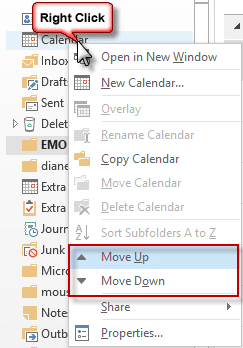
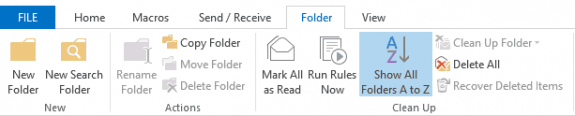
If Move Up and Move Down are missing from the menu, you have the folders locked in alphabetical order. Go to the Folder tab and click on Show All folders A-Z to turn this off.
To reset the Mailbox folder list to alphabetical order (with Inbox, Drafts, Sent and Deleted items grouped at the top), click the Show All Folders A to Z button on the Folder tab. When this button is highlighted, the folders will sort in alphabetical order. When it's off, the sort order returns to the previous order.
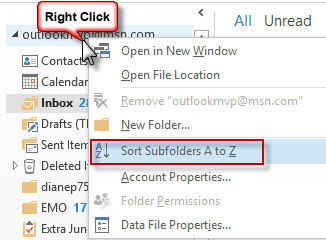
When the folders are in random order and you want to sort them in alphabetical order and retain the ability to move the folder, right click on the mailbox name and choose Sort Subfolders A-Z. This sorts the folders in alphabetical order; it is not a toggle that flips between your previous unsorted order and alphabetical.
To sort subfolder of another folder (such as your Inbox), right click on the folder and choose Sort Subfolders A-Z. Note: if there are no subfolders within a folder, the command is grayed.
Outlook 2010
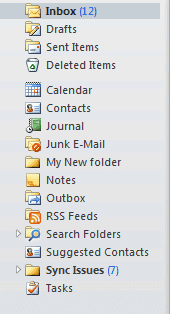
In Outlook 2010 the Inbox, Drafts, Sent Items, and Deleted Items folders are listed first with the remaining default folders and the user-created folders following in alphabetical order.
The folders in the Favorites list in the Mail module, and in the Calendar, Contacts, Tasks, and Notes modules can be arranged in any order. Drag or right-click and use the Move up and Move down commands.
Outlook on the web
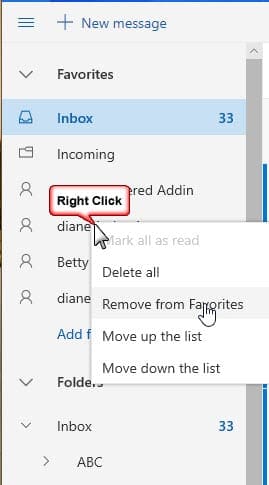
Folders are sorted in alphabetical order in Outlook on the web. As of this writing, you cannot change the sort order in the folder list. If you want to use a specific order, add the folders to the Favorites section at the top of the folder list by right-clicking on a folder and choosing Add to Favorites. Either drag up or down to change the folder order or right click and use the Move up the list or Move down the list commands.
Remove folders from the list by right-clicking and choosing Remove from Favorites.

Kristin says
This is a long shot...but how do I go back from having it sorted A-Z?
swarupa suaro says
Thank you. it helped.
Ian Buda says
How do I sort folders and sub folders in Outlook 365?
Diane Poremsky says
As in Outlook desktop software? The same - using the A-Z button or just drag the folders. IMAP folders can't be sorted - but folders in Exchange and pst can be. Folders in Outlook on the web can't be sorted.
Becky says
When I choose my sent email folder or my subfolders under my inbox, the list is supposed to populate newest to oldest, which it does. However, it always defaults further down on the scroll bar rather than at the top of the list and I'm constantly having to scroll back up to the top to see the beginning of the list. How do I fix it so that whatever folder I am accessing starts at the actual top of the list instead of partially down it? Microsoft 2013 version. Thanks!
Diane Poremsky says
When you switch folders, the last selected message remains selected. Press the Home button on the keyboard
ribbonto jump to the top.Diane Poremsky says
OOPs - typo - that was supposed to be "Press the Home button on the keyboard to jump to the top."
Don Ramm says
I have lost control of the placement of the Inbox in Outlook 2013 on a shared account. The users who share the account (Pattie & Marissa) want it at the top of the folders for that account.
On Pattie’s Windows 7 computer with Outlook 2013 I drag it up to the top, want for a few seconds, and it moves back down below Deleted Items. Right-click and select “Move Up” a few times to get it up were they want it, do anything with the folders, and the Inbox drop back down under Deleted Items. Seems that Inbox is the only folder that exhibits this behavior. I move other folders (Drafts, Outbox, Sent Items, Junk Email) and they stay put.
Marissa has a Windows 10 computer, Outlook 2013, and has same problem.
I set up Pattie’s account on another Windows 7 computer/Outlook 2013 and same thing happens.
Anyone ever had out-of-control Inbox problems and have some advice?
Diane Poremsky says
Is it an Exchange mailbox? IMAP folders can't be sorted.
Are these the only computers the mailbox is open in? Do you have the Sort A-Z button off?
Don Ramm says
Yes, Exchange Online (Plan 1) email accounts.
I have the account in Outlook on three computers - one was a test system that was only logged on long enough for me to see if the Inbox behaved in the same way on a third system.
Sort A-Z was disabled.
I logged back in to all three systems this evening to check the "Sort A-Z" button. While logged in on the two computers that matter, I moved the Inbox to the top on one and after a few seconds it went back to the bottom. I did it on both at the same time...and no more diving to the bottom by the Inbox. I opened and closed Outlook and Inbox stayed in place at the top. I engaged and disengaged "Sort A-Z" and the Inbox stayed at the top whether "Sort A-Z" as on or off.
What happened? I have no idea. Hopefully, it stays that way.
Diane Poremsky says
Fingers crossed. :)
Krishna Bala says
Thank you! This helped. I like seeing the folders sorted.
Clifford Bernard says
I'm on Outlook 2016 and if I create a new folder I have to drag through a long tree of folders to place it where I want it. I don't see any option to add at the point of creation other than the inbox which puts the selection at the top of the tree (my folder list is huge), so it's a lot of dragging or up/down arrow moves. Any suggestions would be greatly appreciated.Thanks
Diane Poremsky says
If you select a folder, it should be placed as a subfolder of the selected folder. If you select the root folder (your email address), to create a folder at the same level as Inbox, it will be placed at the top of the folder list (unless you use the option to sort folders a-z, then it will self-sort after creating).
This should work (but isn't working in my build, i'll file a bug report on it): if you want a folder at the inbox level, select a folder near where you want it and create it as a subfolder, then drag it into the position.
Adela says
THANK YOU so much Diane for your very explicit help with the sometimes intricate matter of folders!!! If I may ask:
1. It seems my Outlook 2010 (W10) doesn't have the "Show All Folders A to Z button on the Folder tab" so I can alphabetize them with one click, because some of my folders run away to other positions...when I'm not looking, lol!
2. Is there a way to avoid those indented sub-folders? I like all my folders straight in one column...besides their placing themselves under the wrong folder names too.
Will appreciate a lot to know how to do these 2 things (of the hundred others that give me headaches). Thanks again for your great contribution in helping us out! :o) Adela
Zachary Madrigal says
Is it possible to sort subfolders in Outlook 2016 based on when the item was created?
Diane Poremsky says
No, sorry, it is not. At least not automatically. You can arrange them in that order as you create them.
Angel Mar says
Diane, seems like when you move a subfolder to a different location it unsorts the sort i had. Are others having this issue? Is this normal functionality or not.
Diane Poremsky says
It should not... unless the folder is in an imap account or Exchange in online mode - those folders load after the Favorites is displayed so the folders may mess up the sort order.
Penelope Dishaw says
Very helpful thanks so much for posting this info
sandp says
In Outlook 2010, in my Personal Folders, the Inbox, Drafts, Sent Items, and Deleted Items folders are listed first old my old computer. After moving it over to the new computer, only the Deleted Items folder was at the top. I manage to move Inbox and Sent to the top, but the Drafts folder remain in alphabetical order below. I finally just Favorited it so that I do not need to scroll down to find it. Ideally I would like to have it in its proper place. Thanks in advance.
sbuser says
Yeah. It just doesn't work - at least not with my IMAP Account in Office 2016. Folders revert to the same order after closing and reopening no matter what I do. (That order, fwiw, is: Inbox, Drafts, Sent, Trash, "C"(custom folder, name starts with "c"), Junk, Outbox, "S" (custom folder, name starts with "s"), Search.)
Diane Poremsky says
Yeah, the imap folder list resyncs from the mail server when outlook is started, so you can't sort.
Vchar says
Is there anything we can do to resolve this problem?!
Diane Poremsky says
No, its a limitation of IMAP accounts in Outlook. Microsoft would need to change it.
sanah says
hello, my emails are now arranged alphabetically. how can i change it to show new emails first
Diane Poremsky says
You change the sort order at the top right of the message list - expand the menu and depending on your version of outlook, will either change the arrangements from the menu or expand Arrange by then choose.
Depending on your view, you may be able to click on the date column to change the sort order.
BoB Brown says
How do I sort eMAIL folders with Windows 10, IE11 Windows with the latest and all other upgrades? I hope?
Diane Poremsky says
Are you using Outlook on the web? Those folders cant be rearranged.
Ian Mead says
March 11th 2017
Hi Diane,
I would like to arrange folders in Outlook 2010, and 365 Home so that they are arranged as such from the example below
1.0 - Engine
(sub Folder) 1.1 - Spare parts
(sub Folder) 1.2 - Monitoring
(sub Folder) 1.3 - Service reports
(sub Folder) 1.4 - etc all the way down to 1.9 in sub folder
(sub Folder) 1.9 - ect
(sub Folder) 1.10 - Work schedules
This I can create, however when I reopen Outlook, I find that the folder tree goes back to
1.0 - Engine
(sub Folder) 1.10 - Work schedules
(sub Folder) 1.1 - Spare parts
(sub Folder) 1.2 - Monitoring
(sub Folder) 1.3 - Service reports
(sub Folder) 1.4 - etc all the way down to 1.9 in sub folder
(sub Folder) 1.9 - ect
i.e. how to keep the above oration, instead of folders jumping into order. Like desktop icons, how to manually arrange, not lock to Auto Grid.
Many thanks for any advice how to overcome this automation of Outlook
Kind regards
Ian B Mead
Chief Engineer
Diane Poremsky says
2010 is forced to alphabetical - so 1.10 will sort ahead of 1.2 (I thought space came before numbers, so 1.10 would be after 1.1.) - 2013/2016 allow you to adjust the sort order (by turning off Show A to Z on the Folder tab). The only way to control the sort order in 2010 is by the names - for numbers, use equal # of digits - 1.01, 1.02.
Dan says
Microsoft didn't think to allow moving the Search folder in the folder list for Outlook 2016/365. Consequently you have to navigate to near the bottom of your folder list everytime to find what you are searching for versus having it located or allowing users to move it more conveniently near the top of the folder list.
Diane Poremsky says
If you use the search folders a lot, you can add them to favorites, just like any other folder.
Sue Chapin says
I cannot move the other folders. I can right click and highlight them and move them, but the will only settle back in alphabetical order . This new folder appears to be a subfolder of Inbox. I have also tried to create a new folder with no luck. Old system was simple. Right click at bottom of list and option to create new folder appeared and went in the list alphabetically. Thanks
Diane Poremsky says
Look on the folder tab for Show All Folders A to Z - it should NOT be highlighted. If it is highlighted, you are forcing outlook to sort the folders.
When you can rearrange folder, it will look like this screenshot.
Sue Chapin says
I have Outlook 2013. One of the folders I set up positioned itself under the Inbox. I have tried the suggested ideas to move that down with my other folders in alphabetical order. No luck. Thoughts?
Diane Poremsky says
Is it a subfolder? Can you move other folders around? The Show all folders A - Z button should not be highlighted if you want to arrange folders in any order. If you want to sort A-Z, the button needs to be highlighted.
Robin Hambly says
Hi we use numerical folder numbers for our contracts which was working fine upto 999. Now we've gone on to our 1000 contract it sits above all the other folders. Is there away to overcome this?
Diane Poremsky says
This is a common problem with numbers - outlook (and many other apps, as well as windows) considers numbers used in text fields as text and sorts them as text, so leading 1's always sort above leading 9's. You have 2 options: add a leading 0 to the earlier ones so all have 4 digits or manually move the folder (if using 2013 or 16) to the position you want it at.
Natasha Harris says
How do I stop my cursor from moving up the list when I am re sending an email? Need to be where I left at and it will put me at the very top from the last email that I sen out. Annoying.
Diane Poremsky says
Sorry I missed this earlier - it sounds like you need to change what happens when a message is closed on deleted. This setting is in File, Options, Mail at the very end of the list.
Scott says
How do I get all of my Data files in outlook to stay alphabetized? currently when I bring in a existing data file or create a new one it drops them in different places?
Diane Poremsky says
Outlook 2013/2016? Try clicking the button to sort folders A-Z on the View ribbon. It would apply to all folders though.
Susan Ferreira says
how do I reset sub folders to numerical order
Diane Poremsky says
Click the Show all folders A-Z button on the Folder tab - when it's highlighted, it's turned on and All folders sort A-Z. To change just subfolders, right click on a parent folder and choose sort subfolders a-z to sort the subfolders.
Evelyne Bos says
That does not work (anymore) on Microsoft of the Web? It changed a few days ago?
Ray says
Why do they keep rearranging themselves?
How do I stop the rearrangement?
Diane Poremsky says
Clicking the Show All Folders A - Z button will lock them in alphabetical order. With it off, you can rearrange the folders.
If the folders on the Favorites tab are restoring, do you have imap folders or folders in an Exchange account that aren't cached locally?
James Thomas says
Is there a way to select a folder and have the multiple sub-folders within that folder sort Z to A instead of A-Z. I mean sorting A-Z is fine for those who have a few folders but its not the same anymore if you have like 50 project folders and each folder has around 300 to 400 sub-folders which keeps on increasing on an every day basis as more and more projects gets added to the program. All the newer projects being the larger in number, always end up in the very bottom because of the A-Z sorting and so much time gets wasted in all the scrolling up and down to get to the current project I am working on. I can manually re-arrange the folders but we are talking about roughly 17500 folders to move around - in however small amount of spare time I have during the day, a manual re-arranging of folders of this magnitude could take months. Please let me know if any one knows any tricks to auto arrange Z-A instead of A-Z. If I were ever set up a program like this in outlook from the start - now I will know to start manually arranging/sorting Z-A from the get go - but I was handed this program as the program coordinator just a couple of months ago and as the number of projects increase so does the number of folders and slowly but sure all the scrolling is become a pain in the behind. Please help if anyone knows a solution to my problem
Mike says
This is why I hate Microsoft, 2013 and finally common sense to allow arrangement of folders. PS. Drafts is the least used folder out of all of them and it has dominance in hierarchy. Thanks Microsoft for creating sub-par products.
Gift of Time Canmore says
Didn't read all posts but caught the one for Outlook 2010 - to exit and restart and boom all my subs ordered alpha. Great tip, thanks.
Hello says
I'm using MS Outlook 2013 with Windows 7. Previously I was able to drag and drop folders at will with no issues, however since reinstalling windows i've been experiencing issues.
I am able to drag and drop folders as per normal, however when I close and re-open Outlook all folders will revert back to A to Z order.
I've read the above article (and comments) in full, and i've read similar articles but cannot see a reason / solution for this issue.
If it's relevant, i'm using an IMAP email address whereas previously I was using a POP3 email address.
I am the one user on the PC and as such I am set as the administrator
Diane Poremsky says
If you are talking about re-ordering in the Favorites list, yes, IMAP is definitely a factor. It could be a factor for the folder list too. If you wait for outlook to load then right click on a folder and choose New Window, does the affected list use your sort order?
thelexn says
The solution was: we deleted the user´s outlook registry key, then everything was fine again...
Diane Poremsky says
Thanks for the update!
thelexn says
We have 2 out of about 80 users that are not able to rearange the order of the folders in the navigation pane of outlook2013 (new feature). Also, the button in the ribbon "Folder - Sort subfolders a-z" as well as the buttons move up (or down) are not showing up. Means they are not visible. Drag and drop isn´t possible as well.
I searched the whole internet :-) but could not find any solution or reason for that...
I would appreciate any help you can give! Thanks in advance!
Diane Poremsky says
Hmmm. It's unlikely a group policy - it was grayed it out when I set it using policy, not gone. Plus it would normally affect the other 78 users too. Did they customize the ribbon? That could remove the button but would not affect the ability to drag or use the right click buttons.
Are the buttons missing in safe mode? To open Outlook in Safe mode: Close Outlook then hold Ctrl as you click on the Outlook icon. You'll get a message asking if you want to start in Safe mode. Click Ok. If it's back in safe mode, check addins - something may have disabled it. If those 2 are the only users of a specific addin, you could try disabling the addin instead.
Have you tried using repair on one of the computers? Resetting the ribbon is probably not a good first step in this case because it seems like the feature is totally gone, like it was an upgrade from an older outlook gone bad.
Tomasz says
Hi,
Are you aware of any way in Outlook 2007 to get the Inbox, Drafts, Sent Items, and Deleted Items folders grouped at the top like they are in O2010-2013?
Diane Poremsky says
No, sorry. The folders can't be moved in the older versions - they are stuck the way Microsoft programmed. (Outlook 2013 lets you drag folders around.)
Tomasz says
That is what I thought :( Thank you.
john seed says
I rebooted and now only Outbox remains incalcitrant
john seed says
In Outlook 2010 Sent Items, Outbook and Drafts mysteriously moved from the top of Personal Folders into alphabetical order below, most annoying, how can I get them back where they belong?
Foo Bar says
Folders begining with swedish characters ÅÄÖ should normally be last in the sorting order however it's not doing that for that particular mailbox. I've done tests and if I create folders in another shared mailbox it works fine. It's Outlook 2010 with Exchange 2010. (same sorting "error" also occurs in OWA). It's a tricky one this one. :)
Nathan Daniels says
In Outlook 2007, My subfolders are arranged numerically per first significant digit, e.g. 1, 11, 12, 2, 20, etc.
Is there a way to get it to arrange them in true numerical order, e.g. 1,2,11,12,20?
Diane Poremsky says
Only if you use 2 digits - 01, 02, 11, 22 etc. Outlook sees them as characters, not numbers.
Foo Bar says
Remember it's the folder sorting that's wrong, mail sorts fine. It's a shared mailbox so all users are affected. It should sort the user created folders like this, A B C Å Ä Ö instead it does A Å Ä B C Ö. Resetting the view did nothing.
Diane Poremsky says
Oh. I misunderstood. Resetting the view won't help the navigation pane. Its a shared mailbox so resetting the navigation pane probably won't do anything but clear the Favorites list.
Are you using Outlook 2010 or Outlook 2013? It looks like Outlook sees everything as A,B,C. I'll see if i can repro it.
Foo Bar says
Seems like the folder sorting in exchange 2010 is based on some setting I can't find. We have a mailbox that sorts folder that the users have created in the inbox wrong. The problem only affects that specific mailbox. Changing language setting on the mailbox does not help, It also occurs in OWA so it's not an Outlook issue. Any ideas? Our regional settings in Windows is correct and works for all other mailboxes.
Diane Poremsky says
Was the view customized? Are you sorting by dates? If so, by Received, Sent, or Modified date?
My first step would be to Reset the view or switch to the default view.
Sam says
My archive (personal folder)is at the top int navigation pane and it is counting against my mail quota. How do move it to proper location in the navigation pane so it does not count against my email size
Diane Poremsky says
That indicates that it is the default data file. What type of email account do you use? If its pop3 or imap, is mail being deleted from the server?
Adi R. says
I can confirm this behavior
Allister Frost says
I think your theory could be right. I have one IMAP mailbox and if I leave this at the bottom of the favorites pane, then the rest of the order of the other folders remains unchanged. If I move the IMAP folder to anywhere but the bottom, the order of the other folders goes crazy when I restart Outlook! If I remove the IMAP account the folder order remains fixed. Another IMAP glitch for Microsoft to fix I guess...
Allister Frost says
Too true! I'd vote this to be top of the list for any UI improvements in future updates. Having folders mystically moving of their own accord is a horrible UX!
Diane Poremsky says
This is in the Mane pane;s Favorites list? Are you using IMAP? Some users think that imap folders can cause them to resort if they are at the top and moving them to the bottom of the list fixes it. I haven't tested the theory yet, when mine are sorted wrong, I restart Outlook and they go back to the preferred order.
Jim Brennand says
How do I sort my contacts list in alphabetical order in Outlook 2010
Diane Poremsky says
In the Contact list or in the Address book?
In the Contact list: sort by the full name field.
In the address book, go to File, Account Settings, Address book tab. Double click on Outlook Address book. You can Show names by to First Last or by File as format. If File as isn't in last, first order, I have a bulk change macro.
Larry Stephens says
I'm using 2013 and have a shared inbox from my exchange server. When I don't use 'Show All Folders A to Z', the shared inbox folder and the shared deleted items folders move up and down the folder list after reading unread emails. At times the inbox will be sorted at the top of the folder list and other times it will be listed below deleted messages and same with the deleted items folder. The both move up and down the folder list after reading unread messages. Do you know why this is happening and how to stop it?
Diane Poremsky says
You could try closing outlook and restarting using the /resetnavpane switch.
I haven't seen this exact behavior, but have seen weirdness with the navigation pane. My problem is the order of the folder in the Favorites list changes when i open the mailbox on multiple computers. If its a shared mailbox and other users access it, it could be related to opening it in multiple profiles.
Close Outlook. At the Start search field on Vista or Windows7 Start menu or in the Start menu, Run command (Windows key + R), type or paste
outlook.exe /resetnavpane
Then press Enter (or OK button) to restart Outlook. Note: Make sure there is a space between the words.
larry says
In the favorite section of Outlook 2007, how do I lock the order of the folders I've placed in the Favorite section? That is, all too often when opening Outlook for the day, the sort of some folders are not in the same order as they were when Outlook was closed the previous day. Some days the order remains the same. How to lock the folder order once I have them set so I do not have to re-order them we opening Outlook?
Diane Poremsky says
Unfortunately, at this time they can't be locked. I've found that it sometimes helps to close and restart outlook. And yes, it is very annoying - in my case I think its because i use the same default email account on 3 computers but have different additional accounts in the profiles.
Lynn Harty says
Is there anyway to make your grouped mailbox folders (inbox, drafts, sent items and deleted items) stationary when you move up and down the folder list?
Diane Poremsky says
I'm not sure I understand the problem. The folders should be stationery. What version of Outlook do you use?
Boontawee Home says
IMAP Outlook2013 can't sort order the top level folder, right? ( Inbox, Sent Items, Drafts, Trash, Spam...)
Diane Poremsky says
You can sort A-Z or arrange as desired. (new outlook 2013 feature). right click on the imap folder name (usually your address) and select sort A-Z. Click and drag to arrange.
Dan Benson says
Hi, appreciate your comments. I am attempting to re-sort project folders in the in-box; when I attempt to drag a folder I am unable to insert the folder between two other folders; it will always end up in one of the two folders. Any solutions to this problem?
Thanks,
Dan
Diane Poremsky says
What version of Outlook? You can't sort folders in the navigation pane, only in the Favorites list. Outlook 2013 is the first that allows sorting within the navigation pane.