The Problem
When you attempt to remove an add-in, the dialog tells you that only an administrator can connect or disconnect the add-in:
This add-in is installed for all users on this computer and can only be connected or disconnected by an administrator.

The Cause
Trying to remove an add-in that was installed using the option “All users” will result in this error message. If the add-in was installed for the current user this message will not appear.
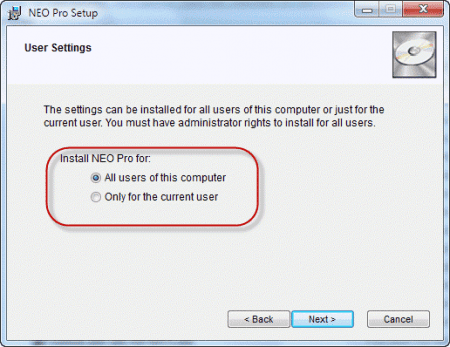
When you install software, the screen may have an option to install it for the current user or for all users of the computer as is shown on this screenshot.
Most users click Next without paying much attention to this screen (using the default set by the developer), or set it for "All users" so the add-ins works for all Windows accounts.
The Solution
Close Outlook and restart it using Run as Administrator then remove the add-in. Close Outlook and restart Outlook normally when finished.
To Run as Administrator, right-click on outlook.exe or the Outlook shortcut and choose Run as Administrator.
If Run as Administrator is not listed, hold Ctrl+Shift+Alt as you right-click on the shortcut to show the full menu.


Aaron Offsky says
nope. When I run Outlook as admin, I am prompted to create a profile. If I don't create a profile, Outlook closes. If I create a dummy profile, Outlook returns an error that it can't reach the non-existent dummy server and will not proceed to the Outlook UI.
Further, the "outlook.exe /pim noemail" trick does NOT work. In this mode, unless I sign in with a Microsoft 365 account, the Options menu is disabled. I cannot access the add-ins dialog.
I refuse to create a profile just to remove an add-in. There has to be a more straightforward way to manage this.
Gabe says
I second this. I'm in Active Directory environment and my administrator accounts do not have 365 access (and why should they). So, how do I access an Outlook instance to do administrative work?
Diane Poremsky says
Can you disable the addin by opening outlook using run as admin?
Dan says
Thank you!!!
Steve says
thank you...learned that Adobe DC auto-installed an add-in into Word. And then sent me a popup telling me my DC subscription was expired and wanted me to re-up just to save my Word file as a PDF. So frustrating. Your post helped me remove the add-in.
Windows 10, Microsoft Office 2016, Adobe DC (which is getting uninstalled as I write this). Just a brutal move by Adobe.
Brian Kemmerer says
THANK YOU!!!!
Straight forward, easy to understand and well formatted.
Many thanks!!!
Mary says
This was just what I needed help on. Unfortunately didn't work. Windows 10 Pro with Outlook 2016. I started Outlook with Run as Administrator and still got the message about not being able to make changes. I'm totally lost here. Why would that not have worked?????
Diane Poremsky says
Was it the exact same message?
Perry says
Can we search information in this website? I didn't find the search icon here. The articles here are really useful.
Diane Poremsky says
There is a search box in the left sidebar. On mobile devices (or narrow screens) it will be near the bottom of the page.
Mongi Bidani says
Thank you very much wonderfully it worked. Again thank you.
John says
Thanks a lot,
the "hold Ctrl+Shift+Alt" did the trick for a similar, excel related, problem
Anka says
If the above mentioned solution didn't work, you can click on "windows button" to open the start menu. And write "winword /safe" while on the menu. Then right click on "Microsoft Word - Run command" and click on "Run as administrator". The only difference is that you run Word in "Safe Mode".
Diane Poremsky says
running word in Safe mode won't help you if Outlook addins are the problem.
Rick says
What do you do if Outlook 2016 won't open as administrator on 5 separate systems? This is pro plus installed via office 365.
Diane Poremsky says
sorry i missed this earlier. What happens when you try to open it?
Mia says
Just press shift right click for the "run as admin" option.
Oscar says
Wonderful--been trying to do this for 2 days until I found your help
water says
thx its working to me..
ying says
How to modify the add-in for the user without admin right?
carpetmesserupper says
worked for me, however.... still get an error message about the particular addon/addin not being available, on each startup of outlook. What a mess outlook seems to be sometimes.
Diane Poremsky says
What version of outlook and which addin?
Brandon says
Thanks so much - that worked a charm. On my Win8 box, it's CTRL+SHIFT but it's the same idea. (What Bill said). See? 2 years on and you're still helping people with that advice.
Bill Darron says
[Ctrl]+[Shift] worked to right click and bring up the Admin menu. I didn't need [Shift].
Bill Darron says
(I meant I didn't need [Alt] )
KaytonK says
I have the same thing Peter, one user out of 50 on the same Terminal Server can't enable it, even tried making them an administrator and domain admin
behnam jamshidi says
thank you diane perfect solution. Behnam
Linda says
Even when I choose "run as administrator" I still get the "This add-in is installed for all users on this computer and can only be connected or disconnected by an administrator." message
Katherine Boys says
Yes, me too, please solve this as Outlook takes too long to start with all those unnecessary ad-ins.
SARAH WETHERBY says
I'm having the same problem. I can't copy my pst file to an external hard drive because of the add ins, and my computer is nearly on life support. Please help.
Diane Poremsky says
The addins shouldn't be dependent on the pst path - but it works best if the pst is on a local hard drive, not external (or a network drive) because it read/writes to the file constantly. The same applies to ost files (which are harder to move than pst files).
Mia says
You may have to login as local admin then Run-as admin.
Peter Desmond says
Thank you Diane - very helpful insights. Peter
Dana Beveridge says
Diane You are Amazing! I do tech support and have been trying to help a caller with this issue all week. Thank you Thank You
Angel Gayle says
Thanks, this was very helpful! I was actually trying to enable an add-in, but the same principles applied.