This is fixed in build 16.0.6568.2036. To get the update manually, go to File > Office Account > Update Options > Update Now. Note that after installing the update, you may need to let Outlook download all POP3 mail one last time.
The latest update for Outlook 2016, build 16.0.6568.2025, is causing problems for people who use POP3 accounts and have Outlook set to leave mail on the server for a period of time. Instead of deleting the aged mail from the server, it deletes all of the mail. Ouch.
Until this problem is fixed, there is a simple workaround: users can uncheck the option to delete mail after a period of days, while leaving the "leave on server' setting checked. This will leave all email on the server for a few weeks, until the problem is fixed. To do this, go to File, Account Settings, double click on the POP account then click More Settings. The leave on server setting is on the Advanced tab. Untick the option to delete it after a specific number of days.
If it were only that easy... there is second issue with this update and POP3 accounts. POP3 mail left on the server keeps downloading, over and over. The usual fix when this happens is to not leave mail in the Inbox on the server, however, this won’t help someone who wants to leave mail on the server.
Switching to IMAP will solve this problem, but because there may be other issues, I recommend reverting to an older version and waiting for the next update.
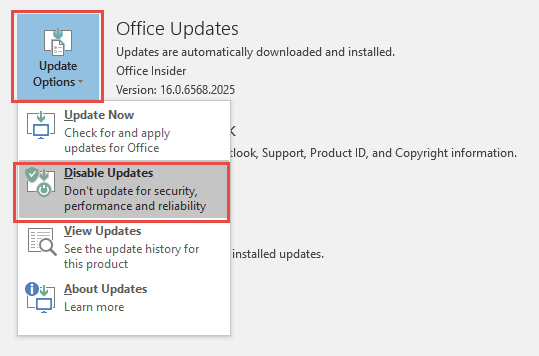
To revert to an older build of Office 2016, first, go to File, Office Account, Update Options and Disable Updates then create an appointment on your calendar to re-enable updates in early to mid April.
Open a command prompt as Administrator. In Windows 10 or 8.1, right click on the Start button and choose Command Prompt (Admin) then type or paste (right click in the command prompt screen) this command line to revert to the February 9 2016 build 16.0.6366.2068 (it's all on one line - make sure you use the leading double quote "):
"C:\Program Files\Common Files\microsoft shared\ClickToRun\officec2rclient.exe" /update user updatetoversion=16.0.6366.2068
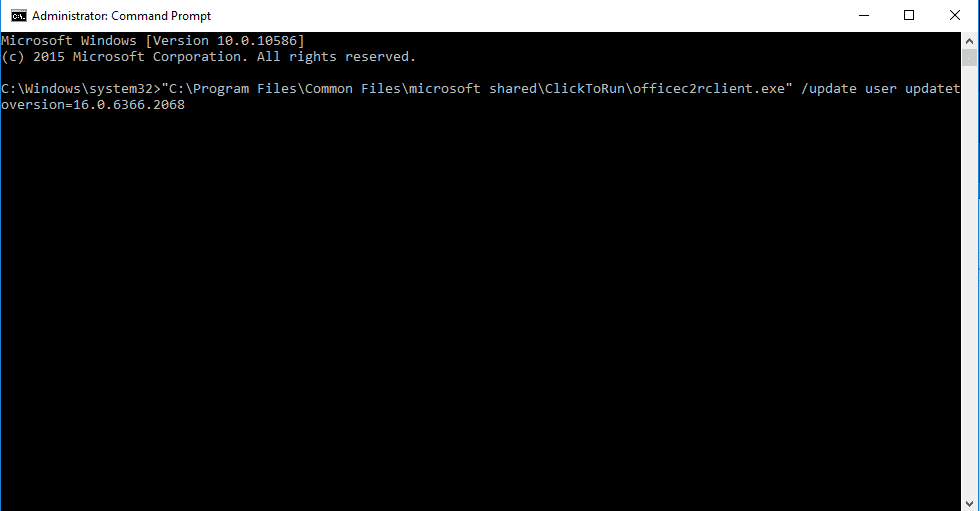
It'll take a few minutes (or more - possibly about as long as it took to install Office) to update the installation and you may need to reboot your computer.

Hugh Lovatt says
Running 2016 on new machine. Using settings as 2010 on old machine but cannot log into my account. Why?
Any help please.
Neil says
Hi Diane
i am usuing outllok 365 on windows 7 for a year. Suddenly I keep getting time out errors when trying to retrieve mail using POP3 accounts.
I do have one mailbox which is over 5GB.
Have disabled all firewall , still an issue. I have another mail client which works fine if I run it before Outlook. Once I run Outlook the other mail client also times out, seems like Outlook has issues and blocking the port. I am able to send mail OK
I have reinstalled outlook - same issue
Any help would be greatly appreciated
Diane Poremsky says
What port are you using? Do you have two-factor authorization enabled? Are you using more than one email client to check mail? POP3 puts a lock on the mailbox while its checking mail and this locks out other clients.
Tom says
Hello
A lot of my friends are not receiving my emails ...I have Outlook 2016 POP on windows 10...I even tried a test email emailing myself and it was a no go ...Somehow I blocked myself and my buddies please help
Diane Poremsky says
Sorry I missed this earlier. Did you figure out the cause? What antivirus/security software do you use? Some will filter outgoing mail and block it based on blacklists or ip addresses and domains marked as spammers. If you use a signature, adding a phone # to the signature can trigger it too.
Manish Shah says
Outlook 2016 with Windows 7 SP1.
Search does not work. I have tried Rebuilding Index file also. It is still working fine with Outlook 2007. Can you please help ?
Diane Poremsky says
Sorry I missed this earlier. Is it still not working? Do you have all updates installed? What exactly happens when yOu try to search?
Judy says
I just started with this issue on 1/21/2017. My account was just fine on 1/19/2017 -- now I am having the issues described above. I keep deleting and they keep coming back. The emails that are specified to go to a specific folder are going to that folder and my Hotmail inbox.
Microsoft is the most ridiculous company anymore, things are working just fine and they change it and it is crap and we have to spend hours to days trying to get things fixed -- AND W/O THEIR HELP I MAY ADD because they hide behind forums and crap.
I don't have time to do all this but I have no choice. I just want to get my emails back to the way they were 2 days ago.
If I put my computer back to the 19th will this fix it? or will it pop back up anyway?
Diane Poremsky says
Rolling the computer back will probably not fix it, but if an updated version of Outlook 2016 was installed right before the problem started, rolling the office install back a version might fix it.
Do you have Outlook set to delete mail from the server when it's downloaded using pop3? Deleting mail from the server will solve this problem.
As long as you are using POP3, you can create a rule to move (or delete) mail that arrived before 1/21 - it should be the first rule in your list and will take care of duplicates.
Peter Van Buskirk says
I just today encountered this problem, and found your information here.
It looks like I have Outlook 2013, and my most recent upgrade was to 15.0.4867.1003. Is there an update available to Outlook 2013 that will fix this, and how do I load this? many thanks
Diane Poremsky says
When Outlook 2013 has a problem also in 2016 the fix is usually 3-6 months behind, so it should have been fixed by now. I'll check.
Christine says
Now I can't even open outlook.2016 on my lap top. Says can't open, failed to open files.
Christine says
I've just started having problems with windows live mail and now outlook 2016. Problems started 9/1/16. I have all my email downloaded on my computer but my desktop computer with windows live mail 2012 keeps downloading all the emails again from the internet. The outlook 2016 on laptop says disconnected but I'm on line. What a pain! If my messages are downloaded on my computer, will I lose those if the server deletes my emails? I have a Hotmail account and outlook.com account. They're synched. Why didn't they warn people about these patches that were going to cause these issues? I don't want to lose the emails on my computer. What should I do? What if I start a new outlook.com email. Will that help me for the future emails? Thank you!
kenn says
July 20, 2016. I can access my email account online through outlook. It is an MSN email account. However, my wife is not able to get her email. We haven't changed anything, and its online, so we don't need to worry about settings. Is there someone we can call :( ...doubt it. The site says there's a problem, but it doesn't offer a solution, so her email account is all locked up. Any ideas?
Diane Poremsky says
i'm not aware of anyone to call - sometimes the answer desk can help, as long as you can get online. Was her account moved to the new server yet? It's possible it's a transient error that will go away.
You can check service status at https://portal.office.com/servicestatus -
Zoe says
Hi, I am able to send email in Outlook [POP3] but not receive, I get this error:
error [0x800CCC0F]: the connection to the server was interrupted.......
Diane Poremsky says
What version of outlook? This is usually caused by Antivirus software scanning email, but antispam scanners may cause Outlook to return this error as well. Disable the email scanning or increase the timeout setting. Also, make sure your firewall is allowing the scanner software to connect to the Internet.
Sheila Nolan says
I keep getting two messages that say Outlook has stopped. I don't know why?
Diane Poremsky says
This message is in outlook desktop? What version? It's often caused by a corrupt file or a bad update.
Angie says
Help! My office is sending appointments and those appointments are coming in every minute or so duplicate? Even the accepted appointments are coming back duplicated every minute or so. We have androids not I phones that the outlook is on too. But this problem is on our desktop and laptop calendars sending and receiving. What to do to stop?
Diane Poremsky says
This is a pop3 account? All appointments are duplicated or just meetings and meeting responses in your inbox?
don says
outlook is deleting my emails from my godaddy domain server, even though I have it set up as imap.
Diane Poremsky says
Do you have more than one computer connecting to the mailbox? IMAP is server-based and only messages you delete would be deleted from the server.
Craig Nickel says
I have not turned on the updates since doing the rollback in March after that duplicate email nightmare. Currently have 16.0.6366.2068. Is it save to turn the updates back on ?
Diane Poremsky says
Yes, it's safe to turn them back on.
Cheslin Coetzee says
when I click on meetings option in outlook i get cannot find meeting room, operation failed, I have no idea why this happens
Diane Poremsky says
How many accounts are in your profile? Is the calendar folder in the same data file where the meeting request is? We've seen issues like this when using an outlook.com account for calendar the meeting is sent to an imap account in the profile.
L Fitzgerald says
Anybody have success yet with build 16.0.6568.2036 to fix the POP3 issues? I'm reluctant to turn updates back on again since the problems were epic with build 16.0.6568.2025 (which I rolled back). Would like to hear a few positives results before I jump back into automatic updates.
Diane Poremsky says
It is fixed in that build.
david burnett says
I followed the above instructions. The net result was that I am now unable to send any email from my outlook client, despite since reinstalling it. The message I get is a send/receive error coded 0x80004005.
I have tried many things to resolve this including running SFC /scannow.
Nothing seems to be able to resolve it. A laptop running against the same mailbox and the same account in the same room has no such problems!
Diane Poremsky says
Can you send email in Safe mode? What antivirus software do you use?
Does the error include any other text? This is a fairly common error code and the description can help point to the problem.
Jack says
Thanks for this info! When the emails in my Earthlink inbox disappeared, the first thing I did was to contact Earthlink and ask them what the heck they did. Then I realized as I was chatting with support that the problem was coincidental with the Office update that had happened that morning. I was going crazy changing settings back and forth trying to fix it, but after the latest update things are good now.
PIANA Romain says
Hi,
https://support.microsoft.com/en-us/kb/3145116 has been updated today.
Information about fixed Build 16.0.6568.2036 has disappeared, replaced by the IMAP Workaround.
De you have any information about this ?
Diane Poremsky says
It was just a problem with the KB article - they updated it but did something that reverted it to an older version of the article.
Sharon says
I am having the same problem in Outlook 2007 with all my emails continually downloading over and over again. I don't have the same settings as in your post before about the new 2016 update. How can I either instal the bug fix to 2007 or revert back to an earlier version. It only started, I think, after a previous Windows update last week, but I've done another Windows update and the problem is still there
Diane Poremsky says
There aren't any updates for Outlook 2007 - Windows updates shouldn't affect it. I have some causes and solutions in this article - https://www.slipstick.com/general/outlook-downloads-duplicate-emails-from-pop3-account/
Marc says
Hello Diane, Does this new fix stop the emails from deleting on the server after download ?
Diane Poremsky says
Yes, it is supposed to fix that problem too (along with the multiple downloads).
Shawn Smith says
Thank you so much for the info. I just passed it along to a friend of mine and I hope it helps him solve his problems with outlook. Thanks again!
Diane Poremsky says
They have released an update build that fixes it - build 16.0.6568.2036. To get the update manually, go to File > Office Account > Update Options > Update Now.
Simon Carne says
Thanks for letting us know.
For those of us who followed the earlier advice to Disable Updates, it is necessary to Enable Updates again in order to see the Update Now option.
Diane Poremsky says
Update Now is manual - so you can leave auto update disabled if you want.
Simon Carne says
How odd! On both my PCs, when Disable Updates has been selected, the Update Now option disappears. (But clicking on Enable Updates restores it.)
Diane Poremsky says
My bad - turning off updates turns off the ability to update and turns it yellow.
Matt Singer says
Is there a corresponding KB# for this good update? My updates use that designation, plus an OS Build #, neither of which match your number above. I believe that a March 1 update (KB3140743) did not fix the problem I was having of multiple downloads in Outlook from a POP account, and I had to revert a second time. There's a new update from March 8 (KB3140768), but I hesitate to allow the update. Any info on this? Thanks.
Diane Poremsky says
This update came out on the 4th or 5th. I don't think there is a kb for the update, only one for the problem - https://support.microsoft.com/en-us/kb/3145116
Barry Brown says
I was getting old emails downloaded on Outlook 2016. I reverted to older version 16.0.6366.2068 and problem is solved. Many thanks. When will we know when we can re-enable updates early/ mid April.
Diane Poremsky says
I should know in about 2 weeks if the update will be ready by then.
Ken Jones says
when I enter this program fix as shown, I get a response " `C:|\Program` is not recognised as an internal or external command, operable program or batch file
I am getting 7 and 8 copies of the same emails emails... what a nuisance!!
Diane Poremsky says
You need the path wrapped in double quotes and there should be no spaces after the \ after it's pasted in the command prompt window.
Beverly says
Thank you so much for this information and fix! It seems to have worked.
Mark says
Thank you very much for sharing this fix, it worked as advertised for me and others at my company. The duplicate emails were just an annoyance, but I also experienced the deletion of ALL my emails from the mail server. That is a ridiculous problem to have made it through Microsoft's supposed QA process.
Evan says
OK, first, you may have just single-handedly helped me hold on to what little is left of my sanity - thank you. But second, I can't find an email address on your site to contact you for support help outside the regular calendar hours. Please email me directly. Thanks.
Diane Poremsky says
My calendar and contact information are at https://www.meetme.so/slipstick.
Johan says
Many thanks!
Sascha says
Hi Diane,
I've followed along your steps but when I run the command in command prompt it comes back with an error "30045-27 (1)". Any way to fix this?
Diane Poremsky says
You could try a repair. It will install the latest build, which will probably be the "bad" one - check it then try reverting again if necessary.
cheryl parrish says
This is horrible and not working
Diane Poremsky says
Any error messages? What happens when you try?
Steve says
Thank you for this fix. It worked for me. My Outlook email is back to normal. Another issue caused by this update is that my .pdf maker add-in button stopped working. After the latest Office update, if you try to make a pdf directly from an Office Word or Excel document, Office crashes. Once I used your fix for the Outlook issue, the pdf issue was resolved as well. Adobe is aware of this problem as posted here: https: //helpx.adobe.com/acrobat/kb/troubleshoot-acrobat-pdfmaker-problems-office.html
Hopefully the next Office update fixes all these problems. Thanks!
D. Brekelmans says
I'm seeing PDF problems of a different kind - having rolled back the version, I can no longer open or save PDF e-mail attachments. I only have Adobe Reader installed, since I create all of my docs in Word, but trying to save a PDF attachment results in Outlook crashing and either attempting a restart, or shutting down completely (depending on how many tries I've done between restarts of the system).
Still, I'm very grateful for this fix so I can at least use my mail without being overrun with duplicates (as a work around I'll forward the e-mail and attachment to another computer from my phone).
Diane Poremsky says
Did it crash on PDF's before? I think there is a patch for a pdf issue in Patch Tuesday updates next week.
S Wronski says
Diane, I just updated my Mac from Mountain Lion to El Capitan over the weekend. Everything went smoothly until yesterday when I started to experience the same email issues as those in this thread. However, I am running Outlook for Mac 2011 version 14.6.1 which I believe last updated on January 22nd. Any thoughts on my best resolution to the problem? Is going back to a previous update of Outlook an option for me?
Diane Poremsky says
I don't think you can go back to the previous version. I'll check with my mac contacts and see if they know anything.
Diane Poremsky says
BTW, did you recreate the accounts in outlook? That can cause duplicates to download = but you should only get one new copy of the message.
J. Webster says
Thanks for posting this, I was going crazy trying to figure out what was wrong with our emails. I installed the updates and have my fingers crossed that all issues will be fixed.
L Fitzgerald says
Yup, same thing happening to me, just realized it yesterday. Feel lucky to have found this post! thanks, Diane!
There's another issue with this update that affects (so far) only Outlook 2016: when typing an email (HTML only as far as I can tell), the cursors jumps back over the last character typed. Super annoying. So it ping-pongs back and forth over the characters while typing.
Can't wait to unload this update... doing it now. I'm sure you'll post when the new update that (hopefully) fixes this is available.
Diane Poremsky says
Yeah, there are issues with typing lagging or being slow, especially withy RTL languages and it's best to remove it. I will update the page when the update is available.
Mirm says
I did revert to the previous version as mentioned and rebooted (and disabled updates!) While the hard delete issue is now okay, I am still receiving duplicated emails! Anyone else experiencing this?
D. Brekelmans says
Hi Mirm - I had a similar thing happening to me, but it turned out that since I quit Outlook in the middle of the download of the 500+ duplicate messages, even though I reverted to the previous version of Outlook using the above method, I had to let the original message download run to completion. Once I let all of the duplicates download one last time, further send/receives are ok and I got only new mail from then on.
Jonas says
I am having a similar problem with a brand new Surface Pro 4 where I am being told :The system cannot find the path specified" - I've tried both the cut & paste and manually typing it in.
Diane Poremsky says
You copied both lines as one? Are you using 32 or 64 bit office?
Diane Poremsky says
Oh, i see the problem - there are a bunch of extra spaces (after each \) added to the command lines when i paste it that don't belong there.
Joe says
Thanks for the excellent write-up and how to revert to previous version. Looking forward to hearing about MS releasing a fix for this.
Mel Field says
Wednesday, when I first noticed the problem on two of my computers, I did some experimentation with different configurations and eventually concluded the problem was related to Outlook 2016 so I contacted Microsoft Customer Support. After an hour of "diagnostics" by the Level 1 technician I was told that a Level 2 tech would call me the following day to correct the problem. A Level 2 tech did call and the problem was resolved in minutes. However, I was terribly disappointed by both Level 1 and 2 Microsoft Customer Service.
The Level 1 tech ended the call by telling me my computer was in great shape. What he did not tell me was that he had stopped all services and apparently deleted some configuration files. Antivirus software was disabled and Adobe Acrobat was unusable (all printers were deleted). Fortunately, I was able to get the computer back in good shape without much problem.
The Level 2 tech apparently performed the fix you described and quickly ended the call. He never told me what he had done, nor did he tell me that he had disabled automatic updates. As a result, I foolishly turned auto updating back on and within hours the problem returned.
I want to thank you very much for your excellent article describing the cause and temporary solution. You've saved me many hours of aggravation.
Tanya Ruff says
Do you have the instructions on how to revert for Windows 7? And THANK YOU. I noticed a problem right away, but I also JUST purchased a surface a new phone so I was driving myself crazy thinking I had an email set-up issue. That's not it... this is definitely my problem.
Diane Poremsky says
The instructions are the same for all versions of windows, but in the older versions you need to find the command prompt - its on the start menu or search for cmd. Right click on it when you find it and choose run as administrator.
Tanya Ruff says
I've followed the steps and unfortunately I'm getting a message that states it is not recognized as an internal or external command.... I'm pasting this into command prompt:
C:\Program Files\Common Files\microsoft shared\ClickToRun\officec2rclient.exe" /update user updatetoversion=16.0.6366.2068
Diane Poremsky says
Do you have quotes at both ends of the file path? Because the path has spaces in it, you'll get that error if you don't use quotes.
"C:\Program Files\Common Files\microsoft shared\ClickToRun\officec2rclient.exe" /update user updatetoversion=16.0.6366.2068
Jonas says
I am on the Surface Pro 4 and am having a similar issue where I am getting the response "The system cannot find the path specified."
I have attempted both a cut & paste as well as manually typing in the line of text and then pressing the Enter key.
Diane Poremsky says
It looks like wordpress is doing something to screw up the command line (it's adding a space after each \) -try the command line in this text file. officec2rclient-revert.txt
Tanya Ruff says
That seems to have done the trick. I can't thank you enough for this interactive and helpful thread. I'll be following you from here on out. :-)
Cel says
Worked for me, too. Thanks, Diane!/ cel
Tanya Ruff says
Thank you for the response. I double checked and entered it with the quotes and received a message back: The system cannot find the path specified.
Diane Poremsky says
What version of Windows do you have, 32 or 64 bit? Same for Outlook - are you using 32 or 64 bit office?
Does it give the full path & exe and say it can't be found or break at one of the words in the path?
Cel says
Diane- Same problem as Tanya. Quotes are there, Office 365 32 bit, Win 10 64 bit. "System cannot find the path specified". No indication as to where in the string there might be a problem. My Outlook has downloaded probably about 1,000+ duplicate e-mails by now! Thanks for your help./ cel
Simon Carne says
Would you be able to update this page when the fault has been corrected?
I am asking, because the previous version of Office 2016 had some faults in other programs that I would prefer not to have to put up with longer than strictly necessary!
Diane Poremsky says
Yes, i will update it when the fix is in - it is expected it to be fixed in April's Patch Tuesday.
Jerry says
Thank You for pointing out this bug! It was causing us problems for the past couple of days wondering what was happening to our emails. We have 5 computers for our small business using MS Outlook to pull emails from Comcast. Comcast said they have no problems and only delete emails from the server after 45 days by default. After changing this setting to NOT having Outlook delete after 15 days, it appears to have fixed our problems!
BUT, now we are occasionally getting the same emails on the same computer's Outlook additional times. It is like it is not properly marking that that computer has retrieved that email, so it brings it in a second or even third time??? Any reason that this might be happening now?
Diane Poremsky says
Its part of the same bug. Reverting to the older version until April is the recommended fix for this.