We're seeing a few errors from Outlook users after upgrading to Windows 10, specifically a message reporting problems sending messages. The affected users receive error 0x800CCC13.
'Task 'email address alias@domain.com- Sending' Cannot connect to the network. Verify your network connection or modem.'
Microsoft is looking into it, but one fix we know works is to open a command prompt as an administrator and run sfc /scannow. Reinstalling or repairing the Office install, making new profiles and other common troubleshooting steps will not fix this issue.
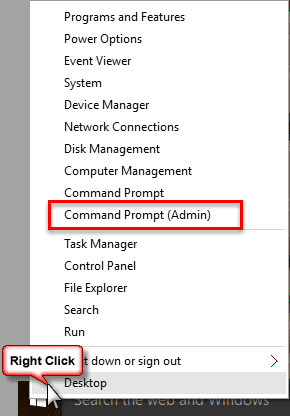
To use the System File Checker right click on the Start button and select Command Prompt (Admin). (You'll need to click Yes to allow it to make changes to the computer.)
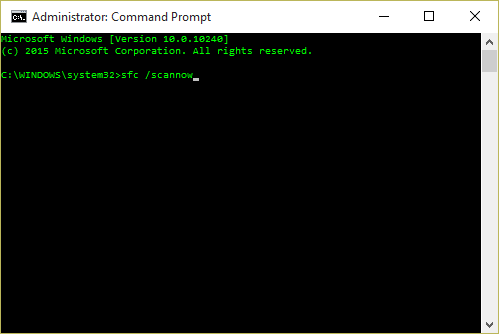
When the Command Prompt appears, type (or paste) sfc /scannow then hit Enter (there is a space between sfc and /).
Once System File Checker is finished, reboot the computer.
Users are reporting that System File Checker reports corruption in mlang.dlI.Mui and Windows.Media.Speech.UXRes.dll.mui. SFC replaces the files and after a reboot, Outlook works again.

Jessica Lee says
I have faced the problem where I couldn't send mail from outlook in Windows 10. Then I was going through the internet searching for the perfect solution of the error. But after seeing your blog I was satisfied with the way of explaining the process of how to fix the error.
Roger Smith says
Got the proper solution thankyou so much!
Obed says
This solved my problem thanks
Aurelia Okino says
My Windows version is Windows 7 - Outlook 2016 after upgrading from Outlook 2007 can't send mail from any profiles. Looking forward to that Microsoft update to fix this problem
Laverne CADLE says
I recently update windows 10 - I also bought and installed Office 365 - my Outlook mail will no longer allow me to RECEIVE I can send but I have to hit the FORWARD cause the Send button is not there - I have repaired I have Changed the setting in control program for incoming and outgoing made sure ports were right numbers repair, rebooted, I am stumped I dont know what to do next HELP
Diane Poremsky says
Have you tried adding a new account (or removing your account and adding it back)? No Send button usually means there isn't an account or outlook doesnt 'see' the account because of corruption.
Pat Thompson says
I cannot send/receive any emails in my outlook account. Keeps prompting me to enter my password. I didn't even know I had a smpt and imap password. What can I do? Thanks!
Diane Poremsky says
The password should be the same for both, but if outlook has problems connecting, it will ask for both. Did it work as expected before? it could be a temporary problem with the internet or the mail server.
Do you use two factor authentication on the account? if so, you need to use the app password in outlook.
JOHN OGUNBAYO says
error Ox800CCC78"
I have tried ''sfc /scannow'' twice They both stopped at 57%
Diane Poremsky says
Did you try making a new profile?
If you use 3rd party security software that installs outlook addins, try restarting outlook in safe mode - if it works ok, then an addin is the likely cause, 3rd party security addins are often the cause.
Alan Cooper says
The scan worked and problem solved...many thanks.
Angie Downes says
HI, I am having trouble sending a batch of emails from QuickBooks, they are sending fine when I send them individually. I have outlook 2016 and Windows 7
Diane Poremsky says
Other causes of sending problems that are not specific to windows 10 and outlook are at https://www.slipstick.com/problems/after-viewing-outlooks-outbox-the-messages-in-it-wont-send/ and https://www.slipstick.com/problems/common-problems-that-cause-email-to-stay-in-the-outbox/
Is it the same error message? If not, what error message do you receive? What exactly happens?
When you say you can send ok individually, are you also sending from QuickBooks or just directly from Outlook?
James says
Tried the sfc method as well as a complete reinstall of office to no avail
Diane Poremsky says
Did you reboot?
Scott Z says
WIN 10 and Outlook 2016 - Can't send any emails!!!!!!! I have tried everything from SCANNOW to un-selecting "My outgoing server (SMPT) requires authentication" , "Logon using XX" NOTHING works and yet I have no issue with the same email account (att.net) on work IPHONE and and on my web based yahoo email account. Come on now Microsoft!!!!!!!!
Diane Poremsky says
Can you download mail sent to the account? Did you verify the server name and port # are correct?
Try using smtp.mail.yahoo.com and port 465 or 587 (requires SSL/TLS or Auto)
Bob says
I am completely stuck. I have tried the above fix method, talked to Comcast and Microsoft, reinstalled outlook, and the 2016 app WILL NOT SEND EMAILS.
sasha says
This is ridiculous- this is my work email, this isn't reliable and now I don't know what to do. It just won't send an email and when I click "send and receive" it says "not implemented"
Diane Poremsky says
Did you do a repair of your installation? That usually fixes the not implemented error.
What version of Outlook do you use?
Paula says
Thanks so much for this solution. I spent hours yesterday trying to get outlook to send on my husbands brand new Windows 10 laptop. Was not popular. Found this post this morning and everything solved. Genius!
Christine Simiriglia says
I've been looking for this fix since April... nothing has worked. You have just made me one happy woman. All fixed! Ten minutes after 5 months of trying.
Roberta says
Good Morning Diane , I hope to find you well. I am having a problem with my built in camera on my laptop as it does not see the camera at all. I have window 10 using Office 2007. My laptop has been shut for almost a month when I used it again had some big updates to do and I could not use my video camera. It gives me ERROR CODE 0xA00F4244(0XC00D36D5). I went to Device Manager and followed the instruction from Microsoft, but it does not work. My Camera is not found anywhere.
Please can you help at all with this?
Thank you very much
Kind regards
Roberta
Diane Poremsky says
After a quick search, it looks like this is a fairly common problem. Probably like this are usually caused by updated drivers, but there can be other causes. Other than that, i don't have any suggestions other than what is in the ms suppoty article (it sounds like you've seen it already). https://support.microsoft.com/en-us/help/13753/windows-10-can-not-find-or-start-the-camera
Yvonne Toepfer says
Followed the instructions when emails stop sending - start - command prompt admin etc. after pressing énter'- nothing happens - just sits there - nothing?
Diane Poremsky says
Which version of outlook do you use?
Kevin Badcock says
We owe a great debt to individuals like this who are a lifesaver. I am so grateful to you for providing a free solution. Thank you so much - you are very much appreciated. This solution worked for me.
Alun Hassall says
You beauty! That's the fix.
Silly Outlook stopped sending messages half way through yesterday. Now my important emails are wizzing around the internet again.
Thanks Diane.
melanie says
when I did this it says that I must be an administrator of a console session to do this. what does that mean.
Diane Poremsky says
Did you do this step:
To use the System File Checker right click on the Start button and select Command Prompt (Admin). (You'll need to click Yes to allow it to make changes to the computer.)
Martin says
This fix worked for me. I have just bought a new Asus laptop and Outlook 2016 would receive emails but not send. I ran sfc and the problem was solved.
Kathy Ames says
I am so frustrated with this new version 10. Can't find things, others don't work as I expected. Now I have urgent e-mails to send out and they won't go. The copy and bcc addressees just underline in red and I am told to correct or remove from the e-mail. The command you suggest does not come up as suggested. This is a brand new laptop and I wish I had never changed
Diane Poremsky says
What version of Outlook are you using? If you right click on the red underlined names, what do you see?
Robbie says
I have tried using the sfc /scannow, but after scan it says only some of corrupted have been fixed. I tried scanning again, but same thing happened, also after rebooting my laptop
Diane Poremsky says
does it say which ones were fixed and which weren't? It might be finding problems with more files than just the ones that affect this.
Arthur Green says
Outstanding thank you very much
Stacey says
I have done as the above say and it hasn't worked!!
I hate the new update - the menu/app page has disappeared, Netflix constantly freezes!! Never had these problems before the up date - which I didn't ask for or agree to!!
Claire says
Thank you from a techie novice - it worked ! I'm really shocked that I go and buy a brand new laptop and most up to date Microsoft office and they don't work together.
Vicky Agarwal says
This is just awesome....after a many days of frustration....finally sorted out.....thank you for the valuable suggetion...
Marchel says
How do I get into the administrator command prompt? I don't get these options when I right click on my start button
Diane Poremsky says
You are using Windows 10? It should be there.
Mark says
Thankyou work like a dream
Joyce Kay says
Tried typing sfc /scannow into command admin. Didn't work. Any other bright ideas. Microsoft should be ashamed of themselves selling something that is not fit for purpose
Diane Poremsky says
What happened when you tried it?
dhada says
same problem sir/madam.. din't work no crrupt files scanned complete..but still not working..
ty
Diane Poremsky says
What version of Outlook and what type of email account (pop3, imap, outlook.com, Exchange)
Mark H says
wow, you've save me so much from so much frustration!
thank you!
Yolanda says
I recently upgraded my Microsoft account. After the upgrade, people that have yahoo, Hotmail, or some business accounts are not receiving my e-mails. I am not receiving an error message. I had no issues until I renewed and upgraded my Microsoft. Please let me know what I need to do to fix this issue.
Diane Poremsky says
is it still a problem?
Erwin says
Thanks - after a few MS articles which didn't help at all, your hint solved the issue. you're GREAT !
Andrew McLellan says
Hi! I spent 90 minutes last night with Microsoft trying to fix this by remotely accessing the computer and they couldn't. I follow this simple process and outlook 2016 now sends. Thank you so much!!!
lester says
Thx..... use the sfc /scannow ...... worked..
Shabeer says
Hello there,
I have setup a new outlook 2016 mail account. Unfortunately I am not able to send any mail from this. It says unable to deliver.Error is [0x80004005-0x000b22-0x000501]. I tried methods (1&2) given by various microsoft forums. Still my problem remails. Could you please advise?
Diane Poremsky says
What type of email account do you use? Does it work in Safe mode? Are you using Norton Antivirus or other 3rd party antivirus? They can sometimes affect outlook, as can firewalls.
To open Outlook in Safe mode: Close Outlook then hold Ctrl as you click on the Outlook icon. You'll get a message asking if you want to start in Safe mode. Click Ok.
James says
Thanks so much! I had tried everything before finding this easy fix! :)
Diana says
Hi I tried the scannow, on an employee computer who can send email from Win 10 Outlook 2013. It came back with a message that states:
Windows Resource Protection found corrupt files but was unable to fix some
of them. Details are included in the CBS.Log windir\Logs\CBS\CBS.log. For
example C:\Windows\Logs\CBS\CBS.log. Note that logging is currently not
supported in offline servicing scenarios.
The scannow didn't work after reboot, he is still unable to send. Messages stay in his Outbox folder, but he doesn't get an error meassage. Any suggestions? I did try to change SMTP to 587, but it wouldn't take it.
Diane Poremsky says
What type of email account? Does it work if you run outlook in Safe mode?
adil says
Thanks, you just save my job!!!!
majorpom says
this is a great fix thanks
Glenn says
When I run telnet mail.tpg.com.au 25 , the server doesn't respond (need to install telnet first).
Something in Windows 10 is blocking traffic to TCP 25. I tried adding an allow rule to the Windows firewall though it didn't work.
I fixed this problem by changing my mail client to use SMTP TCP port 587 with TLS instead of TCP 25. Worked like a dream.
sfc /scannow didn't work for me.
Diane Poremsky says
It's highly recommended to use 587 if the mail server supports it (most do these days), so that is really the best solution.
It's possible the AV software (if using 3rd party AV) hijacked SMTP - otherwise, firewall or the ISP blocked access to it.
Pieter Walraven says
After many searches I stumbled into this advice, and it was the first one not too technical and understandable for those who are not 'techies'. Followed the instructions and it fixed the problem. Was not able to use Office Outlook for many months after the Windows 10 upgrade. Thanks again for this tip !!!!
Henrik says
Absolut a hit used the last 4 hours to solve the issue, so this hint and it was solve din few minutes also for Outlook 2016 on win 10
Thanks a lot
Robert McKay says
Fantastic solution - many thanks!
Dick Sibley says
Absolutely brilliant, did the "sfc /scannow" in the command line and problem resolved. I'd spent hours on the BT support website but with no avail.
Many thanks, this was driving me nuts!!
I'm going to put a link to this solution in my final posting on the BT communities forum site.
Diane Poremsky says
Thanks!
Ric Ball says
Eureka!
Graham Clarke says
Diane
Searched for a fix and couldn't find anything then came across this. It worked so thanks very much. Days of frustration gone.
damian says
I have to say, I am genuinely impressed! This is about the only time a discussion forum has ever proved usedful. I tried everything including resintalling, password changes, port changes, security protocol changes etc etc. Nothing worked.
This did. Thank you indeed for taking the time to post a decent & simple fix. Had to leave it running overnight as the test was slow (maybe needed an hour or two? but it was mignight when I ran the teset) but this morning, it sent all my outbox mail in one go, some of which was a month old!
DBW says
I've posted a very positive comment but it doesn't appear.
Diane Poremsky says
All comments go into moderation and I'm catching up on them after a long US Thanksgiving holiday weekend.
DBW says
I can't thank you enough for this solution to my problem. I have been hounded by this issue for months and months, and have tried every possible suggestion on Google.
You have been a life-saver - thanks a million.
David Plunkett says
I had been having the same problem with my Office 365 version of Outlook. Out of the blue I could no longer send emails, although I could receive it. I too am on Windows 10. Interestingly (perhaps) the new windows 10 mail app would send and receive no problems. Anyway, I was delighted to find that the scannow thing did the trick first time (including reporting those corrupt files).
Hugh Pross says
I am running Outlook 2007 on Windows 10 on a new (Nov 2015) Hewlett Packard laptop. I receive with no problems. If I hit "reply" to a message, it is sent correctly. However if I hit "New" and compose a new message and "Send", it never arrives, even though it says "Sent" in "Sent items"and there are no error messages. I ran sfc /scannow. It reported corrupt files (unspecified) and fixed them. I rebooted. Still no luck with New-Send. Ran the scan again. This time no violations, but still no luck after reboot. Do you have any suggestions. Thanks.
Diane Poremsky says
Id it's in the sent folder, it was handed off to the SMTP server and something happened either server-side or on the recipient side.
What antivirus are you using? Does it scan email? If so, disable the email scanning portion. Some email scanners include a block list that has been known to block legitimate mail.
Hugh says
Hi again, Diane. The problem (Outlook not sending in spite of receiving OK and "Sent" message OK) seems to have resolved itself, although I am not sure what I did. Hopefully it is not an intermittent problem just having a good day. Thanks for your help.
Hugh says
Thanks. I will look into this. I was about to change anti-virus from McAfee to Kaspersky. Perhaps that will solve the issue as I have not had the problem while using Kaspersky before.
Sue says
I have run the scan several times. Didn't resolve the problem. Still cannot send/receive emails in Outlook 2010 since upgrading to Win 10. Using Verizon as ISP. Microsoft tech unable to fix. Very frustrating.
Diane Poremsky says
Did you reboot after running sfc /scannow? What type of email account? Are you getting the Ox800CCC13 error?
Sue says
Yes to rebooting. Have run the scan several times over several days with all apps closed. Yes to error message. Outlook 2010 is very sporadic with sending and receiving. Using Verizon as ISP. Microsoft tech spent 90 minutes Friday via remote attempting to resolve. She is kicking this up to higher level support. I also can't get an account working in Outlook with my Gmail. Google returning message that the app (Outlook) isn't secure enough for them to allow access. Running outlook in a windows compatibility mode won't resolve. Have created new email accounts from scratch in outlook and also created a new profile. Very much appreciate your help.
Diane Poremsky says
Do not use windows compatibility mode - that will make it worse. You need to enable basic auth in gmail.com - see https://www.slipstick.com/outlook/email/outlook-synchronize-subscribed-folders-gmail-error-0x800ccc0e/
Sue says
Thanks Diane. I'll enable the basic Auth in Gmail and try to forward all email to the Verizon addesses to the Gmail account in Outlook. Currently have two verizon accounts setup in outlook, both configured the same and neither working consistently. Seems I'll have to wait for Microsoft to fix it.
Sue says
Rebooted after running the sfc scan several times. A Microsoft tech spent 90 minutes last week creating a new account, a new profile, and troubleshooting all to no avail. Outlook 2010 will send/receive sporadically, but only for a few minutes then it stops working. I can't get a Gmail account working in Outlook. Google message that the app (Outlook) isn't secure enough to allow access to the Gmail server.
Diane Poremsky says
How many accounts are in outlook and are all affected or just some?>
Gmail will work - you need to change a setting in the gmail account to enable basic auth. https://www.slipstick.com/outlook/email/outlook-synchronize-subscribed-folders-gmail-error-0x800ccc0e/
Raffi says
Dear Diane, I need your help. my problem is I added a new IMAP account to my Outlook 10 (windows 7) and started receiving emails normally, but when I try sending I get the error message (0x8004010F) : 'Outlook data file cannot be accessed.'
I tried (sfc /scannow) and also (%appdata%\microsoft\outlook) but same error.
Appreciate any suggestions.
Diane Poremsky says
That usually means the profile is corrupt. Try making a new profile and see if it works.
https://www.slipstick.com/outlook/how-to-create-a-new-profile/
Rob says
Thanks Diane. No, my windows 10 update was only done 1 week ago so I will happily revert back to my previous version of Windows ! I may even reconsider NOT uploading Windows 10 again in the short term :-)
Rob says
Hi Diane, unfortunately the sfc/ scannow does not work for me. When I type this in the Command prompt the message back states "There is as system repair pending which required reboot to complete. Restart windows and run sfc again". Naturally I've tried re-booting countless time but to no avail. As with all the threads in here, my Outlook was working fine until the dreaded Windows 10 update ! Any ideas gratefully received !
Diane Poremsky says
Hmmm. The usual fix for that message is to open the Windows Recovery Environment. Select Command Prompt and type (or paste) this command and hit enter.
dism.exe /image:C:\ /cleanup-image /revertpendingactions
then reboot into windows safe mode and run sfc /scannow
But being that its on a windows upgrade, i wonder if its better to revert back to the old windows and try upgrading again. You have 30 days to revert, assuming you didn't delete the windows.old folder.
Bernard says
Dear Diana
I too had problems sending mail (but not receiving) when I upgraded my laptop and also main computer. From Windows 8 to 10. This was on Outlook 2013. I kept on thinking it was my internet provider. (UK btinternet). The more so in that I could send and receive mail on my two business accounts which are via Exchange.
Running sac /scan now took 20 minutes and worked immediately on both computers. Many thanks and best regards
Bernard
Ron Dunbar says
Hi Diane,
I have not been able to send email through my service provider cox.net using Outlook or Windows 10 mail or several other email clients I've tried, for about two weeks now. The error I’m getting is a smtp server error:
Send test e-mail message:" Your outgoing (SMTP) e-mail server has reported an internal error. If you continue to receive this message, contact your server administrator or Internet service provider (ISP). The server responded: 554 fed1rmimpo109 cox connection refused from 69.242.2"
I can still receive email with my Cox client, just not send. I can set up and sent through my Comcast account but not my primary Cox account.
I have contacted my service provider and they worked on it for about 2 hrs. He then gave up and told me 2nd echelon support would contact me in 8-24 hrs. They did not so I called them and was told since I can send and receive through their Web email client my problem was resolved! It was an outlook issue.
I then contacted Microsoft chat and spent another 2 hrs. on the chat with them and although she was very cooperative and tried several fixes including uninstalling Office completely , for the second time I might add, she was unable to fix my problem.
I have had an IT expert in Boston trying to resolve this issue remotely for two days with no success. He’ll start day 3 tomorrow.
I have uninstalled Office twice now, and have deleted and recreated pst files I don't know how many times. I have turned off all Virus protection, and ran so many virus detection and removal tool I lost count. I have run scan pst, sfc scannow. Any suggestions would be greatly appreciated.
Thank you in advance for your assistance,
Ron Dunbar
Diane Poremsky says
Are all messages bouncing? Are you using a signature? Test with a simple message, no signature. (I've seen bounces with phone numbers, urls or non-alphanumeric characters in them - the server antivirus or antispam didn't like the content.)
Triple check the SMTP server name, port and authentication settings in File, Account Settings, double click on the account - port # is in More Settings, Advanced; Auth setting is in More Settings, Outgoing server.
Ron Dunbar says
Hi Diane, All messages are bouncing, just getting stuck in the outbox, or draft. Always get the same error" " Your outgoing (SMTP) e-mail server has reported an internal error. If you continue to receive this message, contact your server administrator or Internet service provider (ISP). The server responded: 554 fed1rmimpo109 cox connection refused from 69.242.2" All messages I send are just "Testing" in the subject nothing in the body of the emails. No signature. I as well as Cox tech support have tried every conceivable smtp port configuration there is. We thought maybe the particular IP of the router was being blocked for some reason so we forced the router to obtain another address from Cox and that did not work. Totally stumped.
Thanks again '
Ron
Diane Poremsky says
It sure sounds like its something on the isp side. Are you authenticating with the outgoing server? What antivirus software do you use? Does it scan email? If so trying disabling the email scanning feature and see if it works better.
Thomas says
Hello Diane,
Thank you very much for your valuable tip about using sfc /scannow to resolve issues after the latest Window10 update.
For the benefit of others who may have a similar issue I am elaborating as below - -
Late in the evening, on Monday, 02nd November, 2015, I had Windows 10 update, it took a long time to update, after which I shut down my Lenovo laptop for the day and went to bed.
Next day, Morning, Tuesday, 03rd November, 2015, after this update I have selective internet connectivity!!!! Laptop NOT able to connect to MS Outlook 2013 (unable to send or receive), Windows update (not connecting), IE 11 (options greyed out), DropBox not connecting. I use the following web browsers - Google Chrome, Opera and Mozilla but I had NO internet connectivity to YouTube, Gmail, Windows websites, Windows support sites, Wikipedia; apart from these all other websites, including this page from Diane’s blog opens up without any issue. Very strange problem indeed.
On 3rd Nov., I spent the whole day trying to resolve this issue, finally I came across this page from Diane’s blog offering this valuable tip on using sfc /scannow, according I set up the scan and left it to run. This scan took about an hour, saved the CBS log file in text, by which time it was 11:30 pm in the night, so I shut down my Lenovo laptop and went to bed.
Wednesday morning, 04th November, 2015, I started up my Lenovo laptop, waited sometime for it to fully load, and then tested connectivity to DropBox… it connected, fantastic. Next, I tested Outlook 2013 and I now works fine… sending and receiving problem resolved all my pending e-mails downloaded… what a relief, Thank God.
I hope this will help many others who are suffering on account of Microsoft’s buggy updates. I hope people facing this issues would find quickly find this page from Diane’s blog resolve the issue without having to waste time like me.
Thank God, for wonderful people like Diane, God Bless.
Ps:
My Windows 7 was working fine without any issue… really, should NOT have upgraded to Windows 10.
After upgrading to Windows 10, like many other Windows 10 users I too often times face the issue of Windows not shutting down fast. Now, after closing all applications, I check Task Manger to see if anything is open and only then shut down the laptop but still sometimes Windows 10 OS takes forever to shut down… so after waiting a long time I have to resort to do the “Long Press” on the power button to finally shut down both my two Lenovo laptops. I know it is not good to use the “Long Press” on the power button to shut down, but it seems there is no other option to shut down, this happens about 80% of the time, other times laptop shuts down fast. Maybe Windows is doing something in the background, but with Windows 10 we are not able to see what is happening in the background as the screen gets grey, maybe Windows is updating or maybe Microsoft is collecting data... anyway no idea what is really happening.
Also, should NOT have upgraded to MS Office 2013, in Outlook the “double spacing of messages for recipients” is such a frustrating unresolved issue. I followed the steps from this page https://www.slipstick.com/problems/messages-are-double-spaced/ but this double spacing issue still not resolved. I hope somebody would create an Outlook utility or add-on to bypass the MS Outlook default formatting, so we could just use the Outlook 2003 format, which was so easy, good, neat and clean. If anyone knows of such an Outlook utility or add-on, please do let me know. Thanks.
A Sibal says
Thank you so much, its easy to do if you follow the instructions. Sadly PC World couldn't fix the problem
Andy Wallace says
After weeks of frustration this sorted my problems in minutes, thank you very much.
Sandra White says
For those people that sfc /scannow doesn't work for you may like to try this.
I had this same problem on a new install of Windows 10. sfc /scannow did not fix the problem and said "Windows resource protection did not find any integrity violations", After trying everything, including a refresh, my next step was going to be a complete reload.
However, before I tried that I booted from the Windows 10 cd & went in to the command prompt, via the advanced options, and renamed C:\windows\system32\mlang.dll to mlang.dll.old and C:\windows\system32\Windows.Media.Speech.UXRes.dll to Windows.Media.Speech.UXRes.dll.old. I then rebooted the computer, ran sfc /scannow which found and fixed problems this time and I could FINALLY send mail.
Stefan says
sfc /scannow shows no error for me. I tried this solution but (renaming of the files mentioned). sfc repaired them, but still can't send email. I have to start outlook as administrator for it to work properly.
I ahve windosw 10. I upgraded from Windows 7 and did a full reset afterwards. Updated Office 2013 to 2016 yesterday, and that is whe Outlook stops working.
Have tried uninstalling/reinstalling, but still doesn't work.
Any ideas?
Diane Poremsky says
Are you getting that same error code or a different one?
Mark Laborda says
Just to add to the database of comments I had this problem on a Surface Pro upgraded from Win 8.1 to Win 10 and running Outlook 2013. I didn't get an error message and whilst send and receive appeared to complete without errors sent email never left the Outbox. sfc /scannow did find and correct some errors and Outlook 2013 now sends correctly.
Paul says
Thank you, this fixed my wife's mail problem. Tried everything else.
Roy Jeffery says
Hiya guys - my wife only realised her lap top was suffering the dreaded Windows 10 upgrade problem on outlook some time after installation since she uses Facebook messaging and her I pad more frequently than the LT - I should have twigged it really because she wasn't making any comments on the items that I occasionally forward to her for her interest value.
Any way the upshot is - found your site - and the administrators fix @ sfc /scanrow - its worked just as described so we are all up and running again - many thanks
Roy J - Cornwall England
Kevin Richards says
After waisting 2 days trying other fixes finally found your suggestion which worked first time, very annoying problem on my wife's laptop confused by my machine on same isp not having any problem so going through settings was not working. Thank you very much.
Norkster says
Absolutely superb, whoever you are ie cant send outlook email - fixed ie sfc\scannow
love you mate.
Norkster
Ian says
Hi my problem sending emails seemed to tie in with an upgrade to Windows 10 - didn't have any problems before. running the scannow prog cured the problem ( don't forget to reboot after running it, like I did!).
Many thanks to all
David Bolton says
I confirm that running sfc /scannow from an elevated command prompt for Office 2013 on Windows 10 found the two corrupted dlls and it has successfully sent an email with attachment which had never worked! Great call!
Jasman says
Hi Diane,
I am facing the same problem. I did the sfc /scannow command prompt and waited for over 1 hour. The process is still pending.
Diane Poremsky says
Did it ever finish?
Mauro says
It worked for me. New Asus PC, the new Outlook 2013 (W10) was not sending any emails out, although the account settings were surely all right. After running SFC and rebooting the PC (as recommended above) now Outlook works properly.
Thank you very much!!!
Graeme Gaskell says
ok, that's great, many thanks
Graeme Gaskell says
Messages send ok (in Safe mode) without looking in the outbox;
Am using icloud addin - outlook wouldn't send when this was disabled either;
Pasting this I can now send, thank you (even with icloud addin activated). Does that solve it for all time, or does this srs file keep cropping up and causing trouble?
Diane Poremsky says
If the problem was the SRS file, it should be ok going forward - my guess is that the upgrade corrupted it.
Graeme Gaskell says
Hi Diane, I found that sfc /scannow didn't help me to send out of Outlook, but then I followed your other advice to start Outlook in safe mode, and the emails have sent. But what do I do now? Do I have to run in safe mode ad infinitum?
Diane Poremsky says
If it works in Safe mode, it generally means a problem with a support file or an addin.
Do the messages send ok (in normal mode) if you don't look in the outbox?
Are you using icloud addin?
type or paste %appdata%\microsoft\outlook in the address bar in windows explorer and press enter. delete or rename the srs file for your profile. Restart Outlook. Can you send now?
Barry says
Brilliant works perfectly many thanks
A says
life saver for me too.
d says
brilliant - worked and saved me a load of time
Bill Grigg says
I had problems with send in outlook. After all things nothing worked! Then I spotted that I had typed smtp wrongly transposing the last 2 letters! Worth checking as I am not a novice. I then used port 465 and SSL and it all came together.
Sean Cody says
sfc /scannow solution resolved email stuck in Outbox issues for me. Many thanks.
Will Worsley says
Diane,
The sfc / scannow fix worked for me too. Windows 8.1 upgraded to Windows 10 on 15 Sep 15. Running Office 13 on (UK's) BT Broadband as ISP. Fingers crossed it continues to run troublefree. Thank you soooooo much!!!!
Will W
Danilo says
Thank You very very much... this is only solution that worked for me...
Linda Ziegler says
this did not work for me. Any other ideas?
Diane Poremsky says
Did you restart the computer? Is that the error message you are receiving?
Ruwan says
sfc /scannow fixed my sending error on windows 10 /outlook 10- Thanks
rogerhawes says
sfc /scannow worked! Thanks
Jannick Halben says
have had tried for 2 weeks to get my OL2007 working again but on win8.1upg2win10.
I run OL as admin and 1001 times more stuff and sites. Called providers, Called Microsoft which wanted me to make a new profile and redo users etc. and if i needed more help they would charge me 2700 SEK ( USD 300+).
Then after looking at 100 different other Microsoft website this YOUR site pops up. and i tried and it Worked !
Im really happy
and get again the prove that microsoft do not know what they do themself !
I used the Win-Mobile PDA ever since ver.1 and it first worked 75%+ in version 6.5, 9 years later ¤#"§!
Then compare to Google making Android working in 1 Year and conquere the Globe with Android in 2 years.
Those of you guys/gals which did not get this to work by running SFC most probably have setup your account wrongly ALSO.
Thannnnnnnnnnnks !!!!!!!!!!!!!!!!!
Jannick
Sweden
oramoss says
Brilliant...worked a treat for me with the sfc/scannow.
ahare2013ANdrew says
hi, just uploaded windows 10 yesterday and BBoommm same problem, inbound works fine, outbound had exactly the same error you have explained at the start of your thread. I followed your instructions and restarted pc it worked. bearing in mind that I know not a great deal about operating systems I'm very grateful - thanks
Mike McFarlane says
Now I can sleep! sfc /scannow certainly did the trick after all other investigations revealed just how fiendish this problem can be. Thanks Diane.
Jez says
Huge thanks also. Having switched to W10, had been messing around all morning trying to fix this - so very frustrating. Fingers crossed, but certainly now looks sorted... Brilliant :-)
patrick says
sfc /scannow worked! Thank you:)
windsurferdude says
sfc /scannow worked for me! thank you :)
Andrew Grant says
Diane, That is fabulous, many thanks for the fix. "sfc /scannow" worked for me running Outlook 2007 on a Windows 10 upgrade
Thanks again
Christopher Hum says
Wonderful! - many thanks. I hope it will stay fixed. Christopher
Rick Dyck says
Diane: Thanks for the prompt reply. Since I live in Japan, I use an anti-virus sofware from my fiber suppler (in this case, NTT). I will check for updates.
Diane Poremsky says
As long as the AV doesn't do file protection and undoes the sfc changes... I know registry cleaner programs can cause issues like this and it sure sounds like something is undoing the changes.
Rick Dyck says
Dear Diane,
Your sfc /scannow solution is a miracle. However, the error Ox800..... now occurs two or three times a week. Each time, the sfc /scannow solution works. Is this a bug that the oracles in Redmont will finally fix? Or will this be a standard routine as long as I use Windows 10. Thanks
Diane Poremsky says
That sounds like a bug. Once you update the files, they should stay updated. Make sure all waiting windows updates are installed before running it. What antivirus do you use? Are you using a security software that watches for file changes?
Christopher Hum says
Dear Diane
I have the problem described, but cannot find sfc /scannow. When i right-click on the start button I get a much shorter list of options which does not include Commend Prompt. Can you describe another route which someone non-technical can follow, please? Christopher
Diane Poremsky says
click on start, type cmd on the start screen (just start typing, no need to click in the search field) - the top result should be command prompt. Right click on it and choose 'run as administrator' (If have the search field on the taskbar, you can type in that instead.)

Nadia says
Hello again, thank you for all the valuable advise above. I decided to roll back and revoer my old windows. I am headache free now (as my latest problem was blank screens when timing out- usually i just move my cursor to awaken it and it wakes but nothing would come up so i had to reboot it 3 times in 1 day!!). I have one questions. I removed the patch KB3035583 but still getting Your upgrade to Windows 10 is ready (INSTALL) under the WIndows Update in Control Panel. I dont have any more updates to install but worried that when the time comes it might install again. How can i make this disappear? Also how can i make my Get windows 10 icon (that looks like a window) removed? Thank you again. Nadia
Diane Poremsky says
Hide the update in the Windows Update - right click on it, choose Hide.
katie says
up until today i wasn't able to send any emails but I could receive them , i have now completed the scan and i can send but i don't seem to be receiving any now ?
Any idea
Katie
Diane Poremsky says
Any error messages? do they come in if you do a manual send and receive?
Simon (UK) says
Brilliant, outlook works again! Thank you so much
Nadia says
Smashing thank you. Could you tell me how i can rollback? what are the steps? Thank you so much again. Nadia
Diane Poremsky says
Settings > Update & security > Recovery. If you don’t see Go back to Windows 7 or Go back to Windows 8.1 listed, see https://windows.microsoft.com/en-us/windows-10/windows-10-recovery-options for options.
Nadia says
Thank you so much all, i had installed Classic Shell as i cant stand the new Windows so thats why i couldnt even get to Command Prompt Admin. I found a page that asked us to right click when reaching Search Everywhere and Bobs your uncle. I managed to do this temporary fix.
1) Does anyone know if MS will roll anything out to update? OK here is the next problem which i just discovered now.
2) I dont know if you are only an outlook specialist but i have a printer (Brother). I havent switched on the printer for months but just now i tried to print something (so its operational etc) and even when i stick the wire from the printer into the laptop it flickers so its recognising something BUT the error message says Brother MFC-J5910DW Printer -Offline. I just did a quick google and it appears its linked to the Win 10 upgrade. Is there a driver I should install?
3) BTW is it true we can roll back within 30 days? ive only installed the windows updated on Aug 25th so i assume i can still do it. Can anyone explain how? (esp that i have classic shell installed). Even my I.E has a terrible ugly looking interface.
Thank you all again
Nadia
Diane Poremsky says
And office update is expected that will this specific problem going forward. On drivers, try installing the printers windows 8 driver, otherwise, you'll need to wait for brother to release an updated driver. Yes, you can rollback within 30 days as long as you didn't remove the windows.old folder from your hard drive. Windows will automatically delete it after 30 days to free up space.
Sarah says
Diane, Thank you so very much. Not long moved house and hadn't used outlook 2013 since the W10 upgrade and was alarmed to find problems sending emails so used the web instead until I saw this thread. Have now run scannow and rebooted as suggested. Problem solved! You are a star.
Mike Gatehouse says
I tested with Thunderbird and all the folders and e-mails appear correctly. However, some folder names display in grey italic, which apparently means that they are 'real' rather than 'mail' folders and have the /NoSelect flag set. I think this may be part of the problem with Outlook?
Diane Poremsky says
Hmmm. Are the folders subscribed? In Outlook, Right click on the inbox folder and choose IMAP folders... is the box checked to only show subscribed folders? Click Query - subscribed folders have a yellow folder next to the name.
I did a quick google on the gray italics and it means the folder is a parent folder that can't contact mail. I also found this on one site: "Main folders where grey italic, but the subfolders weren't. Turns out, the subfolders were subscribed to but the main folders weren't. The simple solution to this was to subscribe to the folders that were grey again."
Mike Gatehouse says
All the folders show as subscribed in Outlook, and Outlook seems to make no distinction between these 'real' and 'mail' folders.
The post concerning Thunderbird about subscribing to folders that are grey appears not to be correct and other users have not been able to replicate its suggested solution.
The puzzle re Outlook remains!
Diane Poremsky says
That was my best guess... off hand I can't think of what it might be. Yeah, Outlook doesn't distinguish between 'real' folders and mail folders - its all just folders.
Nadia says
Hello Diane, this is the first time i ask for help on an online forum. Since windows 10 update, i accepted the installs on my laptop on Aug 25th. Ever since then my gmail on outlook (office 2013) i cant send out mails from my gmail. I can recieve and even did the test and it works absolutely fine. i checked all my configuration (port etc) and it seems ok. Incoming POP3 995 and Outgoing SMTP 587. I have encrypted connection as TLS. I read all your comments above plus Raj's comments on the "go to C drive/ Program Files/ Microsoft Office/ Office 15 Folder/ Right Click/ Properties/ Security/ Administrators and Users, Make sure all Checked Full Control. "infact i cant change the Users to Full control, i mean i did and it ticks but when i save and exit its not registered. THe error i am receiving on gmail outlook is Reported error (0X800CCC13) cannot connect to the network. Verify your network connection or modem. Please can you advise. I might have missed a comment above (they all looked quite interesting) so please do let me know. Thank you so much. Nadia
Diane Poremsky says
Are you authenticating in More Settings, Outgoing server tab? If you have it set to authenticate and it's still not working, try Port 465 and SSL.
Mike Gatehouse says
Hi Diane,
Thanks for the suggestion. The slider is set to 'All' --which I take it means sync all messages however new or old. I can't work out a pattern with the missing messages. Mostly it is relatively recent ones (since March 2015) up until the last few weeks. But in some folders all messages, whatever the age, are missing. And when I created a new folder in webmail and moved some messages into it, Outlook could see the folder but none of the messages. My ISP has suggested installing Thunderbird and seeing if the pattern is the same.
Diane Poremsky says
Testing it with another mail client is a good suggestion - it can either tell you something is wrong with some messages or it's possible t-bird will fix whatever is wrong and they'll sync down to outlook again.
Mike Gatehouse says
Diane,
I have a different problem: Outlook (365) will not synch my IMAP folders correctly with my ISP's mail-server. I can't be sure, but think this started after installing Windows 10. My IMAP folder structure for stored e-mails (quite complex, with scores of folders and sub-folders) shows up correctly. But some folders are empty (although I can see via webmail on the server that they contain dozens of stored e-mails; others show some but not all e-mails. I can't work out what the pattern is. I've tried lots of fixes:
* Scannow --didn't find any problems
* Subscribing and unsubscribing folders, checking and unchecking 'show only subscribed folders' in IMAP folders in Outlook
* Clicking 'Update Folder List' in Outlook
* Using Webmail to move some of the 'missing' e-mails to a new folder (whereat the new folder shows up in Outlook, but is empty)
* Creating a new e-mail account in Outlook and then deleting the old one
* Repairing Outlook in Windows Control Panel
Nothing seems to work. Any suggestions would be really appreciated.
Diane Poremsky says
Are only old messages missing? Check the sync slider in File, Account settings, double click on the IMAP account.
TOM UNITED KINGDOM says
WOW!!, worked for me, FANTASTIC ASSIST!! Many thanks. Tom
harvey says
Diane, thank you so much for this fix! I've had two frustrating days at work after upgrading to Windows 10, with databases and other programmes. This (hopefully) is now the last piece of software updated for use with Windows 10.
Trotsworth says
Many thanks Diane. Worked for me. Brilliant!
Rob M says
Thank you Diane. Sorted my problem. Surely Microsoft should have sorted this out !?!
Rick Dyck says
This solution is a miracle for me. It ended three days of frustration. I live in Japan and bought a new computer with the Japanese version of Windows
I was right in the middle of a very important M&A project, and I could receive but not send e-mail.
At 3:00 in the morning (Tokyo time), I finally found this website. it worked.
I cannot believe that Microsoft issued Windows 10 with the very basic, mission critical flaw.
Thank you!
Robbie says
Diane Poremsky says
August 18, 2015 at 10:14 pm
Does you host use the username (usually the part of your address before the @) for the login or does it accept either username or email address?
----------------------------------------------
Dear Diane,
1) In Reply to your comment and sorry for delay but I had no access to pc for sometimes.
NO I have my own username.
myname@my-domain.com
2) I would like to add that now I still have problems in receiving my mails. While I am writing to you, the pc is scanning again in the hope it will fix it again.
Any thoughts about it? Thanks.
This is the result, it looks positive, but I do not receive my mails.
Microsoft Windows [Version 10.0.10240]
(c) 2015 Microsoft Corporation. All rights reserved.
C:\WINDOWS\system32>sfc/scannow
Beginning system scan. This process will take some time.
Beginning verification phase of system scan.
Verification 100% complete.
Windows Resource Protection did not find any integrity violations.
C:\WINDOWS\system32>
3) At present my personal domain account is "paralysing my outlook", I have tried to delete it, but no luck. I have tried several times, restarting my pc as well , no success. I have lost hope to remove this account.
Please can you help ? Very appreciated.
Thank you Diane.
Diane Poremsky says
On 3) You should be able to remove it in Control panel, Mail. Close Outlook and go to Control panel, find Mail. Open the profile and delete the account.
Are you having problems both sending and receiving mail?
Robbie says
Dear Diane
yes I have problems to delete the account and I have problems in receiving mails
I received a msg my Outlook was not installed fine so I decided to uninstall and install again with my CD and product key.
The message I get is
Microsoft Office Outlook 2007 encountered an error during set up.
The file Proof.es\Proof.MSI could not be found.
As a result I cannot install Outlook on my laptop, disaster. What shall I do?
I am totally lost.
Please can you help at all?
Thank you very much.
Roberta
Diane Poremsky says
That is Spanish proofing tools. Not sure why that would prevent installation completely... Do you have the Spanish version of office or the separate proofing tools?
Robbie says
Good afternoon Diane,
I have different proofing tools, as I might want to write in different languages.
In a moment of despair I decided to unistall Office and Outlook 2007 , restarting etc.... and install everything back. I must say, with my great joy, I did not received anymore error messages. At present messages come and go, so all fine; however I cannot delete the account with my own dominion, shame! It is stuck in my account, I cannot use it at all and cannot even delete it.
Error msg I receive after deletion is :
"The parameter is incorrect"
Any clue about what is happening?
Thank you so much !
Diane Poremsky says
Are you trying to remove it from Outlook's Tools, Accounts menu or Control panel, Mail, Profile? What type of email account is it - Exchange, POP3, IMAP?
Robbie says
I am trying to remove it form Outlook's Tools
- POP3s.aruba.it --> 995 (port n)
- smtps.aruba.it --> 465
Diane Poremsky says
Hmmm. Removing it's data file could cause an error, but removing the account won't remove the data file. Try closing outlook and going into Control Panel, find Mail then delete the account from the profile. If that doesn't work, you might need to create a new profile.
Robbie says
Magic Diane !
It worked! Account removed , so grateful.....
I have tried to set it up again but I believe there must be some problems with the provider I will talk to them first, before talking any further actions. In the worst case scenario I won't renew my personal mail dominion.
I do not how to thank you for sharing your knowledge !
Have a lovely day
Robbie
Peter - UK says
Thank you so much for the sfc /scannow fix. Outlook would not send after Win 10 upgrade from Win 8.1....works perfectly now.
Roy Baldwin (@creativepubtalk) says
This send - can't find the network error was driving me mad all afternoon on Office 2007 especially as testing the email account found no fault - ran the sfc /scannow, takes time but corrupted files found and replaced and send now working. Great tip - keep up the good work. Only other problem I've found on upgrading from Windows 7 to 10 is corrupted driver with ESET smart security - impossible to fix without ESET direct involvement. Recommended now to remove non Windows security software before upgrading from 7 to 10 then reinstall - done that for other machines and no problems.
Diane Poremsky says
eset is aware of the problem, but uninstalling/reinstalling security software is recommended.
Robert ABEHASSERA says
Hi Diane, I followed the recommendation to run the sfc / scnannow, and my Outlook 2013 on my PC recently upgraded from Win 8.1 to Win 10 is working fine again. Many thanks!
Dave Nash says
Windows 10 and Office 365 (ie Outlook 2013).
sfc /scannow from an elevated command prompt worked for me - thank you
Peter says
After the scannow command it turned out that some files got corrupted during win10 upgrade, or when I was running ccleaner or when i used the optimize feature of BitDefender.
Anyway, scannow fixed the corrupted files and now it is working fine.
Thanks for the help
Diane Poremsky says
We know the upgrade corrupts two...
Richard says
Thank you very much. The solution worked as described. For your information I have just upgraded to Windows 10 from 8.1 and I am using Outlook from Office Home and Business 2013.
Mark Hinge says
Had this problem on Microsoft Outlook 365 loaded onto a new HP computer having Windows. 10. The scan fix you recommend at beginning of forum post worked first time. Thank you...THANK YOU!
Winn says
Terrific. Messed around all day with this, until I found this fix. Ten minutes running sfc /scannow , reboot and fixed. Thank you.
paul murray says
Hi Diane,
All fixed in minutes- been tinkering with outlook settings for days!
Thank you so much.
Manoj Patel says
Hello Diane,
Thank you so so so much! The Problem is solved w/ sfc / scannow.
Great to have People like you in the world!
Manoj
HYLYN says
Thank you , I'm very happy
Paul says
Thank you so much for taking the time to provide this information - ran the scan and problem solved!
Jaimie says
The inital instruction worked for me thanks heaps!
chair1Chris says
Thank you, the problem was solved first time, my wife is a very happy person. I was on Windows 10 with no errors but she could not send and got into a panic.
Mike says
You are a brilliant lady; so many thanks for your help in solving my problem re sending emails on Outlook
NL Palmer says
sfc /scannow - excellent solution, thank you.
Robin Eyre says
Thanks Diane :-)
Robin Eyre says
Thanks for this Diane. The SFC scannow worked. However I'm not too technical ...
Question: having run this, will it affect/disable/do anything else to my computer that I don't want it to? I bought this new computer last weekend and was literally saying to myself how much I was enjoying it when this annoying Outlook problem suddenly occurred.
Should have asked before but hey ho ...
Thanks. Robin.
Diane Poremsky says
No, it won't have an effect. SFC is a fairly common troubleshooting technique and just replaces corrupt files with a new copy from a cache folder.
Tony says
Thanks Dianne, you did it again, worked for me. Windows 10 eh?
pete says
Thanks fix worked for me.
simmo says
Many Thanks- worked for me.
Windows 10 with Outlook 2013
Sean says
Great it also worked for me, Outlook 2013 with Win10 as well. Thank you
John says
Brilliant it worked for me. Outlook 2013 with Win10. Fantastic thanks.
zzdpmjpr says
I thought this might be interesting
I have had several problems with Win 10. After another completely clean install it was good in all respects. Suddenly emails stopped sending (and I lost start and search etc). I ran SFC - no fixes required and same problems. I restored the system which fixed start and search but not email send. I processed KB3081444 & KB3081441 updates. I ran SFC and errors were fixed this time. Outlook sent emails immediately though I am still getting outlook saying there are network errors but it seems to be working ok.
Quite a mess really anyway hope it helps.
Ben says
Thanks so much Diane. The SFC fix worked like a dream. You are a legend.
Maggie Cross says
I am using Outlook 2010 on Windows 10. After days of trying different tips and workarounds, I used sfc /scannow and, half an hour later, all's well and working perfectly. Thank you.
Mike says
Thanks so much for this fix. I'd tried just about everything else and it was driving me nuts.
Brian Wearing says
upgraded from 8.1 to 10 running outlook 2007
got the send error 0x800CCC13
sfc /scannow fixed errors
rebooted and all ok now
Thank-you sooooo much, you are a star!
Mark Purtill says
Followed your tutorial and it worked. Thanks for your help you got me back on track almost immediately.
dazz2014 says
Having upgraded from W8.1 to W10 and I am using Outlook2010 using my own POP3 Domain email with UK2.net and my ISP Plusnet, the sfc /cannow worked. However, it stated that it had found corrupt files, but was unable to fix some of them. The ones it did fix were those referred to at the top of this Forum post. The failed ones related to Microsoft Edge, so I may encounter a further problem there? However, this fix has been added to my list of fixes/workarounds for the future. Many thanks Diane!
Diane Poremsky says
I don't expect Edge to cause issues in Outlook, except maybe if you click a link in an email and it tries to open Edge and can't.
Yulia says
Thank you! All working again!
Dianne Jones says
Thank you Diane for this information, after IT son expert trying for an hour yesterday and me juggling this and other problems today, finally Outlook is working. Yeh. Thank you very much Dianne Jones
Richj says
Diane
I am not very technical
Please can you in simple step by step points set out how to do what you suggest
Which search bar / where
What do I type into it
What is owa
Where can I clear the filters if this is stopping the missing 5 emails
Thanks
Diane Poremsky says
OWA is Outlook Web Access. But my suggestion to search in OWA is not going to work (I tried it). If you search the exchange folder in outlook, can you find the missing messages?
Diane Poremsky says
Oh, in the imap folder, turn off the reading pane and look at the message size - are they 0 kb?
Benjamin Arbit says
good advice indeed, though not clear enough for us, peasant users. To assist the less computer literate, I will add: to activate Command Prompt as administrator in Windows 10 press alt+shift together with the enter to activate it correctly. Then in the command propt enter the magic "sfc /scannow" and it works. after a scan that takes some minutes and reboot, the problem is solved.
thank you!
Ab Bosman says
"sfc /scannow" Wonderfull! it works! Thanks Diana!
Alwin says
Thank you - this worked for me after hours of trying other troubleshooting tips.
I can now send and the messages appear in my Sent box, but I have lost all the earlier messages in the Sent box. Is there anyway of retrieving them? I do have ones older than last week on another computer.
Diane Poremsky says
That definitely shouldn't have happened. What type of email account do you use?
Alwin says
I am using Outlook 2013 with a POP3 account from BT Yahoo Mail.
Diane Poremsky says
Are all newly sent messages missing or just some? If the account is configured as pop3, the messages should be in the sent folder.
Teresa says
OMG! The sfc /scannow solution worked for me with Win 10 upgrade and Outlook 2013, ISP Bigpond Australia. Thank you soooo much!
I spoke to Bigpond and they told me there was no fix until Windows 10 was updated and they could install a new mail client for me for a (hefty) fee! Thank you again!
Greg says
Many thanks Diane. The sfc /scannow solution worked for me with Win 10 Pro with Office 2013.
Cheryl May says
Thank You!!
This has fixed my problem.
Iain says
Thanks also from Australia - win 10 upgrade with Outlook 2013 with iinet ISP. Frustrated for 24hrs until I searched and found this help - 15 mins later problem solved. Great stuff - much appreciated. Only had the problem on an older laptop (2012 Toshiba Satelite z930 ultrabook) - other win10 upgrades worked perfectly on newer Toshiba laptops
Don says
Wonderful Diane, the solution works in Australia too! This on W10 and Outlook 2007, using Bigpond. Cheers.
Niranjala G says
How? Please tell me how this work? I am in Perth Australia using big pond.. upgraded to W10 and outlook is not working. tried scanning with sfc /scannow and returned with no faults. What can I do next? please help. Thanks.
Diane Poremsky says
Is this the error message you are getting? Does incoming mail work ok?
david says
Thank you Diane for your reply.. microsoft answer desk spent 2 hours trying to resolve the issue with mo success they have forwarded it to the tech team who will try and fix the problem in 48hrs..Avg is having conflicts with windows 10 it just wouldnt keep outlook open we changed user profiles etc to no avail i hope avg and microsoft sort this soon theres always going to be a few problems with upgrades ive learnt that in regards to apple updates should of checked online before going ahead..
david says
Apparently user profiles were corrupted during windows 10 update Microsoft are remotely trying to resolve the issue many thanks for their support
mpmrommel says
I think I may be the only person for whom this solution doesn't work. I tried it and I get an error message saying, "Windows resource protection could not open the repair service."
Not a clue what to do with that - can someone help, please? This is driving me potty! Not only me - the Microsoft tech person was online with me for 12 hours.
I've just upgraded from Windows 8.1 to Windows 10, and it's Outlook 2013.
I'm in the UK and my provider is Plusnet.
mpmrommel says
You might be interested to know I finally sorted this out.
Before I could run sfc, the MS tech ran a program called Windows Repair v3.4.2 from Tweaking.com and that reset the permissions on the files on my computer, which was the real problem.
Once that had been done I could then run sfc /scannow and that fixed the issue with sending emails.
In the meantime, I found that one workaround was to run the email program Turnpike, which was not affected by the error.
Diane Poremsky says
Yeah, file permissions are another problem caused by the update. Thanks for the update.
David says
Running scan Sfc since upgrading to windows 10 my outlook has not updated and closes when I attempt to open it very frustrating cbs failed to internally open package [hresult = 0x800f0805 - CBS_E_INVALID_PACKAGE] and so on ..accessing using a pad cannot email on my laptop 64bit
Diane Poremsky says
Have you tried using Online Repair?
Graham says
Upgraded from Win7 and ran into this issue. I use Outlook 2007 with a gmail account. The fix worked for me. Didn't even need to reboot. - Thx
josy says
thankyou, this solved my problem
Graham says
Graham says
I updated from Windows 8.1 to 10 last week, Outlook 2007 would receive but not send out emails.
I followed your advice and ran sfc /scannow and now I have a fully functional Outlook,
No more hair pulling.
Many thanks for your advice
Worked a treat
richard j says
Diane I found 249 sync issues in sync folder...all similar
nearly all are this type:
21:32:23 Synchronizer Version 14.0.7151
21:32:23 Synchronizing Mailbox 'Richard'
21:32:24 Synchronizing Hierarchy
21:32:25 Synchronizing local changes in folder 'Agreement'
21:32:25 Uploading to server 'C77FB459-F096-446A-AB30-8B12DEBACF51@'
21:32:25 Terminated in error
21:32:25 [8004010E-30141301-0-310]
21:32:25 Outlook Data File
21:32:25 For more information on this failure, click the URL below:
21:32:25 https://www.microsoft.com/support/prodredirect/outlook2000_us.asp?err=8004010e-30141301-0-310
some of the first few are this type:
10:50:34 Synchronizer Version 14.0.7151
10:50:34 Synchronizing Mailbox 'Richard '
10:50:34 Downloading from server 'c77fb459-f096-446a-ab30-8b12debacf51@'
10:50:35 3 view(s)/form(s) added to offline folder
10:50:35 Uploading to server 'c77fb459-f096-446a-ab30-8b12debacf51@'
10:50:35 1 view(s)/form(s) updated in online folder
10:50:35 Could not connect to public folder server.
10:50:35 [0-0]
10:50:35 Done
Even though it identifies which folder the missing emails are not in, it would be difficult to establish how many emails and which ones exactly???
what are the next steps/
kind regards
Diane Poremsky says
Yeah the only way to know which mails is to check it side by side - with an IMAP account in your profile.
richard j says
Diane
If you right click on any of the folders in Outlook
click properties
Click sync tab…its shows the stats of the sync from Outlook up to the Exchange server
It shows ...Date and time synced
It shows ...Server folder contains 14 items
It shows ....Offline folder contains 14 items
But only 9 emails are in Exchange/web folder and 14 are showing in Outlook….are the other 5 hidden/ corrupt???
How can I resolve this.
Also did the sync issue code I emailed you not point to the problem
[8004010E-30141301-0-310]
many thanks
Diane Poremsky says
if you put a space in the search field, does it find all 14? Is there a filter applied to the folder in OWA?
bonetired says
Spent hours last night trying to send an important email and Outlook point-blank refused to send. Eventually, because I HAD to get that email out, I installed Thunderbird. In the clearer light of another day, I discovered your post... Ran sfw and, lo and behold, a perfect fix. Thank you ...
Robbie says
Sorry I forgot Thank you very much again , I was "desperate" ;)
Kind regards.
Robbie says
Hi Diane
I followed you instructions and it worked with gmail ! I am so grateful ! Thanks a million however it did not with my personal domain and I get the following:
Sending' reported error (0x800CCC78) : 'Cannot send the message. Verify the e-mail address in your account properties. The server responded: 550 5.1.0 4ETw1r0093dxzzN01ETw87 authentication failed'
Diane Poremsky says
Verify sending authentication is correct in the Outgoing server tab of the More Settings dialog. File, Account Settings, double click on the account then More Settings, Outgoing server. Are you authenticating with the server using the incoming credentials? also, verify the port and SSL setting is correct on the Advanced tab.
Robbie says
Dear Diane,
sorry I was unable to reply earlier.
Yes I checked the outgoing server and the ports.
Incoming 995 SSL
Outgoing 465 SSL
According to my dominion regulations, I did not change anything.
Thanks and have a good day.
Roberta
Diane Poremsky says
Does you host use the username (usually the part of your address before the @) for the login or does it accept either username or email address?
mady says
i have also tried all the version not got rectified with this issue with a new way for the same
Yarrow says
Hi Diane,
I couldn't send emails in Outlook 2013 after upgrading to Windows 10: error 0x8004210b and error 0x800ccc13. Tried your fix and all now ok.
You're a star. I'll think about Slipstick when I watch the Perseid Meteor shower tonight.
Many thanks, Yarrow
Baz says
Many thanks, worked for me. Been having intermittent problems sending emails since uploading Windows 10.
Allan Pearson says
I updated from Windows 8.1 to 10 last week, Outlook 2010 would receive but not send out emails.
I followed your advice and ran sfc /scannow and now I have a fully functional Outlook, Happy Days.
Many thanks for your advice
chrissiebondyoga says
Excellent, thanks! The System File Checker process worked for me and now able to send emails from outlook :)
Craig says
I can confirm that this solution worked on my Windows 10 machine with Outlook 2013. I am now sending email with no issues. Thank you - I don't know how I ever would have solved it otherwise.
Arif Mogha says
Thank you Diane, I wasted the best part of an afternoon trying to fix this problem until that is, I came across your solution.
Regards
Arif
PvK says
-- This worked great thanks:
sfc /scannow
Beginning system scan. This process will take some time.
Beginning verification phase of system scan.
Verification 100% complete.
Windows Resource Protection found corrupt files and successfully repaired
them. Details are included in the CBS.Log windir\Logs\CBS\CBS.log. For
example C:\Windows\Logs\CBS\CBS.log. Note that logging is currently not
supported in offline servicing scenarios.
-- Log FIle:
2015-08-11 21:40:26, Info CSI 00005085 [SR] Verify complete
2015-08-11 21:40:26, Info CSI 00005086 [SR] Repairing 2 components
2015-08-11 21:40:26, Info CSI 00005087 [SR] Beginning Verify and Repair transaction
2015-08-11 21:40:26, Info CSI 00005088 [SR] Repairing corrupted file [ml:60{30},l:58{29}]"\??\C:\WINDOWS\SysWOW64\en-US"\[l:68{34}]"Windows.Media.Speech.UXRes.dll.mui" from store
2015-08-11 21:40:26, Info CSI 00005089@2015/8/11:09:40:26.312 Primitive installers committed for repair
2015-08-11 21:40:26, Info CSI 0000508a [SR] Repairing corrupted file [ml:60{30},l:58{29}]"\??\C:\WINDOWS\SysWOW64\en-US"\[l:26{13}]"mlang.dll.mui" from store
2015-08-11 21:40:26, Info CSI 0000508b Warning - Overlap: Duplicate ownership for directory [l:58{29}]"\??\C:\WINDOWS\SysWOW64\en-US" in component Microsoft-Windows-mlang.Resources, Version = 10.0.10240.16384, pA = x86, Culture = [l:10{5}]"en-us", nonSxS, PublicKeyToken = {l:8 b:31bf3856ad364e35}
2015-08-11 21:40:26, Info CSI 0000508c@2015/8/11:09:40:26.424 Primitive installers committed for repair
2015-08-11 21:40:26, Info CSI 0000508d [SR] Repair complete
2015-08-11 21:40:26, Info CSI 0000508e [SR] Committing transaction
2015-08-11 21:40:26, Info CSI 0000508f Creating NT transaction (seq 2), objectname [6]"(null)"
2015-08-11 21:40:26, Info CSI 00005090 Created NT transaction (seq 2) result 0x00000000, handle @0x6ec
2015-08-11 21:40:26, Info CSI 00005091@2015/8/11:09:40:26.460 Beginning NT transaction commit...
2015-08-11 21:40:26, Info CSI 00005092@2015/8/11:09:40:26.485 CSI perf trace:
CSIPERF:TXCOMMIT;45330
2015-08-11 21:40:26, Info CSI 00005093 [SR] Verify and Repair Transaction completed. All files and registry keys listed in this transaction have been successfully repaired
holly says
Scannow worked for me. Thank you very much
Pieter Portengen says
I'm running office 2013. The file system checker did the trick for me.
David says
Thank you. It worked for my Outlook 2007 which had exactly the symptoms you describe after upgrading from Windows 7.
I got hundreds of messages in the CBS.log saying "00004db1@2015/8/8:05:39:18.620 Primitive installers committed for repair". Reboot installed some updates and send finally worked for the fist time since Windows 10.
I'm not yet a fan of Windows 10, but at least this has removed one obstacle.
Sue E says
Found a ridiculously simple solution, having got the 0x800ccc13 error and unable to connect to server in Outlook after upgrade to Doze10. Tried all sorts of scan fixes, removal of Add ins etc none of which worked....
I have Thunderbird on the machine as well, and duplicated the account on Thunderbird.... and that cleared the error in Outlook and its working perfectly again.
Sue E says
(that was after sending one test email on the Thunderbird account through the same servers as the Outlook account was using)
Diane Poremsky says
interesting. it's as if there was a problem message on the server and t-bird cleared it.
Colin Eeles says
I am afraid not. They were apologetic about being caught out over the Win 10 upgrade but did not give away any 'secrets'. Let's hope they do find out and sort it quickly.
Colin Eeles says
I gave Microsoft support remote access to my PC today. They ran many tests and found the same problem I have had. They then set up a new e-mail account on Outlook, not with my current supplier, and it worked, send and receive, perfectly. So they said the problem was not with Outlook / Windows 10 but with my internet / e-mail provider. I contacted them and they eventually admitted that they do have problems with Win10 and are working on a solution which they hoped would be within a few days! I think they were just unprepared for the take up of Win 10. So, mystery solved but not sorted (yet).
Diane Poremsky says
did they say what the problem was?
Rich Kav says
It worked! Profound Thanks
Colin Eeles says
I get no error messages. All messages are affected on attempting to send. I use Avast anti-virus. I have checked all the settings in that and it appears ok. I have not tried to start the pc in safe mode to try and send e-mail.
Diane Poremsky says
I meant Safe mode for Outlook - safe mode for the PC might work too though.
To open Outlook in Safe mode: Close Outlook then hold Ctrl as you click on the Outlook icon. You'll get a message asking if you want to start in Safe mode. Click Ok.
Colin Eeles says
I can receive e-mail but not send. It appears if I reply to a received mail it does go, but if I write a new mail and use my address book or type in the address manually it goes nowhere. The taskbar shows sending progress and the mail goes to the 'sent' folder but it never arrives at the destination address.
Diane Poremsky says
Do you get any error messages? Does it get sent in Safe mode? Are all messages affected or just some?
What antivirus software do you use? some software filters outgoing mail and this could be causing your problems.
Jose says
After I downloaded Windows 10 I can only open outlook as administrator ( have office 2010), also I cannot use the mailing option in word, it sayas there's another version of outlook open. I've gone through task manager, I've closed outlook, and then the cicle starts over, I have to go as administrator to open outlook and again it says there's another version open.
Diane Poremsky says
it sounds like a permissions issue. Repair or reinstall office - that should fix the permissions.
Colin Eeles says
Hi there.
Checked all the things you suggested. All set as your note .Still nothing.
My wife's laptop, still on Win 7, uses the same router via Wi-Fi with another Tiscali.co.uk account and Outlook 2010. She is able to send receive normally, but any mail she sends to me does not get through. All other (hopefully) mails are getting through to me.
Diane Poremsky says
So the problem is she can't send to you (or you aren't getting any new mail) or you can't send to anyone?
richj says
Diane
had a look at your link you sent me....i checked my outgoing server 587 and noted it was ssl instead of tls
this has now fixed problem and i can send gmail emails thru outlook
thanks so much
richard j says
Hi Diane
I have a new problem(you kindly sorted out my previous problem -see above)
I have outlook 2010/windows 10/aol as my mail server. I am switching over from aol to office365 exchange mail account
Historically I have 100's of outlook email folders and subfolders with all important mail dragged in from inbox to specific folders. These folders are "offline" in that they only exist in outlook on my hard drive. In order for them to be more "online" I created a new office365 exchange mail account on outlook. I then copied all the folders to the inbox on the new account. I checked that all the emails in each folder were copied by looking at the email folder count in old folder and compared this to new folder. I was satisfied the copy was 100%. I then let it to sync for many hours from the outlook new account up to the office 365 mail account up on the web. It slowly populated all the folders. You can see on outlook that it says it is uploading the folders. When it said all folders are up to date I logged in to the web based office 365 exchange mail account and randomly checked some of the folders. Unfortunately there is no counter like in outlook so I selected a few folders and manually counted the emails and compared this to the outlook folder .I noted that not all the emails had synced up eg. 8 emails in a folder in outlook but only 4 are on the web based exchange account.
How can I resync to ensure that all emails end up on the web based account so I have a 100% confidence that what is currently on outlook has successfully replicated on the external server.
Appreciate your advice.I am not very technical so would need detailed instructions to resolve if there is a solution
many thanks
Diane Poremsky says
Check in the Sync issues folder - if they haven't all synced up, there should be errors there. Also, you can add the account to Outlook as an imap account (use manual setup, outlook.office365.com for the server, ssl) and check the counts there.
richard j says
Diane, where do I find the sync issues folder ...outlook or exchange and exactly where?
Also are you suggesting that adding this outlook.office365.com as a new outlook account it will then download the folders (that have just been uploaded) to outlook and I will then have the ability to check the emails count on each folder to compare to the original folder?? Will this not then just highlight which folders are incomplete...how do I fix the issue of the emails not being complete up on the web exchange server?
thanks
Diane Poremsky says
Sync issues is in the folder list - Ctrl+6 to switch to it.
Yes, if you add it as an imap account, everything (well, all mail) you send up will download to the imap folders and you can check them. You could use a second profile in Outlook, but it's easier to compare with 2 accounts in one profile.
We first need to know if they synced up or if owa is hiding them - then sync issues might contain a clue as to the problem. Once you identify the missing mail, you can try dragging it to the imap folders to see if it syncs up.
richj says
upgraded from window 8 to 10. use outlook 2010. use aol as mail provider. oultlook would not send emails. searched and found the scannnow fix...this worked.
now added my gmail account to outlook. now have same problem.... gmail in outlook will not send emails but aol in outlook still does. tried the scannow again. still not working for my gmail account
please help
Diane Poremsky says
that is something else. incoming works ok in gmail? Are the ports correct and are you authenticating with the outgoing server?
https://www.slipstick.com/outlook/sync-outlook/synchronizing-outlook-google-accounts/
Raj says
Do this: go to C drive/ Program Files/ Microsoft Office/ Office 15 Folder/ Right Click/ Properties/ Security/ Administrators and Users, Make sure all Checked Full Control. This should solve the problem. Raj
Colin Eeles says
The e-mail account is a POP one with Tiscali (talktalk) in the UK.
I no longer get the send / receive error message 0x800CCC13 but am still unable to send.
As shown by this, e-mails are getting through to me.
I don't receive any error messages, I write an e-mail, click on send, it shows it as going then moves to the sent box. But I know they are not being received anywhere.
Diane Poremsky says
Check you port numbers in under Account Settings, double click on the account then More Settings, Advanced tab and also your outgoing authentication on the Outgoing tab (use save as incoming mail). Verify the port # is correct - many places use 465 SSL or 587 TLS.
Colin Eeles says
I also have this send problem (outlook 2010). I have run the scannow prog and it reports no issues found. But still Outlook will not send. Test message reports all ok. Can send e-mail via g-mail or via the internet using my normal account. Any ideas?
Diane Poremsky says
What type of email account is configured in Outlook? Do you get any other error messages?
Dan Gilmartin says
A temporary fix for is to run Outlook as an administrator. See if that helps.. right click the icon and run as administrator.