Users are reporting duplicate copies of messages in their sent folder:
Our accounts consistently get double messages in the sent folder. The recipient only receives one copy, but there are always two in the sent message folder.
The cause of this phenomenon depends on the type of email account involved.
In the case of IMAP accounts, Outlook saves a sent message in the IMAP account's Sent message folder and your IMAP mail provider may also save a copy. The result is two messages in the Sent Items folder every time you send a message. This seems to be most common with Gmail and Yahoo-hosted accounts but other IMAP accounts may be affected as well.
Change the IMAP Account's Sent Options
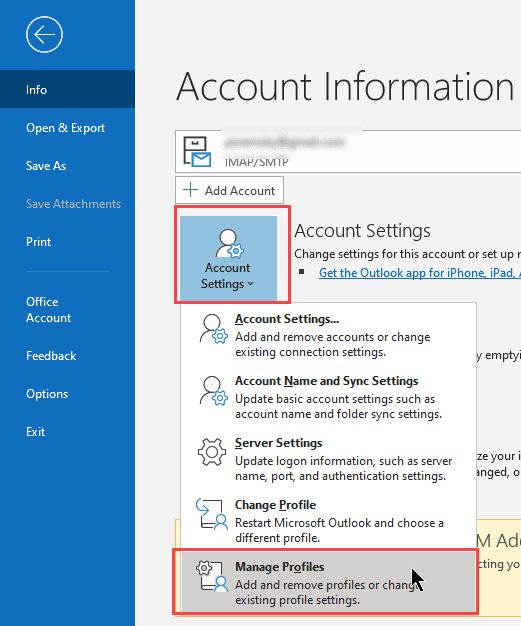
If you are using Outlook 2016/2019 and have the Simplified account setup dialogs, you'll need to check the Advanced settings from Manage Profiles. This is the control Panel > Mail dialog, but you can open it right from Outlook: Go to File > Account Settings > Manage Profiles. Click the Email accounts button, double click on your account then click More settings.
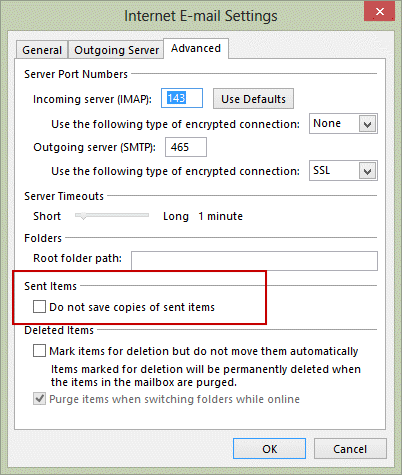
In Outlook 2013, to check your settings for saving Sent items, open File, Account Settings. Double click on your IMAP account then click More Settings. In Outlook 2013 and 2016, look on the Advanced tab.
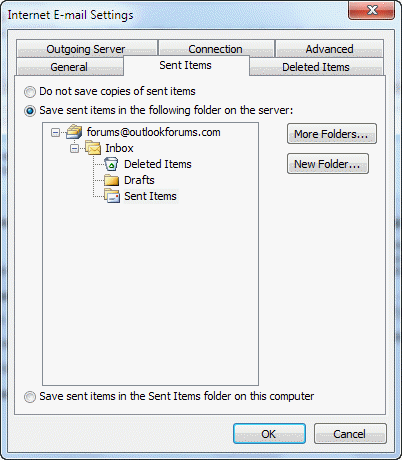
In Outlook 2010, check the options on the Sent Items tab.
Choose the option for Do not save copies of sent items and send a test message to see if the problem persists.
Note: this setting will not remove existing duplicated sent messages. It will prevent duplicates from being created going forward.
Change Outlook's Global Options
If you have only one email account in your profile, you could use the option to not save sent messages. This is in File, Options, Mail, in the "Save messages" section, uncheck the option to Save copies of messages in the Sent folder.
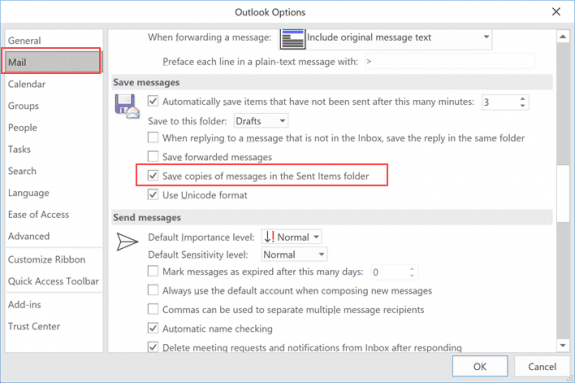
Note that this setting will apply to all accounts - if you have more than one email account configured, you will not save sent items for any account.
For this reason, you need to be careful using the global setting in File, Options as not all mail servers will save a sent item for you when sending. It's better to disable the option to save sent items on the More Settings, Sent folder tab.
Scanning outgoing mail with an antivirus scanner may result in duplicates.

Baidy says
Hi - Do you have a solution for Outlook Version 1.2023.1204.100 (Production)?
I have similar issues - Yahoo saves 2 copies of the email in the sent folder.
I couldn’t see the setting available in this version of outlook to stop this.
Robert says
In my case, the problem was with messages sent through Outlook 2019 using my Gmail account. Unchecking Gmail\Sent Mail in the Outlook Send/Receive group stopped the problem on the Outlook side. However, it still happens on the Gmail side, presumably since both Gmail and Outlook are tracking sent mail. I can live with that.
Herdanto says
I don't even use outlook... when I searched for outlook, I found outlook 2017 and when I click on it, it start a new installation..
Is there any other solution?
Diane Poremsky says
At this time, there is not an option to disable the sentting in new Outlook. Is the suplicate only in Outlook -do you have duplicates on the server?
Lisa says
Hi,
I had an issue this morning I’m hoping you can explain. I opened my outlook mail (aka hotmail) on my iPad like I always do. I did not use a web page I used the email app on my iPad. The very first message in my inbox was an email I sent on Monday morning (it is now Thursday). It said it was sent this morning at the exact time I opened my email app. I didn’t send it and I’m hoping it did not get mailed to this lady as she is very busy and she had already responded. It also said follow up at the top of the email. Did this email randomly send itself out a second time three days later?
any insight would be appreciated.
Thank you,
Lisa
Bruce says
Excellent information!! Thanks very much for solving an issue I have been dealing with for months now!
cara says
Does this solution apply if the problem isn't consistent? I sent an email using Outlook 365 on the 16th, and there's only one copy in my sent folder. I sent another email 2 days later and got the duplication in Sent. I'm afraid if I change this setting, I will have NO copies of my sent emails, at times...
Diane Poremsky says
No, its specifically for IMAP accounts where the SMTP server saves a copy of the sent message. Your problem sounds like a bug somewhere, either in outlook or a smtp server.
Dharmendra sing rautela says
Thanks
It worked
Albert says
Solved the problem, thank you, its being annoying me as I had not used IMAP on Outlook for a gmail account previously . Iwill now find something to remove all the extra copies, if not a cuppa and some brute force will be the method :-)
Diane Poremsky says
This should work find on the sent folder - it's not a speed demon, but hopefully you don't have a ton of sent messages.
Delete duplicate messages using a macro (slipstick.com)
ERik says
idiotic solution!!!!
Diane Poremsky says
Do you have a better solution?
JPaul says
You, ERik, are a moron and an ass. This lady actually wrote the Outlook book(s) and why she tolerates people like you is unfathomable. You should listen to her you idiot. The stuff you don't understand is limitless.
Dave says
That solution doesn't solve the issue. All of us wants to remove duplicates not every copy of sent emails.
Diane Poremsky says
If you use an IMAP account and have duplicate sent mails, this will prevent future duplicates, which are caused by both outlook and the IMAP server saving a sent copy.
To remove the duplicates you either need to use a utility or brute force - deleting one at a time.
ddp! says
You dont talk for "all of us" stop projecting!
XXX says
Thanks for making this blog
Andy says
Thank you. Worked perfectly, and much more easily than the other work rounds which were long-winded and flawed.
Jeroen says
Thanks Gérard Oomens maar het is niet opgelost.
Fernando Cruz says
Thank you very much for your help in solving this problem
Kind regards
Fernando
Tony says
Brilliant. Thanks again Diane for some very helpful information.
Meryl Wiernik says
I have my gmail linked to my Outlook account, and the above doesn't work for me; mail won't send when I choose 'don't save copies in sent file.'
Diane Poremsky says
it's set up as a connected account in Outlook.com? The information on this page applies when its added to outlook desktop as an account.
Wendy says
As already said by David!
Thank you! My Outlook 365 (subscription) had been doing this for a long time and I finally decided to conduct some research on it. This article was the first in the Google search results and it worked perfectly!
thanks again for a solution
Steven Richard says
Hi, I’m very curious about my email settings. I knew I was not receiving them correctly because my law school administrations emails were showing up randomly in spam. I had been receiving these emails correctly for months. If all my email accounts were added to an imap server, how would this occur?
Diane Poremsky says
If they are landing in the spam folder, either the server or outlook is identifying the messages as spam.
Dina L says
I was able to get rid of duplicates in the Sent Items folder by following your guidance, but the single copies of sent items show up as unread. How can I fix that problem?
Diane Poremsky says
Who is your email hosted with? We see unread sent items when using rules to move sent mail but it shouldn't happen if the server is saving the sent items,
Dina L says
ATT/Yahoo. It's an sbcglobal.net account.
Without changing settings and seemingly irrespective of whether I send a message from Outlook 365 on my Microsoft Surface Pro or the native email app on my Samsung Galaxy S8+ smartphone, sometimes I still get duplicates in my Sent folder - one of which is read and the other unread. If there is only one message, it is marked as unread. I can't figure out where the issues originate.
Please advise. Thanks,
Diane Poremsky says
so it happens when you send from either device? I'll see if i can repro it with my yahoo account.
Dina L says
I was told by a friend today that he has been receiving duplicates of all messages I send, so I tested things out by sending one email to myself from my sbcglobal email from each of my devices (Samsung smartphone native email app and Outlook 365 on laptop).
On both devices, I received only one copy of each message in my inbox, but in my Sent folder there are two copies of the message I sent from my phone (one read and one unread) and only one copy of the message sent from my laptop, which is marked as unread.
Seems like there's an issue with the email settings on my phone, right?
Dina L says
Continuation...I downloaded the Outlook app onto my phone and sent an email to myself from my sbcglobal email. That resulted in only a single copy of the message in my Sent folder, a single copy in my inbox on Outlook on my laptop and in the native email app on my phone, but two copies in my Outlook inbox on my phone.
Dina L says
I'm sorry for all the messages. After a delay, I now have two copies of the email message sent to myself from Outlook in the Sent folder in the native email app on my phone and on Outlook 365 on my laptop, one read and one unread. However, in Outlook on my phone, there is only one copy of the message in the Sent folder. I can't make sense of this.
To summarize, there are two main issues:
1. When I send myself sbcglobal email from any app on my Samsung phone (native or Outlook), I get duplicates in my Sent folder, one read and one unread, and although I only receive one copy in my inbox, others receive duplicates of messages I send.
2. There appears to be no issue with duplicates of items sent from Outlook on my laptop; however, the single copy of the message in my Sent folder is marked as unread.
Thanks in advance for your help.
Dina L says
I did some investigation, and here's the situation:
When I send email from my sbcglobal email account from any email app (including Outlook) on my phone, duplicates are sent out and two copies show up in my Sent folder, one read, and one unread. The issue does not happen when I use my gmail account to send email.
When I send from the sbcglobal account from Outlook on my laptop, only one copy is sent, and only one copy shows up in the Sent folder, but it is marked as unread.
Any idea what's going on?
Diane Poremsky says
Sorry I missed this earlier. sbcglobal is hosted by yahoo, correct? They are now doing what google does - saves a copy of sent messages, so disabling the option on the account settings in Outlook will solve the problem on the outlook side. I'm not sure if there is an option for the phone, but will check.
Darryl Rosenfeld says
There are a number of online discussions in various forums with this same problem, and seemingly no solution. All deal with att yahoo e-mail. In my case, outlook on my pc seems to be the only place they're duplicated and one is marked unread. I've used the steps above just now and seem to have the duplication issue fixed (on initial, early review), but the "unread item in the sent folder" is still an issue.
Diane Poremsky says
Yahoo recently started saving a copy of the sent item when the mail is sent, just like gmail does.
I'll see if i can repro the unread message.
Daniel says
I have my Outlook 2013 configured for IMAP and my ISP's e-mail is hosted by Yahoo. I get a duplicate in my Sent Items, but ONLY for ONE particular recipient whose e-mail account is also with my ISP. I don't know if anyone else has the same particular hiccup. My Outlook did not have the "do not save copies of sent items" checked, and after putting in a checkmark there, the problem seems to have been resolved. Thanks!
Robin H says
Sorry to keep posting here, but now I noticed that when I sent an email with attachments, all of the attachments were also sent twice.
Diane Poremsky says
If the message was sent twice, i would expect the attachments ot go twice too - but not doubled attachments on one message.
Gary says
My issue is a sent message (once in my Sent File - OK) AND a duplicate sent message in my Inbox. Solution for that? Office 365
Robin H says
Actually, I just heard from an email recipient that all of my emails are also actually being sent twice,so this seems like a bigger problem.
Robin H says
I am confused about the fix. I want to save a copy of my sent message. I just don't want to have two copies of the sent message. It seems to me that following the instructions will result in not having any copies of the sent messages. Please let me know if I am missing something. Thanks for any help and guidance!
Diane Poremsky says
Does your imap server save a copy of sent messages? If so, you don't want outlook to save a copy.
Try disabling the save sent option and send a few test messages. Is a copy saved in the sent folder on the server?
Do recipients still get two copies of the message?
On the duplicate messages - what do you use for antivirus? A 3rd party antivirus that scans outgoing mail can cause duplicates, especially on messages with attachments as it takes longer to scan the messages.
David says
Thank you! My Outlook 365 (subscription) had been doing this for a long time and I finally decided to conduct some research on it. This article was the first in the Google search results and it worked perfectly!
Gandhali Neeraj More says
Hi, will you be able to help me outlook for mac version 16.6 ......
Dr Dipesh Bhalani ghoda doctor, Rajkot says
Thanks for this. This was very helpful. Please send me a message.
Gaurav says
Thanks for help. great job
Kathy says
I don't know where you got your information but when I followed your prompts it lead me nowhere. I have Outlook 2016. I am getting duplicate emails in my sent folder. After your suggestion didn't help I fished around on my own and found this to work. While in Outlook go to FILE then OPTIONS then MAIL then scroll about half way down and under SAVE MESSAGES untick SAVE COPIES OF MESSAGES IN SENT ITEMS FOLDER.
Diane Poremsky says
That option turns off saving sent mail for all accounts. If you only have one email account, its not a problem, but can be a problem if you use multiple accounts and only one has a problem.
The first solution in my article is for IMAP accounts - duplicate sent messages is a known issue with Gmail accounts, so Microsoft added the option to not save sent items to the account properties page.
David fay says
I have Outlook 2016, but for settings it doe not give the detailed Internet email settings any longer - basically just email and password and it self configures. I have several accounts in Outlook - 3 exchange and 3 IMAP, any other suggestions?
Diane Poremsky says
That is the new simplified dialog.
You can get into advanced settings from File > Account Settings > Manage Profiles - click on Email button then your account name hen more Settings.
Sometimes the Advanced tab is in Send & Receive settings - Ctrl+Alt+S - click Edit, select the account then Account Properties. (It comes and depending on the build.)
Carol Zehr says
I have done this 3 times and it works for the rest of the day and then the next day I have duplicate sent emails and I have to go in and click the box for "do not save copies of sent items" again. Why is it reverting back to the duplicate emails each day?
Diane Poremsky says
You're the second person who told me it didn't stick on restarts. I had him set the value in the registry - not sure how long it stuck, but he hasn't complained about it again. The profile key is HKEY_CURRENT_USER\Software\Microsoft\Office\16.0\Outlook\Profiles\profile-name\9375CFF0413111d3B88A00104B2A6676- then there is a key under it with subfolders - the subfodlers are named 000000nn - find the imap account. The account name and server names will be easy enough to see on the right side. When you find it, it's in the QWORD "IMAP Sentitems flag" Hexadecimal value of 8 = dont save sent. If you change it to 8, does it stick?
Carol Zehr says
I thought I sent a message yesterday. Can you give me more details on how to fix the problem with 2 sent messages in my sent folder? I don't know what I am supposed to do. I am not an IT person. Thanks for your help!
Diane Poremsky says
Sorry I missed this earlier. If the change won't stick, you need to edit the registry. Unfortunately, I can't provide a ready to use reg file because its slightly different on every computer. You'll need to edit the registry yourself. :(
On the start menu, type regedit and press enter. Browse to HKEY_CURRENT_USER\Software\Microsoft\Office\16.0\Outlook\Profiles\Outlook\9375CFF0413111d3B88A00104B2A6676, where the bolded Outlook is the name of your profile (default is Outlook, but it might be something else). Look through the keys to find your IMAP account. Change the value of the "IMAP Sentitems flag" tto 8 (hexadecimal.
Keifere says
thanks, appreciate the help on this subject.
Steve says
Brilliant! Thank you so much!!
Alan C says
Worked like a charm, this has been an irritant for some time, thanks!
Marc Smith says
This process worked great -- it quickly and easily took care of the problem. Thanks.
Mark Griffith says
Quick and easy fix to a long time annoying problem. Thank you so much!
PDR says
Still useful post. Solved my Problem. thanks
Jake says
I've used it to help my clients out on the rig.
Thank you!
Bruce Webb says
Diane,
Thanks for the information and concise instructions for dealing with the problem. You've save me a lot of time.
-
Patricia says
It worked! Thank you!
Nicolene Wessels says
Can someone kindly assist me please.
I am currently using Outlook 2013. Whenever I send emails to recipients it stays in my outbox and shows that it has not been sent but my recipients complains that they sometimes get up to 20-30 copies of the email that I have sent.
Please help!
Diane Poremsky says
What type of email account do you have? (POP, IMAP, Outlook.com, Exchange) What do you use for antivirus and antispam?
Does it happen all the time or only occasionally.
It sounds like the message is sent but outlook is not getting confirmation back from the smtp server. This can happen if antivirus software is canning outgoing email but there could be other causes as well. You can try running outlook in safe mode and see if it happens - if not, it indicates an addn could be the problem. To open Outlook in Safe mode: Close Outlook then hold Ctrl as you click on the Outlook icon. You'll get a message asking if you want to start in Safe mode. Click Ok.
Linda says
Thanks for helping. It was easy to fix the problem following your explanations.
hike says
Also I am receiving 2 same mail in inbox. I search the settings with the same logic related sent items but I could not find the place. I am using both Exchange and imap in Outlook with Windows 10, Office 2013.
How can I block copy mail.
Thanks.
Diane Poremsky says
In File, Account Settings, double click on the imap account then click More Settings. Look on the Advanced tab - you want to change the setting so Outlook doesn't save the message. This will result in one message saved by the gmail server. If you want a copy saved in outlook, create a rule to copy sent items to another folder (leaving do not save off).
hike says
Hello to all;
Could you please let me know, how can I move gmail-sent folder to pst-sent folder. I do not want to use gmail folder.
Thanks in advance.
Diane Poremsky says
You can use a rule to move sent it - but gmail will save a copy of all messages sent using their smtp server.
MK Reddy says
I am very happy for that
MK Reddy says
Thank you Diane Poremsky, i very happy for that
Tommy says
I have this same problem. I recently discovered that ALL of my sent e-mails from my (POP) Outlook client are stored on the Gmail server. This is so even though I have the box for Leave copy of sent message on the server UNchecked.
According to this article, making the adjustment in Outlook should solve the problem. It doesn't.
I'm using Outlook 2003.
Any better ideas?
Diane Poremsky says
It only applies to new messages you send - duplicates should stop, but existing ones won't be removed. Outlook 2003 doesn't have options specific to IMAP accounts, but it saves sent items locally, so you should only have 1 copy in the gmail sent folder and one in your Outlook pst sent folder. If you don't want the sent copy in the pst, you can turn off the option to save any sent items. The only way to avoid it in gmail is to use a different smtp server (I don't think gmail has an option to not save sent items, but could be wrong.)

Tommy says
Thanks for your response, Diane. It looks like I may have to do the filter thing.
As to your comment "It only applies to new messages you send - duplicates should stop, but existing ones won't be removed." - I totally know that. I have only wanted sent mail to be stored in my pst folder (locally). For ever, I have had the option selected in Outlook to NOT save copies of sent mail (meaning on the Gmail server). That's why I said how surprised I was to see almost 3000 e-mails in my online (Gmail) Sent folder - 2.45MB worth! Theoretically, those e-mails should NEVER have accumulated. I painstakingly deleted them 50 at a time.
As I said, I may try to set up that filter to see if it does the trick. Then I guess I'll only need to empty my online trash folder periodically.
Diane Poremsky says
You'll need to use a folder with gmail - they don't have an option to not save sent items and anything that goes thru their server is saved. Trash should empty as the messages age (from deleted date) - 30 days i think.
I just tested the filter - it works. I used my gmail address in the from field then selected delete it on the second screen.
Diane Poremsky says
Here is an option to prevent gmail from saving the messages: https://productforums.google.com/forum/#!topic/gmail/reIlN3wHNYw
Create a rule (filter) in Gmail.com to delete messages from "me".
Kim says
I'm sorry, but I am not particularly tech savvy and am not sure how to follow and apply the advice below, on how to eliminate the duplicate items in my sent folder. I use hotmail on my Apple desktop and access it on my iPhone -- not through an app, but through the "mail" option. How do I get the sent mail to stop showing up twice in my sent folder?? Thank you in advance.
Diane Poremsky says
What version of Outlook do you use? How is the hotmail account setup in outlook - using ActiveSync/ Outlook Connector to sync mail, calendar, and contacts or as an IMAP account (mail only)?
Kim says
Looks like I am using outlook.com/hotmail.com. I sign in to hotmail via the web, so not sure how it is setup. While searching to find out what version I was using, I saw something Outlook 2016 for Mac -- perhaps I should install that and switch over to the newest version?
Diane Poremsky says
If you are using "hotmail via the web" then you are reading it in the browser - you could certainly switch to a client such as Outlook (Mac or Windows version depends on your OS). If you are using a browser & the app on your phone, then the dupes should be coming from the phone. If you are using the Apple mail client on both the desktop and phone, the duplicate could come from either. I'll try to repro on my mac and iPhone.
Kim says
OK, thank you. I am indeed using on my iPhone as well as the desktop. If you figure out the issue that is causing the dupes from the phone/setup, please do let me know and I will try to fix it. Many thanks Diane!
Gayle Kruger says
Hi Diane I am experiencing the same problem as Kim.... duplicate messages - this has only happened since purchasing new iphone 6 - I use hotmail. How do I fix the problem?
Diane Poremsky says
Is it listed on the phone as an Exchange account? (Settings, Mail, contacts, Calendar, Select account, Right above account name it will say the account type.)
Freshner Fresnido says
Hi Diane, How about duplicate sent items on the shared mailbox? Shared mailbox is on-prem but the personal accounts is on o365
Diane Poremsky says
The duplicates are in the shared box? I know you can get dupes in shared boxes with Exchange online and Exchange 2013/2016 now that you can configure the server to copy sent items to the share mailbox's folder. I'm not aware of any way to avoid that (and haven't verified if not saving sent items will still copy the sent item to the shared mailbox).
Bill Donnelly says
Outlook 2010 has two settings: "When replying to a message that is not in the Inbox, save the reply in the same folder", and "Save copies of messages in the Sent Items folder".
The problem I have is that with both of these checked, I have duplicates: the reply is saved in the same folder as the inbound message AND also in the Sent folder.
If I uncheck "Save copies of messages in the Sent Items folder", then I doesn't save ANY messages there - not replies from the Inbox nor any brand new messages.
Does anyone have a suggestion for always saving the sent message but never saving TWO of them?
Diane Poremsky says
What type of email account do you use? You should only get one copy... but i wouldn't be surprised if IMAP causes two messages. In this case, turn off save sent messages. If the account is gmail, definitely turn off saving sent message for the gmail account as gmail always saves a copy.
Bob says
I changed the settings on my PC and it seems to work. However, I cannot find similar settings on my iphone and ipad and both are saving two copies of sent emails. Any ideas?
Diane Poremsky says
You can choose what folder to use for sent items but as far as I know, you can't set it to not save sent messages.
Debra says
Oh, and I don't have the box checked for saving messages in the sent folder. I have Outlook 2013.
Debra says
Here's the challenge. I need to have sent E-mails linked to my contacts and accounts. If there's no saved sent E-mails, then don't you lose that function?
Jatin Kapoor says
Thank you!
Alex says
so there's noting to be done about duplicates in Trash folder which have started to appear in Outlook 2013 and gmail a couple weeks ago?
Diane Poremsky says
As far as I know, at this time there is nothing you can do. I'm surprised that it just started a couple of weeks ago though - did you recently change anything in either outlook or gmail online that could have affected it?
Joann Bonanno says
Hi Diane. I purchased new Surface Pro 3 256GB/Intel i5 with Office 365 recently. I have been having issues with Outlook 2013 and my 2 Gmail accounts and duplicate sent messages. Your instructions (to change Account Setting/Advanced tab/ etc/) solved the problem temporarily but within a day it was creating dups again: 2 copies in my Trash folder and 1 in Sent Mail folder for 1 account; for the other account, it was sending 2 sent items again. On the server I see one copy, no dups anywhere for each account. Some historical sent emails came in with dups or even 3 copies. Nothing consistent. After struggling trying to set up different profiles I completely deleted all profiles, renamed the ost files to make sure they were not being used and started from scratch. Sure enough my Inbox still reflects all the dups that I had before for both accounts. My Inboxes look just like the last profile. I thought that if the dups did not exist on the server that I would be able to rebuild my Inbox with a new profile. Please help! I am so at a loss. My Outlook 2007 worked flawlessly and this has been a month of trial and all errors.
Diane Poremsky says
If the duplicates weren't synced to the server, they would not download into a new ost file. Google is good at hiding dupes, so it's possible they are online... Changing the Advanced setting will apply only to Sent messages - drafts tend to create dupes though. It's a known bug. Moving messages to other folders can also create dupes.
FWIW, when you deleted the profiles, Outlook should have deleted the ost files too.
Francheska Farrugia says
Hi - I am having this problem with duplicate copies in my sent items (one always 0kb) using Gmail/Outlook 2013 but absolutely NEED to have the sent items showing up in Outlook (only one though) as I only use the Outlook client for work. I hardly ever use Gmail itself. Is there any way around this at all? I never had this problem with Outlook 2007.
Diane Poremsky says
if you disable the save sent items setting in file, account settings, gmail account, more settings, advanced, you'll still have one copy of the message - gmail saves it for you. When outlook also saves a copy, you get two copies.
Dori Schmetterling says
Hi Diane, I only mentioned dropping the (non-Outlook.com) POP3 account now rather than later because I am migrating out of it anyway, so the option exists to leave completely now.
The problem with it -- and, as it turned out, with my other, non-Outlook.com IMAP accounts -- is that if I switch off Saving in Sent folder there is no Sent message anywhere in any of the non-Outlook.com accounts, whether POP3 or IMAP, which is not acceptable.
Interesting comment about method of setting up the WLMail/Outlook.com connection. Initially I did it automatically but then went to manual set-up and selected IMAP. That way I felt I had more control over it, but maybe it is not such a good idea.
=> Thanks for testing that!
Maybe I should start again using auto setup?
I get syn'ing of calendar and contacts anyway. That worked even before I connected WLMail and Outlook.com. Actually from end Oct 14 there was a period of sync failure but I found a solution on the MS forums.
My AV is AVG Free, with email scanning never enabled. (I have not enabled or switched off scanning emails for years. Pointless marketing feature.)
Dori Schmetterling says
Hi Diane,
No probs. I understand that and appreciate that you are actually examining every one... (and mine was a long one...).
Dori
Dori Schmetterling says
Diane, I tried that *but*...
I sent a detailed comment on 3 Feb but it still seems to be "awaiting moderation"...
Diane Poremsky says
Yeah, I'm trying to get caught up on comments. I approve them when I reply (otherwise they get lost). I'm down to 70 comments waiting. :(
Ken Link says
I've tried to reproduce this myself with limited success. I tried several forwards today and all worked as they should with only 1 copy in the sent folder if I originated the forward from the Inbox.
If I begin in the Sent folder and do the forward from there, I get 2 new copies stored. Confirmed as I added text to the outgoing message to ensure it was unique. Hope this helps in your testing.
Diane Poremsky says
Thanks. I'll see what i can find out.
Diane Poremsky says
Do you have the option set in File, Options, Mail to save sent messages with the original if the message you are replying to is not in the inbox? That will create dupes... outlook copies the sent item to the same folder while google saves the sent item too.
Ken Link says
This check box is ticked (yes I do). I removed the check and re-tested. Seems to have cured the issue. I wasn't aware of all these option. Thanks for your help.
Ken Link says
I have followed the steps and no longer receive duplicates for original emails I send. Yet when I reply or forward emails, I get 2 copies in the sent folder - maybe these are treated differently?? I use Outlook 2010 with Gmail (IMAP) and have the "do not save sent mail" checked within Outlook. Any suggestions or comments?
Diane Poremsky says
They should be treated the same - it's all just sent mail. I'll see if i can repro it.
Dori Schmetterling says
Diane, thanks very much for the very quick response.
I tried every which way more carefully this time and it looks like Outlook.com is, indeed, the sole culprit.
My setup:-
Vista / WLMail 2011
BTW, I am already using Outlook 2010 for other purposes and do not wish to use it for what we are talking about here.
In WLMail I have several accounts:
-- 1 x POP3, a legacy mailbox given when my internet supplier used to manage domains and give out one mailbox as part of the deal (my original and out of which I am trying to migrate; no new mail going there. I think the mail service will be terminated in the next few months anyway)
-- 1 IMAP connected to Outlook.com (my presently preferred new mailbox host)
-- 2 x IMAP connected to my present domain supplier (HEG, a significant European domain name and hosting provider) (undergoing testing as an alternative preferred mailbox home).
NB: The 'Saving messages in Sent folder' option applies to the whole of WLMail, i.e. I cannot apply it selectively to specific accounts.
It is reached by going to the drop-down menu at top left, then clicking on
Options/Mail/Send.
In case relevant, the automatic polling interval is 10 miin.
First I sent a test message using all three different accounts with the Saving in Sent folder ticked/enabled.
The duplicate in Sent appeared ONLY in the Outlook.com account.
I unticked the Saving in Sent and repeated the sending of test messages. Only ONE message appeared in the Sent folder of the Outlook.com account (as you predicted), but NO message appeared in the other two (POP3 and IMAP).
Even if I drop the POP3 account immediately it still leaves the problem of the absence of a Sent message in my HEG IMAP accounts, at least one of which I am using permanently for a specific purpuse.
One way out is to drop Outlook.com which anyway seemed harder to set up initially than HEG; odd, considering WLMail is an MS product, but I would rather not as I like the integration with the rest of OneDrive and my Contacts in particular, as I do use the web interface quite a bit. (HEG requires a manual import of my contacts...)
The other way is to bite the bullet and grin and bear the hassle of duplicated messages in the WLMail Sent box.
Or is there another way? I am pretty sure that was not happening when I first set up WLMail/Outlook.com.
Diane Poremsky says
Yeah, the situation is different with WLM and the options on this page are specific to Outlook. I'm not sure if there is a solution but will look into it. Dropping the pop account won't have an effect - it's totally related to Outlook.com.
Is the outlook.com set up as IMAP or using DeltaSync? I'm not able to repro duplicate sent messages when I let WLM set up the account. DeltaSync is the default account type when you let WLM set up an Outlook.com account automatically. It syncs calendar and contacts between the server and the computer.
What antivirus software do you use? If it scans outgoing email it can cause problems.
Dori Schmetterling says
Hi Diane
Very recently the exact same phenomemon as in the heading (about duplicate messages in the Sent folder even though only one message is actually sent, as far as I have been able to determine) started with my Windows Live Mail 2011/Outlook.com combination. I have no such problem if I use the Outlook.com web interface.
It is set up as IMAP.
I started diverting new email into Outlook.com (using my custom domain and email address) about four weeks ago and about a week or two ago this started.
In case it is relevant, I have other accounts set up in WLMail 2011 with different hosts, including one that has the same email address but is POP3 (my original mail service from which I am migrating).
Any suggestions? (Do I need to start a new thread?)
Diane Poremsky says
It sounds like the same problem as with the Gmail accounts - outlook.com is saving a copy. Try disabling the option to save sent items on the imap account and send a test message - see if you get duplicates.
S.Umashankar says
I see multiple messages in outlook tasks(Items selected with flags) not in sent folder. I went to "Internet E Mail Settings" and the selection there in "Save sent items in the following folder on the server". Can you please help me
Diane Poremsky says
Flagged items are what you see in the To-do List in the Tasks module. You'd need to flag the message after sending it for the sent items to be flagged.
RVS says
Thank you. This solved the issue with my outlook.
Bruce says
It worked for my gmail accounts. Thank you, that has been annoying me for years :)
Outlook com IMAP is buggy says
Thanks for clarifying.
But Yes, this bug definitely exists with 'other' popular email clients, and in the cases I am troubleshooting (I'm a Corporate IT Manager), this bug is actually causing incidents of 2 copies of mail being SENT, and months of troubleshooting always lead to this same advice to uncheck, delete, re-add, rebuild, repair, and nothing works. MS's implementation of IMAP is unforgivingly sad
Outlook com IMAP is buggy says
Actually, this fix totally defeats the whole point of IMAP, does it not?
Many email clients ONLY have the option (to uncheck) of "Store Sent Messages on the Server" , so carefully notice what options you are disabling...
The whole point of IMAP is to allow you to access your email from multiple devices/sources, and to manage them and synchronize from whatever device you are currently using. If I use my laptop, and send an email, and don't save my sent item on server, then my cell phone, also with outlook.com via IMAP, will have no record of that sent email. I might as well stay with POP3 if that is the problem.
**This workaround, suggested here and at multiple other help sites, it inherently flawed.
It makes it seem as though it it user error, when it is actually a horrible bug at outlook.com IMAP implementation. They give a week excuse about intermingling the POP3/IMPA settings for their users, blahblahblah (they have been aware of this bug for about a year, and give this same bad "workaround" advice)
IMAP has been around for 10+ years, Outlook.com/Hotmail finally implemented it in late 2013, and it has this horrible bug. I think they do it intentionally to prop up Exchange email server and MS Outlook software, so that every other email client via IMAP looks bad.
The part that makes it even worse for me, is that it ACTUALLY IS sending two copies of the email via outlook.com IMAP setup on my email clients. UGH
Diane Poremsky says
These instructions are specific to Outlook and if the server is saving a copy (as Gmail and Outlook.com do), you don't need Outlook to also save a copy. It's not a bug in Outlook, its how the IMAP server handles it - Gmail does the very same thing. It's set per-account in Outlook, so you can leave 'Save sent messages' enabled for all accounts but disable it for the accounts where sent messages are saved by the server.
In my tests, Outlook.com didn't send duplicates - but i do have dupes in the sent folder if the option to not have Outlook save a copy is not enabled.
Tessa says
Thanks a mill - this works a treat.
tammy says
OMG.. thank you so much!!!! It totally fixed it. Much appreciated!
JORGE FERNANDEZ says
Make sure your Sent Items folder is not overly large.
The folder can hold 2 GB at most. To check the size, go to your Outlook Express store folder and examine the Sent Items.dbx file's size.
Move messages from the Sent Items folder in Outlook Express to another folder. Set up folders for all mail sent in a year, for example.
Diane Poremsky says
This doesn't apply to Outlook - if using Outlook 2002 or less, the maximum data file size is 2 GB, in 2003 and up, its unlimited. Honestly, you shouldn't even be using Outlook Express - it's not stable or secure.
Michael Healy says
There is no connection to google/gmail. The company wide system is Novell Group Wise which is OK in the office but not from home where you have to access via webmail. Hence I use Outlook. There is no support for Outlook in the company. I clicked "do not save" and it saved nothing.
Diane Poremsky says
Ok. Sounds like it's getting duplicated as it syncs with the server. I don't think there is any way to avoid it.
Michael Healy says
Hi Diane, I have same problem but only for last 3 weeks or so. I have Outlook 2013 and a single IMAP account. Saving twice to Send folder but only sending once. Amy ideas? MHC
Diane Poremsky says
Is the imap server on google/gmail? Did you try changing the option in Account Settings, More settings, advanced to not save sent items for this account?
ATS says
I have also having constant synchronisation (if I move to a folder and back to inbox) and the dupes - this all started only 2 or 3 days ago. What has changed and how do I stop it?
Diane Poremsky says
Is it still happening? What type of email account? Oh, and which version of Outlook?
KJ says
I appreciated the logical explanation and I tried this ... but now I get the two copies in my sent folder - one of them xKB and the other one is now 0KB (but opens and displays like the other copy). Irritatingly, I do not ALWAYS get this 0KB one. Randomly, I will get only one Sent item.
Any idea what's going?
Additionally, is there some quick and easy way to delete every other email in the sent folder (ie each of the duplicates) or do I have to spend hours clicking the X on every other line?
Diane Poremsky says
Deleting: you'll need to use an addin or do it manually. Utilities are here: https://www.slipstick.com/addins/duplicates-addins/duplicate-remover-tools-for-outlook/ However, if a field is different in the copies outlook sent, you could sort or group by that field and delete several at a time.
Does the 0KB one have an attachment? I've seen a 0KB file when there is an attachment and the message hasn't uploaded yet.
KJ says
Awesome response time! Thanks.
To answer your questions, the 0KB ones did not have attachments. And I just went ahead and methodically deleted the duplicates. I am having such a dreadful time with Outlook 2013 (installed 1 month ago) that I just couldn't venture into 'add-ons' and whatnot. (This hell all started when my typical monthly Bandwidth usage of ~5GB skyrocketted until I exceeded my limit of 40GB - all for email!) And I have many thousands of errors in the Sync Issues folders.... (noting, importantly, that I wasn't actually having any problem sending or receiving or synchronizing emails - except, of course, for the duplicates issue.)
I can't tell you if the duplicates problem persists since, as a result of the errors and the Bandwidth etc., I have sunk over my head into troubleshooting a program well beyond my abilities. I tried adding a new profile (with a subset of my IMAP accounts), tried deleting and reestablishing various accounts in the original Profile), tried doing something with Root folders. Sigh.
Thanks for your response to my question.
Oh that you were my neighbour and you could come over and fix my mess before I abandon O2013 completely since I surely can't afford the overage charges!
Rick says
I have the "Do not save copies of sent items" checked in Outlook 2013, but Gmail sent messages still show up as duplicates in O2013, immediately after sending.
No special rules/filters in Gmail or Outlook 2013. Only IMAP settings in Gmail concern how to handle deleted messages (other than which IMAP folders to show).
Annoying, to say the least. Ideas? Tks.
Diane Poremsky says
Hmmm. if you are not saving sent items, you shouldn't get duplicates. Are they both in the Inbox? Are you BCCing yourself?
Did the problem just start recently?
There is a bug with drafts that cause them to duplicate - but they should stay in drafts until you delete them.
Valerie says
Great post! I have been annoyed by this for months and your solution worked perfectly!!!
Shah says
Great post. I was getting worried if my pc is infected.
Ray Burts says
WOrked great. Thanks so much!
Nicholas R. Koriakin says
Yes, I was you using IMAP with the old email host too. Disabling then re-enabling Norton did not work either. Anything else?
Nicholas R. Koriakin says
We are using IMAP
Nicholas R. Koriakin says
Yes, I have Norton AntiVirus & AntiSpam. Never had this problem until the company switched to serverpointapps.com/webmail/. If I turn off the Norton AntiSpam, can I use SUPERAntiSpyware Free Edition?
Diane Poremsky says
You can try the other program and see if it works ok. Were you using IMAP with the old email host too? It could be something with the server, with Norton/Outlook, or maybe Norton needs updated or repaired - sometimes disabling it then re-enabling it fixes the problem. Try this: disable the Norton addin, do a send and receive then go back in and re-enable it - I've seen that fix some problems. I can't promise it will fix your problem, but it doesn't take a lot of effort to try it.
Nicholas R. Koriakin says
I'm always online, never offline. No, when switching to the outbox, they still do not send. Your help will be much appreciated.
Diane Poremsky says
Are you have the Norton Antispam? It's causing this problem for a lot of users.
Nicholas Koriakin says
Recently, I see that all my emails have been sent to the Outbox. I use Outlook 2010 via IMAP. How do I get this fixed? ‘SEND IMMEDIATELY WHEN CONNECTED’ is on.
Diane Poremsky says
Are you offline? If you are connected and the account is online, the messages should be sent immediately. Do they all send if you switch to the outbox?
Donna Rummery says
Unfortunately I am having the same problem. I have clicked the box that says 'do not save sent message' but am still getting 2, sometimes 3, duplicates in my sent folder. Any other suggestions would be greatly appreciated.
Diane Poremsky says
What type of email account do you have? Are you using any rules?
Grga says
This solve the problem, but opens another one. The send msg are not saved globally just local.
Diane Poremsky says
If you disable saving sent messages because your provider also saves a copy, you'll have a global copy.
Russ says
Thank you! Thank you!
AC says
thank you... problem solved with duplicates in sent folder!
Shane says
Thank you very much Diane. This has been bugging me for over a year, and works perfectly for gmail in Outlook 2010.
Steve says
I have clicked the dont save sent messages in the more options and test but it defaults back to saved again ....any clues ?
Diane Poremsky says
Are you using a registry cleaner utility? Does it work until you reboot?
Neil says
Thank you Diane,
This works for virginmedia.com using IMAP too (Outlook 2010)
TyinATX says
Thanks so much! This just solved my issue too with IMAP connection to gmail via Outlook 2010.
Stuart says
Thanks! This worked for an IMAP connection to gmail via Outlook 2010
Yuri Dara Mikaelyan says
it worked for Gmail . thank u very much.
Neil Blake says
This solved the same issue I had too thank you.
Winnie says
This worked for my gmail account as well. Thanks!
Rob says
Excellent discussion. Your solution options solved the double sent email problem.