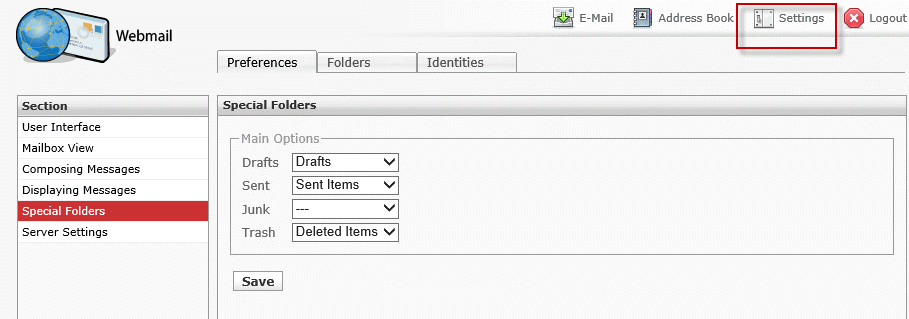
Outlook 2013 uses the XLIST or LIST-ENHANCED command to get the Sent, Deleted, and Junk mail folder names from the IMAP server. Although you can no longer change the folders in Outlook, many IMAP servers let you select the folder to use. You'll need to log into your account's web interface to make the change.
This screenshot is from RoundCube but other popular Linux IMAP servers are similar. Check the Settings for a Special Folder option.
Select the folders you want to use for the special folders and Outlook will use them.
GMail accounts
GMail does not let you set the special folders. In my experience, Outlook will use the Gmail folders.
You should change how Outlook handles sent items in More Settings, Advanced. Gmail will save a copy of the sent item automatically, so you should select the option for Do not save a copy of sent items for this account. (More Settings is at File, Account Settings, then double click on Gmail account).
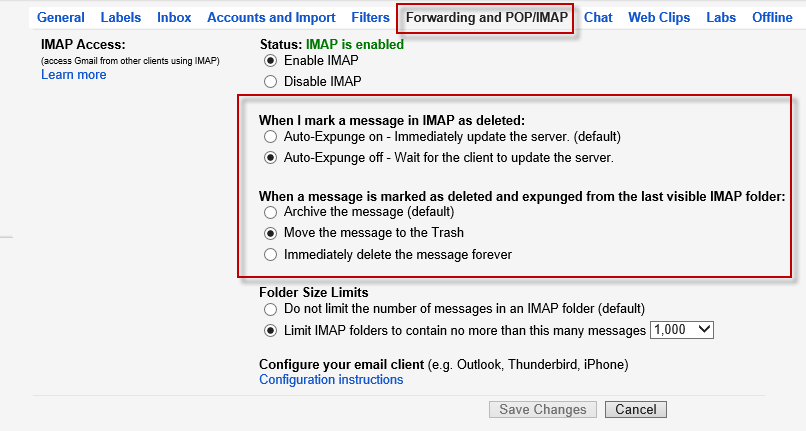
Gmail lets you control what happens when you delete an item in an IMAP client. Look in the Forwarding and POP/IMAP options.
GoDaddy IMAP accounts
GoDaddy does not have an option to set the special folders. Outlook 2013 should use the correct folders.
Accessing Exchange server using IMAP
Exchange accounts accessed using the IMAP protocol should use the correct folders. If your Outlook folders are using non-English names, try this.
- Unsubscribe all IMAP Folders. You may have to do this using Telnet, because Outlook won't unsubscribe the special folders.
- Login to Outlook Web Access. Open Options and switch OWA to English. Let it rename the default folders, then switch back to your language without renaming the folders.
- Delete the Outlook Profile using Control Panel, Mail.
- Restart Outlook and create a new Profile. The Special Folders will not be recognized.
- Subscribe to the (English) special folders.
- Delete the Outlook Profile again
- Create a new Profile.

Erkan says
all versions off outlook can not be used with imap.
outlook makes all time trouble and forget to try using outlook with imap.
everyday other problems. if your mailbox grows up more and more outlook needs to many time to synchronize. i make test with other clients like opera mail client, they work more stable and faster synchronizing.
now the final is. we use zimbra as our mail server system.
Diane Poremsky says
All current versions of Outlook work fine with IMAP.
ann says
sorry, I have office 2016, but I just bought outlook express in december2017
ann says
I have bought and installed Outlook 2017 and initially I had all the folders appear, but now although they are all there for the outlook mail account, my imap account for my business emails has had the junk mail, deleted items, sent items folders all disappear. none of the help suggestions work for this version. I have collapsed and uncollapsed the folders using the arrow to the left of the account name but the folders are simply gone. Can you help me get them back? I went to the "new folders" option and created one called "sent items" but nothing ever shows up in it.
Diane Poremsky says
Right click on a folder in the business account. Choose IMAP folders... then click Query. Click Subscribed tab. Are the missing folders in the subscribed list? They should be... and it also should be impossible to unsubscribe them.)
Does your imap server use those names? Many use Trash, Sent or Sent Messages, Bulk Mail or Spam as the folder names.
ann says
Yes they are listed there. But they don't appear elsewhere so I can open them.
Diane Poremsky says
Try this: right click on the account name in the folder list and choose 'open file location'. This opens file explorer with the data file selected. Close Outlook then rename the imap data file. Restart outlook and see if the folders come back.
James Small says
I have just installed office 2007 had a old copy and my deleted email is gone and sometimes the program just deletes email without me even clicking the button I am a go daddy imap user because I have my email and web address set up through them can you help ! I would be willing to pay you if you can save my deleted email on this program ! or do I need to buy a newer version that will save my deleted email ?? thanks Jim
Diane Poremsky says
The behavior will be better in a newer version because deleted items are moved to the deleted folder. In Outlook 2007 when you delete in an imap account they are marked for deletion and are purged either when you change folders or when you purge the folder. To see the deleted items before they are purged, change the view on the folder to show deleted items.
I don't know that it would be useful to set up a meeting (it's nothing i can fix) except that i would be able to show you how it works. if you want a meeting, my calendar and rates are at https://shop.slipstick.com/services
villy says
I having a laguage problem with my Outlook 2016. I use Danish as main language and in one.com I have set the webmail to Danish as well. when I setup my one.com IMAP mail in outlook 2016 I get both the Danish and the English version of the special folders sent, spam and trash, and inbox turn out fine one version only in Danish as Indbakke. i have tried to delete the ost folder with no luck.
Diane Poremsky says
Are you using the English version of Office? If you have the danish version, the /resetfoldernames switch might help. Delete the imap ost (if you have calendar & contact folders named 'this computer only' and have things in them, export the contents to a pst first) then restart outlook using the /resetfoldernames switch - to do this, open the Run command (windows key + R) and type or paste outlook.exe /resetfoldernames
villy says
I'm using the Danish version and have tried the /resetfoldernames switch to no vain. I have tried the Internet repair Office function too. I wonder if it will help to create a new outlook profile?
Diane Poremsky says
You can try a new profile but i make no guarantees it will fix it. Are the english folders synced to the server? If so, delete them from the server using webmail.
Dave says
What to do if imported items include folders that have duplicate folder names with Outlook.com folders? New folders come in with "(2)" appended. When I delete the old folder, I still can't rename the new folder-error message duplicate folder exists. I've cleared my deleted items box. I've tried using both the OWA access as well as Outlook 2013 client on my laptop. On the laptop, the Outlook.com mail account shows as an Exchange Server mailbox.
Thanks!
Phil says
Hi Diane, after having upgraded to Outlook 2016 I'm finding that I can't unsynchronise new folders that I create for specific projects. I use the IMAP folder dialog box to unsubscribe and although it looks like it works, the folder still appears when checking emails on other devices and via webmail (Outlook.com). How can I fix this as I don't want to synchronise everything?
Regards,
Phil
Dee inkersole says
i use Outlook and recently my emails changed from POP to IMAP. My problem is that I can't get rid of deleted emails from my Inbox. They appear with a line through them but I changed a setting and they disappear from view but they still exist. I would like them to be transferred to a 'Deleted Items' folder automatically when I delete them; I can then permanently delete the contents of this folder from time to time (so that if I do delete an email in error, I can probably still recover it).
Thanks
Dee
Diane Poremsky says
Those are messages marked for deletion - you need to purge the mailbox. Outlook has a setting that urges on folder change - use it with the IMAP view that hides messages marked for deletion.
Yogi says
Have you found a way to change the special folders on a Yahoo Mail account? When I added the account as IMAP, Outlook 2013 found the correct Inbox, Draft, Sent, and Trash folders. However, Outlook created a new "Junk E-mail" folder separate from the "Bulk Mail" folder that Yahoo Mail uses for spam.
Diane Poremsky says
No, I'm not aware of a way to change it.
anton says
confirmed by apple this os a bug in ios 7. stay tuned for an update.
anton says
I have the same problem on my iphone. when I choose move to jubk it moves them to a folder called junk not the bulk mail folder. not sure when this new folder was created, and while I can choose what folders to sync for inbox, deleted, etc, name of span folder is not an option. I once saw someone saying yahoo mail web interface had settings for this, but I have yet to find it. anyone can help please?
Diane Poremsky says
I don't see anything on the yahoo web interface that would allow you to select the folder to use for junk mail.
anon says
Hi - any idea how to change the special folder settings in Zimbra? Outlook 2013 does not recognise Zimbra's Address Book as Outlook Contacts... Thank you
Diane Poremsky says
Did you check with Zimbra? It's possible the connector does not work with Outlook 2013. I can't find anything at zimbra, only that they expected to release something "soon" in a post dated 1/2013.
Outlook has two ways to set address books: in File, Account Settings, Address books the address book service needs added. In some cases, such as with Outlook Contact folders, you also need to right click on the Contact folder, choose Properties, then Address book tab to enable the folder as an address book. I'm not familiar enough with Zimbra to know if it has a special address book service or just needs enabled on the folder properties when the zimbra connector is installed.