• Outlook User
  • New Outlook app
  • Outlook.com
  • Outlook Mac
  • Outlook & iCloud
  • Developer
  • Microsoft 365 Admin
    • Common Problems
    • Microsoft 365
    • Outlook BCM
    • Utilities & Addins

Printing the Monthly Calendar with Line Wrap & End Times

Slipstick Systems

› Outlook › Outlook 2007 › Printing the Monthly Calendar with Line Wrap & End Times

Last reviewed on February 15, 2021     No Comments

Applies to: Outlook 2007

We recently started to see problems that are solved by uninstalling the July 13 2010 update, which also included the April 27 2010 hotfix along with the security fixes. Apparently very few people installed the hotfix - we saw no complaints until late July.

The September 14 2010 update supersedes the July 13 update, so it will need to be uninstalled if you need the end times printed on the monthly calendar. Install the August hotfix if you keep the September 14 2010 update installed and want the lines to wrap properly.

The April update introduced line wrap to printed Monthly calendars, as seen in older versions of Outlook. Unfortunately, the algorithm that did the wrapping didn't do a very good job and new lines begin in the middle of words. Oops. The end date was also removed. We've had a lot of complaint about the lack of line wrapping since the release of Outlook 2007, now they're complaining about the lack of the end times. These issues are scheduled to be addressed in updates later this year.

Another problem that goes away when the update is uninstalled is "now you see them, now you don't" Color categories. One of the affected users described it like this:

I noticed that when I open Outlook 2007, often times (but not all the time), my categories are reset to the default basic colors. If I close Outlook and re-open it, they usually all come back! When "missing", the names of the categories will show up with gray background in appointments or contacts instead of whatever color they should be. When "categories" list is viewed, none of these categories show up at all.

We also saw a couple of problems with recurring appointments that were solved by removing this update, including one where the attachment wouldn't open.

If you notice any other weird or buggy behavior, try uninstalling the update.

Updates
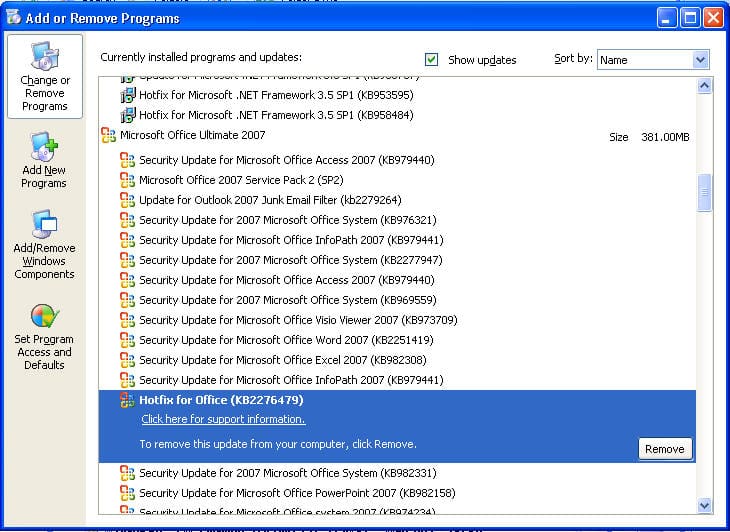
Uninstall Windows updatesUninstall these updates to restore the missing end time.

Security Update for Microsoft Office Outlook 2007 (KB980376)
Security Update for Microsoft Office Outlook 2007 (KB2288953)
Hotfix for Office (KB2276479)

Block certain automatic updates
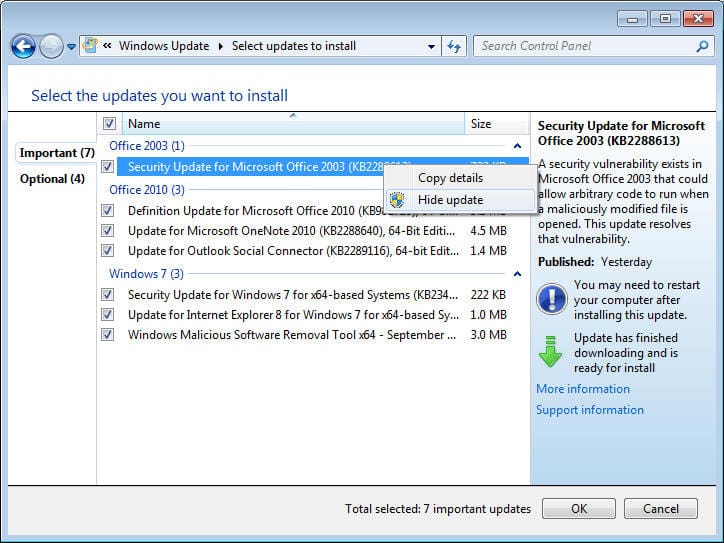
Hide Automatic Windows updates to keep them from reinstallingAfter you uninstall the problematic updates, Automatic updates will keep reinstalling the Update. You need to go to the update site and hide this update.

  1. Uninstall the update
  2. Go to the Start menu and click the link for Windows Update.
  3. Let it search for updates it thinks you need then review the list.
  4. Right click on the updates you don't want installed and mark it hidden. If the update is enabled (checked) for installation, hiding it will remove it from the installation list.

September 14 2010 Security Update

While the update is a "critical security update", the exploit it addresses is only triggered by a user opening an attachment that arrives in an email message. Consider how likely someone would open an unknown attachment on the computer when deciding whether you can go without it until the issue that bugs you is fixed.

This security update replaces security update KB980376 MS10-045: Description of the security update for Outlook 2007: July 13, 2010

MS10-064: Description of the security update for Office Outlook 2007: September 14, 2010
https://support.microsoft.com/kb/2288953

July 13 2010 Security Update

While the update is a "critical security update", the exploit it addresses is only triggered by a user opening an attachment that arrives in an email message. Consider how likely someone would open an unknown attachment on the computer when deciding whether you can go without it until the issue that bugs you is fixed.

MS10-045: Description of the security update for Outlook 2007: July 13, 2010

August 31 2010 hotfix

This hotfix fixes word wrapping in calendar print outs which was broken by the July security update. Note that this update does not restore the end times to the print out, that is expected to be fixed in a future hotfix.

Other issues addressed by the August hotfix for Outlook 2007 include fixes for the following issues:

  • When you receive a signed email message in Outlook 2007 containing an encryption certificate and add the sender to your Outlook contacts the certificate is not added to the contact as expected.
  • When a mailbox is moved to Exchange 2010 and you open an email message that contains an attachment send by an external user and you try to save the attachment, its not saved.
  • You use a computer that is running Outlook 2007 to connect to a server that is running POP and SMTP services with IPv4 and IPv6 services enabled on the server and on the computer. When you click Send / Receive in Outlook 2007, it reports that it cannot connect to the server.
  • When the reading pane is enabled in Outlook 2007 and you install an add-in, the original email message of stubbed email messages cannot be loaded.
  • With Allow in-cell editing option enabled in Outlook 2007, a memory leak occurs when you check or uncheck a check box in the View pane.
  • On a computer with the Regional Settings set to Turkish and you press “i” on the keyboard to go to the email messages that comes from senders whose names starts with the letter “I”. Outlook 2007 goes to the first message from a sender whose name starts with the letter ”J” or it stops responding.
  • When you use a VBA code to save email messages when they are sent and enable the Request a Read Receipt option and the Use Voting Buttons option, Outlook 2007 cannot track the read receipt for the sent email message in Sent Items and the total vote results are not counted.
  • When you try to open one of the embedded messages that are attached to an email message, the embedded message that is opened is not the message that you selected.
  • When you create a public folder calendar and then you add this calendar to your favorite folders in Outlook 2007 then switch to the Calendar view, “in Public Folders” text is added after the name of the public folder calendar.
  • When you print a message, Outlook 2007 stops responding.
  • When you print a message that contains an embedded image and other attachments, the embedded image is opened unexpectedly.
  • A hotfix is also available for the German MUI for Outlook 2007. This fixes an issue where You accept the meeting request and the information bar in the accepted meeting request displays incorrect text.

The August update contains the Outlook 2007 hotfixes described in the following KB Articles.
https://support.microsoft.com/kb/2276479
https://support.microsoft.com/kb/2308912 (Additional hotfix for German MUI)

Hotfixes for the other Office applications are linked at
Office 2007 Cumulative Update for August 2010
https://support.microsoft.com/kb/2396342

More Information

MS10-064: Description of the security update for Office Outlook 2007: September 14, 2010

Printing the Monthly Calendar with Line Wrap & End Times was last modified: February 15th, 2021 by Diane Poremsky

Related Posts:

  • Update November 8 2012 This was fixed in both Outlook 2007 and Outlook
    Attachment extensions are duplicated
  • Monthly Calendar Printing Bug when Starting the Week on Monday
  • Fixed: Could not read the calendar error
  • Outlook 2010 Updates: September 8 2015

About Diane Poremsky

A Microsoft Outlook Most Valuable Professional (MVP) since 1999, Diane is the author of several books, including Outlook 2013 Absolute Beginners Book. She also created video training CDs and online training classes for Microsoft Outlook. You can find her helping people online in Outlook Forums as well as in the Microsoft Answers and TechNet forums.

Subscribe
Notify of
0 Comments
newest
oldest most voted
Inline Feedbacks
View all comments

Visit Slipstick Forums.
What's New at Slipstick.com

Latest EMO: Vol. 30 Issue 38

Subscribe to Exchange Messaging Outlook


Support Services

Do you need help setting up Outlook, moving your email to a new computer, migrating or configuring Office 365, or just need some one-on-one assistance?

Our Sponsors

CompanionLink
ReliefJet
  • Popular
  • Latest
  • Week Month All
  • Use Classic Outlook, not New Outlook
  • OUTLOOK.EXE continues running after you exit Outlook
  • Reset the New Outlook Profile
  • How to Remove the Primary Account from Outlook
  • How to Hide or Delete Outlook's Default Folders
  • Move an Outlook Personal Folders .pst File
  • Adjusting Outlook's Zoom Setting in Email
  • Disable "Always ask before opening" Dialog
  • This operation has been cancelled due to restrictions
  • Removing Suggested Accounts in New Outlook
  • Opt out of Microsoft 365 Companion Apps
  • Mail Templates in Outlook for Windows (and Web)
  • Urban legend: Microsoft Deletes Old Outlook.com Messages
  • Buttons in the New Message Notifications
  • Move Deleted Items to Another Folder Automatically
  • Open Outlook Templates using PowerShell
  • Count and List Folders in Classic Outlook
  • Google Workspace and Outlook with POP Mail
  • Import EML Files into New Outlook
  • Opening PST files in New Outlook
Ajax spinner

Recent Bugs List

Microsoft keeps a running list of issues affecting recently released updates at Fixes or workarounds for recent issues in classic Outlook (Windows).

For new Outlook for Windows: Fixes or workarounds for recent issues in new Outlook for Windows .

Outlook for Mac Recent issues: Fixes or workarounds for recent issues in Outlook for Mac

Outlook.com Recent issues: Fixes or workarounds for recent issues on Outlook.com

Office Update History

Update history for supported Office versions is at Update history for Office

Outlook Suggestions and Feedback

Outlook Feedback covers Outlook as an email client, including Outlook Android, iOS, Mac, and Windows clients, as well as the browser extension (PWA) and Outlook on the web.

Outlook (new) Feedback. Use this for feedback and suggestions for Outlook (new).

Use Outlook.com Feedback for suggestions or feedback about Outlook.com accounts.

Other Microsoft 365 applications and services


New Outlook Articles

Opt out of Microsoft 365 Companion Apps

Mail Templates in Outlook for Windows (and Web)

Urban legend: Microsoft Deletes Old Outlook.com Messages

Buttons in the New Message Notifications

Move Deleted Items to Another Folder Automatically

Open Outlook Templates using PowerShell

Count and List Folders in Classic Outlook

Google Workspace and Outlook with POP Mail

Import EML Files into New Outlook

Opening PST files in New Outlook

Newest Code Samples

Open Outlook Templates using PowerShell

Count and List Folders in Classic Outlook

Insert Word Document into Email using VBA

Warn Before Deleting a Contact

Use PowerShell to Delete Attachments

Remove RE:, FWD:, and Other Prefixes from Subject Line

Change the Mailing Address Using PowerShell

Categorize @Mentioned Messages

Send an Email When You Open Outlook

Delete Old Calendar Events using VBA

Repair PST

Convert an OST to PST

Repair damaged PST file

Repair large PST File

Remove password from PST

Merge Two Data Files

Sync & Share Outlook Data

  • Share Calendar & Contacts
  • Synchronize two computers
  • Sync Calendar and Contacts Using Outlook.com
  • Sync Outlook & Android Devices
  • Sync Google Calendar with Outlook
  • Access Folders in Other Users Mailboxes

Diane Poremsky [Outlook MVP]

Make a donation

Mail Tools

Sending and Retrieval Tools

Mass Mail Tools

Compose Tools

Duplicate Remover Tools

Mail Tools for Outlook

Online Services

Calendar Tools

Schedule Management

Calendar Printing Tools

Calendar Reminder Tools

Calendar Dates & Data

Time and Billing Tools

Meeting Productivity Tools

Duplicate Remover Tools

Productivity

Productivity Tools

Automatic Message Processing Tools

Special Function Automatic Processing Tools

Housekeeping and Message Management

Task Tools

Project and Business Management Tools

Choosing the Folder to Save a Sent Message In

Run Rules on messages after reading

Help & Suggestions

Submit Outlook Feature Requests

Slipstick Support Services

Buy Microsoft 365 Office Software and Services

Visit Slipstick Forums.

What's New at Slipstick.com

Home | Outlook User | Exchange Administrator | Office 365 | Outlook.com | Outlook Developer
Outlook for Mac | Common Problems | Utilities & Addins | Tutorials
Outlook & iCloud Issues | Outlook Apps
EMO Archives | About Slipstick | Slipstick Forums
Submit New or Updated Outlook and Exchange Server Utilities

Send comments using our Feedback page
Copyright © 2026 Slipstick Systems. All rights reserved.
Slipstick Systems is not affiliated with Microsoft Corporation.

:wpds_smile::wpds_grin::wpds_wink::wpds_mrgreen::wpds_neutral::wpds_twisted::wpds_arrow::wpds_shock::wpds_unamused::wpds_cool::wpds_evil::wpds_oops::wpds_razz::wpds_roll::wpds_cry::wpds_eek::wpds_lol::wpds_mad::wpds_sad::wpds_exclamation::wpds_question::wpds_idea::wpds_hmm::wpds_beg::wpds_whew::wpds_chuckle::wpds_silly::wpds_envy::wpds_shutmouth:
wpDiscuz

Sign up for Exchange Messaging Outlook

Our weekly Outlook & Exchange newsletter (bi-weekly during the summer)


Please note: If you subscribed to Exchange Messaging Outlook before August 2019, please re-subscribe.

Never see this message again.

You are going to send email to

Move Comment