Suppose you need to process reports at the end of each month and need data from your co-workers to complete the reports. They always seem to forget, so you need to send them a reminder. How do you automate the process, so they get the reminder automatically?
See Using Microsoft Outlook to Schedule Report Transmissions for a method that uses custom forms. Note that tighter security in Outlook may prevent this from working as expected.
See Delay Sending a Message to delay the sending of a message.
In addition to scheduling recurring messages, the tools on this page can be used to schedule messages to be sent later.
Use Appointment reminders to send recurring message
You can use appointments to trigger a recurring message. In all versions, you can use VBA to send a message when a reminder fires. In older versions that support the online meeting feature, you can use it to open a prepared template and include an attachment.
The VBA method is at Send an email when an Appointment reminder fires. While the sample code contains the message in the appointment body, which is copied to an email message, you can use it to open and send a template instead.
How to use: Create a recurring appointment and set the reminder. When the reminder fires, the macro creates the message and sends it. This method works with Tasks as well.
Use PowerShell and Task Scheduler
If you can't use VBA but can use PowerShell and Task Scheduler, you can use PowerShell to schedule messages.
Open the Windows PowerShell ISE (type PowerShell on the Start menu to find it) then paste the script into the Paste the script into the editor then click Run button to test it. Errors will display in red in the bottom half of the editor. When finished, click Save.
If you want to edit the message before sending, change .Send to .display.
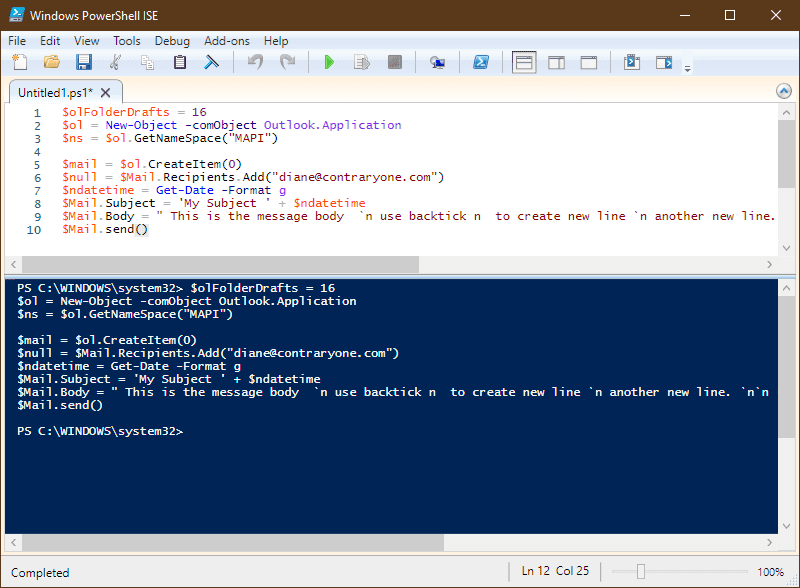
$ol = New-Object -comObject Outlook.Application
$ns = $ol.GetNameSpace("MAPI")
$mail = $ol.CreateItem(0)
$null = $Mail.Recipients.Add("alias@domain.com")
$ndatetime = Get-Date -Format g
$Mail.Subject = 'My Subject ' + $ndatetime
$Mail.Body = " This is the message body  `n use backtick n  to create new line `n another new line. `n`n (backtick is the other character on the tilde key)"
$Mail.send()
To use a template, use this PowerShell script (this assumes the recipient address was saved in the template).
$ol = New-Object -comObject Outlook.Application
$Mail = $ol.CreateItemFromTemplate("C:\path\to\template.oft")
$ndatetime = Get-Date -Format g
$Mail.Subject = $Mail.Subject + ' '  + $ndatetime
$Mail.send()
You can insert text or HTML files instead.
$body = Get-Content "D:\path\to\file.htm" |out-string
$ol = New-Object -comObject Outlook.Application
$Mail.HTMLBody = $body
$ndatetime = Get-Date -Format g
$Mail.Subject = $Mail.Subject + ' '  + $ndatetime
$Mail.Recipients.Add("alias@domain.com")
$Mail.send()
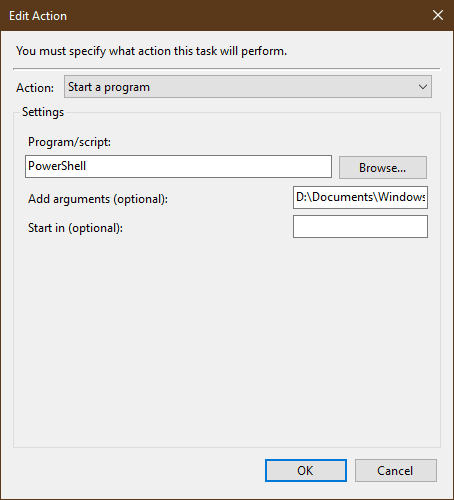
When you create the Task in Task Scheduler, enter PowerShell as the program and the path to the script as the argument.
Tools
SendLater is a free Outlook add-in e-mail scheduler with recurring email option. Prepare all your email notifications and reminders in advance and schedule their delivery. Re-send email automatically if a reply is not received. Set up repetitive follow-up emails at comprehensive time intervals. When sending recurrent emails, you can set path to CSV file and load recipients from that CSV file automatically. The updated SendLater is fully compatible with the latest Windows 2018 October Update and Microsoft Outlook 2019. | |
One of the utilities in the MAPILab Toolbox, Email Scheduler allows you to chedule messages to be sent at specific date/times or intervals by setting up a task for each message. MAPILab Toolbox is a set of 18 different add-ins for Outlook. | |
Schedule Recurring Email schedules email to send later. The maximum number of emails that can be scheduled can be in the hundreds. You can schedule emails that go out hourly, daily, monthly, early, or randomly. The monthly and yearly patterns can be adjusted by a number of days so that schedules like "2nd to last workday of the year" or "3 days after the first Tuesday of every month" can be specified. Works with all Outlook accounts, including IMAP and Outlook.com. | |
Use ScheduledSend for Outlook to send emails on a schedule. Set a schedule and recurrence as Outlook appointment and send emails on a later date. The add-in adds a separate calendar where all your scheduled emails are displayed in a familiar fashion. |

Daniel Smith says
Hi Diane
I am running the script fine on ISE but when setting up my Task Scheduler it books Powershell but it acts as nothing happens and instantly closes and no email is sent.
Do you have any ideas on this one?
Conrad says
My service is called SendRecurring and it is at http://www.sendrecurring.com (just cliick my name on these comments). I would love to hear more feedback from users so try it out.
Conrad says
I made a web application that gives you full control over recurring email messages. You can send to yourself, or large groups of other people, and there are options to allow all of the recipients to edit the message for a form of email collaboration. It is a great tool! It is free and doesn't require a login/setup process, just a valid email address to confirm your recurring emails.