When reminders just won't dismiss, there are several things you can try to get rid of it:
Use the Cleanreminders switch. This works most of the time.
When cleanreminders doesn't work, look for the appointment the reminder belongs to and delete it.
When you can't find the appointment, you need to use MFCMAPI to browse "inside" the message store and delete the reminders. Outlook will then rebuild the list with just the valid reminders.
Use Cleanreminders switch
The easiest way to try to get rid of corrupt reminders is by closing Outlook and reopening it using the /cleanreminders switch. To do this, press Windows key + R to open the Run dialog. type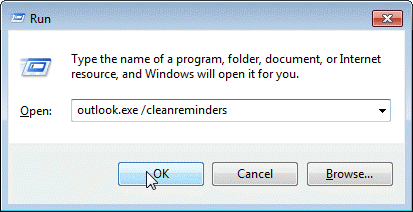
outlook /cleanreminders
in the field and press Ok.
Make sure you have a space between Outlook and the slash. Using 'outlook.exe' is optional - just the program name should work.
A (very) few people will need to use the full path to outlook.exe. Click Browse and look under C:\Program Files\Microsoft Office\ (C:\Program Files (x86)\Microsoft Office\ if using 64-bit Windows).
Delete the Appointment
Sometimes the cleanreminders switch doesn't help. When this happens, look for the appointment that is associated with the reminder and delete it. If you can't find it, you'll need to use MFCMAPI to delete the reminder.
Use MFCMAPI
Please note the steps are slightly different when you use a pst file or Exchange mailboxes and may vary slightly with newer versions of MFCMAPI. These instructions were last updated for MFCMAPI v15, March 2012.
PST File (used with POP3 and IMAP accounts)
- Run MFCMAPI
- Go to Session, Logon
- Select your profile
- Select your data file where the stuck reminder is. (It may be use your email address as the filename.)
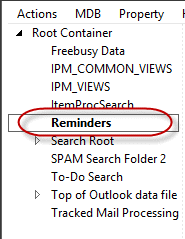
- Expand "Root Container"
- Right click "Reminders" and select "Open Contents Table"
- New Window Launches with Title Reminders
- Find the corrupt reminder(s) then right click and select "Delete Message". Do not select all reminders, as that will delete all appointments.
- Close MFCMAPI
Alternately, you can delete the Reminder folder and Outlook will rebuild the valid reminders.
Exchange Mailbox
- Run MFCMAPI
- Go to Session, Logon
- Select your profile
- Select your Mailbox
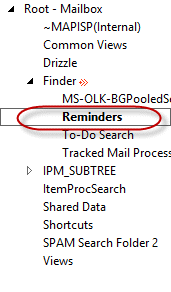
- Expand "Root - Mailbox"
- Expand "Finders"
- Right click "Reminders" and select "Open Contents Table"
- New Window Launches with title "Reminders"
- Find the corrupt reminder(s) then right click and select "Delete Message". Do not select all reminders, as that will delete all appointments.
- Close MFCMAPI
You may need to log into the mailbox using a non-cached profile and delete the corrupt reminders from the mailbox on the server too.
Delete Outlook Reminders Tutorial
When you are deleting reminders from Exchange accounts, choose your Mailbox name. When you are deleting reminders from POP3 accounts or *.pst files, right click on the pst name that contains the corrupt reminder.
Remember: Delete only the corrupt reminder(s) when you delete from inside the reminder folder you are deleting the appointment too.
If you can't find the corrupt reminder, you can delete the entire Reminders folder. Outlook will rebuild the folder and the (good) reminders.

Olin says
Thank you for this. You would think in 2024 Outlook wouldn't still have bugged reminders, but it does!
Chris says
Thanks Diane, I've always appreciated your knowledge in this area. Just used the MFCMAPI to get rid of some very annoying birthday reminders that evaded all other methods.
Jayesh Parmar says
Thank you so much Diane, It helped.
Kevin says
You may have to search for hidden notifications if you've completed a migration from on-prem to exchange online.
Rich says
Thank you for this--the MFCMAPI solution worked for me. This was driving me nuts! I suspect my issue started after trying to delete items that were duplicated in an Exchange migration.
Al says
Worked like a charm o Windows 10 for me! Thanks!!
dugisan says
Had the same issue - I was unable to successfully dismiss or open some reminders in my birthday calendar. Turns out, you can set the reminder for "9AM at day of event" in the web-calendar (Office365), which effectively sets the reminder time to -9 hours, but the desktop version of Outlook is unable to process negative reminder values. After I changed the reminder to "None" (or prior to the event), everything worked as expected.
Diane Poremsky says
Thanks for that information!
Jim says
Thank you! MFCMAPI 64-bit failed to work with Outlook 2007 on my Win7 64 Ultimate machine, but once it occurred to me to try the 32-bit version with my old Outlook (used only for Contacts and Calendar with my BlackBerry), it worked like a champ to delete the messed-up Reminder entry.
So happy that's finally fixed!
Diane Poremsky says
Yeah... that is a common mistake. You need to use the MFCMAPI version that matches your Outlook bitness, not Windows.
Luey says
Thank you! I just had a hard drive failure and upgraded from Outlook 2007 to outlook 2016 in Office 365. Even my computer guy didn't know how to fix this! I had to run the cleanreminders window a couple of times and then open and delete the old reminders and their recurrence and your instructions worked! Yay!
Mary Molloy says
This worked! Thanks!
cheryl says
How does this work on a Mac with Mac version of Outlook having same issue?
Steve says
I had this problem on Mac and when the reminder pops up, use the top of screen menu to open the related item. Then you can remove it. Good luck!
Mary Molloy says
Thank you! Thank you! It was SO ANNOYING!!!
tyler says
Thanks the clean reminders switch worked!
LGlenn says
I agree - worked like a charm! thanks
david says
I have followed this procedure for Exchange, but there are 10 messages that i cannot delete, nor can i delete the folder. This is the error message i received.
Any thoughts?
Error:
Code: MAPI_E_EXTENDED_ERROR == 0x80040119
Function lpParentFolder->DeleteFolder( lpItemEID->cb, (LPENTRYID)lpItemEID->lpb, lpProgress ? (ULONG_PTR)m_hWnd : NULL, lpProgress, ulFlags)
File MsgStoreDlg.cpp
Line 924
Rahman says
Delete without Hard deletion
Sheri says
OMG Thanks!!! It was driving me crazy.
Christianna C says
I have tried the clea reminders switch and the cleansniff switch and the MFCMAPI
None of them work and I now have another reminder that won't dismiss
when I try to delete the reminders folder I get the following error message
Error:
Code: MAPI_E_INVALID_ENTRYID == 0x80040107
Function lpSourceFolder->CopyMessages( lpEIDs, NULL, lpWasteFolder, lpProgress ? (ULONG_PTR)hWnd : NULL, lpProgress, ulCopyFlags)
File MAPIFunctions.cpp
Line 991
The problem appointments were originally entered on my phone in Google calendar and then synced with OUtlook
but most appointments don't have this problem
Christer V says
I also have this issue. Any suggestions?
Tyler E says
THANK YOU very much!!!! I used the clear reminders command and it seems to have worked. You are like the mouse that removed the splinter from the lion's foot!!! My perpetual meeting reminder had been going on for some time and just couldn't get the right search to get the right site (yours) but today... today is going to be a good day! :)
Peter P. Denooij, DVM says
I have Outlook 2013 and 2 reminders I cannot dismiss, as the end date is before the start date according to the message I get.
I follow your instructions for PST file, but when I try to delete, I get this error message.
Error:
Code: MAPI_E_INVALID_ENTRYID == 0x80040107
Function ((LPMAPIFOLDER) m_lpContainer)->DeleteMessages( lpEIDs, lpProgress ? (ULONG_PTR)m_hWnd : NULL, lpProgress, ulFlag)
File FolderDlg.cpp
Line 708
then I get kicked out of the program
Mick says
MFCMAP instructions worked like a charm - thanks.
Problem occurred via old backup PST.
:) Mick
janegoodallsenegal says
It worked thanks!
Gareth says
Further to your last comment Diane, just to highlight that in my case I'm not using Exchange, just a stand-alone copy of Outlook 2010. I do have quite a few add-ins so I guess one of them could possibly be to blame. Otherwise, just wondering, have you heard of any other instances of the cleanreminders action screwing things up completely as it did for me?
Diane Poremsky says
No, I haven't heard of problems like you are having. It normally works for all account types.
Gareth says
Well even more strange.... as of today it's all started working correctly again! I didn't do anything further but somehow it's corrected itself.
Diane Poremsky says
Thanks for the update. I wonder if something was holding the outlook.exe open before and you rebooted... that would fix the problem.
santhosh Kumar says
why the reminders will corrupt. What is the reason for this?
Diane Poremsky says
It's hard to say why they ended up corrupt, but if using exchange and the mailbox is open on multiple computers or handheld devices, it can get corrupted during the sync process. Outside applications, like sync software or addins, can also cause problems.
Gareth says
Another update! If I close Outlook and reopen it, it DOES now display the correct reminders list, following the changes I made to specific reminders the last time it was open. So it appears I have a partial resolution, in that it updates the reminders list when Outlook is closed and reopened again, but it's a shame it doesn't update IMMEDIATELY within the current Outlook session, as it should do.
Gareth says
UPDATE! I've not tried a full rebuild of my Outlook profile as yet (as I just don't have the time just now) but did try creating a new Outlook profile, opened it, and set a task with a reminder set for a minute ahead... but again it did not remind me. I then tried changing the default data file in that new profile to Outlook's new clean data file. I set a new task there with a reminder for an hour previous, saved it, and voila - up popped the reminder. Then, a few seconds after, the reminders in my usual data file also popped up. Success, or so I thought.
So I closed Outlook, and reopened it with my usual profile. Again all the outstanding reminders popped up. So far so good... If I "Dismiss" reminder from the list it disappears from the list as expected. BUT... If I instead open a reminder item in the window, and change the date/time for the reminder to defer it,it still remains in the reminders window. Similarly, for a recurring (monthly) task which was in the reminders list for today, I opened it and marked it as complete. It has change the next due date to end of May and set the reminder for that date also, BUT that task is still in the list in the reminders window for today even though its not due until end of next month. So once a reminder pos up the only way I can currently clear it off the list is by dismissing it.
So, it looks like I'm back to where I started with this - I have my reminders appearing again now, BUT, Outlook is not taking them out of the reminders window view when I either mark recurring ones as completed, or change the reminder time to put them off till later. Aaargh!!
Gareth says
Hi Diane. Yes it cleared the list but my problem is that it has not then rebuilt it. I have several outstanding reminders but they are no longer popping up. I have checked and my reminders for certain email, tasks, and calendar items (including recurring tasks and appointments are all still in place, but if I click to view the reminders window it's blank. I've tried setting new tasks and setting a reminder in them (either for a past date, or for a few minutes time) but again the reminder never pops up. And yes, they are all in my default data file.
From looking at other suggestions online, I also tried downloading the MFCMAPI tool and running it but when I expanded the Reminders folder in that it showed nothing. As suggested, I then tried deleting that folder from within the tool (as it said Outlook would rebuild the reminders) but again it's made no difference. I'm now wishing I never ran the cleanreminders action, as it's just made things go from bad to much much worse - as I now get no reminders at all - and I am very reliant on these on a day-to-day basis. Strangest things is - I googled this very situation "No reminders work after running the cleanreminders switch" and I've not found a single other reported case of running that action having this effect - so I guess it's unusual for it to totally mess up the reminders functionality.
I'm desperate for a solution to this one so hope you can help.
Gareth says
Suddenly yesterday I found that completed reminders were still appearing in my reminders window even if I set the task as completed or dismissed them from the reminders window. A search took me to this page so I tried running Outlook /cleanreminders. It certainly worked to clean my reminders window but now my copy of Outlook will not display ANYreminders at all!. If I open the reminders window it is empty. I've spent all day trying various other solutions but nothing has worked. I'm running Outlook 2010 (32 bit) on a 64 bit PC with Windows Version 8.1. Please note I don't have Exchange so my data file is .pst. Any suggestions, please?
Diane Poremsky says
Cleanreminders will empty the reminder file and Outlook will rebuild it using reminders that are still valid. Create a new appointment for a few minutes from now and set a reminder. Does it come up? If so, reminders are working.
Are all of the items in the default data file?
Aaron Lesher says
This program worked!!! I had a reminder I couldn't get rid of in Outlook for years, spent hours on phone with IT company to no avail. This solved it! I couldn't find the reminders folder (or other folders) using the instructions on this web page though. But the program has a "QuickStart" tab that I tried instead, and it immediately has a link to the "reminders" folder. From there it was simple- locate and delete reminder. I am so happy now. Thanks!
Klo says
It worked!
Finally after more than a year that reminder is gone!
John Callahan says
Thank you for this information. It worked when all other fixes failed.
Dave Ramsey says
None of these helped me. I found that the PST file that is associated with these reminders was corrupted. After I repaired it, the reminders went away. Thanks for the help though.
Varghese Abraham says
Hi,
One of the user in my company is dealing with the issue of reminders hich are 5 and 6 days old showing up even after dismissing it. Another strange instance are reminders for appointments which are way into the future (like 1 week ahead) are showing up in reminder. I have tried the clean reminder switch to no avail. I tried using MFCMAPI to get rid of those specific corrupt reminders but it deleted the original appointment itself.
We use Outlook 2013 (64bit), Hybrid exchange environment with on-premise exchange 2013. The older reminders also show up in OWA. So i am guessing its not a local issue.
Your insight would be appreciated.
Brian G says
Wow. After many months and many tried solutions the "MAPI" one worked for me. Thanks
Mike says
My reminders window is showing that the reminder is on email messages rather than calendar appointments. If I dismiss them all, they keep coming back immeidately. Cleanreminders and the MFCMAPI fix didn't work. The reminders keep returning. On Outlook 2013/Exchange, no PST. I can't delete the emails as I need them. Any ideas?
Diane Poremsky says
Can you remove the flags? Do you sync with a smartphone?
Hugues says
Hi Diane,
This tools is wonderfull. I used it but my stuck reminder still will not disappear...
Working with Win8.1/Office2007, I tried to remove one reminder as test and it worked but the stuck reminder does not disappear from the list using the 2 first deletion modes, and displays an error for the 3rd mode DELETE_HARD_DELETE :
«
Error:
Code: MAPI_E_UNKNOWN_FLAGS == 0x80040106
Function ((LPMAPIFOLDER) m_lpContainer)->DeleteMessages( lpEIDs, lpProgress ? (ULONG_PTR)m_hWnd : NULL, lpProgress, ulFlag)
File FolderDlg.cpp
Line 708
»
Any idea how to nuke this reminder?
Thanks for your cares.
Dave says
Hi Diane - I am having a slightly different problem. Win 7, Outlook 2010, Apple icloud sync to a phone and ipad. Not using Exchange, just local .pst Only on the win 7 system, some reminders cannot be dismissed nor snoozed. They come right back up after trying. They are current appointments, not old nor necessarily reoccurring. They are my own created remainders, not meeting reminders sent from someone else. I am getting the impression the reminders which have already been snoozed a few (or many times) may become the ones which can no longer me snoozed or dismissed. This is just a theory. It also seems this condition exists sporadically. So far I just did the clean reminders launch and all seems well but I guess I have to wait to see if this fixes anything. For example yesterday I had a couple that refused to be snoozed or dismissed, kept coming back up. Today, everything is fine. I guess because those reminders have passed or something? So, those particular ones from yesterday eventually seem to stop, maybe because I closed Outlook and re-opened or shut the system down and the cold boot the next day fixed something? Thanks in advance for any assistance
Diane Poremsky says
I'm guessing the close/reopen (possibly as part of a reboot) is responsible for it - that would kick off a fresh sync with iCloud and clear the bad reminders.
Jim S says
Outlook 2007 on Vista. Cleanreminders didn't work. I'm not technically strong but I watched your video and tried MFCmapi, which cleared the reminder. As a note, "Outlook" was the only profile name I saw so I simply followed the remaining sequence of steps you described for Pop 3. Thank you.
lorena says
i deleted the stuck eminders in the mfcmapi procedure............the error came with a double pst file linked in outlookk..........however, some of my contacts with a reminder also got deleted......how can i get the contacts back?
Diane Poremsky says
Unfortunately, if you deleted the items using mfcmapi, they are most likely gone. Check the deleted items folder, just in case. If they are deleted and you use Exchange mailbox, they might be in deleted items recovery. Otherwise, you'll need to recover them from a backup. Sorry. :(
Mark Ridgeway says
Thank you! You saved me....again!
Ashton says
Superb!!!! resolved my issue which I was facing since long.
Thanks a lot.
Charlie Mann says
Thanks for the suggestion, but that didn't work either. I was able to figure out the MFCMAPI and deleted all the reminders and everything is working well now. Thanks again for the help!
David Redwine says
My I-Phone 4 was re-insterting the appointment on my calendar. After I deleted it with MFCMapi.exe, it kept coming back, outlook /cleanreminders did not work, it came back. Using MFCMapi.exe to delete the reminders folder did not work, it came back, AND it was popping up 1-2 times a second. Finally I clicked on Calendar in my I-Phone 4, went back to the date of the appointment, and declined it. Instantly it stopped re-appearing/deleting , re-appearing/deleting, and constantly popping up every second in my outlook 2007 Windows Vista client.
Steve Battiato says
Outlook 2007 on Windows 7. Google Apps for Business with Google Sync. Five reminders continue to pop-up. Tried Outlook triggers: cleanreminders, etc. Tried MFCMAPI and ScanPST. ScanPST finds no errors. Trying to modify any of the appointments fails to save. No specific errors. Any help is appreciated.
Diane Poremsky says
Do you get any error messages when the appointment fails to save?
Charlie Mann says
I recently switched email hosts to Outlook 365. I exported the pst file and then deleted the old email account from outlook. I then created a new email account in Outlook and connected it to 365 and then imported the saved pst file. This created some duplicate calendar entries, which I fixed, but I am now getting 5 reminders from the Outlook calendar entries, even after deleting the calendar entry. I tried the cleanreminders which didn't work. I opened the MFCMAPI but the instructions didn't match what I was seeing. Any suggestions?
Diane Poremsky says
Try /cleansniff switch and see if that helps.
Leo says
Legend! That's been annoying me for months. Thank you
BPackard says
Diane,
I believe I have fixed both issues. Thank you for your help.
The steps I detailed above worked. The only thing I did not do was re-enable cached mode.
Once I enabled cached mode on the user's Outlook client the issue of 2 reminder windows opening back to back went away. This was tested on multiple users, all were successful. I will gleefully close the support tickets on this today. Well, maybe tomorrow...just to be safe. Thanks again!
BPackard says
Diane,
After more research, I have discovered the second reminder window popping up after hitting dismiss all is not isolated to just Apple products. This is happening with Microsoft Surface, and Android devices as well. I have checked Outlook clients for "sync" add-ins such as iCloud and none were found. When the user leaves for lunch I will log in and test Outlook in safe mode, but not optimistic. Since this is happening to multiple users with disparate mobile devices, I am leaning to the root cause being either on the Exchange server or Outlook client. Could there be anything else (besides mobile devices) causing a second reminder window (same event) to pop up immediately after hitting dismiss?
BPackard says
Right, two reminder windows. Yes, iCloud is in play. I suspected the same, I had one of the users log into iCloud and remove calendar entries. No word yet. Is it possible two-way sync is pushing back to Outlook? Would this be as simple as setting the iphone to sync from Exchange to device only (One-way)? Grrr....so close on this, I can taste the closing of these support tickets. :)
Diane Poremsky says
If you are using Exchange, the phone should be syncing directly with the server, not through iCloud. It's a much better experience direct to the server. You can't use one way sync with either iCloud or exchange but you won't have as much of a problem with duplicate appointments (and their reminders) if the phone syncs over the air with Exchange. Plus, you can get rid of one outlook addin. :)
BPackard says
Moderate success!!!
Ok, the issue of 20-30 reminders popping up in one window seems to be fixed.
What I did:
1. Backed up/exported the PST from Exchange Server
2. Logged in as the user and exported just the calendar.
3. In non-cached mode, deleted EVERY calendar entry via MFCMAPI
4. Scanned and cleaned the user's OST and the exported calendar PST (SCANPST)
5. Reopened Outlook to verify there were no rouge calendar entries.
6. Once I was sure it was clean, I imported the newly cleaned calendar back into the users mailbox via EAC.
7. Reopened the user's outlook, issue fixed.
Now the issue of two reminder windows popping up for one event. (Have to hit dismiss twice for two different reminder windows).
I read that this is a sync issue with mobile devices, correct?
This is happening to both Android and iPhone/iPad users.
Any info on this would be very helpful.
Diane Poremsky says
Two reminder windows? Are they using iCloud? I know that will bring up both the iCloud reminder window and Outlook's. If not iCloud, any other sync addins installed?
BPackard says
Yes, the same number of reminders showing in the reminders folder is also showing in the one window. I would guess the same applies for the number of reoccurring meetings and the ones shown in the reminders folder.
After removing ALL of the reminders via MFCMAPI tool then reloading the profile, the problem seemed to be fixed. Later, the problem came back. It seems the data stored in Exchange contains the corrupt settings/items and the issue comes back after the sync is completed.
I have exported the exchange mailbox to a PST. I have also scanned this PST for errors, some were found. Perhaps completely removing the user's mailbox, create a new one, then import the repaired PST into the recreated mailbox would do the trick? Seems drastic, yes.
Diane Poremsky says
I smell desperation. :) *If* the problem is just corrupt meetings, then yes, redoing the mailbox will fix it but if the problem is the result of syncing with a device, it may come back. If a device is involved, I would clear the calendar on all devices (everything is backed up in the pst) and resync then copy the appointments back.
Oh, and meetings should be moved, not copied, to a PST because copying can break updates.
BPackard says
I have tried all these solutions. I have had limited success.
I have looked around and have yet to find info on this:
How do I determine which reminders are corrupt in the MFCMAPI tool?
There is quite a bit of data and I cannot see a way to distinguish the good from the bad.
I have tried deleting the entire (non cached) reminders folder, no luck there. /cleanreminders doesn't seem to help. I have also deleted the entire Outlook profile and reloaded. After Outlook pulls down the mail items, the reminders issue comes back. This is happening for multiple users in the AD environment. Is it possible the corrupt files are being pulled down from Exchange?
Exchange Server 2013
Outlook 2010 and 2013 (Happens on both client versions)
Diane Poremsky says
The corrupt reminders are the ones that keep firing - deleting every reminder in the reminder folder would get the corrupt reminders and outlook will rebuild the good ones. If you deleted them from the non-cached mode, you deleted them on the server. Did you delete from non-cached mode then create a new ost file?
Do the users have a lot of past due times? If not, you can try two things: first is to turn off reminders, restart outlook. This clears the reminders for all past due items. turn reminders on and restart outlook. The other option is similar: use a macro to set reminders to 'none' for all older items.
BPackard says
I deleted the entire reminders folder in both cached and non cached mode. What would be the proper combination for deleting all reminders and rebuilding the ost?
Some users have reminders that were accepted and have passed time wise that are popping up multiple times in a single window.
On one user I turned off the reminders off, restarted Outlook, then turned reminders back on then restarted Outlook. The same user sent me an email this morning with the same issue.
These are reoccurring meetings that pop up 20 and sometimes 30 times in one window.
Diane Poremsky says
It sounds like you used the proper procedure to clear corrupt reminders. If you previously mentioned 'recurring meetings' I overlooked it, sorry. I think it might be the clue.
Are the affected users syncing with smartphones or tablets? If so, which ones?
Are only recurring meetings affected? Do the number of reminders correspond with the length of the recurrence?
Djo says
Hello Diane, I found something.
Using two Windows 8.1 computers with Outlook 2013 (syncing outlook.com account) the past reminders of completed tasks kept popping up. I have tried the MFCMAPI and the /cleanreminders approach but these reminders kept popping up. With the MFCMAPI approach the problem was that I received an error: I could not delete the reminder.
However, I encountered something that hopefully can avoid any further frustrations and maybe you can create a less intensive approach with it.
I noticed that a reminder of a task has a on/off checkbox, a date field and a time field. Pressing [Delete all] on the reminder windows seemed to uncheck the checkbox, but it did not clear the field of the reminder date and time.
** Manually deleting the reminder date and time field (so it says "None") and then saving the task proved effective. The reminder was not bounced between devices anymore. **
Could you maybe extend this now to a more practical solution?
Have you any idea how to edit multiple task at the same time? Or do you have any other suggestions or relating information about why this is happening in outlook 2013?
Diane Poremsky says
You'll need to use a macro to hit all of the tasks in one go. Oh, the group by method will work - group by a field then drag everything to it. See https://www.slipstick.com/tutorial/how-to-easily-change-the-private-flag/ for details - group by the Reminder time field then drag other tasks to it. You can select several and drag.
Note that if you remove the reminder on recurring events, you'll remove it from all future events.
Nivine says
Hi Diane,
I tried both solutions, the /cleanreminders switch did not resolve my problem and when I run MFCMAPI i can't find “Reminders” in "Finders" when I expand “Root Container”
i'm using outlook 2010 and OWA exchange server.
Hope you can help me.
Diane Poremsky says
Did you restart Outlook a second time, without using the switch? How many data files are in your profile?
Jon A says
Hi Diane
I'm using MFC MAPI on a Vista PC on a pst file using POP. When trying to delete reminders I get three options: "Delete to deleted items", "Permanent deletion (deletes to deleted item retention if supported)", and "Permanent delete passing DELETE_HARD_DELETE (unrecoverable)."
Choosing the first two does nothing - the reminders are still there. When I choose the last I get the message:
Error:
Code: MAPI_E_UNKNOWN_FLAGS == 0x80040106
Function ((LPMAPIFOLDER) m_lpContainer)->DeleteMessages( lpEIDs, lpProgress ? (ULONG_PTR)m_hWnd : NULL, lpProgress, ulFlag)
File FolderDlg.cpp
Line 691
What am I doing wrong?
Thanks for your help
Jon
Diane Poremsky says
I don't think you are doing anything wrong - a few others have had the same problem. One eventually fixed it by moving everything to a new pst. I think I'd try scanpst first though...
Andi says
We ended up having to fail over our email cluster and this error message disappeared along with the ghost reminder.
Thank you anyway for your help.
Andi says
As soon as I open up Reminders I receive the following error message:
Error:
Code: MAPI_E_NOT_ENOUGH_MEMORY == 0x8007000E
Function lpContentsTable->GetRowCount( NULL, &ulTotal)
File ContentsTableListCtrl.cpp
Line 647
I can click OK but then I don't see any reminders; although there is still a reminder in Outlook that pop ups for an event that was deleted!
Do you know how to resolve this?
Diane Poremsky says
What version of Outlook and what type of email account? I'll see if i can repro it - i know a few people get this error but no one seems to know why.
Brian says
Thank you so much for the info. :)
jakcie says
Thanks a lot, I appreciate your very quick response
Mike Nostrom says
Hi Diane,
I have one user who is having to dismiss reminders twice. They are running Windows 7 64-bit, Outlook 32-bit and Google Apps Sync to sync Outlook with Gmail. I just setup this person's new computer and then Google just pushed out a new update to Google Apps Sync as well. I have run the /cleanreminders switch on their Outlook several times. This allows them to successfully dismiss a few reminders but then other reminders will re-appear.
Any thoughts?
Ed Starke says
Followed your instructions and problem remains. What else should I do?
Diane Poremsky says
Wait 24 hours and see if it clears up - i know there were some issues with the service the last couple of days and this could be related.
Ed Starke says
I followed your instructions and issue wasn't solved. Any suggestions? I'm figuring the problem is on their end because it seems strange that all of a sudden I'm no longer receiving my calendar reminders to my hotmail email address.
I'm running Windows 8 and I just go into the calendar that's in metro add an event for a specific day and time, set the reminder, and then I'm emailed a reminder beforehand the day of the event. That's how it was working until 6/12/13.
I've checked my computer and it's in good working order, fully updated, and no one uses it but me.
Any guidance would be greatly appreciated.
Thanks
Ed Starke says
Hi Diane, I'm not receiving reminders in Outlook mail from Outlook Calendar.
I used to receive the reminders but it just stopped. I haven't changed any of my settings at all.
I already have calendarnotification@email.microsoft.com in my safe sender list.
I appreciate any help you can provide.
Thank You
Diane Poremsky says
This is on outlook.com calendar? It possible the problem is on their end, not yours. Try setting the reminder options up again and then create a new event due 'now' to test.
Bilson says
No idea what happened.
Opened outlook yesterday, the reminder went haywired again, popping a few reminders of past 2 weeks. Just dismissed all of them.
After synchronization or update of outlook, all the issues were resolved.
No more old reminders, no more task menu issues, no more unreceived emails. All my emails that were not received by outlook inbox for the past weeks appeared.
Diane Poremsky says
Gremlins :)
Louis says
Thank you for your help. I eventually had to use mfcmap which is not very intuitive and the instructions on how to navigate to the Reminders box were not straight forward, but after some experimenting and your helpful instructions I eventually found and deleted the offending reminders.
I am not a computer expert and I found all the extra unintelligible columns rather daunting, but after perseverance it's great to get rid of the annoying reminders.
Thanks again.
Bilson says
managed to delete most of the wrong reminders, but left 1 which is the first one that has problem. it seems that before synchronizing properly, i deleted the calendar event. That the reminder is sort of having problem.
Bilson says
Unfortunately it is not pst file, it is mailbox. I am using win xp. tried to repair the outlook but it didn't work.
Diane Poremsky says
The clean reminders switch works on Exchange data files too, but it may not get rid of really stubborn reminders. If you are using an ost file, delete the ost and let outlook rebuild it. As long as the bad event was not synced to the server, it will get rid of the bad reminder.
Bilson says
microsoft outlook 2007, seems to be 128bits version
Diane Poremsky says
Is this a pst or a mailbox? Outlook 2007 would be 32 bit, so you need the 32 bit MFCMAPI tool, but it should warn you if you have the wrong one. (128 bit is SSL)
Try running scanpst on the pst file, assuming you are using a pst.
Bilson says
Having issues using MFCMAPI, having two errors.
Error:
Code: MAPI_E_INVALID_ENTRYID == 0x80040107
Function DefaultOpenItemProp( iItem, mfcmapiDO_NOT_REQUEST_MODIFY, lppProp)
File ContentsTableListCtrl.cpp
Line 1467
Error:
Code: MAPI_E_INVALID_ENTRYID == 0x80040107
Function m_lpContentsTableListCtrl->DefaultOpenItemProp( iSelectedItem, bModify, lppMAPIProp)
File ContentsTableDlg.cpp
Line 820
Any suggestion?
Diane Poremsky says
Which version (and bitness) of outlook are you using?
Larry says
I have a user that, each time they receive a meeting request, every reminder they have ever had pops up. I used the outlook /cleanreminders switch and that solved it until the user closed and re-opened Outlook. They have over 6,000 reminders, so trying to find the one that is the issue would probably be impossible. Any suggestions?
Diane Poremsky says
This is with an exchange account? Are you using cached mode? Does the problem occur in online mode? If not, delete the cache file and let outlook rebuild it.
Singh says
Delete your profile from your Phones!!! This occured for me and the solution to this problem came out to deleting the profile on my Iphone!
After this I went back to outlook and held down shift + delete on the meeting and it was solved!!!!
mike says
Diane, I have this issue and downloaded and ran the MFCMAPI. I used the instructions on removing the reminders that would not delete and it worked. Now the problem is that new reminders we are unable to delete now, so its the same problem again. What do I need to do to prevent this going forward. Is there a reason for this to continue, is the exchange file currupt? Please reply! thanks
Diane Poremsky says
It's obviously not normal behavior. It's possible that the cache file is corrupt. Can you delete the reminders for OWA?
I would try closing Outlook and restarting with the /cleanreminders switch and see if that fixes it in outlook, otherwise, delete the ost and let Outlook rebuild it.
Joe Obrien says
I have tried all methods mentioned in this thread and I can't seem to get the reminder to stop popping up.
* Exchange 2010
* Not in Cache mode
* No .pst file
* All deleted items permanently deleted
* All mobile devices not connected (e.g., not re-sync'ing)
* Event was a meeting scheduled by someone else, that I accepted, but subsequently deleted
Any advice?
Joe
Diane Poremsky says
You tried both cleanreminders switch and deleting the reminder (or the reminder folder) using MFCMAPI?
AnnaLee says
In the reminders windows it just shows the contact name and all 65 other contacts I have. When I click on "open item" it shows the contact information. Under Activities-All Items it shows "there are no items to display". Activities-Upcoming tasks/Appointments "there are no items to display" There is no birthday information recorded in the contact's information.
When I click "Dismiss All" all the appointments go away and then reappear showing as "Follow up" with the present date and time.
I have not created any appointments in my calendar
Diane Poremsky says
Sounds like the contacts have flags. I'd do two things. Close Outlook then restart it using the /cleanreminders switch. Press windows key + R and type or paste
outlook.exe /cleanreminders in the field then press enter.
If its still a problem, I'd make a custom view with the reminder field in it, group by the field and drag everything to the (none) group.
AnnaLee says
Hello Diane,
I'm having an issue with Outlook 2003 reminders. I used MFCMAPI to remove all of the appointments. Once I did this all of my contacts were gone. When I try to enter them back into my contacts the reminders show up again. I tried importing the contacts from a previous backup I made before the persistant reminders issue happened and the reminders still show up. The number of reminders equals the number of contacts I have in my list. I tried turning off reminders through options>advanced and now my cursor constantly shows up as the blue circle like it is busy. Do you have any advise as to what I should try next?
Diane Poremsky says
in the reminder window, are the reminders for appointments or contacts? You can set flags and reminders on contacts - if they are for the contact birthday, it's an appointment.
Brian says
OK so after checking some of the items are in the deleted items but not all because this calendar contained years worth of appointments that we would like to have that aren't there. So we have a PST backup of the calendar from a few days ago that we're going to use to recover the items. So question - I should be able to just simply import the PST and merge it with my existing calendar correct or is the process more complicated than that.
Diane Poremsky says
That's all you need to do - import the calendar (only the calendar).
Brian says
This is an Exchange account and it appears that some of the appointments are in the deleted items folder. I'm gonna check and see if we can recover the appointments from a recent backup.
Diane Poremsky says
You can drag the ones in the deleted items folder back to the calendar. If some are there but not all, then they were deleted for some other reason (duplicates etc).
Brian says
Hello Diane,
I am in desperate need of your help. I used this tool to clear out reoccurring reminders but I missed the part that said not to select all reminders and now all of my appointments are gone! Is there any way to recover these appointments using this tool
Diane Poremsky says
What type of email account?
Do you have a backup copy of your pst? Or use Exchange with Recover deleted enabled?
If not, immediately close outlook. See if https://www.stellarinfo.com/deleted-email-recovery.htm finds the deleted appointments. If so, I can probably recover them for you.
Tracie says
We figured out our issue ... user B declined the appt in the iPad ... it was the iPad that was continuously sending out the message - so we re-created the email profile on it (rebooting and resetting it didn't work) and now it has stopped sending the decline messages.
Diane Poremsky says
I'm not surprised - apple devices are know to cause problems when you accept meetings on it.
Tracie says
I have a frustrating issue. Running Exchange 2007 sp3. Client Outlook 2007.
User A had a calendar event where she invited User B. Then User A delete the event but User B declined the event. Now User A gets an email every few minutes that User B declined but it says The meeting is not in the calendar; it may have been moved or deleted.
I've verified that the event is in neither User's calendar. I've opened outlook with the switch /cleanreminders for both users. I've deleted the reminders folder for User B. So, User B keeps sending the decline but User A says "I don't know what you're talking about"
Any ideas?
Mange says
Thanks very much for this. helped me get rid of those annoying reminders that wouldnt be deleted !
Scott Barentsen says
Diane - u rock! I had a pesky, annoying, broken for weeks reminder in a pst data file and you showed me the way. THANK YOU!
Ian Thompson says
Diane,
You are a genius! I've had a stuck appointment in Outlook for about 3 months. This was preventing my iPhone syncing with Outlook on my PC. All is now well. Many thanks!
Pete says
None of these solutions worked for me but I did just notice something interesting about ALL of the Reminders that were coming back for the user I was helping:
When I opened the offending Appointment tied to the Reminder it states that it has been "Tentatively Accepted." I thought maybe if I officially "Accepted" it I might be able to get rid of the Reminder pop-up. Weirdly, when I tried that (Accepting it), the Reminder would still pop-up, and when I re-opened the Appointment it still said "Tentatively Accepted" albeit it was now timestamped with the current time that I had Accepted it on.
Maybe this is diagnostic of something? Also some of the reminders have a reminder time of: 1525252321 minutes (I googled this and found some things but very few and none that worked).
UPDATE: I noticed also that the offending Appointments seemed to be organized/requested by someone else. I wondered if perhaps it was too late to "Accept" since they were all in the past? So this time, as they re-popped up I tried Declining the invite, and then Dismissing the Reminders for them when they popped up again.....holding my breath now to see if they come back.....nope, did not work.....all popping back up again.
UPDATE #2: I cannot even delete the original Appointments. After awhile they reappear too. This user is synching the Calendar with an Android. Maybe it is re-synching these back on? I did a synch refresh on the Android. Didn't make any difference. This user is using Exchange/Cache Mode. Something, somewhere is confused.
Can I turn Reminders off completely??
Arrghg...
Diane Poremsky says
In Options > Advanced you can turn off reminders. This disables them for past due and current events but not future ones.
Mike Hayes says
Yes, I have tried that as well as reset folders. As soon as I access the contacts the reminders pop up. I have tried reseting all the flas to "Clear flags" as well. I am about to try the MFCMAPI option. I have never seen this happen?!
Diane Poremsky says
I have never seen it, but i only have maybe 10 of my contacts flagged, with no reminders set. If you are getting reminders when none were ever set, then something is really messed up. But it's no uncommon to import flagged items an have a previously dismissed reminder come up.
I'm wondering if the repair did it...
Mike Hayes says
Sorry it should read, "recovered an oversized Outlook 2000 PST".
Mike Hayes says
Hi Diane,
I have just recovered an Outlook 200 PST that was corrupt. I have upgraded the client to Outllok 2007 and opened the PST there and copied the contacts into his new PST. None of the email addresses came in and every time I access a contact I get a reminder for each contact that will not clear. When I dismiss all they pop right back up?
Diane Poremsky says
Is it an actual reminder? If so close outlook, wait 5 minutes and the restart it by opening the run command (windows key + R) then type or paste the following into the field and press Enter:
outlook.exe /cleanreminders
Diane Poremsky says
No the missing email addresses - are they missing from contacts or are the contacts not in the address book when you click To? If they are missing from the address book, it means there is a problem with the profile - you need to make a new profile. Contacts are missing when you click the To button
Mike Hayes says
Running MFCMAPI, I received the following error:
Problem array:
Index: 0x00000000, ulPropTag: Tag: 0x36020003
Type: PT_LONG
Property Name(s): PR_CONTENT_COUNT, PidTagContentCount, ptagContentCount
DASL: , scode: 0x80070005 = MAPI_E_NO_ACCESS
In file MAPIFunctions.cpp
On line 956
Diane Poremsky says
I'm not familiar with this error. What version of Outlook? If using 64-bit Outlook, are you also using the 64-bit version of MFCMAPI?
Yvonne says
Hi Diane
Thank you. Thankyou.
I used the easy to follow instructions for (clean reminders switch) method and it worked!
The annoying reminder I could not dismiss for 43 weeks did not pop up!
I will keep a link to find your solutions for any other problems I have.
Cheers and thanks again!
Yvonne
Cecilia Sepp says
This was utterly useless. Deleting the appointment did not work.
Neither option for cleaning reminders in a .PST file worked. I tried both "cleanreminders" and downloading BOTH Versions of MFCMAPI. I tried both the 32 bit and the 64 bit.
None of the drop down menus look like the ones in the screen pulls or the tutorial video. When I select "Session" there is no plain "logon" option -- there are several, none of which show me my accounts.
I have Outlook 2010, and it is running on Windows 7.
I checked my settings in Outlook and it is selected as the default mailbox at startup.
I downloaded the January 2010 version of MFCMAPI which is the link on this page.
This was total, complete waste of my time. This does now work at all.
Diane Poremsky says
What type of email account do you have configured in Outlook? Do you sync with a smarthphone? If nothing works, you'll need to export your pst to a new pst, add the new pst to your profile and delete the old one.
Please note, you need to use the same bit-version of MFCMAPI as your Outlook. 32-bit Outlook = 32-bit MFCMAPI.
A tutorial for the older version of MFCMAPI is here - https://outlooktutor.wordpress.com/tag/mfcmapi/.
Lea Ann Weisbruch says
When I move emails from my inbox in Outlook to personal folders - something generates an odd "flag" - that has a red flag with a person on it - and then it triggers reminders about the email - even after I have handled the email. I can't find anything on line or in Outlook help to make this stop and/or find out why it is even happening.
Diane Poremsky says
This icon? (or one similar).
It means the sender set a flag/reminder before they sent the message. You can create a rule to remove flags from incoming email.
Diane Poremsky says
@Mark - it doesn't sound like the problem is reminders, but an issue with sync. When you delete them in Outlook, they are syncing back from the BB. Can you find them on the BB? If so, try deleting them from it - it will be the easiest way. Or you can delete the calendar cache on the BB and resync.
Mark Richards says
First, thanks for the great information. I'm not sure if my issue is a Reminders issue or not. I am on an exchange server using Outlook 2010 and it is synced with my Blackberry. My profile is for the exchange server shows as non-cached. I have recurring meetings on my calendar that were scheduled by coworkers. Over time, those meeting times have changed or been canceled but the meetings still show up on my calendar along with the new meetings. I have tried deleting them from Outlook, I have tried the cleanreminders method and I have tried the MFCMAPI method. I was able to delete the appointments using the MFCMAPI program but a short time later everything is back on the calendar. No matter what I do, the calender appointments keep reappearing. Any ideas how I can delete them and keep them deleted?
Brian Matthews says
Diane, you are brilliant! The clean reminders solution worked for me. Your solutions are best laid out and explained on the entire web regaridng this issue. Thank you. Other help pages explain that you can use MFCMAPI, but they don't show you how to us this tricky bit of sofware. Thanks again!
Carolyne says
Hi Diane, I had 2 old recurring reminders that I couldn't delete and kept popping up in my reminders window. I tried using the Cleanreminders switch. Now, I have over 1600 reminders popping up in my reminders window. Very upsetting. I can't delete them because I keep getting an error message that says: "Can not turn off reminder. You may be reminded again. You must specify a valid date and/or time. Check your entries in the dialog box to verify they represent a valid date and/or time."
I tried using your other suggestion of using the MFCMAPI to delete the reminder. However, when I go to select my mailbox, my only options are 2 different archived folders or a personal folder. Although I've tried each one and gone to the Root Container, I can't find the “Reminders” and select “Open Contents Table”.
Do I have to reinstall a new version of Outlook? What do you advise?
Diane Poremsky says
A new version is unlikely to fix this, even if the old version is really, really old. Reinstalling your current version is not going to help either.
What type of email account do you have configured and what version of Outlook? A new default data file will fix it - import the old default pst file into the new one - but that is not an option if you use an Exchange mailbox.
steve says
Dianne,
I am running Outlook 2010 and have a reminder that I have deleted from the Calendar but each time I open Outlook up pops the reminder, which is now 4 weeks overdue. What ever means I use to close it up pops a box saying "Cannot turn off reminder. You may be reminded again. You must enter a positive duration."
I have used outlook /cleanreminders and have tried using the MFCMAPI as stated above but where you say select your profile, the only profile available is outlook and when that is selected there is no reminders shown in the expanded root container. Where do I go from here? Thank you.
Diane Poremsky says
Use a List view (View ribbon, Change view) - can you find an appointment of the same name as the reminder? If so, use Shift+Delete or drag it to the deleted items folder.
Diane Poremsky says
What do you see? Only Exchange mailbox users will have "Mailbox" listed by name. Everyone else needs to right click on their default pst file, or on the pst file that has the corrupt reminder. (I updated the tutorial using the current MFCMapi build.)
gkupfer says
I also downloaded the MFCMAPI file to fix an error message " Cannot turn off the remnder. You may be reminded again. Cannot locate recurrence information for this appointment" The outlook /cleanreminders method did not solve the issue.
I followed the "Delete Outlook Reminders Tutorial" and discovered that the MFCMAPI file that I downloaded is different than in the tutorial. I downloaded ver. 15.0.0.1030. The problem is that this version does not show "mailbox" after choosing "Outlook" as my profile, so I can't even locate the root container that has reminders as a sub-folder.
I am running W7, 32 bit and wondering if anyone can get me to the reminders in MFCMAPI
Patrick says
I have ~60 reminders that will not clear. They show up in the Reminders folder for my local profile, but they do not show up in the Reminders folder for my OWA folder. When I try to delete individual reminders or the local Reminders folder or the OWA Reminders folder, I receive an error:
Error:
Code: MAPI_E_UNKNOWN_FLAGS == 0x80040106
Function lpParentFolder->DeleteFolder( lpItemEID->cb, (LPENTRYID) lpItemEID->lpb, lpProgress ? (ULONG_PTR)m_hWnd : NULL, lpProgress, ulFlags)
File .MsgStoreDlg.cpp
Line 973
Any idea how I might solve this (and thereby solve the annoying recurring reminders problem)?
Thanks!
Diane Poremsky says
You are using cached mode? The easiest way to fix it is to delete the ost file and let outlook rebuild it.
Other than that, I'm not sure why are are getting that error.
Ryan says
Hi Diane,
I am running MFC Mapi and running it locally on a non cached mode of Outlook 2003 sp3. I am opening my Mailbox store, expanding root container, going into the reminders window and deleting the reminder, by right clicking and delete message. However when i do this it deletes the entire reoccuring appointment. Do you know why this could be happening? I followed the instructions word for word.
Diane Poremsky says
I'll check it out. This is with an exchange account, correct?
Diane Poremsky says
Either delete the corrupt item, if you know which one it is or delete the Reminder folder. Deleting the item from the folder is used to get rid of appointments that are corrupt and need deleted. If you delete the folder, Outlook will recreate it and rebuild the reminders.
Chris says
Yes, many of the calendar items were in the dumpster, even though I selected delete to deleted items folder.
I did perform this against another users mailbox. Do I need to run mfcmapi locally?
Diane Poremsky says
I have not tested it against a shared mailbox, so I can't say what would happen. I'd use it locally to avoid possible problems.
Chris says
These MFCMAPI instructions caused many calendar items to be deleted, not just the reminders. Is this expected or did I do something wrong? I was in the reminders folder...
Diane Poremsky says
Did it delete the actual calendar item? If so, you did something wrong.
When you delete the reminders, it removes the reminders from the Reminders folder. This folder is where Outlook keeps track of reminders it shows in the reminders window. When you restart Outlook, it recreates the valid reminders.
Tim Seekins says
what if the error occurs in OWA? Synced to an Android phone.
I assume then that the problem is NOT local, I don't see anything at the Exchange end, and it appears to be just 1 of 12 users..
Diane Poremsky says
If the problem is in OWA, it should also be in outlook. They share the hidden reminders folder. If it's in OWA, but not in cached Outlook, the cache is syncing everything with the server.
The fix is the same, use Outlook to clean the reminders. I'm not aware of a way to do it from OWA, although it might be possible using a cmdlet in Exchange 2007/2010. I'll see what i can find.