We're seeing a lot of questions that begin like this:
I'm using Outlook 2010 and messages I send are not being saved to the "Sent Items" folder. I know they have been sent but I cannot locate them. I have checked the options and the necessary check-boxes have been checked
For most people, the sent messages are being saved correctly but not in the folder where they expected the sent item to be. Outlook 2010 (and up) changes how accounts are handled and Sent items are stored in the account's data file.
Although not a change from past behavior, Outlook 2007 and 2010 users can configure where the sent items for IMAP email accounts are stored. This option was removed from Outlook 2013 and newer.
First, check your options and verify you are saving sent items. Most users will have the correct settings but you should check it just to be sure. Next, check the Sent folders in your profile.
Sent Item Options
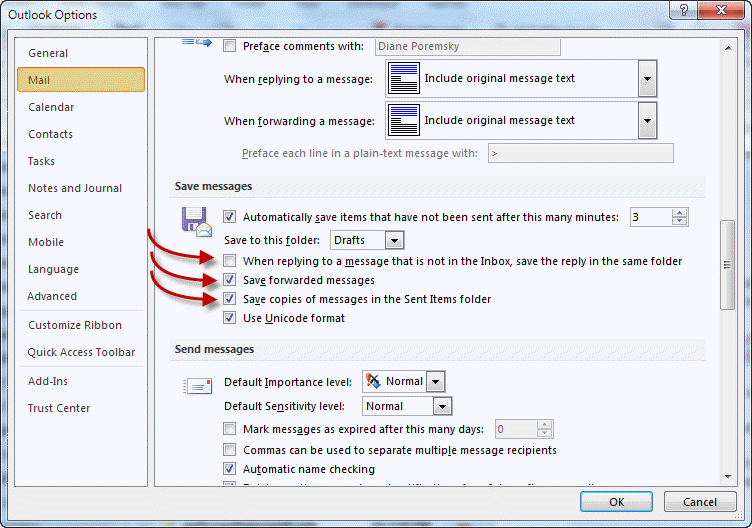
In Outlook 2010, go to File, Options, Mail and check the Save Messages options.
Are you saving replies in the folder with the original?
If you forwarded the message, are you saving forwarded items?
Are you saving sent items?
Find the Sent Items Folder
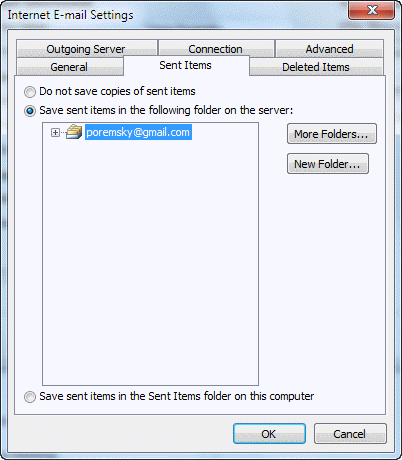
Outlook 2007 and Outlook 2010 have the ability to choose the Sent folder for IMAP accounts. Other account types save sent items in the data file where the incoming messages are stored.
If you have an IMAP account
- Go to File and open the Account Settings dialog in Outlook 2010 and newer; in Outlook 2007, it's Tools, Account Settings.
- Double click on email account to open the Change Account dialog
- Click on the More Settings button to open the Internet E-Mail Settings window
- Select the Sent Items tab (Folders tab in Outlook 2007) and verify where you are saving sent items.
Gmail users: Note that saving sent items on the server will result in duplicate messages being saved in the sent folder because Gmail will save a copy as well. Some users report that two messages are sent, however I can’t reproduce this behavior. Autodiscover in Outlook 2013 and up will properly configure the account so you don't get duplicates.
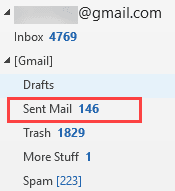
Gmail's Sent Mail folder is under the [Gmail] folder in your folder list. Other IMAP servers may use a similar configuration.
If you have a POP3 account
By default, Outlook 2010 creates a separate data file for each email account, with separate Inbox, Drafts, Sent Items folders. The messages you send using each account are placed in the Sent Items folder in the data file associated with the account, not in one main sent folder.
To locate your folders, browse the folder list and look for additional Sent items folders. To make it easier to find this folder, drag it to the Favorites list at the top of the Mail navigation pane.
If you prefer, you can change where all messages for the additional POP3 accounts are placed by opening the Account Settings dialog, selecting the account and clicking the Change Folder button. We have screenshots and a tutorial at Deliver Two or More POP3 Accounts to One Data File.

Pak Mega Place (www.pakmegaplace.com) says
I came across this issue yesterday. Windows 10, Outlook 2016 (16.0.11929.20234) 32-bit, on-premises Exchange 2010, no Cached Exchange Mode, with an image used in the signature. Removing the signature allowed emails to send, but with the signature included we saw “Cannot send this item”.
Another confirmation here that turning on Cached Exchange Mode fixed it.
Glad I spotted this thread!
Stan Russell says
My "Sent" folder does not show "sent" emails,as the"inbox" does ?
the sent emails are shown thus:-S...Re: Subject..Sort by..Sent by...size
I click on that and it open to show the Sent email. I want to have all my "Sent" emails listed, and I can easily select the one I want ?
Can you advise ?
Diane Poremsky says
So its just the view on the folder that is wrong? Have you reset the view? View tab, Reset button.
Jarrad Hodson says
Hi Diane, I have an Office365/Exchange setup. Outlook email displays both a 'Sent Items' folder and also a 'sent' folder. For some reason, my sent mail is getting saved in either of these folders, not just one. Where do I control which folder is used for saving all sent emails? Thank you for your time.
Diane Poremsky says
You're syncing with a phone or tablet, probably apple? The native mail app uses a different folder - go into the device's settings, mail account and change the folder that is used for the sent items - deleted items may also be in the 'wrong' folder.
This also occurs with imap accounts - outlook & phones may use different sent and deleted folders.
Jerry says
Thank you, I searched for an answer to this problem in many places and only found it here. I am a Gmail user and after reading this article realized I had two sent folders in Outlook (have just deleted one). My sent e-mails were in the folder under Gmail as indicated above. Simple problem, it was just not intuitive. Thank you again
Shreya sharma says
Thanks Guys. This worked. Have been struggling to find the latest email.
Toop says
Hello Diane
I use Outlook 2013. I have done 'File - Save messages - checkbox', the 'File - Account settings - Sent mail'. but all these do not work. Simply the Sent Mail folder is always empty even as all the messages are delivered. I use a gmail account. Is there anything else i can do ?
Terry says
Not only are the messages not saved, I don't even think they got sent. Windows 10 and Outlook have wasted too many hours of my life. I'll never buy another Microsoft product.
dirk says
Good day, i am using Outlook 2013, up until friday all my sent items were saved, all of a sudden it is not saving any more. Checked that my dont save is unticked. please help
gina says
Hi Diane - I am using Outlook 2010 without Exchange. I use IMAP.
For my AOL accounts, I have the setting to save all emails in the Sent Items folder for the respective AOL accounts/AOL server. 99% of the time, that is exactly where they get saved. But then, a few here and there end up in my Personal Folders/computer "sent."
I think this sometimes happens when I leave the reply open a long time before hitting send. But other times, it also happens when I reply right away.
What could be causing this? This seems to happen only with AOL (never happens with Gmail mail, even though I have the same exact settings).
Thanks,
Gina
Diane Poremsky says
What are the setting in File, Account Settings, More Settings, Sent tab?
gina says
Thanks Diane.
All my AOL accounts are set up the same.
In the File > Account Settings>More settings>Sent Items:
Save Sent Items in the Following Folder on the Server:
Sent (this is the folder that's highlighted)
That's why it's so puzzling that they don't always end up there and sometimes end up in the computer/personal folder. :/
Gina says
Diane, was just following up on this, I am still having the same issue. I hope you can help me. Thanks Gina.
Diane Poremsky says
This is happening only with an aol account? I need to test something else in Outlook 2010 and will dust off my aol account and kill two birds. :)
Gina says
Thanks Diane. :)
Nope, not just with the AOL accounts. I just looked through the Outlook sent items folder and I have emails sent both from AOL and Gmail.
Gina says
Just to add to this and refresh your memory...
I have a *feeling* this has to do with how long an email sits in limbo while I compose it. I think if I let it sit for a long time then when I go send it it ends up in that folder rather in the corresponding account's sent folder.
Diane Poremsky says
You could be on to something - will try those steps to repro.
Gina says
OK Diane. Excited to getting your take on this.
Gina says
Just following up on this Diane - any luck reproducing?
Diane Poremsky says
No, i haven't been able to repro.
What antivirus security software do you use?
Does it work correctly if you start outlook in safe mode? To open Outlook in Safe mode: Close Outlook then hold Ctrl as you click on the Outlook icon. You'll get a message asking if you want to start in Safe mode. Click Ok.
Have you tried using online repair? I normally don't suggest it unless i'm sure it will fix it (and in the past, it often didn't), but have had a few clients recently where it actually fixed weird problems.
Katherine says
Hurray! Thanks so much - this was just what I needed.
David Minns says
Hi, got new laptop, now running office 16. And my emails sent from outlook are no long being saved in Sent folder in outlook (i have them up to the 20/08 this year, but since then, nothing...) . I am using IMAP. The email is a gmail account, and if i go to sent email on mail.google etc, I can see all the sent emails.
I have followed all advice in the comments, ticked all the right boxes.. .but they still don't appear in Sent folder... Any ideas?
Diane Poremsky says
Outlook 2016 doesn't save sent Gmail mail; if you do it's because it creates duplicates because gmail also saves a copy. the gmail copies should be in the Sent folder under [gmail].
Sophie Johnson says
Diane, this is very frustrating. I am having exactly the same problem as David Minns. Yet you appear to be saying that it does not exist. Please tell: Why are sent emails not stored in my Sent Items (2016) when I send through any account that is not gmail? And can this be rectified?
Diane Poremsky says
This is with your Outlook.com account or a gmail account? Gmail send mail folder is under the [Gmail] folder in the folder list, not in a Sent Items folder at the same level as the Inbox (as is normal for most accounts.)

j18 says
Thank you Diane. Thanks so much. That is the answer.
Manish says
This is not correct Diane.
I have 6 account setup in outlook for (different companies) Gmail.
These accounts are different domain name and can access through
Gmail. Off late only "one particular account" sent email are not getting saved in sent items folder. All other sent emails are getting saved in respective sent items folder. I tried generally known option but none is working.
Diane Poremsky says
They are all gmail? As long as they are set up as imap, you should have the sent items as gmail saves a copy and the sent folder syncs to outlook. Can you find the sent copy if you search? Have you tried resetting the view?
Sophie Johnson says
I am having exactly the same problem. Diane's answer to you is no solution. Now I suppose my post will be deleted again.
Diane Poremsky says
Not deleted, just way behind in replying. :( (Everything stays in moderation until i answer, so i can find the comments easier.)
Carole Burrow says
I have also set up a new laptop with outlook 16, my email is also via a gmail account, and only some of my outgoing emails are saved in the Sent folder in outlook[gmail] (it is the only sent mail folder I have kept), even though they all show up when I check in gmail direct. This is extremely frustrating! I can't find any solution in this forum (or anywhere else).
Diane Poremsky says
Gmail saves the sent messages, so it sounds like they aren't all syncing back to outlook. There might be information in the sync issues folder.
Jenny charles says
Hi I wonder if you can help. I have just got a new PC and on Windows 10 and Outlook 2016. I have 2 websites and have set up 4 email addresses in Outlook. For one site there are two email addresses the main one is fine and is configured as POP3, the other one is configured as IMAP and when it set this up it hasn't set up a sent items box. I have an inbox, outbook, sync (this computer only) and a search folder.
Diane Poremsky says
imap sent items should be in a folder in the imap account, if not, they would be in the default sent items folder. i you want the accounts as imap or pop3, you can create them manually instead of using auto account setup.
gary says
I use Firefox. Suddenly the emails I send are not being saved in my "sent" file.
What can I do to correct that?
Diane Poremsky says
Are you using webmail? If not, is the account set up as IMAP?
Duncan says
Hi I have an exchange account set on Outlook for Android on my phone and Outlook /office 365 on my laptop. Sent messages from my phone are not pushed to my SENT folder on my laptop. Same with Drafts. If I start an email on my phone I have to finish on my phone. Can Exchange/Outlook Phone and Desktop be set to sync sent and draft folders between all accounts?
Diane Poremsky says
This is an office 365 Exchange online account? If it's set up as an Exchange account on the phone, the sent and drafts folders should sync. (IMAP accounts will also sync the folders) If the mail app lets you set the sent and drafts folder, make sure it's using the folder in the mailbox.
Emily Harper says
I have an exchange online Plan1 Office 365 mail account. When I send email from my account using Outlook 2007 (desktop version), the sent items are not showing in my exchange online mail account. If I create a sent folder in Outlook 2007 Account settings then the sent items show in exchange online, but I then have 2 sent folders! Is there any way around this?
Diane Poremsky says
The account is added to outlook as an exchange account? Outlook should use the Sent items folder in the mailbox.
Claudia Templeton says
I am using the last version of outlook with a hotmail.com account that has forwarded messages from other emails. It is connected to the exchange, is there any way to save the sent messages? Also I would like to show another email as a return address, it is possible in the webmail but I can't see how to do it in the desktop version. My computer is W10.1
Diane Poremsky says
Are you sending them using web access or Outlook? Sent messages should be in the Sent Items folder.
An upcoming build of Outlook 2016 will support using aliases with the accounts moved to the new server, as will an upcoming version of Windows 10 Mail.
Deb says
Thank you! I found your site post today and you helped solve not only this issue but two others. You are my new go to expert! Profound gratitude.
Sue Paine says
Tried everything suggested; nothing works! Still does not save.
Ankit says
Hi,
I've got outlook 2016 on my laptop and now having the same issue where the sent items aren't being showed on the sent items folder. So, I tried following the above mentioned steps however when reaching the step regarding sent items tab, I'm unable to find it as the only options provided to me are General, Outgoing Server and Advanced.
Apart from that, I think I may have fidgeted with a couple of things such as the archive thing which I'm routing to google drive. Is that the cause of my problem?
Please help
Penny says
In Outlook 16 (Office 365) you don't see all those Tabs on the Internet Mail Settings. I can't find any new sent items since upgrading, except by saving them on the Gmail server as well as sending them back to myself.
Diane Poremsky says
is your account configured as pop3 or imap?
Penny says
IMAP- I've never used IMAP before, but it doesn't work with POP3 on the new laptop with Windows 10 / Office 365 latest version
Diane Poremsky says
Pop3 will work with it. What happens when you try?
Are you looking in the sent folder in Gmail - it's in [Gmail]\sent
Penny says
I get Unable to Send and/or Unable to connec to Pop3 server. There is nothing in the [gmail] Sent folder, or the Personal Folders Sent folder (the .pst file from my old laptop)
Penny says
I've found them!! There's another folder called SentMail, as well as the Sent one under the Gmail group! Thanks for your help
Meesha says
There is actually a small box right underneath the wordage after clicking more settings. You have to go to the "advanced" tab. The little box says "do not save copies of sent e-mail". You have to UNCHECK this box!
Diane Poremsky says
That option is only available for IMAP email accounts - it should be checked for Gmail accounts and only for other IMAP account types if both outlook and the IMAP server is saving copies of sent items (and you end up with duplicates).
Soji says
Hi,
I'm having issue with outlook 2013. Once a user sends an email, it hangs in the outbox folder of the user and this only happens to 4 users out of about 100 users. please help out
Michael says
Thanks for your solution to my Gmail messages not showing up in my sent folder in Outlook. Very strange how two days ago the setting changed all by itself!
Dave Thillen says
Thank you for helping solve my issue with Outlook 2010 Sent File not showing sent messages. Your solution for IMAP users worked.
Scott Behrends says
Diane, thank you for all of your posts and answered questions! I have been able to figure out how to view my sent emails on my computer now. My question: Is there a way to save the sent emails on my computer AND on the server?
Diane Poremsky says
What type of email account? What version of Outlook? You can use a rule or a macro to keep a copy in a second folder. (When you use imap, Exchange, or outlook.com, a copy of the sent item is stored on the computer - in the Synced sent items folder.)
Claudia says
Thank you! I KNEW this couldn't be difficult but just couldn't figure it out. Your instructions were easy to follow.
Arun kumar says
why inbox mail id and send items mail id are showing different in outlook
for eg:
in inbox showing : Helpdeskmaradu KL
but showing in send items Helpdeskmaradu.KL@airtel.com
Diane Poremsky says
The inbox uses the sender's display name, the sent folder uses the name & address as its stored in the autocomplete cache or in contacts for the To field. In most cases this is the same as how its shown in the inbox, but not always. It's also possible to use a custom field and display the email address, but you need to set it up.
Larry Roesner says
Thanks, fixed the problem in not time...LAR
Rohit Dixit says
Dear Diane, i am using microsoft outlook 2007,but after sending the mails to any one,those mails are not reflected in sent items from 2 weeks back,So kindly suggest me for the same.
Diane Poremsky says
This is with the outlook.com account? Are you using the outlook connector?
Kathy says
Yes, that's what I'm trying to get, but my older "sent" messages aren't appearing there. For some reason, they aren't syncing correctly, but I know they're still on the server because I can see them in the web interface for Gmail. I am using IMAP. Thx!
Diane Poremsky says
Go to File, Account Settings and double click on the gmail account. What is the sync slider set to?
Kathy says
It is the whole way to the right: "All"
Diane Poremsky says
So everything is syncing... or is supposed to be syncing. Can you find them if you search for them? Oh, is gmail set to sync everything? You can set it to only sync the last 10,000 items.
klemunyon says
Diane,
I just got a new laptop running Windows 7. I am using Outlook 2013 for my
Gmail; previously I used the Gmail web interface.
I've been able to get Outlook set up so outgoing messages sent from Outlook Gmail appear in my Outlook Gmail sent box, but I can't figure out how to get all my OLDER Sent messages to appear in my Outlook sent box as well. What's really odd is that my Outlook Gmail Inbox is fine - showing all my inbound messages both before and after this new computer was purchased.
Can you help? Thanks in advance for any guidance you can give.
Diane Poremsky says
The Account is configured as IMAP? Messages in Gmail's Sent folder should be in your profile under [Gmail] folder - in the Sent Mail folder.
Arthur Hernandez says
Hello Diane,
For the past two weeks, something weird is happening when I resend an email in Outlook 2007. The email is sent to the person but a copy also goes to my draft folder. I have checked the settings but found nothing strange. This started approx. two weeks go. Have you ever heard of this happening?
Diane Poremsky says
What type of email account?
Ryan says
As per usual, the issue I was having was related to having to "turn on" saving sent items even though I had gone into the account settings and set it to save them on the IMAP folder of choice. One caveat to your directions... My company uses Gmail, but some of my vendors' mail servers would reject my emails because they were coming from Gmail's SMTP server and possibly also because my address in outlook is on our company domain, not @gmail.com. Gmail automatically saves outgoing messages to the Sent Mail folder as long as you use their SMTP server with authentication. To avoid emails being rejected, I used our ISP's SMTP server, which meant Gmail no longer saved a copy of my sent emails and I had to enable it through the various settings mentioned here.
Diane Poremsky says
On the rejected email - does your company have SPF records and domain keys published? That usually solves the smtp server issues.
Keith says
Do you think it is a normal behaviour for Outlook 2010 Client to keep copy of a mail in the RECOVER DELETED ITEMS location when the mail is only sent after more than 3 minutes?
I have tested on another Exchange server and are getting the same result.
Thanks.
Diane Poremsky says
Yes, I think it is, especially with cached mode. The draft was deleted when the message was sent.
Keith says
I have re-check the timing again. It seems if i take more than 3 minutes to compose and send an email then a duplicate copy is made. If less than 2 minutes than there is no duplicate.
Diane Poremsky says
That makes sense - the drafts time is 3 minutes. So when it saves the draft, it is deleting the old draft and replacing it with the new one. Yeah, it should just update the copy, but cached mode often sees changed items as new.
Keith says
Hi Diane,
I do not have a second computer but am using Exchange ActiveSync feature with my Samsung android mobile device. I do not think the Exchange ActiveSync feature is causing the problem as my colleagues are facing the same problem and their accounts do not have the Exchange ActiveSync feature enable.
I noticed if i am composing a long email or takes more than 20 minutes to write and send an email, a duplicate copy of the email will be found in the RECOVER DELETED ITEMS. Thanks.
Diane Poremsky says
I'll test it and see what is going on. Microsoft will probably say its expected behavior. :)
Keith says
Hello Diane,
This week i noticed my Outlook 2010 client (with Exchange Server 2010 account) is duplicating emails from my DRAFTS folder to the RECOVER DELETED ITEMS (Deletions) folder by itself.
I discovered this when I had sent out an email and found the same email but with incomplete message in the RECOVER DELETED ITEMS. The completed message email appears in my SENT ITEMS folder as expected but i did not expect one to appear in the RECOVER DELETED ITEMS.
I am using Retention Policy on my Exchange Server but I do not think it is applied to the DRAFTS folder. Thank you.
Diane Poremsky says
The retention policy would not apply. I wouldn't expect a draft copy to go into the recover deleted folder but it could if you are using multiple computers - a second computer that had a cached copy could add it to the recover deleted items when it updated it's cache.
Emran says
Hi,
my case is close to the title, they only difference is that when i send an email it will be placed in Outbox folder, please note that email will be received by the destinantion...
i tried to repair my office 2010, also insured the checkboxes mentioned here but it didn't work
please help me, since i want my sent emails to be in Sent Folder
Diane Poremsky says
So it stays in the outbox instead of moving to the sent folder? What type of email account - IMAP, POP3, Exchange, Outlook.com ? Which version of Outlook?
Nikki Ochtman says
I have Outlook as part of Office Home and Business 2010. For some reason since yesterday evening my sent messages are not being saved in my Sent folder - but this only applies to one of my 3 POP email addresses (my private btinternet.com one; the two work ones are still saving sent messages there).
nopnop says
Thank you very much.
nopnop says
I'm enabled in send on behalf on a shared mailbox. This shared mailbox is configured in outlook as additional mailbox. When I create a new messagge in outlook 2010 and change the folder FROM with the additional mailbox address, all it's ok. The mail is saved in Sent Items of additional mailbox. If I use the function Save & send in word 2010 and change the "FROM" folder, the email is saved in my personal mailbox. Is there a setting to do to save in sent items of additional mailbox?
Diane Poremsky says
No, unfortunately, you can't change that. The Send to command brings up the email at a point later in the new message process and it can't pick up the current account.
waleed says
Exchange server 2010, and yes its only one message missing , he has smartphone but not sync with outlook . what do you mean by permission ? on user laptop profile or it could be done on exchange server itself to delete anything from user's mailbox ?and if it can be done on user laptop with out login to what is the tool that can be used for it
Diane Poremsky says
In order for someone to delete a message, they need access to his computer or Exchange permissions to open his inbox or mailbox from their computer. Right click on the folder, choose properties then permissions. If no one has delete permission, they could only delete it if they were on the user's computer.
waleed says
Dear Diane ,
i have outlook 2010 and windows 7 , i had strange case .
i have user in the company i work for and he complain that there is a e-mail deleted from his sent items by someone else without log on to user computer . can this happen ? and if it does what are the tools to be used and how i can check that
note , i am the help desk in the user company
Diane Poremsky says
What version of Exchange server? Anyone with the correct permission to the user's mailbox could delete anything but it's more likely something else. Is only one message missing? Do they sync with a smartphone? There isn't any type of activity log and the last person to access the mailbox is the only information you'll have - definitely not helpful.
Carol says
Dear Diane
Am using Outlook 2013, my one sent item keeps getting copied and send every 2 minutes to my trash..filling up the trash can. have tried all kinds of things and cant seem to stop it..Is it virus?
Diane Poremsky says
I don't think it's a virus. Is this an IMAP account?
Mo says
I am using outlook 2010 and have a pop3 account. I can view Inbox, Sent Items etc. under the email address on the bar on the LHS of the screen but while the other email address attached to outlook allows me to view all items in the inbox, drafts, sent items etc. I can only see the Inbox in my pop3 account. When I click on deleted items, sent items etc. it says "There are no items to show in this view". I followed your instructions and ensured that I had the right boxes ticked in the account settings but I am still unable to view any sent items/deleted items etc. as there are none able to be viewed in the folder (according to what it says when you click on it). I even clicked on "reset the view" thinking that this might make a difference (but it didn't). Please can someone help? I am pretty technologically challenged so if you have an answer for me please make it easy to follow and idiot proof!
Diane Poremsky says
When you use a pop3 account, you can only see folders you created in the local pst file. If you have folders on the server you won't see them, as pop3 is Inbox download only. You should see sent messages you sent from this outlook. Same for deleted - if you deleted it in outlook, it should be in the deleted items folder.
Hans says
Thank you! You are a blessing! Problem Solved! I just followed your steps! Thanks that I found your link! :)
ann says
Thank you - I was directed to your site from the Help button on my Outlook 2010 and I have found the answer to my problem. What a great public service :-)
Priya says
Hi Diane,
I found that my Sent Item Emails are not saved more than a week. Is there any possibility to get the emails and if so how to find it.
Could you please help me in getting my emails back?
Thanks in Advance!
Regards,
Priya
Diane Poremsky says
What type of email account do you use? POp3, IMAP, etc.
Did you reset the view? Check your Deleted Items folder? If the sent messages are not being hidden by a view that shows only this week's sent messages and you don't have backups, they are likely gone for good. If using Exchange server, it's possible they are in deleted item recovery.
Anthony says
Good morning...I am using Windows XP 2007/Outlook...my sent messages in Outlook are always there for viewing, however, I cannot "see" any of today's sent items...there just aren't there...I can see last night's sent items...I know they are being sent as the recipients are sending me replies and my phone is configured to receive emails...I have attempted to follow your instructions through your tutorial on addressing this problem, but I cant seem to correct it...also, the sent items are also being grouped into categories which I have not requested..such as "Three Weeks Away" etc...can you offer some advice as to how this can be corrected...please and thank you.
Anthony
Diane Poremsky says
Do you have a view set that hides messages that arrived today? Try resetting the view.
Barbara says
That fixed it -- thank you so much! Today's "Sent" emails have just appeared in the Sent Items folder, without waiting until after midnight. I can't imagine why that is not the default setting; I hope if you have some influence you will urge Microsoft to go back to that method.
Barbara says
I am not savvy enough to figure out my "type of email account" or to know what it means to "[reset] the view on the sent folder." Can you give a neophyte like me a more complete reply that will enable me to fix my problem?
Diane Poremsky says
Sure can... just need to ask. :)
Check your account type: File, Account Settings - to the right of the account name is the type. POP3, IMAP, Exchange, etc. If using Outlook 2007, it's Tools menu, Account Settings.
Reset the view: Outlook 2010/2013: Open the folder where you want to reset the view. Go to View ribbon, Reset View. In Outlook 2007 and older, click on the fields above the message list, where it usually says 'arrange by' and choose customize, then reset. More information here: Reset views
C. Travis says
Please Help - I’m using Outlook 2010 and messages I send are not being saved to the “Sent Items” folder. I know they have been sent. I have checked the options and the necessary check-boxes have been checked
Diane Poremsky says
What type of email account do you have configured?
did you check the folder list to see how many Sent folders are in your profile? Ctrl+6 will open the folder list so you can check.
Byzas says
We have similar issues (1) Outlook 2010 on one of our Macs puts sent emails into "deleted items" instead of "sent items". (2) Also "move this email" button to a set folder moves them to the junk folder instead of the pre-selected correct folder.
So many legitimate emails are going to deleted items and junk.
The "more settings" for chosen destination folders are correct.
Any ideas what might be happening?
Diane Poremsky says
Is that Outlook 2010 running in Windows/Parallels on a Mac or Outlook 2011 for Mac?
In either case, the list is created as you use it - default is just the simple More to Folder / Copy to folder commands. You need to delete the list and rebuild it as you use it. This has instructions for clearing the MRU list in Windows: Clear the MRU lists
Mandy says
I am using 2007 and have no idea what's going on! My messages were saving up until a week ago in my sent items and now nothing. I've been using this account for 2 years and now it won't work. I have no idea how to fix it. I have a POP3 account. Please help! :(
Diane Poremsky says
Are you syncing with a smartphone? Press Ctrl+6 to switch to the folder list - is there more than one sent folder?
Terry Harter says
Thank you for the fast reply. I thought that would be the case from digging around on other sites, but I wanted to ask someone who would really know. The upgrade to 2013 sounds like what I will do.
Thanks again.
Terry Harter says
The issue I am having is with Microsoft Outlook 2010. We use IMAP. I have a user that wants his DRAFT emails to default to his IMAP DRAFT folder, whereas now they DEFAULT to the DRAFT local (personal) account. I’m starting to think there is no way to make this happen within Outlook without some kind of APP (Which I don’t want to use.). I’ve been reading around at other people solution for this, but I haven’t found any. So I thought I would through it out here. I see that Ian on March 27-2012 had the same question.
Thanks.
Terry
Diane Poremsky says
There is no solution to this - Outlook 2010 keeps them in the local drafts. Outlook 2013 will use the IMAP drafts though.
Melissa B. says
I am using gmail to link in. I cannot find the files if I search. The Deleted file under the Personal Folders shows a random number of deleted emails (nothing I deleted recently), and the Trash file in the Imap.gmail folder shows only one email from 2010. I do not get the "this will be permanently deleted" message so this leaves me to believe they are going somewhere.
Diane Poremsky says
IMAP accounts work a little differently, more so with gmail. Are you using Outlook 2010? In older versions, IMAP sent items go into the local pst file's Sent items folder. In Outlook 2007/2010, you can choose the sent folder. In Outlook 2013, the server's folder is used.
Melissa B. says
Hi Diane. I am stumped trying to figure out what is happening to emails once deleted. I am using Outlook 2003 (I know stone age). If I delete an email, it goes away. I look in the Junk folder, nothing. I look in the deleted folder and nothing. The "do you want to delete permanently" message does not appear so I do not believe the settings are such that it deletes the email without sending it to the deleted folder. Now there are a handful of emails in the deleted folder from a wide range of dates. Why those were lucky enough to make it there is beyond me. But it is frustrating to accidentally delete and then not be able to retrieve. I have not found any on-line (google) help blogs that have answered the question. Any help would be appreciated!
Diane Poremsky says
What type of email account do you use? Can you find the deleted items if you use Search?
Kathy Mason says
Interesting. When I used Outlook 2007 it didn't do that. And I've created the same rule I used in that version of Outlook (other than there is no longer an option to add "mark as read", so when they're dropping into the send folder, they go in as unread). Even more interesting, is that I have this account set up on my work computer (the one with 2010) and my home computer (which still has 2007). Ever since I set up this account in the 2010 version, the one at home is now putting sent emails in the inbox too. I haven't changed anything there but it's acting the same way.
Diane Poremsky says
It's set up as POP3 on both computers?
Outlook 2007 didn't mark sent items moved using a rule as read, so that behavior has not changed. You needed to use a macro to mark them read.
Kathy Mason says
I have just moved to outlook 2010 and have two email accounts. The IMAP one works fine. The other is POP (gmail in recent mode). As I've done in the past, I set up a rule to move the emails sent from that account into the sent folder, but they are also going into the inbox. How do I get them to stop going into the inbox and only go into the sent folder?
Thanks!
Diane Poremsky says
That sounds like typical Gmail behavior. It keeps a copy of messages sent through its server and because of the way gmail uses labels instead of folders, the sent items are in the same folder with new mail. Try setting up a rule in the account online to archive messages from your address. I haven't tested it, so it might not work... but that is my best guess right now.
Debbie says
I followed the instructions provided, but it didn't work with this imap account that was automatically set up when I installed the new Outlook 2010 program. Between this and Windows 8, I'm ready to scream. I cannot get my sent emails to show up in the Sent folder and I can't see my deleted files, either. Very frustrating because I need to be able to access them occasionally. Please help!
Diane Poremsky says
What are your settings for Sent and Deleted items in More Settings?
Mike W says
I like to have replies saved to an archive folder where I've moved the received message and have new messages just in the "Sent Items" (ie the default). My problem is having a mix of pop and imap accounts in one instance of Outlook (2010). If I check "Save copies of messages in Sent Items" then that's good for new messages for the pop accounts but I get the imap accounts saving all replies in the Sent Items folder as well the archive (with the original message). But conversely if I don't check "Save copies of messages in Sent Items" then the imap accounts behave correctly (ie the message is only in the archive folder) but for pop all new mails I create seem "lost".
Is there an ideal set up for have both types of account in Outlook?
Diane Poremsky says
Try an "after sending" rule to save sent items - I'm not sure how it needs to read to apply to all messages (maybe through specified account, except if subject has RE:), but there should be a way to make it work.
Barbara says
Since purchasing and installing Outlook 2010 I have had no problem with Sent Items being saved automatically in the Sent Items folder for the respective identity. But now suddenly the sent items do not show up until the next day. If I need to consult a sent message on the same day, it's not there. What happened and how can I reverse it?
barbcb
Diane Poremsky says
What type of email account? Did you try resetting the view on the sent folder?
Debbie says
I have found that they are sometimes filed in the Outlook Data File folder which appears at the bottom of the folder list. However sometimes they are there and sometimes in the Sent folder associated with the email address
Hal says
I switched to IMAP from a POP account so that I could sync my phone, laptop, and desk computer email. The inbox does seem to be synced but the sent items from my phone and desktop are different. Is there a way to sync these so are the same as well?
chris says
I just got it right. Thank you for your suggestion Diane Poremsky, you have been such a help. God bless you and continue to give you more wisdom.
Gorlock says
Thanks for not approving my post. I'll just call the 24x365 toll-free tech support at MS for Office 365, as opposed to you fat-ass poseurs - not that this post will appear. But at least you will know that your ghey-ass middling poseur consulting site will have lost potential business, mkay.
Diane Poremsky says
I'm sorry, but I don't see any prior posts from your name or address - I approve all comments that get through the spam filter. It may take 24 hours on weekends, as I do have a real life too.
Thomas says
I have everything checked as it is supposed to be, but still not saving to sent items. I am using Outlook 2010 with Office 365 Exchange, This just started today. I have made no changes to anything on my machine.
Diane Poremsky says
Did you reset the view on the sent folder?
If you use the option to show in conversations and from all folders, do you see the sent messages?
Are you using the option to save Sent items in the folder with the original?
will says
HI, I have followed the above setting changes with an IMAP account but i still cant save my sent items, would you be able to help with this.
S says
Pre 2010 Outlook was so easy to use! Despite the instructions above, I must go to Options and click Save sent items in the Sent Items folder every time I send a message or I can't keep it in Outlook. If I don't remember each and every time, Then I have to go on the internet, forward the message, and then drag it into Outlook. I've even chosen Outlook as my default email. I don't receive any emails in Outlook anymore either. It's been frustrating and I regret my purchase of the 2010 Office Suite. Diane, if you would contact me privately through my email address instead of this forum and help me get my Outlook account working like the Pre 2010 Outlook worked, I'd really appreciate it!
paul says
Help still required (IMAP account). Have followed all steps suggested, but sent messages still not being saved in Sent Items folder, nor are deleted messages being saved in Deleted Items folder. I can see in the Change Settings windows that the Sent Mail and Trash folders are drop-downs from my Inbox, but on the list of folders down the left when I open Outlook, there is no + next to the Inbox to allow me to open the drop-down list for more folders within the Inbox. Is this where I am getting stuck?
Ian says
Good morning Diane - I had the problem as outlined, followed your excellent suggestion and my Sent items are now in my Sent folder!!
However, I also have a very similar problem with Draft items - when I save a Draft of an email I am composing it is not saved in the Draft folder. No doubt there will be something simple I'm missing, but is there as equally good a solution for this problem?
Diane Poremsky says
Is it saved in the Inbox? That is normal under certain circumstances.
IMAP drafts should be saved to the local drafts folders, not to the IMAP accounts drafts.
gary says
The problem is on are new 2010 outlook. When we make are toolbar and at the end of the we log off, the next day we log on to outlook we have to set up the tool bar again, how do we get it to save are toolbar setting?
Thanks Gary
Diane Poremsky says
That usually means Outlook did not close correctly and it reverts to the last good set of files. Try closing Outlook and waiting a few minutes then looking in Tasks Manager, Processes tab and see if outlook.exe left running. If it's not running, restart outlook and see if your changes stuck.