One of the first questions I'm asked when I travel and someone finds out I support Microsoft Outlook, is:
How do I send mail from the hotel?
They can download their email just fine, but replies won't send and they have no idea what's wrong.
This is usually the result of authentication issues. In order to prevent strangers from using their SMTP server to send spam, many ISPs require users to authenticate when they try to send email while accessing the server from outside the network. In many cases, users will also need to use a different port number and may need to use SSL.
Check Outgoing Server Authentication
To check or change the outgoing server authentication, you need to open the Account settings dialog. In Outlook 2010 or Outlook 2013, this is on the File tab, and on the Tools menu in Outlook 2007 and earlier versions.
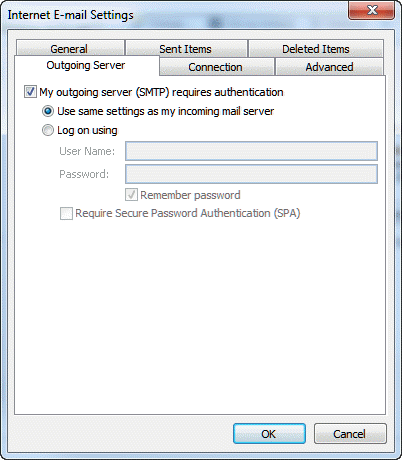
After opening the dialog to the list of email accounts, double click on the email account then click the More Settings dialog and select the Outgoing server tab to check the authentication settings.
Enable My outgoing server (SMTP) requires authentication and select Use the same settings as my incoming mail server. These settings will often work both at home and when traveling.
You'll also want to check the port and SSL settings on the Advanced tab. Commonly used port numbers are 587, 465, and 1025 but if these don't work, you'll need to check your mail providers support pages for the correct port number. You may also need to select SSL or Auto for encrypted connections; again, this information should be on your mail providers support website.
Once you make these changes, you should be able to send email from home, coffee shops, or hotels.
More Information
Tutorial: Configuring More Email Account Settings
Settings for Gmail, Yahoo, Outlook.com (Hotmail), and GoDaddy

Alisha Ross says
Your post is really good.....
I have a question, how can a subcategory be placed under different parent categories showing products according to both categories.
like tshirts subcategory is for men and women
If i want to place men, women, category in menu
then showing all such subcategories under the three main categories but it should show tshirts of men when i click men in menu, and tshirts of women menu using mega menu
Regards
Ross Alisha
Shal says
Thank you.... i was struggling with this issue for a week now where I could send emails from my office network but not any other network.. i had began to think maybe this is some restriction my employers have put for whatever reason. but thank you really saved me a lot of hassles.!!!
bill says
Hi
my Cox.net email works great at home but when I visit my parents house I receive fine but cannot send.......they have comcast.
I've changed the SMTP port as you describe above........still nothing goes out. Of course Cox's webmail works fine but is horrible to use for work and groups
Diane Poremsky says
what port # are you using for outgoing mail? comcast blocks port 35 to other servers - if cox supports port 465/SSL or 587/TLS, those should work. (I couldn't find anything about how ot manually configure an email account on the cox website in a quick search)
Jonas Lauwereys says
Hi
I am going on holiday and I Always have the problem of not being able to send e-mails but I am able to recieve them. I tried to do everything as told above, but i get this message when I click the verification thing: Send Test E-mail: This server does not support any authentication method supported by this client.
Note that I am not sophisticated user of pc and I don't understand all the port things :/
Thanks you allready!
Jonas
Diane Poremsky says
who is your email provider? Not all providers support these ports, some use other alternate ports.
shabbar says
hello
i am on holiday and for some reason outlook will not send emails
i have tried the different settings but to no avail
is it my mail provider or the ISP at my holiay address that is the problem
it really is frustrating to not be able to access my work emails
thanks
Diane Poremsky says
it is probably your provider but it could be the holiday address - what port are you using for outgoing mail? Try 465/ssl or 587/ts - those are the standard ones for secure smtp.
shabbar says
hi diane, i am currenlty using 25 with none selected for encryption. my privider had told e that i did not require to tick the requires authentication
i have tried all the combos but cant seem to make it work
really annoying to not have a solutions
Diane Poremsky says
who is your host? If they have another ports besides 25 available, you should use it. Also DO NOT use SPA (Secure password auth.) - few, if any, providers support it.
Anuj says
Hi,
Thanks a ton. 465 formula is working. But, a pop up box is opening again and again with below mentioned message after changing it to 465.
"The IMAP server issued an unrecognized greeting."
Diane Poremsky says
This is your gmail account? Do you have ssl enabled? 587/ tls should also work with gmail SMTP server.
Mamunur says
Thanks for the info. Indeed it's useful.
hben says
Hello Diane,
My user uses Outlook Anywhere from his home (wifi connection) and
unfortunately when sending mail, they remain stuck in the mailbox.
Is there a specific setting for the RPC over http connection?
Diane Poremsky says
What version of Outlook and Exchange?
If Outlook can connect to the email server, it should work. It's all done over the https port and shouldn't be filtered - and if it is, both incoming and outgoing will be blocked. (Diagnostic software like Fiddler will cause problems, but both directions should be affected.)
It could be OAB issues - Outlook needs it downloaded. First test connectivity https://testconnectivity.microsoft.com/ - see if any errors come up. Then make sure the offline address book is published for external connectivity. '
Set-OABVirtualDirectory -identity "server name\OAB (Default Web Site)" -externalurl https://mail.domain.com/OAB -RequireSSL:$true
https://technet.microsoft.com/en-us/library/bb201695.aspx
marco says
Hello,
I'm unable to send outlook emails while I'm at home and using my internet wifi. but when i'm at work or using any other internet i'm fine.
I can receive emails, just can't send. It just at home. Ant thoughts
Diane Poremsky says
that is usually an authentication issue. Are you having problems with your work account when at home? How is the account configured - pop or imap? what port # does the smtp server use?
Tammie says
All my settings are already as they are supposed to be - noted above - and I still cannot send emails when connected to hot spot. I can receive but not send.
Diane Poremsky says
This is with your cox account? What port # do you use? Do you get any error messages? Hotspots may block some ports, ISPs may block ports from IPs they don't own, but generally speaking, using port 465/SSL or 587/TLS will work. You'll also need use set the checkbox for outgoing mail to use the same user/password as incoming.
From their instructions:
Server name: smtp.cox.net
Check the Port number and use one of the following options:
587 with TLS enabled
465 with SSL enabled and the authentication box checked, if available
Misim says
I had the same issue and I used 465/SSL. It works very good now!
Thank you!
Lily says
Hello. I'm trying to set up Outlook 15.29 on Mac. It receives emails fine but sending out doesn't work. I'm getting this error message: [5.7.0 authentication failed Error -17898.] The original port number is 1025 and doesn't use SSL. I had tried using 587 but it didn't work either. 1025 works on the PC version of Outlook but I'm stumped why these settings doesn't work with Mac. Your help would be much appreciated if possible. Thank you.
Diane Poremsky says
Sorry I missed this earlier. Did you get it working? Are you authenticating with the outgoing server? In Accounts, select the account then More Options button. It should be using the same as the incoming server.
(What works on Windows should work on Mac.)
Alex says
Excellent... so happy I found this page. I have been trying to send emails at home from a work computer without any luck and by simply following the above steps, I can now send emails. Thanks !
Karl says
My problem didn't start till SimplePass Identity Protection tried to put all passwords for different programs under one umbrella. I was not able to fix the problem while on the road but once I got back to my own server I could apply your fix and voila... it worked. Thanks for the help.
Colin S. says
Thank you! Solution worked for me on 8/8/16, I'm using Outlook 2013 and needed to change the outgoing port number to 587. Appreciate it!
Carolyn says
Fixed my problem! Thank you so much
manojV says
i am showing allways on this comment from while open the outlook 2007 " ENTER NETWORK PASSWORD" I put the correct password but this windows opened continusly...,please give any solution for
Diane Poremsky says
What type of email account? Do you only get this dialog when you are using a public network? If so, what port # do you use for SMTP?
Wendy Vanderstam says
My mom has traveled from BC to visit me in Ontario. What can cause her email in Outlook to not send on her laptop. She has windows 10.
Diane Poremsky says
Either the internet service she is using is blocking SMTP or her SMTP is blocking mail sent from outside the network. most ISPs require port 587 or 465 to send mail when you are traveling.
VR says
Thanks so much!!!! Your tips were great and the problem is fixed after many years of frustration! Thanks again
KAN says
I have the exact opposite issue. When on some (not all) public wifi, specifically my University which I believe uses a MS Exchange Server, I can send but cannot receive emails (error 0x80042108). Any fix for that???
Any and all assist GREATLY appreciated!!
Diane Poremsky says
That sounds like an authentication or port error, or the wifi has the ports blocked that you need to use. Look in file, account settings - how is the account configured?
KAN says
Hi Diane,
Thank you for your reply.
It is earthlink email (pop.ix.netcom.com) and the incoming settings are:
POP3/110
(SSL is UNCHECKED)
Let me know if you need any other info.
Greatly appreciate this!
Connie says
Thank you so much!!!! I have been looking for this resolution for a long time.
Gray says
What do you do when using outlook with a MacBook
Diane Poremsky says
Use the same basic idea - enable outgoing auth settings on your mail client. For the Outlook 2015 on mac, the settings are in Preferences > Accounts.
Tina says
I have had this problem in the past and was frustrated with making port changes that didn't work the next time--I'm OK with a computer, but get frustrated, especially when I'm tired, in a strange place and just want to relax and answer business and personal emails. So, I now pay $40 a year to a server company that has taken care of that for me. I know for some people that sounds like a waste of money, but to me it's been a wonderful peace of mind for the last three years and I'll keep renewing as long as I'm traveling.
Tom says
I travel on business and could never send emails through Outlook 2010. I was told by my ISP it was due to being in different time zones :-) Thank you for that Cox! Changed port from 25 to 587 and followed the other steps and it works great!! Thank you for the fantastic information. Maybe Cox Communications should hire you??
Diane Poremsky says
I'm not sure I could work for a cable company, although I don't hear many bad things about cox, compared to Comcast. :)
Dueane Dill says
PERFECT!!! This has always been a bother when travelling. Sometimes my outlook would work and sometimes it wouldn't - and I had no idea what was different.
This simple setting change solved it!! Thank much!!!
larry says
i found out I can use my Gmail account for all my email accounts. Yay!
Rob Ellis says
Okay for YEARS I've had trouble on one particular email account where I couldn't send emails out, however it was only on random networks so I was stumped! I just went in to settings and changed my outgoing port number to 587 and it works fine - I'm happy I'll never have to deal with this issue again. Thank you!
David Williams says
Great! My Outlook wouldn't work on wifi so had to use webmail (bit of a nuisance). Switched to "use same settings as incoming server" which enabled incoming mail to Outlook, then switched outgoing port from 25 to 587 which then enabled my outgoing mail!
Zhenya Chausheva says
Huge gratitude ! This problem always made me feel nervous during the holidays.
It is now in the past :)
John fitzgerald says
Thank you. I have been having this trouble for a while and your solution worked for me.
Maria Angelini says
I have had this same problem for years, and am happy to say I have just implemented your recommended changes and it has worked.......thank you!!
Brad Quon says
Worked for me. Thanks.