You'll find some debate over which method is better for managing different types of contacts -- have more than one Contacts folder (Personal, Business, etc.) or use one Contacts folder with categories. There are pluses and minuses for both.
Personally, I use a combination. I have a couple of separate Contacts folders that use special forms, plus I make extensive use of categories in my main Contacts folder.
Multiple Contacts Folders | |
| Pluses | Minuses |
|
|
One Contacts Folder, Multiple Categories | |
| Pluses | Minuses |
|
|
How to Create Additional Contact folders
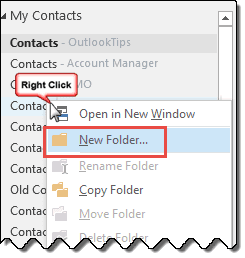
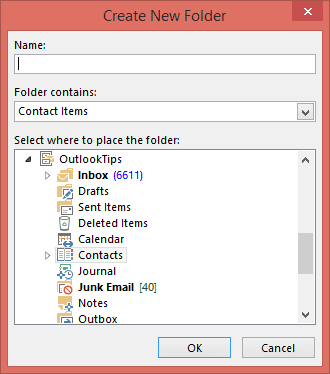
To create additional Contact folders, right click on the Contact folder and choose New Folder. Enter a name for the folder.
If you don't want it to be the subfolder of the Contacts folder, select a different folder before clicking Ok.

Dina says
Wondering if you could help? I am looking to categorize my bosses colors on his Mac, I am his admin and share his calendar. I have a PC. When I tried doing this a week ago, he had different colors with the same category name than what I have. The admin before him set up the colors and told me to go into his calendar categories if I need to change things. I did and he has different colors with the same category names, which through me off. My question: Is this a sync-able action when I go into his mac outlook calendar- categories, or is this something I need to change in his calendar and then go into my shared calendar version and change it in mine? I only can get his laptop for about 15 mins max (he's super busy), and would like to know before I start trying to fix it.
Bob says
I have been using categories extensively for many years and they suit me well. However when I decided to use outlook.com to sync my contacts i find that copying them from my outlook contacts it looses my categories whereas gmail uses them as Groups and happily syncs them with my Android.
Is there any way I can transfer my outlook contacts to outlook.com with categories?
Diane Poremsky says
Outlook.com uses categories for groups but you need to create the groups in outlook.com, not in Outlook. The groups will sync down as categories but any changes made in outlook will remove the contact from the group online.
Brad says
Is there a way to setup contact folders that then have more subfolders linked under that? For example, having a folder for Client contacts, but under that have another folder under that that is for a specific client, and then also below that client a break out for any number of multiple jobs we are doing for that client?
Diane Poremsky says
While you can have multiple contact folders, but the contacts in them aren't linked if they are in more than one folder. That's why it's better to use categories over folders.
cfmagnan says
How do you set up multiple contact folders or address books in Outlook 2013
Diane Poremsky says
Right click on the Contact folder and choose New Folder. Enter a name for the folder.
nanners613 says
Thank you, it was the "looking like two of them" that threw me. I am using categories. You are a big help; the only source that I have found that simplifies issues for those of us that are less than "techie".
nanners613 says
My problem is a little different. I have finally got my contacts, almost 500, separated into several categories. I need to copy a few of these contacts into more than one category i.e. personal friends and school reunion. The contact data would be exactly the same so I don't want to duplicate, just have the contact appear in each category. Every instructioin I have located does not seem to track for me. My Outlook is 2010. You seem to have a way of explaining things simply for those of us who are not experts. Thanks,
Diane Poremsky says
Are you using categories or separate folders? If Categories, you can add as many categories to each item as you need. If you coach youth sports with your brother in law, you'd would assign the family category and also the coaches category to his contact. It's one contact - if you group by contacts, it will look like there are two for him, but it's really only one contact in two categories.
If you are using separate folders, you have no choice but to make duplicates of each contact.
TJ says
my computer crashed, total failure of hard drive, so I tried to bring in different contact lists off of 2 old computers and an android phone. Now I have 3 different contact lists and they are not really set up to be different....is there anyway to merge or import them all into one contact list?
thanks
Diane Poremsky says
Open one folder you want to remove, select all and drag to the folder you want to keep. Repeat with the other list. You should be asked about duplicates when you make the moves, but if not, there are duplicate remover tools you can use.