A common issue with Microsoft Internet Explorer is controlling the e-mail program used when you click on a mail address on a web page. If it's not set correctly, you may get a "Can't create object" error message.
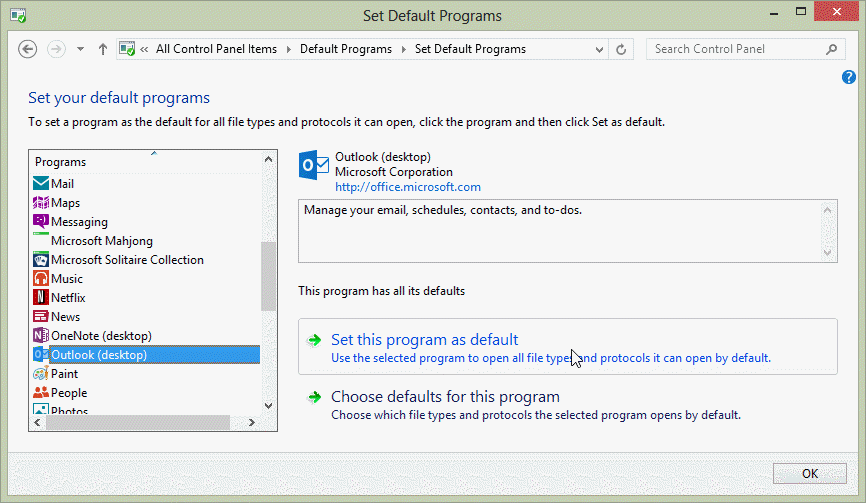
In Windows 7, 8 and 10, you can set the default mail client in the Control Panel's Default Programs applet. Select Outlook from the list of applications on the left and click the button to Set this program as default.
When you use the 64-bit versions of Outlook 2010 or Outlook 2013, some applications will report that there is no default email client when they try to send email. The problem is not that there is no default email client, but that the application can't access the 64-bit version. You'll need to use the 32-bit version of Outlook for the Send to menus to work.
Changing the default program
The easiest way to set the program is to use the Internet applet in Control Panel or choose View | Internet Options in Internet Explorer. On the Programs tab, click Select Programs to open the Set Default Programs dialog. Click the top link then find Outlook in the list of programs.
If you don't see a change, even after restarting Internet Explorer or restarting Windows, then you can make this change manually. In Windows Explorer, choose View | Options. On the File Types tab, you'll need to edit the Open event for "URL:MailTo Protocol." Sample entries are as follows, for different Microsoft e-mail programs:
| Email Application | Command |
|---|---|
| Internet Mail and News | rundll32.exe C:\Windows\System\Mailnews.dll,Mail_RunDLL |
| Outlook Express | "C:\Program Files\Outlook Express\Msimn.exe" /mailurl:%1 |
| Windows Messaging or Microsoft Exchange | rundll32.exe url.dll,MailToProtocolHandler "%1" |
| Microsoft Outlook | "C:\Program Files\Microsoft Office\Office\Outlook.exe" -c IPM.Note /m "%1" |
Adjust the path to Mailnews.dll or Outlook.exe as needed to match your own system.
Notes
Outlook 8.02 and later versions support additional parameters in mailto commands placed in web pages and e-mail messages, to add the subject and more recipients. Some examples:
mailto:someone@slipstick.com;test@example.com?subject=Comment
mailto:test@example.com?subject=Suggestion?cc=me@mycompany.com?bcc=myboss@mycompany.com

Peter W. Guenther says
After a non-destructive OS recovery of my Windows 10 system the default system feature does not work. I changed the default email to Thunderbird and now applications like Adobe Acrobat no longer recognize Thunderbird or any email client. This is an urgent problem.
What is the step by step solution?
Diane Poremsky says
How did you make the change? When a client switched to eM client, we checked Control panel, Defaults and Settings, default but also had to set it in eM's options before other programs could see it as a mapi client.
Phil says
Hello Diane,
Thank you for your attention and efforts.
However, none of the suggestions for Outlook Express [msimn.exe] are available nor work to make OE the 'default Mail handler' in Windows 10.
There is no user-accessible selection method for non-registered programs.
Note:
OE works in Windows 10, but cannot be made the default client.
Please describe how to successfully set OE as default - with no Windows gotchas - or registry reversions. Thank you.
I look forward to your reply (to yet IMO another unnecessary WindBlows inconvenience).
Regards,
Phil
Diane Poremsky says
OE is not supported on Windows 10 and is not very secure - you really need to use a more modern client.
I support Outlook, not OE (even though it has Outlook in the name, OE is not part of the outlook family.)
Phil says
Hello Diane,
Using OE6.v.05 msimn.exe (from XP) in Windows 10.
OE6 does not keep Make this program the default Mail Handler.
In Control Panel Windows Default Programs, OE does not appear and there is no option to select a non-listed program. Surely, selection of ANY related functioning program should be possible.
Re your instructions: There is no 'Windows Explorer, View | Options On the File Types tab' in Windows 10.
Please advise (many) how to get user preferences working in Windows. Thank you.
Regards, Phil
Phil says
Hello Dianne,
Please reply with a working solution for Windows 10 to allow default selection of a functioning program: e.g. OE6.v.05.exe (Outlook Express 6).
OE6.v.05.exe is fully operational in Win 10 Home. Local Security Policy editor N/A - why not if this can provide functionality.
SYSTEM-WIDE FUNCTIONALITY IS WHAT USERS BUY AN OS FOR!
Windows user configuration lockouts and unavailable listing / selections of working programs is juvenile.
Please accept the above serve as constructive criticism to provide a working solution. Else is fail.
Regards,
Phil
Diane Poremsky says
OE is not shipped with Windows 10. If you installed it from a 3rd party site, the installation process should have added it to the registry so it could be set as default. The path is stored in the registry at HKEY_CLASSES_ROOT\mailto\shell\open\command - try setting the path to your OE install there.
Phil says
Dianne.
Thank you for your suggestion. However, the registry entry:
Diane Poremsky says
if it doesn't exist, you need to create it (but that one should exist as mailto is a default setting). It's probably better to check with the people who hacked OE to make it work with Windows 10 - that way you can be sure it's correct. (I recommend getting a modern client that were updated to work with Win10).
Matt says
What if I DON'T WANT any of the lame default e-mail options but rather something functional and useful like Gmail, for instance?!! Tell me how to switch from the useless MSN e-mail to Gmail, PLEASE?!
Diane Poremsky says
You need to open Gmail in Chrome and click the little icon next to the star. Choose allow to have Gmail take over all of the mailto links.

jERRY says
DdIANE oops I FORGOT TO SAY WIN7 I THINK 64 BIT.
Diane Poremsky says
If the program supports 64-bit windows it shouldn't matter.
jERRY says
I HAVE LOADED OECLASSIC. I GET "NO ASSOCCIATION" MESSAGE. I CAN GET TO DEFAULT SETTINGS BUT I AM LOST FROM THERE ON. I DON'T THE TERMINOLOGY. hELP
Diane Poremsky says
Sorry, i'm not familiar with that program. Is it listed in Control panel, under Default Programs, Set your default program? If so, select it and click the button to make it the default.
Ali Nassereddine says
hello diane. i am facing a problem.. trying to install windows mobile device center. during installation, i recieve this notification " there is no email associated to perform the requested action. please install and email program or if one is already installed, create and associate in the default program control panel.
I am Using 64 Bits windows 7 ultimate operating System and Microsoft office 2013.
In the Microsoft outlook i added entered options and click on default and saved.
Also from control Panel i entered default program -set default-choose outlook(desktop). there is a statement ( this program has all its defaults) clicked on set default, nothing changed. also clicked on choose default for this program, unfortunately all are selected including MailTO... i can't deselect anything in that list or select anything.
kindly advice solution as soon as possible
Diane Poremsky says
Are you using 32 or 64bit office? I believe it only works with 32bit.
Rudy Pesut says
How do you configure Gmail so that it is configured for access through the MAPI email client installed in Windows?
coretext says
I bought a toshiba in May and the Windows 365 software...when I set up my computer it made me set up an outlook mail account which now is my default email...this is bothersome because I use an online database for work and when I try to download emails it automatically sets them
Up in outlook and won't let me do a copy and paste to my work account which is through yahoo...I realize I probably can't get rid of the outlook email but can I disengage it...I have tried your suggestions and none seem to work...am I just stuck with this problem?
Diane Poremsky says
Change the yahoo account to the default email account, or if you don't use the outlook.com account, just delete it from the profile (after setting yahoo account as default).
Go to File, Account Settings - on the email tab, set the yahoo account as the default. This should fix your problem. If the yahoo account is set up as imap, you'll want to keep calendar and contacts in either outlook.com or a pst file - if you decide to remove the outlook.com account, you'll need to set a pst as the default, not an imap data file.
Bruce Lister says
Hi Diane
I simply want to create a macro to open both [Folders] and [Mail] dialogue boxes simultaneously and place them where I want them?
Can you please help?
Thanks
Bruce
Diane Poremsky says
I'm not sure I understand - you mean the main Outlook windows or something else?
Samantha Weppelman says
Hi Diane, I seem to be having the same problem with the error message: "Either there is not default mail client or the current mail client cannot fulfil the messaging request ..." I have set outlook as the default in default programs and in outlook itself as well as in set program access and computer defaults. I have Windows 8.1 with outlook 2013. How do I make the change listed above "If you don’t see a change, even after restarting MSIE or restarting Windows, then you can make this change manually. In Windows Explorer, choose View | Options. On the File Types tab, you’ll need to edit the Open event for “URL:MailTo Protocol.” Sample entries are as follows, for different Microsoft e-mail programs:" As I cannot see a file types tab??
Diane Poremsky says
In newer versions of Windows, it's in Control panel, Default Programs, associate a file type. However, if you use 64-bit Office, it's likely the problem is that the other program is 32-bit and can't access Outlook because it's 64-bit.
Diane Poremsky says
Try running the Repair option for Office in Control panel, Program and Features. That should fix any problems that are not related to using 64-bit Office.
dawjDon Williams says
Eudora will always run but ever since I upgraded from Office 2010 starter to Office 2013 Eudora reports that it cannot change the registry to make it the default. I have tried the default set program but it says nothing and does nothing. I can always call up and use Eudora but it's an annoyance to always see that warning message.
Diane Poremsky says
Outlook 2013 moves the location of mapi32.dll and moves the profile in the registry. I'm guessing it's either one of those or the registry is read only to Eudora. Try starting Eudora using Run as Administrator and see if it can be set as the default.
vpvalentine says
just got 7. new to computers and use picasa email. can this be default email.
Diane Poremsky says
You need to set Outlook as default so you can send pictures in picasa? What version of Outlook?
Jerry Stern says
When I access the Internet Options/Programs on my computer it shows that EUDORA is the program default used for e-Mail. In reality, when I click on a link to an e-Mail account my system tries to start the Outlook Wizard, which I do not wish to use. I have not been able to disable this function, and my setup still continues to show EUDORA as the default program for e-Mail. Is there any work around? I currently use Windows XP SP3, with MS Office 2002 and 2010 installed on my system. Is this a function of MS Office 2010, in that it will not recognize my settings?
Diane Poremsky says
The mailto: protocol is probably associated with Outlook. If you aren't using Outlook, I would uninstall it... otherwise, go to Windows Explorer's Tools, Options, file types tab and look for url:mailto in the file type column. It's near the bottom (I actually have two on my windows xp install) - select it and click advanced, then select open and click edit. I'm not sure i you just need the path to eudora, only that you don't want Outlook.
Donna says
still confused....I already have the yahoo toolbar installed. ATT and yahoo are the same; well actually it's called att powered by yahoo. I have the yahoo toolbar installed with messenger. So I don't understand what you are saying I need to do in reference to accessing yahoo through web browser. what does that mean?
Donna says
That still does not correct the problem. Att/Yahoo does not show up as a default program so you can't select it. I've tried everything to change the MAILTO protocol. The only choices I get are Google and Windows live. I want to use my yahoo/att to send mail. Also in the Internet Explorer options under the programs tab, att/yahoo isn't in the list. How do I get it to be my default MAILTO program?
Diane Poremsky says
If you access Yahoo through the web browser, you can't set it as the default. unless you install the yahoo toolbar - https://help.yahoo.com/l/us/yahoo/mail/classic/set...
G L HAWKINS says
WINDOWS 7 DOES NOT HAVE ANY OF THE TABS THAT YOU
SPEAK OF IN YOUR TUTOTIAL. HOW DO I FIND OUT HOW TO
SET UP DEFAULT FOR WINDOWS 7.
Diane Poremsky says
Thanks for bringing this to my attention. In Windows 7, in Internet Options, Programs tab, click Programs - or in the Start menu's Search field type default programs - on the default programs dialog, use the top entry, Set your default programs.