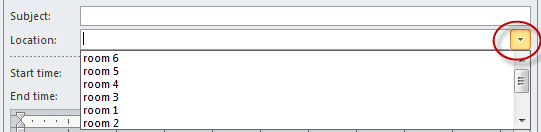
Outlook appointments show a drop-down list for Location, populated with the most recently used locations added to appointments. You cannot populate this list with your own preferred locations, or delete a location from the list. You can, however, clear the list by closing Outlook, removing a value in the Windows registry and then restarting Outlook. Always make a backup of the registry before making any changes.
While you cannot populate the locations easily, you can add new locations and force older locations to drop off the list because the list is limited to the last 10 locations used. Create a new appointment and add a location then save it. Repeat for each additional location. This obviously works best if you want to replace older locations, not the last location you used.
To select a location from the most recently used locations, click the arrow on the right side to display the MRU list.
Delete LocationMRU Key
Press Windows Key + R to open the Run command and type regedit then press Enter.
Browse to the following path, right click on LocationMRU and select Delete.
In Outlook 2016, 2019, 365, the value is found at:
HKEY_CURRENT_USER\Software\Microsoft\Office\16.0\Outlook\Preferences\LocationMRU
Outlook 2013
HKEY_CURRENT_USER\Software\Microsoft\Office\15.0\Outlook\Preferences\LocationMRU
Outlook 2010
HKEY_CURRENT_USER\Software\Microsoft\Office\14.0\Outlook\Preferences\LocationMRU
Outlook 2007
HKEY_CURRENT_USER\Software\Microsoft\Office\12.0\Outlook\Preferences\LocationMRU
Outlook 2003
HKEY_CURRENT_USER\Software\Microsoft\Office\11.0\Outlook\Preferences\LocationMRU
Outlook 2002
HKEY_CURRENT_USER\Software\Microsoft\Office\10.0\Outlook\Preferences\LocationMRU
Outlook 2000
HKEY_USERS\.DEFAULT\Software\Microsoft\Office\9.0\Outlook\Preferences\LocationMRU
Outlook will automatically add the value back into the registry the next time you set a location on an appointment.
Do It For Me
If you prefer not to edit the registry yourself, you can use the appropriate .reg file for your version of Outlook. Simply download the file and run it (answering the prompts when they come up.)
Outlook 2016, 2019, 365 Outlook 2013
Outlook 2010 Outlook 2007 Outlook 2003
Outlook 2002

Liela Fuller says
Hello!
We are using Outlook 365 and I do not see the LocationMRU option in the registry.
Is there another way to do this?
Diane Poremsky says
Do you have the new location where it looks up addresses as you type?
Liela Fuller says
Yes, we do.
Liela Fuller says
Yes, but the old locations show up as well.
S Cona says
My location history box stopped working on Outlook for MAC .. Any ideas?
Diane Poremsky says
What is your version/ build number? Do you have the New Outlook switch turned on?
Does the history stick until you restart Outlook?
Mark Hall says
Thank you! This also works for Outlook 2020 (I used the Outlook 2016 instructions).
Wilfred says
Hi Diane, I have a question about the "Location" in the meeting template.
Is it possible to customise / override it so that when user clicks on it, it shows my custom popup to select specific meeting rooms by user?
Diane Poremsky says
Anything is possible using code. It might be better to use a custom form - custom field for your locations then the selection fills in the real location field.
susan says
i cannot believe this is 2020 and they just keep tweaking these products until i want to throw everything out a tall building window. maybe just sign up for Gsuite and get it overwith LOOOOOOOOOOOOVED office 7
susan says
this didn't help at all perhaps because we are networked?
Diane Poremsky says
Network wouldn't matter. What version of Outlook do you use?
Michele McConnell says
The locationMRU file gets reset but 1 entry, the one I want to remove, remains - everytime
dale anderson says
My location history box stopped working on Outlook for MAC 2011. Any ideas?
Diane Poremsky says
Did it stop working after installing the March security update?
Christopher.Saulter says
I have a user who used to be able to hit the location field, select his conf number, and the message would autofill his conf call number and any other contact information. Where is this stored?
Diane Poremsky says
It would be stored in the registry. The location field stores the last 10 entries.
JamieL says
I'm trying to find how to setup a meeting location/room to be shared across our organization. I keep finding articles on how to edit or delete them, but not setup. Do you have any resources you can share? Thanks!
Diane Poremsky says
This is in Exchange? The Admin creates a mailbox and sets it as a resource or room. The exact steps vary with the version of Exchange.
Wayne says
Diane;
When I click on the link for my version of Outlook under "Do It For Me," nothing happens...there are NO prompts. Are these links no longer valid? What I see is an about page with the following line:
Windows Registry Editor Version 5.00
[HKEY_CURRENT_USER\Software\Microsoft\Office\11.0\Outlook\Preferences]
"LocationMRU"=-
Thanks,
Wayne
Diane Poremsky says
If you see that test, your browser is opening the reg file as a text file. Right click on the link and choose Save as (IE calls it Save target as, Firefox and Chrome call it something slightly different).
Tim Fagan says
About 99% of the time, we populate this field with our conference line/ext info. Is there any way to make the default when you choose the invite to be an "online meeting" be your conference line info (which is in my list of 10), vs "Online Meeting"? Running Office Professional Plus 2010.
Diane Poremsky says
No, there isn't an option to set a default location but you could use a macro to set it when you open a new message.
This macro will set the location field of the current meeting request. It would also be easy to create a new meeting with the field filled in (change the line to Set olAppt = Application.CreateItem(olAppointmentItem)) but it's harder to do it using the New Meeting command.
Public Sub SetLocation()
Dim objAppt As AppointmentItem
Set objAppt = Application.ActiveInspector.currentItem
With objAppt
.Location = "Office"
End With
End Sub
Geraldine Croquart says
I want to create a two line location in the Location field of the appointment notice. I used to be albe to use the function ALT+ENTER. That does not seem to work now. Does something need to be turned on or off to have this functionality again?
Diane Poremsky says
No, that is not an option you can turn on. Which version were you using where multilane were supported?
Grant King says
We are using a shared calendar as a resource so we can see everyone in the offices appointments (I dont know why this is so hard to do in outlook) But the only issue we have now is that the location field automatically populates with the resource everytime which makes the location "sharedcalendar" can this be disabled or is that what the registry fix is for? I know we can manually delete the location and put in our own, but most people forget to do it.
Diane Poremsky says
No, it can't be removed. sorry. (The only way to avoid it is by using a macro.)
Riyad says
Actually I am trying to make the location field automatically populates with the resource name everytime we make booking "sharedcalendar"
Diane Poremsky says
The shared calendar name is not the resource you want in the location field? It should do that by default.
Carol says
My location keeps changing to one of the saved locations. Any suggestions on how to fix that? if I don't happen to notice, before I send out the invitation, it can be send out with the wrong location.
Diane Poremsky says
I'm guessing you are hitting something on the keyboard or arrow keys to select a different location as you exit after selecting a location. I don't know of any way to prevent it, short of using a macro to ask "Are you sure want to use this location?" If you pay attention to how it happens, you might be able to change your habits to avoid it.
Adam says
Diane -
Thanks for your speedy reply!
- Adam
Adam says
Diane - My question is related in I want Outlook to save MORE than the last 10 locations. (possibly the last 20?) Is that possible? If so, how would I do that. Thanks! - Adam
Diane Poremsky says
No, sorry, the list size can't be increased. You can use a simple macro to enter the location in an open meeting or appointment - I'd use it for long locations, to save typing. (Typing a short location name is often as fast as clicking a toolbar button with a mouse). You could also use a userform or a control on the appointment form to list the most common locations, but that would require a click or two more than simple macros.
Public Sub SetLocation()
Dim objAppt As AppointmentItem
Set objAppt = Application.ActiveInspector.currentItem
With objAppt
.Location = "Office"
End With
End Sub
Macomb User says
Hi Diane,
Thank you for the response. We are running Exchange 2010 on the server side, all patched and updated, and a mix of Outlook 2013 and 2010 clients. We see this issue across all users.
It is very odd that when selecting the conference room from the recent location drop down list, it does not populate the TO field. The users have to select the room button and choose the room from the GAL each time they want to reserve that room.
Cheers
Diane Poremsky says
Oh, now i understand. The location field is just a text field, it's not linked to the gal entry. When you select a remove (or a person) as a Resource, then its added to the Location. But you can type anything there and it won't affect the resources.
Macomb User says
What is the point of that drop down list if it does not properly update the TO: Field of a meeting request? I have users who select a previously scheduled meeting room from that list and it does not put that room into the TO: field. So when the users goes to hit send, that room mailbox never receives the message.
Diane Poremsky says
What version of Outlook and Exchange? Are all users affected? If I correctly under what you are doing, it should work.
Kathleen says
My problem is not clearing the location drop down list on appointments, my problem is the my drop down list is not populated with any locations. What can I do??
Diane Poremsky says
Do the locations you enter 'stick' if you create more than one appointment while Outlook is open?
If they aren't sticking when Outlook is closed and reopened, it often means that Outlook is crashing when it closes or that Windows is closing Outlook and rebooting to install updates.
Mario says
I have a similar problem with deleting the entries in the list of locations of meeting workspace in Outlook 2010.
Can someone tell me the location MRU key for the meeting workspace server locations in Outlook?
Thanks very much for helping me. :-)
Diane Poremsky says
As far as I know, they are stored as hidden properties in Outlook. I'll see if they can be deleted.
tom says
Thank you very much for taking the time to show us non technical folks how to clear the locations drop down...
Gtd says
thanks
Adam says
Is there a way of loading a default set of locations, for example to use on a shared calendar used to book meeting rooms in an office - Similar to a fixed drop-down list in Excel?
Thanks
Adam
Diane Poremsky says
The list is the last 10 location you used. It's stored in the registry so it could be pushed out to workstations using logon scripts or policy, but it would replace the current locations a user has, not merge with them. Because it replaces locations a user uses, we don't recommend doing this.
Diane Poremsky says
No, there is no way to easily update the location fields when you change the conference room names. You'd need to change the meeting and send updates.
Sarah says
This is great!! BUT - Is there a way to change existing location entries if we were to change conference room names in AD? We are working to standardize names here and when I change a room name, appointments set prior to the name change still show the OLD name in the location field. I wasn't sure if that's related to something local like a nk2 file or some attribute somewhere I can change? Thanks!
Dan says
How do you DISABLE the cache? Clearing it is not practical if I don't want it to save any data. It means I would either have to create a registry wipe script and run it with scheduled tasks every few minutes or something.
Any ideas on disabling the whole thing?
Thanks
Diane Poremsky says
I'm not aware of anyway to turn it off, sorry. I would delete the values then export the (now blank) key - run it in a logon or logoff script to reset the value. If you need to clear it more often, use task scheduler to run it on schedule.
JANET says
Thank you so much for the magic link to clear the locations information. Without it, I would have looked at this list and been frustrated.