Some smartphones don't care for Outlook's phone number formatting and are unable to dialog calls when the number includes formatting or the country code.
If you are syncing with a smartphone and it can't handle the + or the parenthesis, you need to prevent Outlook from formatting the numbers.
Beginning with Outlook 2013, the numbers were always formatted for your region... but only if you enter 10 digits. If you enter 11 or more, it's entered as an unformatted number. While dialers will dial all 11 numbers, as soon as you hit a full number, the phone network will connect you to that number. The extra number is ignored.
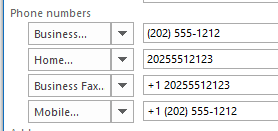
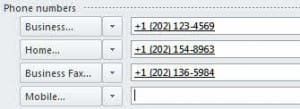
The numbers in this screenshot were typed in as a 10 digit number (Business), 11 digits (Home), +1 and 11 more digits with no spaces, (Bus. Fax) and as 11 digits then clicked the button to check the number (Mobile).
Outlook 2010 and older
For older versions of Outlook: Number formatting can be easily prevented in Outlook by typing the number in the field on the contact form and not using the Check Phone Number feature.
If the country code is added as soon as you tab out of the number field, check the dialog properties. You may have it set to automatically update phones numbers with the country code. For more information, see Dialing phone numbers.
Smartphone users should avoid touching the Check Phone Number buttons as doing so will add a + and country code to the number. If you open the dialog, click Cancel to leave the screen, not Ok. Check Phone Number dialog
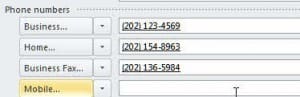
Before clicking the buttons beside the number, they are formatted without the country code:
When you click on the phone number buttons, this dialog opens.
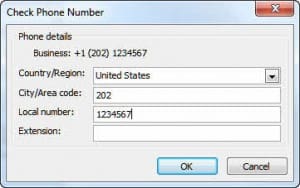
When you click Ok to exit the Check Phone Number dialog, Outlook adds the country code:
Entering Extensions
You do not need to use the Check Phone Number Dialog to enter Extensions. You can enter extensions when you type the phone number.
To enter Extensions, type an x then the extension following the number:
2021234567x12345 or 2021234567 x12345
How to Keep Outlook from Formatting Numbers
This only works in older versions of Outlook.
Additionally, if your phone doesn't handle the parentheses around the area code, switch to the International Freephone Service in Control Panel, Phone and Modem options.
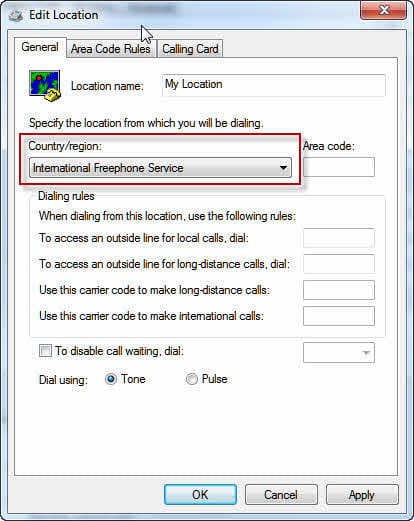
Using this location, Outlook will leave your number as typed: 2021234567 provided you do not check the phone number, or if you do, click Cancel to close the Check Phone Number dialog.
This does not work in Outlook 2013. The only method I know of that will keep the format as one number, e.g. 4405551212, is entering too many numbers for your location; for example 44055512121 will stay as a single 11 digit number. The number can be dialed (unless your device blocks it) as the phone system ignores the extra number at the end.
Removing the Country Code from Existing contacts
If you don't have many contacts with the country code, editing each individual contact is workable. Unfortunately, there is no easy way to remove the country code from large numbers of existing contacts within Outlook.
You have two choices for converting numbers: VBA or Excel.
You can export the contacts to CSV format and remove the country code either by opening the CSV in Notepad or Excel and using search and replace, but if you have long notes, you may lose some of the notes.
If you prefer VBA, try the macro at Remove Prefix and Reformat Phone Numbers.






























I know it's been a while since the last comment, but I started to get the automatic +1 several years ago (Outlook 2010) and it never bothered me. Now, however, I sync my contacts with a new smartphone which doesn't like the +1 at all. Which is why I found this thread. Now I've found the answer, at least in 2010. Here's how I found it. I clicked open a contact and clicked the Call icon on the QAT (the little handset). that opened the New Call dialog. I then clicked the Dialing Options... button at the bottom, which displayed that dialog. In the lower middle is a checkbox titled "Automatically add country/region code to local phone numbers" It was checked. I unchecked it, OK'd out and that did it. It no longer adds the +1. It was not easy to find, and I'm almost certain it was added a few years ago and set as the default. I know I suddenly noticed that new numbers or edited old numbers started having the +1 added. I struggled with it a little then, then shrugged and gave in as it was only irritating. Once it became an impediment to dialing on… Read more »
In outlook 2007 too we are not able to change the number formating to "without paranthesis"? Can someone suggest me to resolve? Thanks
in 2007, using the international 800 number format should work. It will not work in 2016, possibly not in 2013 - they will always use ().
OK, I take it all back. I found a different SlipStick article on this -- slipstick.com/outlook/config/dialing-outlook-phone-numbers/ that fixed the issue of added +1 simply and easily. I still think this was caused by a Microsoft update, but fixing it was simply a matter of changing the default. On the other hand, you had to know about the default to begin with...
Outlook 2010/Windows 7. Nothing keeps new numbers from receiving +1. None of the workarounds work around it anymore. International Freephone adds +800. I suppose I could add rules for every area code I'm likely to dial and NOT tick the box to add a "1" in front of the number, but... Microsoft clearly forces this in its code. I believe it started within the last two years--old numbers that haven't been edited do not have the +1 in front.
My smartphone doesn't like the +1 and will sometimes balk at dialing, giving me an error that there's something wrong with the number. This means syncing, then editing all the numbers with +1 on the smartphone side. What a hot mess this has become!
Windows 8.1 / Outlook 2010.
I have been messing about with this, too, today, as I wanted to use Outlook 2010 more for Contacts. I may have found the solution to the other people's 'automatic +1' problem (which I did not see but read about here and in another forum)...
In Control Panel go to Phone and Modem (it might be quicker if you start from Icon View). Click on Dialling Rules and then New... In the new window click on middle tab Area Code Rules, and then on New...
At the bottom there is a tick/check-box for a default country code. If not amended it shows +1. Maybe if that box is ticked then all numbers get a +1 prefix...
I dare not test it by ticking the box in case it adds +1 to all my phone numbers, which I would have to edit manually to get rid of...
If in Windows Live Mail (2011 and 2012) there isn't this telephone-number configuration problem I don't see why it could not have been programmed out of Outlook by now...I know Outlook 2010 predates WLMail 2011, but surely a Windows Update could handle it? (Ggrrrr..)
Seems Outlook 2010 has been changed somehow. Every time I enter a new contact now it adds a +1 in front of the area code and I didn't hit the look up number tab to the left. I also can't change the few that I have in my contacts that needed to be corrected no matter what I try.
It's possible something changed, either in outlook or windows. I know that trick no longer works with outlook 2013/2016.
what OS are you using?
The International Freephone seems to be working only if there is no blank in the number you type e.g. +33612345678. If you try something like +33 6 1234 5678, then the "I know better than you what you want" automatic annoyance is back and it reformat it +33 (6) 1234 5678 which is not working properly...
Hence, no blanks in phone number... or drop outlook !
Alate reaction, but the numbers in my smartphone need the +nation-code notation. But sync with Outlook 2010 removes the + sign .....
Check your modem/ dialing setting in Control panel, Phone and modem. Outlook should keep the format set there. Open the phone and modem settings then Edit the location and set up dialing and area code rules. Try using the International Freephone location or a different country if you can't get the rules right.