This content has been archived. It may no longer be relevant.
These instructions apply only to EAS accounts in Outlook 2013 and 2016. If your Outlook.com account was moved to the new server (all older accounts should be moved by mid-2017), you'll be able to import CSV's directly in Outlook or upload appointments and contacts in other folders using drag and drop IF you remove the account from Outlook and add it back using auto account setup, which will add it as an Exchange Account.
As people start using Outlook 2013, I'm seeing more complaints that import doesn't work.
"When I try it import a CSV, it says "operation cannot be completed because the service provider does not support it" any ideas on why this is? What I can do to get around it?"

This error is the result of trying to import into an Exchange ActiveSync (EAS) account. The EAS service provider (Outlook.com / Hotmail) does not support importing CSV (or pst files) into the Outlook.com/Hotmail folders.
You can move Calendar and Contacts from a local data file into the Outlook.com/Hotmail folders.
Initially you needed to Copy calendar and contacts from a local pst to the Outlook.com data file, but a recent update changed the behavior and Move works now. If Move fails, try Copy.
Use IMAP to move or import Email messages into the Outlook.com account.
If you need to import calendar or contacts from a CSV file, you'll need to import them into a local .pst file then move or copy the appointments or contacts into the EAS account's calendar or contacts folders. If they are in a .pst file already, open it using File, Open, Outlook Data File and copy the calendar and contacts to the Outlook.com folders.
 To copy the items to the Outlook.com folder, use a list view, especially in a Calendar, then select all and right-click, drag and copy the items to the EAS account.
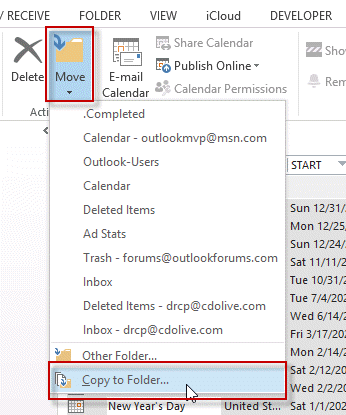
You can also use the Move > Copy to Folder command to copy the selected items to the Outlook.com folder.
If the items you copied are not synced up to the server after a few minutes, press F9 or the Send and Receive button.
Import Email into Outlook.com
If you want to upload email to Outlook.com, you'll need to configure the Outlook.com account as an IMAP account and move the mail into it. Once it has finished syncing, you can remove the IMAP account. You can have both the IMAP and EAs account in your profile.
Set up an Outlook.com IMAP account
Video Tutorial
This video tutorial shows how to add a new .pst to your profile and import the contacts (or appointments) into the .pst then move them to the Outlook.com account.

William says
I was trying to merge two Outlook accounts and found that just doing it all via Outlook.com is the 'source' contacts list.
Diane Poremsky says
Are your accounts still on the old server? If they are on the new server, add the account you are uploading to, to Outlook using auto account set up (this adds the account as an Exchange account) then you can drag Outlook items between accounts and they will sync up to the server.
Kelly Cannon says
I was going crazy trying to import my Gmail contacts into Outlook. Thank goodness for the video!
Sebastian says
I actually bought the office 2013 and I still get the same error, I don't know if I get it since I am using the same email address to the one I created with the EAS. Any ideas
Diane Poremsky says
You can't move mail into the EAS data files, you should be able to move or copy calendar and contacts into the data file. if you need to upload mail, configure an imap account to outlook.com.
https://www.slipstick.com/outlook/email/setting-outlookcom-imap-account/
Lynda says
Seems that you cannot import files over 500 KB into the outlook 2013 Contacts Folder or import a CSV file that is over 500 MB directly into People on outlook.com. Do you know of a work-around?
Diane Poremsky says
That is a server limitation. You'll need to split the file - you can open it in Excel or Notepad to split it. Just make sure the additional files have a header row. When i need to split files, I usually make copies of the original and edit the copies, keeping the first 500 lines in file1, the next 500 in file2 etc.
Jodi W says
I signed in to Outlook online and imported them that way and it worked just fine.
willyq711 says
How did you import into Outlook online? There is no import feature that I know up (in People right?). I am returning to WIndows from MAC and Gmail/Google, but OMG, it is soooo frustrating as Outlook 2013 installed on my Win 8.1 always comes up with an error no matter how I try to import. Gmail easily imported my MAC Outlook 2011 .csv file, but Outlook 2013 or outlook.com won't do it, keeps coming up with errors (now at least I know why EAS doesn't work), but even if I try a local account import, it still comes up with a MAPI error... and I have no idea which field of the MANY is causing the conflicting error. I wanted to just have ONE system between my Surface's MS 2013 and Outlook.com, and all is good, but to no avail. I'm going to have to stick with the Paid Google Gmail system and have my Blackberry and Windows machine (Outlook 2013) sync with that. I understand first year issues, but C'mon, MS won't even work with ITS OWN SYSTEMS!!
Diane Poremsky says
When you use Outlook.com account, you need to import into a local pst file then move or copy to the Outlook.com folders. Or import a CSV containing the contacts using the online interface.
What is the exact error message you receive?
Stan says
Thanks. Using Trend Micro anti-virus. Have tried turning that off and launching Outlook, but to no avail. I had a work-around solution with some help from a Gizmodo column for the Outlook 2013 trial version, but that doesn't work now with the permanent version. And launching in safe mode doesn't help, btw.
Diane Poremsky says
So far I can't repro but it could be affected by addins or other software.
What antivirus are you using? Norton 360 is known to cause a lot of problems with Outlook. I haven't heard this one specifically though.
Stan says
Yes. I use manual setup for Outlook.com or EAS.
FWIW, other people on the Outlook 2013 Forum have reported same problem, with no MS solution forthcoming. (Well, they drag out the usual obvious bs 'solutions' that we've all tried ad nauseum to no effect.) But so far, nothing works.
Thanks.
Stan says
Outlook 2013 works OK with my gmail account until I add my msn account. Then it crashes repeatedly until I remove the msn account and it returns to normal functionality. Is this because we're still living with MS not supporting its own email systems in Outlook? So far, no good answers on MS Office site or Office Forum.
Diane Poremsky says
That is a new one to me. I'll test it. I assume you are using MSN as an EAS account?
Loïc says
Thank you for your answer. Do you think, or know, if Microsoft will change EAS to accept "importing/moving" mail from outlook folders ?
Diane Poremsky says
I hope so. :) I don't know if it will ever happen though.
Loïc says
how import mail from pst file in this new mailbox outlook.com ?
Diane Poremsky says
With Outlook 2010 and the outlook connector... at this time EAS does not support importing or moving mail to folders. You could possibly export it to Windows live mail to upload, but the dates may be goofy. (I haven't had a chance to test the export method yet.)