The good news: In all likelihood, the data files aren't really missing. When Windows upgrades your computer, it creates a folder called "windows.old" and it contains all of the files used by the previous Windows installation, including your user account files.
Windows 10 does a better job at migrating your files when a major update is installed and the folders in Windows.old may be empty.
To recover your data files (and other personal files) open Windows Explorer and go to C:\Windows.old\Users\username\AppData\Local\Microsoft\Outlook Your old data files should be there, or in the Outlook Files folder in My Documents (the old My Documents!).
Move the files to their proper location. Do not access them from the windows.old folder. They may be deleted when Windows cleans up the disk or another update is installed. *.pst files should be moved to your Documents folder. Outlook now uses Documents\Outlook Files as the default location for pst files.
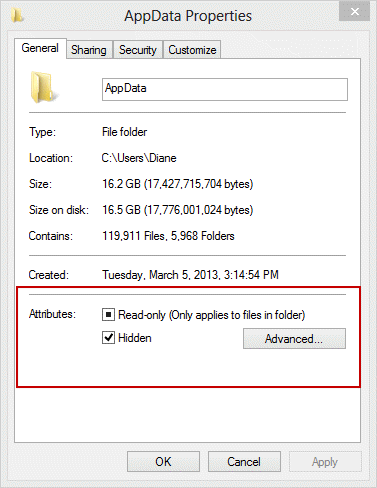
Because the folders under the AppData folder are usually marked Hidden, you may need to configure Windows Explorer to display hidden files and folders or remove the read only (and Hidden) flag from the properties of the AppData folder and apply it to all child folders.
To show Hidden files and folders in Windows, switch to the View tab in Windows Explorer. The option is on the right.

To remove the Read only and Hidden flag:
- Right-click on the folder and choose Properties.
- Clear the boxes and click Apply.
- Choose Apply changes to folder, subfolders and files then click OK.
It may take a while to complete!
If you are still having problems, check the Permissions tab in Properties. You may need to give your account permission to the folders.

Deven Malik says
To be on safer side, it is highly recommended to backup your data before upgrading to new windows or new outlook.
Diane Poremsky says
Definitely when upgrading windows. If using an IMAP account with “(This computer only)" folders, export those folders before upgrading - and on a regular basis.
Hellene May Burling says
I have my license for recovery toolbox but do not know how to get started. Not very
computer literate, sorry.
Hnin Mon Thant says
Previously, I don't know exactly my outlook data file location because this is set up by others in our company. Unfournately, when my computer windows updated, my outlook data file that i have used cannot find in my computer, there are lost of data in my outlook date file. Where I can find these data? Please help and suggest me.
Diane Poremsky says
What type of email account - POP, IMAP,, or Exchange?
The default location is either in the Documents\Outlook Files folder or in %localappdata%\microsoft\outlook. Older versions of outlook put both pst and ost in the app data folder.
If you had office 2016 in the windows store version, the ost files are stored in a different location and lost when the app is uninstalled.
Gary says
I have helped SO many people migrate Outlook files over the years... I never thought the day would come that I would need help!! Thanks endlessly Diane for this article. "Windows.old", eh? Your suggestion worked like a charm!! I FINALLY upgraded my Win 7 Pro to 8.1 Pro tonight and like a damn novice I simply forgot to backup my .pst files on a flash drive before making the move, committing the cardinal crime that I have watched other people do many times. Proof positive that "nobody's perfect".
I guess I can blame it on the coronavirus....why not?
Thanks again and stay well.
Gary
Dom says
I have my .pst files in Documents \ Outlook Files as suggested. However, One Drive does not like them there and will not synch as long as .pst files are in Documents. Where should the .pst files be stored in Windows 10 when using One Drive?
Robin in Cody says
So, if my file is named something different (vfuprov.dll) can I 'rename' it or should it be duplicated and renamed or since MS will not support me, a long long time customer, should I try some other software? I have too many address and contacts in my 2003 Outlook. It does not smoothly transition into the Outlook that is now on my Windows 2010. I am extremely frustrated with MS.
malty says
Thank you! Thank you! Thank you! I was going around in circles with all help topics telling me to run the repair tool, when I just needed to find my stolen files! You helped me fix it and now I have a functioning Outlook. Damned Windows 10.
sarthak says
thank u very much
Joseph Martin says
My computer don't have a windows.old ? Is there any other way?
Diane Poremsky says
That means the folder was deleted (its only kept for 30 days). If you don't have a backup file, then no, there is no way to recover missing data files. Sorry.
wawery says
thanks a tonne
Rajeev Dayal says
I'm unable to open Outlook 2010 in Windows 10 and getting the following error message -
cannot open your default e-mail folders. the file is not an outlook data file (.ost)
I have tried to open in safe mode yet it is trying to contact exchange server, which I had never configured. Please help.
Diane Poremsky says
what type of email accounts are configured in outlook? What is the default data file? Can you open the Control panel, mail applet?
john Tsang says
My Outlook 2013 program on my pc has stopped working. A pop up note says that a problem caused the program to stop working correctly. Windows will close the program and notifiy you if a solution is available. I then close program and nothing happened! It only works when I go through the internet and it works on my other devices e.g. Ipad, mobile but not on the PC. Any idea what I should do please?
Diane Poremsky says
does it work if you start in Safe mode?
Tim says
I assumed, wrongly, that the Outlook .pst files were backed up with the rest of my documents before I reformatted the hard drive. I tried out a number of packages that were available but they did not work. I then came across this article and to cut a long story short I now have all my .pst files safely back where they belong. Thank you. Regards Tim
LRitter says
Hi Diane,
My computer was already running Win10 and we had major upgrades yesterday and this morning my IT dept had to fix some issues. I save ALL of my working files, including .pst files on a server, not my hard drive. However, when they returned my computer to me, 2 months worth of emails and even contacts are gone. When I go to the .pst location on my server, it looks like some of the pst files are missing entirely. For example. I have a .pst file titled: AAA_Projects about 2 months of this emails and subfolders created within the last 2 months are gone. I have another .pst file titled: Accounts A, which was a new file I created within the last 2 months. The entire folder and subfolders are gone.
I tried to walk through your steps above with IT (C:Windows.oldUsersusernameAppDataLocalMicrosoftOutlook) and when I get to the folder "Windows.old" my name is not among the users. So, I couldn't go any further. My IT department is stumped and so am I. I'm not giving up, I know those files are somewhere. Everything was fine yesterday (except for other computer issues - computer blacking out).
Graham Hughes says
Hi Diane,
Not sure if windows did an update, but I was certainly using WIn 10 when this happened, upgrade time was ages ago for me.
When using Outlook 365 I get all my emails for all my email accounts.
Problem is none of my contacts or my calendar are now in place. One day they were there, next day all gone.
If I open outlook in firefox, I have all of my contacts and all of my calendar, but the emails are not syncing..
On my phone I have all of my contacts and all of my calendar and my emails are working fine.
I can add a calendar item in outlook 365 and it will sync to my phone, but if I add one to my phone it does not sync to outlook 365. It does sync with web outlook though.
I have several email accounts linked to my domains on imap and have always used an exchange server email account to get the syncing of all info.
My data is saved as ost's so no importing of an old pst back. I don't have a windows.old file.
Any suggestions?
Cheers
brigitta says
Hi Diane, my Hotmail account has been upgraded 2 weeks ago and now it says Outlook email. I wish this upgrade did not happen, as I have lost my other account's blueyonder.co.uk from my files. The name spelt incorrectly blueyonder.uk after the upgrade so obviously no emails come through. So I reinstalled blueyonder.co.uk so that I could see my emails at one place. Unfortunately that doesn't work either. There is only a picture of a file when I try to open it. With all these changes my files are a mess now and I think some disappeared. Can you please suggest a solution? Thanks
Rich says
I am trying to back up all of my Windows live emails and folders with Windows 10. It was easy to locate the folder with Windows 7. Now I am getting an error message that my OneDrive failed to start because it could not find the Qt platform plugin "windows". This all happened after I tried to find the hidden folders on the C drive. Now when I click the C drive, I cannot see the folder which said Owner. Previously, I checked the hidden tab under the properties of the owner folder. I thought this would release my backup folder for my stored windows live emails. Instead I lost all of my desktop files and folders. Frantically, I recovered this and I exported all of my Windows live mail emails and folders to outlook 2012. But I can't find the backup folder for outlook 2012 on the C drive either. I just have the guest folder and the public folder. Somehow the owner folder disappeared. Outlook 2012 works much better than Windows live. But with Windows 10, I cannot backup my emails. I really would like to do this just in case my computer crashes. Any help would be greatly appreciated.
Andy says
Have just upgraded Windows 10 and now when I search old emails, the search is limited to the last 2 months
Diane Poremsky says
what type of email account? Windows 10 shouldn't have an effect on search, provided all of the data files are in outlook and enabled for search.
Rob Hunter says
Hi Diane. Same problem as most others. Contacts have disappeared. Can't find the folder in Window.
I usuall use icloud contacts but says the set of folders cant be opened
Remember this happening when it fort got installed. but have no idea how I fixed it.
Any help appreciated.
Diane Poremsky says
Have you signed out of iCloud and signed back in? That fixes a number of iCloud problems.
Bessie says
I've lost my contacts and it looks like my inbox folder name has been renamed to one that was in my personal folders so i now no longer receive emails. All my filed email folder structure and emails are mixed up or missing.
I've tried to locate my old data files but i don't have an outlook folder in the pathname outlined under windows.old.
What else can i try?
Diane Poremsky says
is this with your hotmail account? If you use autoaccount setup to add the account previously, it was in as an account they syncs - you wouldn't have data files for it. you only need pop3 or stand-alone pst files - everything in hotmail, imap, or exchange syncs down.
Bessie says
Of course-thank you so much. Looks like all my emails, folder structure and contacts are all back as I expected when i added my hotmail account again.
earmey says
I found it, but then what? How do I reinstall contacts, etc?
Diane Poremsky says
either open the pst in Outlook or import it into the pst you are using now.
Ginger says
I lost all my outlook emails from before July 2016 when I updated to windows 10. How do I get them back? Some included photos that I can't get any other place. Why were these emails removed without my permission?
Diane Poremsky says
Did you have a pst in the Windows.old folder path? Use Windows instant search the entire hard drive for *.pst
Beatrice Rhodes says
Hello, I updated as I thought it would enable me to use a program. Now I can't use the program I wanted and all my emails in Outlook express are gone. For a while I could find the app- the yellow thing- but that one is gone and no where to be found. I have saved emails for years,and is at loss to what to do. How do i find the outlook express app again?
Diane Poremsky says
Outlook Express is not available on newer versions of Windows. You can use Windows live mail or Outlook for email. If you need to import Outlook Express mail, you need to import it into live mail then export to outlook.
Sarah says
Hello, I have been forced to upgrade to windows 10 and lost all my emails from before the upgrade on microsoft exchange (via outlook). How do I get them back? Many thanks
Diane Poremsky says
what type of email account was it? They should either be in a pst - if it wasn't moved to the new documents folder, then it's under windows old. if imap, create the account in outlook and the mail will resync.
Dolores says
I lost all my archived emails after my W10 upgrade. My folders in the pst file are there, but no emails in them. I use Oulook 2013 and the emails were already in my archives, but now they are gone.
Diane Poremsky says
Are you sure you are looking in the right pst? Try resetting the views on the folders.
Andrea Petzold says
I have lost my contact list after automatic upgrade in windows 10. I have located the .csv file and .pst file but I get an error when trying to import them into outlook 2013
Diane Poremsky says
What is the error message?
Andrea Petzold says
MAPI error 0X80040201 was reported. Please try to import again later
Diane Poremsky says
That is with the CSV? That error indicates there is a bad entry in the csv. If you have the pst file, it's better just to open it in the profile.
SMC says
We did a Windows 365 update at work and my microsoft email has been completely reformatted! I can no longer find my way around (ugh) and I hate it. Is there a way to restore my email format to the old one prior to the update and not loose any of the new date that came with the update??
Diane Poremsky says
is this with the mail app or outlook? You can't revert the mail app and have limited customizations available. Outlook should be the same as before.
Joan says
Okay, followed directions (even printed them) but all I see is garbled code and NOT my emails. I have a ton of emails that I am trying to save before I close out this account. What am I doing wrong?
Diane Poremsky says
What email client are you using? In what way is the mail garbled?
Magnus says
Dear Diane,
I have read all your valuable info here, but nothing worked for me. I have got Windows 7 and 8 with my mail-program outlook express, and a swipnet-adress. I cannot find these anywhere. I have tried to search after pst, old windows, changed Appdata-properties, looked in my old documents, nothing. I am desparate. All my emails since 2008 are there. At least I found all the other files under my old documents, but no email, please help..
Diane Poremsky says
Unfortunately, this page references Outlook, the email client that comes with Office, not Outlook Express. You'll need to migrate the Outlook Express account to Windows Live Mail, Outlook, or another program. It would have been best to do this before upgrading, but it is recoverable. See https://www.slipstick.com/outlook/config/move-oe-to-outlook-new-computer/ - if you are going to use live mai, you can stop with the step that imports.
The express files will be under something like c:\windows.old\Documents and Settings\username\Local Settings\Application Data\Identities\{FA572F59-2087-498C-A7A9-F546571D6ECF}\Microsoft\Outlook Express
Mike Bearman says
Dear Dianne. I have upgraded to W10 and still using 2003 Outlook from the Professional package. Now, when I type in a regular email address, it does not auto complete. A highlight of the address shows up, but wont be moved into the recipients address, leaving me to type it out in full.
Any thoughts please on a fix
Many thanks,
Mike.
Diane Poremsky says
I'd start with resetting the autocomplete list and see if that clears it up - the file could be corrupt.
George G says
Dear Diane,
i have a problem with Outlook 2016. im getting error 0x800404010F . not receiving nor sending emails. IT guy did something,now i can see archived mails but nothing happens. what do i do? he suggest i reinstall Office.
Diane Poremsky says
Could be a corrupt profile - https://support.microsoft.com/en-us/kb/2659085
Helen Wootton says
Hi Diane, I, like others, have fallen victim to the Windows 10 upgrade. I have followed your advice but have then come unstuck.
Route 1 - Go to c:windows.old\users\username\appdata\local\microsoft\outlook - I got as far as microsoft but then couldn't see any mention of outlook.
Route 2 - I found the old 'my documents' folder but access was denied. I went into properties but couldn't work out what I needed to do to change permissions so that I could then access the folder.
Prior to the upgrade I was using the outlook that came with my laptop to access my plusnet email account.
I'd be grateful for any help you could offer.
Regards,
Helen
Diane Poremsky says
#1 - it's normally a hidden folder - you need to change the view to show hidden folders. But it's also possible that the contents were migrated. Unless you use pop3 and set the account up in Outlook 2007 and older, there shouldn't be any pst files here, only ost files that are mostly useless now. They are just copies of messages and on the server and the contents will resync to a new pst.
#2 - you need to right click on it and give your new user account full access permission.
Hirra says
After finding these files what do I do next so that all my emails shows up in Outlook again? I have outlook 7 and windows 10. I did a format of windows 10 so want my outlook email back.
Diane Poremsky says
Move the pst files to a better location, such as in your My Documents folder. Go to File, Open, Outlook Data File and open them in the profile. You can set a found pst as the default data file in File, Account Settings, Data File.
Bill says
ok. just upgraded to win10 from win7 using outlook 2007. I forced retrieval of all old gmail from google server by creating imap account - will drag and drop them into my pop account and then delete the imap account. Now am trying to find old outlook calendar.
I have retrieved my old email pst, but calendar isn't showing up.
Diane Poremsky says
did you have more than one pst in the old profile? Is the pst you found set as default?
Phil says
Purchased new laptop and transferred emails from remote server to newly set up outlook 16. Now cannot find emails and they have been deleted off server. Any thoughts?
Diane Poremsky says
How did you transfer the emails? What type of email account is it?
Mark Eckman says
Thank you Diane! You are a life saver! If you were here I would hug you and buy you lunch. My wife's computer was locking up because it was out of space and Windows was corrupted so I bought an external drive and pulled every file off I could find, to include the PST files. When I reinstalled Windows, a year's worth of emails were missing because she had put them in folders that didn't archive because my back-up drive was also out of space. She was in tears because she lost all her Dad's emails who passed away recently. Thanks to you, I found the hidden PST files in the old windows folder and now I don't need to leave the country. Thank you so much.
Susanna says
Today I opened my computer to get the notification that my Browser has been Reset. Most of my icons are gone. Outlook gone Office gone, all files in This PC empty. Microsoft helpline can't help me. Following instruction from Microsoft I tried Windows.old files, nothing there. What is Microsoft 10 doing?
Diane Poremsky says
Just the browser was reset? That shouldn't affect Office or other files. Do you have more than one windows logon? Could this be a new log on?
Frank Fazio says
I did a search and the PST files are there. When I try to recover them in Outlook, I can't see the folder "My Documents" which is where, supposedly, there are. I tried showing hidden files, but still don't see the folder. Any ideas?
Diane Poremsky says
What folder does Search say they are in? Right click on the found pst and choose open in new window - that will open the folder location in the new window. copy the path from the address bar then in Outlook, go to file, open, outlook data file and paste the path. Can you see the pst files when you do that?
Kert Kert says
Please try to check in my documents folder.
Ake Kolm says
I have followed your instructions: In the folder Outlook you mention there are no .pst files, only some small .OST files. No folder My Documents can be found.
I have also searched for .pst files but nothing was found. The pst file in question should be quite big after 20 years of work:
What shall we do? - At the installation of w 10 the system missed that we use Office 365.
Pls help
Diane Poremsky says
What type of email account do you use? My Documents would be the documents folder in your user account - if the pst files are not the old default location with the ost files, they are either in the new default under the documents folder or in another folder where you moved the pst to.
Belinda says
We have recently upgraded to Windows 10 (from Windows 8) and now all of the email folders where we saved emails by category for business and taxation purposes all still exist but are now empty.
I have found the windows.old folder but there is no mail folder in it. Any ideas on how we can recover the old emails?
We are using Windows Mail version 17.6568.46121.0
Diane Poremsky says
This is with Windows mail app or Outlook that comes with office? I'm not sure how to restore windows mail... I'll see what i can find out.
Diane Poremsky says
Are you using POP3 mail or IMAP? I asked some people more familiar with Windows Mail and one said that IMAP accounts may take some time to sync after you first look in the folder - the folders will be empty at first.
Rebecca says
We reloaded windows, when this was done DH set up the email addresses again, but obviously all history was lost. He has now reinstated it following your guide but I now have duplicate folders for inbox and emails but only the new ones are receiving mail?
Also how do I remove the newer/wrong/duplicate ones and have the mail arrive where it is meant to.
I also lost all of the rules for handling my mail sorting etc can these be recovered?
Diane Poremsky says
this was a pop3 account? Set the old pst files as the default in File, Account Settings, Data Files tab (Outlook 2010 and up). That should bring back rule and color categories, if used. On the Email tab, select the account and click Change folder then select the inbox in the old pst file. Restart Outlook, right click on the new pst and choose close, then import it into the old pst (Open & Import on the File menu to access the import & Export wizard)
If you are using IMAP account, which version of Outlook?
maxine says
please help! I'm afraid I'm very computer illiterate and needs the idiots guide, step by step. I've reset windows ( on advice from a computer technician) in order to resolve problems with windows 10 crashing constantly. Was not advised or guided as regards saving anything in outlook or anywhere else. But did opt to save files. Having reset windows I've reinstalled office 365 and all apps including outlook. Have set up the identities (2) afresh in outlook now but don't have address books and no calendars. Have located windows old folder and applictation data/local/microsoft/outlook and in there is na offline address books folder which is empty and also i can see the 2 e mail iD's but the dates next to them are today and yesterday's dates which is when I re-created them .Am I going to be able to find the old identities anywhere with address books, contacts, and calendar? I did ask the computer technician and he said no way to get calendar back. Thanks in advance.
Diane Poremsky says
What type of email account do you have? On;y Exchange has offline address books and it syncs from the server. Calendar & Contacts would also be either on the server or in a pst file, unless you used an imap account with the "this computer only" folders - if so, you needed to export the contents of the 'this computer only' folders, otherwise they are lost. Sorry.
Patricia Taylor says
I did exactly what you said and got to the end of the string and Outlook was not there. I upgraded to Win10 from Win8 and have Outlook2016. I am missing all contacts and calendars. Do you have any more suggestions. I run a business and I need those contacts. I also have Office 365 and the contacts are there but so far I have not been able to form a group. They have made that very hard also. I am so sorry I upgraded
Diane Poremsky says
What type of email account do you have configured in outlook?
Mike says
I just updated outlook from 2007 and my archive and personal pst folders and email are gone. i see in windows.old a .dat file but was unsuccessful using that to restore my lost email. anyother fixes? thank you
Diane Poremsky says
Mail isn't in a dat file, it's in a pst file. Are you showing file extensions? did you look in the same location in the new windows folder? type or paste this into the address bar - %localappdata%\microsoft\outlook to check the new folders. Any pst not moved would be in the same location under windows old.
J Cavanaugh says
I had so much information in my Outlook contacts! At one point it good moved to iCloud contacts but it still worked. Now that I've upgraded to the new Windows OS I can't open any of my old ones. I followed your directions on the hidden files, and the located the .pst file. When I try and open the old contact outlook.pst file it still gives me the same error message "..folders can't be opened. The information store can not be opened." Please help! I want to cry!
Diane Poremsky says
They should be in the iCloud - if you install it and sign in, you'll have them back in outlook.
What version of outlook are you using? Are you sure it's the correct data file?
Carla says
Hi, have just upgraded to Windows 10, but all my email history has disappeared! I have found the windows old folder on my c drive, but am struggling to find the folder with the files in. Any advice gratefully received.
PS as far as I am aware I have unhidden all the files using the infomration above, but still couldn't find an outlook fiels folder anywhere!
Duane says
My son installed Windows 10 on my computer and selected the new Mail in lieu of my old Outlook and I lost all my contacts. I have tried windows.old file but it doesn't include any
Outlook files. I have searched *.pst also and come up with nothing. Any ideas?
Connie says
I'm running Windows 8.1, and recently did a big "refresh" and all my outlook calendar and contacts have disappeared. Emails and the categories I'd set up came through just fine, I use gmail. I did the steps above, including the Permissions part, and no joy. Any further suggestions?
Diane Poremsky says
Were the calendar and contacts in folders labeled "this computer only"? if so, you need to export them before doing anything that could potentially delete the data files or force you to make a new profile. We recommend using a pst file set as default for calendar and contacts when using an IMAP in Outlook 2013 and 2016 - this is the Outlook 2010 and earlier behavior.
Connie says
Perfect! At first I didn't understand what a pst file is, but as it turns out the Outlook Data File I jiggled in your suggested fix was in that format, and I was able to import it back into my Outlook 2013. (Also couldn't recall if my calendar & contacts were labelled "this computer only" or not. Arrrrgh.) But all's well that ends well, thank you so very much!
Elissa says
So what if you didn't know you were supposed to export them first? Is there any way to find them? I have Win 10 / Outlook 2013, did a Reset.
Diane Poremsky says
If the files are not somewhere under a folder named windows.old, they were erased from the hard drive and are not easily recoverable. You'll need to use a commercial file recovery tool, however, because the disk way overwritten, you are unlikely to get the pst files back. Sorry.
Kristy says
Thank you ~ worked like a charm!!
stacy kam says
I have lost 99%of my archives and same in my emails since transferring windows 10 .what to do.
Diane Poremsky says
What type of email account? Were they in a pst file? Did you look for them in the winodws.old folders?
Conni says
We have installed windows 10 and now my outlook calendar data is missing. I cant find it? Could you please offer advice.
Diane Poremsky says
What type of email account? A pst file is either in %localappdata%\micrsosoft\outlook or in the Documents\Outlook files folder.
Doug Clark says
I upgraded to Windows 10 (so far I'm not very impressed) on my laptop & desktop.
I use Office 2007 and it syncs all my contacts & calendars with I-phone & I-pad.
Laptop no problem but on my desktop I get an error message and no contact or calendar data. Error message says:
Set of folders cannot be opened.
The information store could not be opened.
What the heck do I do short of going back to old Windows or new Apple computer?
blackluigi5 says
Saved my life! I had refreshed my wife's computer and then had to install an older version of outlook. I was looking frantically and saw your liiiiitle not about outlook being in my documents and voila, there it was.
Thanks again.
Gabrielle Lepage-Lavoie says
Hi just bought laptop with MS Windows 8...Outlook has been a nightmare.
1) I imported my pst files 2 or 3 times so all the emails are replicated including the permanent folders like Inbox, Outbox, Drafts (I have two of all of these and wish to delete them but cannot.
2) I drag emails from inbox to my new folders and they disappear!!! what the H....?
Diane Poremsky says
What type of email account(s) do you have configured in Outlook?
I would: Close Outlook. Open Control panel, find Mail. Add the old pst to the profile and set it as default. If you opened outlook and downloaded mail, leave the one you imported into in the profile for now - after you get the new mail out of it you can remove it from the profile.
Edson says
I upgraded from 8.1 to Windows 10. I had to reinstall Office 2007. That's ok but when I imported the pst file.... All my contacts are gone my calendars are gone and most important..... my mail is not in the subfolders it's all in the inbox. Over 7000 emails. They had been organized in folders and subfolders. This is business and I am distraught. I cant go through 7,000 emails and recreate... My conctacts are in other programs I can retrieve and calendars are not important to me. But I am in trouble with the folders
Diane Poremsky says
Don't import a pst file - just open the old one in the Outlook profile. What type of email account do you use?