• Outlook User
  • New Outlook app
  • Outlook.com
  • Outlook Mac
  • Outlook & iCloud
  • Developer
  • Microsoft 365 Admin
    • Common Problems
    • Microsoft 365
    • Outlook BCM
    • Utilities & Addins

To Change the Default E-mail Program in Windows

Slipstick Systems

› Outlook › Configure and Maintain › To Change the Default E-mail Program in Windows

Last reviewed on December 31, 2020     36 Comments

A common issue with Microsoft Internet Explorer is controlling the e-mail program used when you click on a mail address on a web page. If it's not set correctly, you may get a "Can't create object" error message.

In Windows 7, 8 and 10, you can set the default mail client in the Control Panel's Default Programs applet. Select Outlook from the list of applications on the left and click the button to Set this program as default.
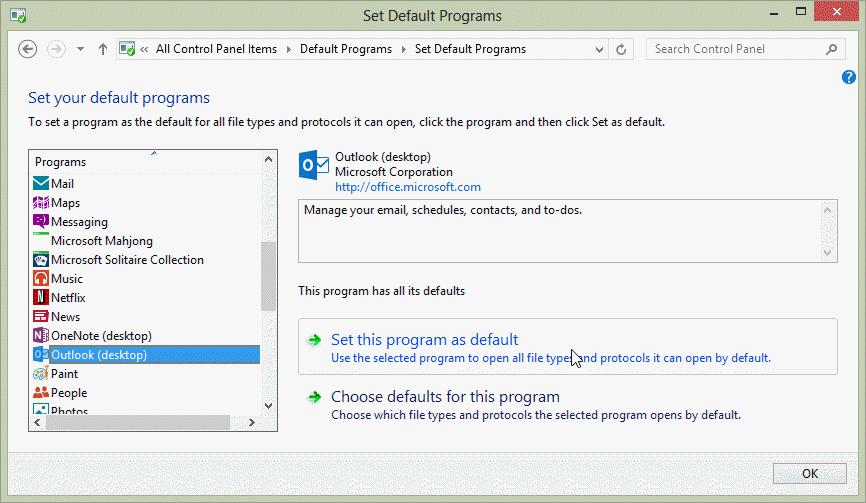
choose the default email client

When you use the 64-bit versions of Outlook 2010 or Outlook 2013, some applications will report that there is no default email client when they try to send email. The problem is not that there is no default email client, but that the application can't access the 64-bit version. You'll need to use the 32-bit version of Outlook for the Send to menus to work.

Changing the default program

The easiest way to set the program is to use the Internet applet in Control Panel or choose View | Internet Options in Internet Explorer. On the Programs tab, click Select Programs to open the Set Default Programs dialog. Click the top link then find Outlook in the list of programs.

If you don't see a change, even after restarting Internet Explorer or restarting Windows, then you can make this change manually. In Windows Explorer, choose View | Options. On the File Types tab, you'll need to edit the Open event for "URL:MailTo Protocol." Sample entries are as follows, for different Microsoft e-mail programs:

Email ApplicationCommand
Internet Mail and Newsrundll32.exe C:\Windows\System\Mailnews.dll,Mail_RunDLL
Outlook Express"C:\Program Files\Outlook Express\Msimn.exe" /mailurl:%1
Windows Messaging or
Microsoft Exchange
rundll32.exe url.dll,MailToProtocolHandler "%1"
Microsoft Outlook"C:\Program Files\Microsoft Office\Office\Outlook.exe" -c IPM.Note /m "%1"

Adjust the path to Mailnews.dll or Outlook.exe as needed to match your own system.

Notes

Outlook 8.02 and later versions support additional parameters in mailto commands placed in web pages and e-mail messages, to add the subject and more recipients. Some examples:

mailto:someone@slipstick.com;test@example.com?subject=Comment

mailto:test@example.com?subject=Suggestion?cc=me@mycompany.com?bcc=myboss@mycompany.com

More Information

OL2002 Error Message When You Send E-Mail from Third-Party Program Either There Is No Default Mail Client or the Current Mail Client Cannot Fulfill the Messaging Request
To Change the Default E-mail Program in Windows was last modified: December 31st, 2020 by Diane Poremsky

Related Posts:

  • Outlook is Not Recognized as the Default Email Client
  • Using Outlook’s ‘View it in a web browser’ with Edge
  • Some mail programs allow you to set a default domain for e-mail. This
    Send Internet mail without adding @domain.com
  • Use FireFox as the Default Browser to Open Links

About Diane Poremsky

A Microsoft Outlook Most Valuable Professional (MVP) since 1999, Diane is the author of several books, including Outlook 2013 Absolute Beginners Book. She also created video training CDs and online training classes for Microsoft Outlook. You can find her helping people online in Outlook Forums as well as in the Microsoft Answers and TechNet forums.

Subscribe
Notify of
36 Comments
newest
oldest most voted
Inline Feedbacks
View all comments

Peter W. Guenther
April 5, 2018 5:10 pm

After a non-destructive OS recovery of my Windows 10 system the default system feature does not work. I changed the default email to Thunderbird and now applications like Adobe Acrobat no longer recognize Thunderbird or any email client. This is an urgent problem.

What is the step by step solution?

0
0
Reply
Diane Poremsky
Author
Reply to  Peter W. Guenther
April 5, 2018 11:00 pm

How did you make the change? When a client switched to eM client, we checked Control panel, Defaults and Settings, default but also had to set it in eM's options before other programs could see it as a mapi client.

0
0
Reply
Phil
February 14, 2017 8:45 pm

Hello Diane,

Thank you for your attention and efforts.

However, none of the suggestions for Outlook Express [msimn.exe] are available nor work to make OE the 'default Mail handler' in Windows 10.

There is no user-accessible selection method for non-registered programs.

Note:
OE works in Windows 10, but cannot be made the default client.

Please describe how to successfully set OE as default - with no Windows gotchas - or registry reversions. Thank you.

I look forward to your reply (to yet IMO another unnecessary WindBlows inconvenience).

Regards,

Phil

0
0
Reply
Diane Poremsky
Author
Reply to  Phil
March 31, 2017 9:42 pm

OE is not supported on Windows 10 and is not very secure - you really need to use a more modern client.

I support Outlook, not OE (even though it has Outlook in the name, OE is not part of the outlook family.)

0
0
Reply
Phil
December 31, 2016 1:21 am

Hello Diane,

Using OE6.v.05 msimn.exe (from XP) in Windows 10.

OE6 does not keep Make this program the default Mail Handler.

In Control Panel Windows Default Programs, OE does not appear and there is no option to select a non-listed program. Surely, selection of ANY related functioning program should be possible.

Re your instructions: There is no 'Windows Explorer, View | Options On the File Types tab' in Windows 10.

Please advise (many) how to get user preferences working in Windows. Thank you.

Regards, Phil

0
0
Reply
Phil
Reply to  Phil
March 28, 2017 5:20 am

Hello Dianne,

Please reply with a working solution for Windows 10 to allow default selection of a functioning program: e.g. OE6.v.05.exe (Outlook Express 6).

OE6.v.05.exe is fully operational in Win 10 Home. Local Security Policy editor N/A - why not if this can provide functionality.

SYSTEM-WIDE FUNCTIONALITY IS WHAT USERS BUY AN OS FOR!

Windows user configuration lockouts and unavailable listing / selections of working programs is juvenile.

Please accept the above serve as constructive criticism to provide a working solution. Else is fail.

Regards,
Phil

0
0
Reply
Diane Poremsky
Author
Reply to  Phil
March 28, 2017 11:27 am

OE is not shipped with Windows 10. If you installed it from a 3rd party site, the installation process should have added it to the registry so it could be set as default. The path is stored in the registry at HKEY_CLASSES_ROOT\mailto\shell\open\command - try setting the path to your OE install there.

0
0
Reply
Phil
Reply to  Diane Poremsky
March 31, 2017 12:27 pm

Dianne.

Thank you for your suggestion. However, the registry entry:

HKEY_CLASSES_ROOTmailtoshellopencommand

does not exist. Please specify the exact syntax for registry modification / entry.

Thank you.

Phil.

0
0
Reply
Diane Poremsky
Author
Reply to  Phil
March 31, 2017 9:26 pm

if it doesn't exist, you need to create it (but that one should exist as mailto is a default setting). It's probably better to check with the people who hacked OE to make it work with Windows 10 - that way you can be sure it's correct. (I recommend getting a modern client that were updated to work with Win10).

0
0
Reply
Matt
August 28, 2016 11:41 pm

What if I DON'T WANT any of the lame default e-mail options but rather something functional and useful like Gmail, for instance?!! Tell me how to switch from the useless MSN e-mail to Gmail, PLEASE?!

0
0
Reply
Diane Poremsky
Author
Reply to  Matt
August 31, 2016 12:05 am

You need to open Gmail in Chrome and click the little icon next to the star. Choose allow to have Gmail take over all of the mailto links.
Set gmail default

0
0
Reply
jERRY
July 16, 2016 4:45 pm

DdIANE oops I FORGOT TO SAY WIN7 I THINK 64 BIT.

0
0
Reply
Diane Poremsky
Author
Reply to  jERRY
July 16, 2016 8:15 pm

If the program supports 64-bit windows it shouldn't matter.

0
0
Reply
jERRY
July 16, 2016 4:43 pm

I HAVE LOADED OECLASSIC. I GET "NO ASSOCCIATION" MESSAGE. I CAN GET TO DEFAULT SETTINGS BUT I AM LOST FROM THERE ON. I DON'T THE TERMINOLOGY. hELP

0
0
Reply
Diane Poremsky
Author
Reply to  jERRY
July 16, 2016 8:14 pm

Sorry, i'm not familiar with that program. Is it listed in Control panel, under Default Programs, Set your default program? If so, select it and click the button to make it the default.

0
0
Reply
Ali Nassereddine
June 17, 2016 5:53 am

hello diane. i am facing a problem.. trying to install windows mobile device center. during installation, i recieve this notification " there is no email associated to perform the requested action. please install and email program or if one is already installed, create and associate in the default program control panel.
I am Using 64 Bits windows 7 ultimate operating System and Microsoft office 2013.
In the Microsoft outlook i added entered options and click on default and saved.
Also from control Panel i entered default program -set default-choose outlook(desktop). there is a statement ( this program has all its defaults) clicked on set default, nothing changed. also clicked on choose default for this program, unfortunately all are selected including MailTO... i can't deselect anything in that list or select anything.
kindly advice solution as soon as possible

0
0
Reply
Diane Poremsky
Author
Reply to  Ali Nassereddine
June 17, 2016 7:48 am

Are you using 32 or 64bit office? I believe it only works with 32bit.

0
0
Reply
Rudy Pesut
January 30, 2016 4:56 pm

How do you configure Gmail so that it is configured for access through the MAPI email client installed in Windows?

1
0
Reply

Visit Slipstick Forums.
What's New at Slipstick.com

Latest EMO: Vol. 30 Issue 38

Subscribe to Exchange Messaging Outlook


Support Services

Do you need help setting up Outlook, moving your email to a new computer, migrating or configuring Office 365, or just need some one-on-one assistance?

Our Sponsors

CompanionLink
ReliefJet
  • Popular
  • Latest
  • Week Month All
  • Use Classic Outlook, not New Outlook
  • How to Remove the Primary Account from Outlook
  • Reset the New Outlook Profile
  • Adjusting Outlook's Zoom Setting in Email
  • OUTLOOK.EXE continues running after you exit Outlook
  • How to Hide or Delete Outlook's Default Folders
  • Removing Suggested Accounts in New Outlook
  • Shared Mailboxes and the Default 'Send From' Account
  • This operation has been cancelled due to restrictions
  • Add Holidays to Outlook's Calendar
  • Opt out of Microsoft 365 Companion Apps
  • Mail Templates in Outlook for Windows (and Web)
  • Urban legend: Microsoft Deletes Old Outlook.com Messages
  • Buttons in the New Message Notifications
  • Move Deleted Items to Another Folder Automatically
  • Open Outlook Templates using PowerShell
  • Count and List Folders in Classic Outlook
  • Google Workspace and Outlook with POP Mail
  • Import EML Files into New Outlook
  • Opening PST files in New Outlook
Ajax spinner

Recent Bugs List

Microsoft keeps a running list of issues affecting recently released updates at Fixes or workarounds for recent issues in classic Outlook (Windows).

For new Outlook for Windows: Fixes or workarounds for recent issues in new Outlook for Windows .

Outlook for Mac Recent issues: Fixes or workarounds for recent issues in Outlook for Mac

Outlook.com Recent issues: Fixes or workarounds for recent issues on Outlook.com

Office Update History

Update history for supported Office versions is at Update history for Office

Outlook Suggestions and Feedback

Outlook Feedback covers Outlook as an email client, including Outlook Android, iOS, Mac, and Windows clients, as well as the browser extension (PWA) and Outlook on the web.

Outlook (new) Feedback. Use this for feedback and suggestions for Outlook (new).

Use Outlook.com Feedback for suggestions or feedback about Outlook.com accounts.

Other Microsoft 365 applications and services


New Outlook Articles

Opt out of Microsoft 365 Companion Apps

Mail Templates in Outlook for Windows (and Web)

Urban legend: Microsoft Deletes Old Outlook.com Messages

Buttons in the New Message Notifications

Move Deleted Items to Another Folder Automatically

Open Outlook Templates using PowerShell

Count and List Folders in Classic Outlook

Google Workspace and Outlook with POP Mail

Import EML Files into New Outlook

Opening PST files in New Outlook

Newest Code Samples

Open Outlook Templates using PowerShell

Count and List Folders in Classic Outlook

Insert Word Document into Email using VBA

Warn Before Deleting a Contact

Use PowerShell to Delete Attachments

Remove RE:, FWD:, and Other Prefixes from Subject Line

Change the Mailing Address Using PowerShell

Categorize @Mentioned Messages

Send an Email When You Open Outlook

Delete Old Calendar Events using VBA

Repair PST

Convert an OST to PST

Repair damaged PST file

Repair large PST File

Remove password from PST

Merge Two Data Files

Sync & Share Outlook Data

  • Share Calendar & Contacts
  • Synchronize two computers
  • Sync Calendar and Contacts Using Outlook.com
  • Sync Outlook & Android Devices
  • Sync Google Calendar with Outlook
  • Access Folders in Other Users Mailboxes

Diane Poremsky [Outlook MVP]

Make a donation

Mail Tools

Sending and Retrieval Tools

Mass Mail Tools

Compose Tools

Duplicate Remover Tools

Mail Tools for Outlook

Online Services

Calendar Tools

Schedule Management

Calendar Printing Tools

Calendar Reminder Tools

Calendar Dates & Data

Time and Billing Tools

Meeting Productivity Tools

Duplicate Remover Tools

Productivity

Productivity Tools

Automatic Message Processing Tools

Special Function Automatic Processing Tools

Housekeeping and Message Management

Task Tools

Project and Business Management Tools

Choosing the Folder to Save a Sent Message In

Run Rules on messages after reading

Help & Suggestions

Submit Outlook Feature Requests

Slipstick Support Services

Buy Microsoft 365 Office Software and Services

Visit Slipstick Forums.

What's New at Slipstick.com

Home | Outlook User | Exchange Administrator | Office 365 | Outlook.com | Outlook Developer
Outlook for Mac | Common Problems | Utilities & Addins | Tutorials
Outlook & iCloud Issues | Outlook Apps
EMO Archives | About Slipstick | Slipstick Forums
Submit New or Updated Outlook and Exchange Server Utilities

Send comments using our Feedback page
Copyright © 2026 Slipstick Systems. All rights reserved.
Slipstick Systems is not affiliated with Microsoft Corporation.

:wpds_smile::wpds_grin::wpds_wink::wpds_mrgreen::wpds_neutral::wpds_twisted::wpds_arrow::wpds_shock::wpds_unamused::wpds_cool::wpds_evil::wpds_oops::wpds_razz::wpds_roll::wpds_cry::wpds_eek::wpds_lol::wpds_mad::wpds_sad::wpds_exclamation::wpds_question::wpds_idea::wpds_hmm::wpds_beg::wpds_whew::wpds_chuckle::wpds_silly::wpds_envy::wpds_shutmouth:
wpDiscuz

Sign up for Exchange Messaging Outlook

Our weekly Outlook & Exchange newsletter (bi-weekly during the summer)


Please note: If you subscribed to Exchange Messaging Outlook before August 2019, please re-subscribe.

Never see this message again.

You are going to send email to

Move Comment




























