• Outlook User
  • New Outlook app
  • Outlook.com
  • Outlook Mac
  • Outlook & iCloud
  • Developer
  • Microsoft 365 Admin
    • Common Problems
    • Microsoft 365
    • Outlook BCM
    • Utilities & Addins

Outlook 2013 calendar details printing bug

Slipstick Systems

› Outlook › Outlook 2013 › Outlook 2013 calendar details printing bug

Last reviewed on November 12, 2013     16 Comments

Applies to: Outlook (classic)

I think every release of Outlook had at least one printing bug slip though the beta testing phase because so few people print calendars and Outlook 2013 kept up the tradition. This time around, the bug is with the Calendar details style: Appointments are duplicated in the print out.

This problem was fixed in one of the July 2013 updates. Verify Office is updated from File, Office Account, Update Options. You should have version 15.0.4535.1511 or higher.

The Calendar Printing Assistant for Outlook should work with 32-bit Outlook 2013 if all updates are installed.
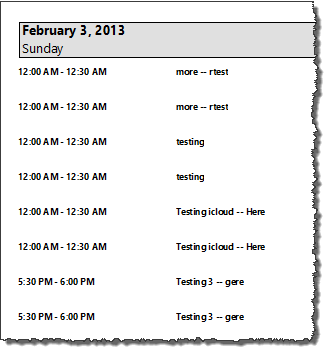
Calendar print bug sample

Outlook 2013 calendar details printing bug was last modified: November 12th, 2013 by Diane Poremsky
Post Views: 20

Share this:

  • Share on Facebook (Opens in new window) Facebook
  • Share on X (Opens in new window) X
  • Share on Reddit (Opens in new window) Reddit
  • Share on Bluesky (Opens in new window) Bluesky
  • Share on Mastodon (Opens in new window) Mastodon
  • Email a link to a friend (Opens in new window) Email

Related Posts:

  • Outlook 2007: Month Calendar Printing Bug
  • Calendar Printing Tools
  • Calendars aren’t printing in color
  • Some Outlook 2007 users are having problems printing calendars with th
    Printing Calendars with Color Categories

About Diane Poremsky

A Microsoft Outlook Most Valuable Professional (MVP) since 1999, Diane is the author of several books, including Outlook 2013 Absolute Beginners Book. She also created video training CDs and online training classes for Microsoft Outlook. You can find her helping people online in Outlook Forums as well as in the Microsoft Answers and TechNet forums.

Comments

  1. Puma1966 says

    May 5, 2017 at 4:28 pm

    I have 15.0.4919.1002 on a PC. When I try to file/print/
    Calendar Details Style/ Print Options/ Print Range (Start/End),
    prints lots of blank space between days. Something that
    should print 4 pages prints on 6...

    Reply
    • Diane Poremsky says

      May 6, 2017 at 1:10 am

      That is the newest build. Did you delete the outlprnt file? it's in %appdata%\microsoft\outlook

      Reply
  2. Neil says

    October 7, 2015 at 9:59 am

    I found a new bug. Create a new calendar because this doesn't not affect your default calendar. Then go to print this calendar and select "Weekly Calendar Style." You will see that it cuts off the days of the week.

    Reply
    • Diane Poremsky says

      October 10, 2015 at 9:48 am

      LOL. Thanks for letting me know. I'll make sure it's reported.

      Reply
    • Diane Poremsky says

      October 10, 2015 at 10:13 am

      Heh... now the default calendar is goofy too. I forgot to change a setting and printed a month's worth of weeks from the default calendar - some of the pages had the names cut off and now it's bad in preview too.

      Reply
  3. Alan says

    November 4, 2013 at 6:24 am

    Thank you soooo much!!!! It worked!!

    Reply
  4. Alan says

    October 30, 2013 at 8:54 pm

    Diane, do you have the link for the July's update? My pc here at work doesn't allow me to install updates through the Windows Update icon.

    Reply
    • Diane Poremsky says

      October 30, 2013 at 9:19 pm

      I believe its this one - https://support.microsoft.com/kb/2817468/ - its not listed as one of the things fixed by the update, but they don't always list everything.

      Reply
  5. Jonathan says

    August 27, 2013 at 2:12 pm

    Please do! You could also ask them why the download page for CPAO specifically says it _does_ work with Outlook 2013 when in fact it definitely doesn't.

    Reply
  6. Michael John Pyott says

    August 19, 2013 at 7:48 am

    it is now August 19/2013 and my computer (windows 7, office 2013)is updated all the time, so I believe it is at the current Rev, I still can not print combine calendars or load Calendar Printing Assistant for Outlook on to my computer as it says it can not find Office 2007.

    Reply
    • Diane Poremsky says

      August 19, 2013 at 8:01 pm

      CPAO doesn't support Outlook 2010 at this time. It's been awhile since I asked if they were going to update it (and received a very non-committal response) so I'll check again...

      Reply
  7. Jimminy Kricket says

    July 12, 2013 at 2:09 pm

    Even if most people don't "print" their calendars persay Microsoft should be smarter then this and should realize that some people use "printing" of the details style calendar for posting and sharing travel itineraries within workgroups as I do. I print it to PDF, convert it to word, make the changes I need and print it back to pdf. This error makes my old process nearly impossible as it is so time consuming. Since I upgraded my office products it has not only cost my company money to upgrade but now extra money in time spent working on itineraries when I used to have a perfectly good working system sharing through the calendar with colleagues etc. I have checked back periodically for a fix for this and I am extremely dissapointed that it is not out there yet.

    Reply
    • Diane Poremsky says

      July 12, 2013 at 9:36 pm

      It appears to be fixed in the July updates just released. At least it is here and also for another person.

      Reply
  8. Nic says

    June 28, 2013 at 6:08 am

    Bottom line...it's broken, among many other problems, and instead of a fix, you get more marketing of junk product. Gmail is a better and more reliable option for FREE.

    Reply
  9. otswebMike Osbourn says

    February 16, 2013 at 3:36 am

    I reported this bug in November 2012 and they still released to retail without fixing it.

    Reply
    • Diane Poremsky says

      February 16, 2013 at 8:51 am

      To be fair, Office was RTM in Oct, so Nov was a bit late to stop the release. :)

      Reply

Leave a Reply Cancel reply

Your email address will not be published. Required fields are marked *

Visit Slipstick Forums.
What's New at Slipstick.com

Latest EMO: Vol. 31 Issue 10

Subscribe to Exchange Messaging Outlook


Support Services

Do you need help setting up Outlook, moving your email to a new computer, migrating or configuring Office 365, or just need some one-on-one assistance?

Our Sponsors

CompanionLink
ReliefJet
  • Popular
  • Latest
  • Week Month All
  • Deleting Auto-Complete Entries No Longer Works
  • Use Classic Outlook, not New Outlook
  • How to Remove the Primary Account from Outlook
  • How to Hide or Delete Outlook's Default Folders
  • Disable "Always ask before opening" Dialog
  • Removing Suggested Accounts in New Outlook
  • Change Outlook's Programmatic Access Options
  • Understanding Outlook's Calendar patchwork colors
  • Adjusting Outlook's Zoom Setting in Email
  • Reset the New Outlook Profile
  • Deleting Auto-Complete Entries No Longer Works
  • Sync Issues and Errors with Gmail and Yahoo accounts
  • Error Opening iCloud Appointments in Classic Outlook
  • Opt out of Microsoft 365 Companion Apps
  • Mail Templates in Outlook for Windows (and Web)
  • Urban legend: Microsoft Deletes Old Outlook.com Messages
  • Buttons in the New Message Notifications
  • Move Deleted Items to Another Folder Automatically
  • Open Outlook Templates using PowerShell
  • Count and List Folders in Classic Outlook
Ajax spinner

Recent Bugs List

Microsoft keeps a running list of issues affecting recently released updates at Fixes or workarounds for recent issues in classic Outlook (Windows).

For new Outlook for Windows: Fixes or workarounds for recent issues in new Outlook for Windows .

Outlook for Mac Recent issues: Fixes or workarounds for recent issues in Outlook for Mac

Outlook.com Recent issues: Fixes or workarounds for recent issues on Outlook.com

Office Update History

Update history for supported Office versions is at Update history for Office

Outlook Suggestions and Feedback

Outlook Feedback covers Outlook as an email client, including Outlook Android, iOS, Mac, and Windows clients, as well as the browser extension (PWA) and Outlook on the web.

Outlook (new) Feedback. Use this for feedback and suggestions for Outlook (new).

Use Outlook.com Feedback for suggestions or feedback about Outlook.com accounts.

Other Microsoft 365 applications and services


New Outlook Articles

Deleting Auto-Complete Entries No Longer Works

Sync Issues and Errors with Gmail and Yahoo accounts

Error Opening iCloud Appointments in Classic Outlook

Opt out of Microsoft 365 Companion Apps

Mail Templates in Outlook for Windows (and Web)

Urban legend: Microsoft Deletes Old Outlook.com Messages

Buttons in the New Message Notifications

Move Deleted Items to Another Folder Automatically

Open Outlook Templates using PowerShell

Count and List Folders in Classic Outlook

Newest Code Samples

Open Outlook Templates using PowerShell

Count and List Folders in Classic Outlook

Insert Word Document into Email using VBA

Warn Before Deleting a Contact

Use PowerShell to Delete Attachments

Remove RE:, FWD:, and Other Prefixes from Subject Line

Change the Mailing Address Using PowerShell

Categorize @Mentioned Messages

Send an Email When You Open Outlook

Delete Old Calendar Events using VBA

Repair PST

Convert an OST to PST

Repair damaged PST file

Repair large PST File

Remove password from PST

Merge Two Data Files

Sync & Share Outlook Data

  • Share Calendar & Contacts
  • Synchronize two computers
  • Sync Calendar and Contacts Using Outlook.com
  • Sync Outlook & Android Devices
  • Sync Google Calendar with Outlook
  • Access Folders in Other Users Mailboxes

Diane Poremsky [Outlook MVP]

Make a donation

Mail Tools

Sending and Retrieval Tools

Mass Mail Tools

Compose Tools

Duplicate Remover Tools

Mail Tools for Outlook

Online Services

Calendar Tools

Schedule Management

Calendar Printing Tools

Calendar Reminder Tools

Calendar Dates & Data

Time and Billing Tools

Meeting Productivity Tools

Duplicate Remover Tools

Productivity

Productivity Tools

Automatic Message Processing Tools

Special Function Automatic Processing Tools

Housekeeping and Message Management

Task Tools

Project and Business Management Tools

Choosing the Folder to Save a Sent Message In

Run Rules on messages after reading

Help & Suggestions

Submit Outlook Feature Requests

Slipstick Support Services

Buy Microsoft 365 Office Software and Services

Visit Slipstick Forums.

What's New at Slipstick.com

Home | Outlook User | Exchange Administrator | Office 365 | Outlook.com | Outlook Developer
Outlook for Mac | Common Problems | Utilities & Addins | Tutorials
Outlook & iCloud Issues | Outlook Apps
EMO Archives | About Slipstick | Slipstick Forums
Submit New or Updated Outlook and Exchange Server Utilities

Send comments using our Feedback page
Copyright © 2026 Slipstick Systems. All rights reserved.
Slipstick Systems is not affiliated with Microsoft Corporation.