A big point of confusion with people and Exchange in Office 365 is around the concept of the email in-place archive. There are some important things that should be pointed out when it comes to this in-place archive:
- Every Exchange Online plan (except Kiosk plans) have the ability to have an in-place email archive.
- By default, on all plans, the in-place email archive is disabled for all users. An administrator must enable it before it can be accessed.
- The in-place email archive contents are stored ONLY in the cloud. They are never synced to a desktop as the Inbox is.
- The in-place archive folders are only visible with the Outlook version in the Professional Plus product. Other versions of Outlook will not display the archive folders even though they may be present and enabled.
- Plans that include Exchange Online Plan 2 (E3, E4) have an unlimited archive. Plans that have Exchange Online Plan 1 (Business, and E1) have a current limit of 50GB of storage between the Inbox and the Archive. For example, in Exchange Online Plan 1 you could have a 25GB Inbox and a 25GB Archive, or a 10GB Inbox and 40GB archive. With Exchange Plan 1 the total size of the Inbox combined with the in-place archive cannot exceed 50GB.
You can enable the in-place archive using the Exchange admin portal or using PowerShell.
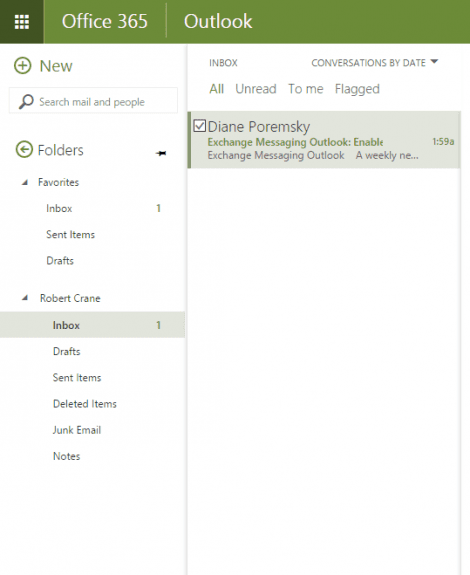
You can see that the mailbox currently has an Inbox and other default folders but no archive mailbox.
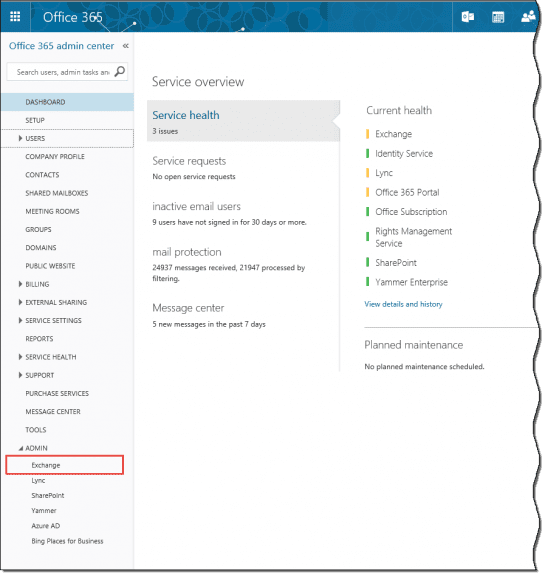
The first step is to login to the Office 365 admin portal as an administrator and select Exchange in the lower left corner of the window to log into the Exchange admin center at //outlook.office365.com/ecp/.
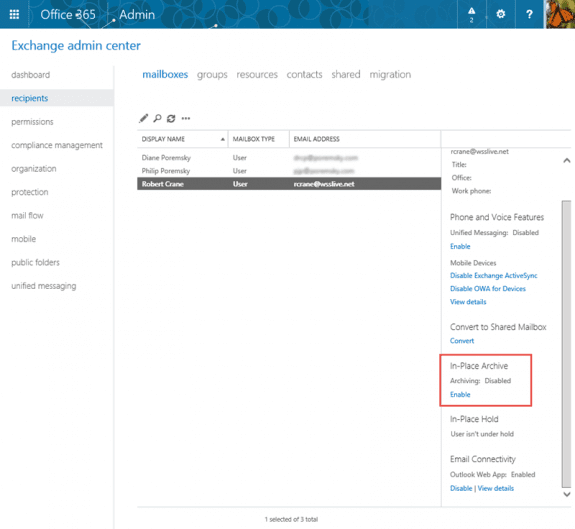
Select recipients then mailboxes and then select the mailbox you wish to enable the in-place email archive. From the information in the right hand side panel select Enable under the In-Place Archive heading.
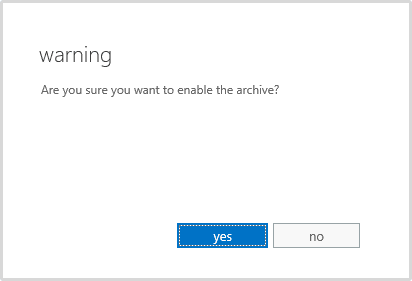
Select yes to enable the in-place archive.
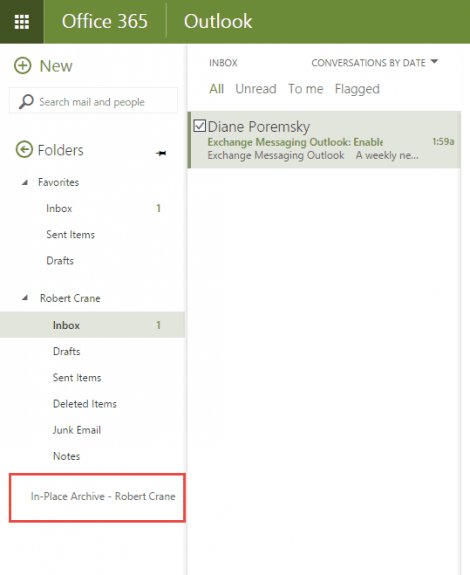
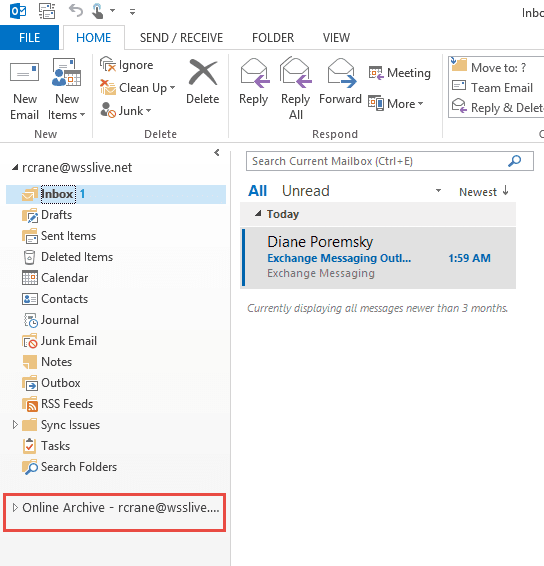
After a few minutes (the process is not instantaneous) a new folder will appear in your Outlook web called In-Place Archive – <name> or in Outlook desktop called Online Archive -<name>.
The folder list in Outlook Web Access looks like this:
In Outlook desktop, the online archive is in the folder list:
The archive is now ready to use. Users can drag and drop items into the archive folders and email policies (user and organizational) can now utilize that folder.
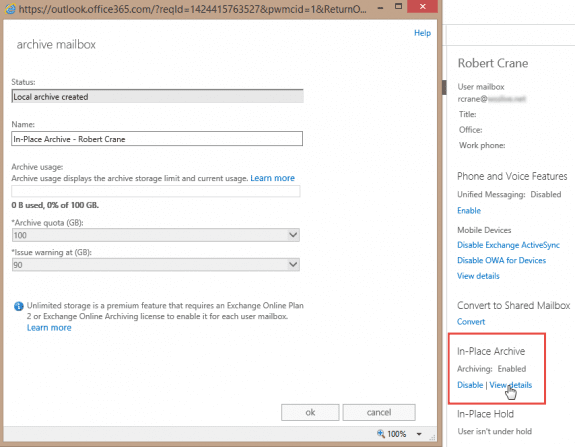
As an administrator, if you again look at the mailbox, under in-place archive you will see an option View Details. Selecting that will show you a window providing details of the mailbox. Remember, this options vary depending on the Exchange Online plan the mailbox is subscribed for.
Using PowerShell to enable Online Archive
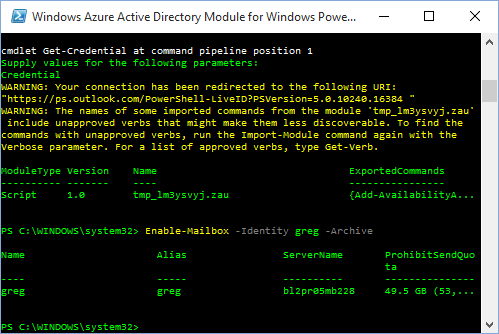
You can of course do the same thing with PowerShell, using the enable-mailbox command:
Enable-Mailbox –Identity user@domain.com -Archive
To set all mailboxes to use the online archive, use this format:
Get-Mailbox | Enable-Mailbox –Archive
To enable the archive only on usermailboxes, use
Get-Mailbox -ResultSize unlimited -Filter {(RecipientTypeDetails -eq 'UserMailbox')} | Enable-Mailbox –Archive
When archive is enabled, the default retention policy is applied to the mailbox. To apply a specific retention policy to a specific mailbox, use
Set-Mailbox -Identity user@domain.com -RetentionPolicy policy-name
To set a specific retention policy for all mailboxes, use
Get-Mailbox | Set-mailbox -RetentionPolicy policy-name
More Information
Exchange Online Archiving Service Description (TechNet)
How to apply Retention Policies to all mailboxes
Enable-Mailbox

Thomas Snoeks says
In order to reduce the load on my Computer, I've used OWA for searches within the personal archive of a shared mailbox instead of the Outlook client. Since recently, I can only open the OWA Shared Mailbox itself, but the related Online Archive keeps "loading" and never shows up.
I checked via the Outlook client software and the Archive is still there (so, luckily no data lost).
Is it a setting at the server-side that might have changed, or should I rather look in my browser settings?
Diane Poremsky says
Test in a private browser and see if it works - if yes, clear the cache and cookies.
As far as I know, nothing changed but will check on it.
Ali Anqeed says
Is it working with office 2016 standard
Diane Poremsky says
That is what used to be Business, so yes, it should work with it.
Farhan says
Hi, Online archive is not working in outlook 2016, i can see the online archive in outlook on left pane and set policy on some folders to move items older than 1 week to online archive but nothing happened, Any help will be highly appreciated.
Outlook 2016 pro plus
Exchange 2013
Thanks!
Diane Poremsky says
Is the mailbox manager process enabled and running on a schedule?
Martijn says
Hi Christine,
good news, you can find all the requirements here: https://technet.microsoft.com/en-us/library/dn922147(v=exchg.150).aspx
Outlook license requirements for accessing an archive mailbox
To access their archive mailbox using Outlook, users need one of the following licenses.
Outlook in Office 365 subscriptions
Outlook in Office 365 ProPlus
Outlook in Office 365 Enterprise E3
Outlook in Office 365 Business
Outlook in Office 365 Business Premium
Outlook retail licenses
Outlook 2016 stand-alone
Outlook 2013 stand-alone
Outlook volume licenses
Outlook 2013 stand-alone
Outlook 2013 included with Microsoft Office Professional Plus 2013
Outlook 2010 stand-alone
Outlook 2010 included with Microsoft Office Professional Plus 2010
Christine says
Hi Diane, I was wondering if there is a specific version of Outlook needed (like Pro Plus) to see the online archive. We have read some articles indicating it has to be a particular type of Outlook installation, meaning those with Office 365 Home or a retail version of Office with Outlook wouldn't be able to see it. Thanks for any expertise you can lend to this. We consider Slipstick to be an authority in all things Outlook.
Diane Poremsky says
You need ProPlus to see the archive. They are supposed to be adding it to the business premium subscription, but it wasn't added last i checked. (It might be by now.)
It will not be in Home or the retail version.
Mario says
Hi,
Is there any way to access archived mails from the native IOS mail app on iPhones/iPads, or do you need to use OWA to retrieve mails in the Online Archive ?
I enabled Online Archiving yesterday. The oldest mail in my archived inbox dates 2 years old. I tried to search for the Sender and the subject from my native mail app, but can not find those mails.
Not sure whether I'm to impatient (I waited one day), or whether OWA is required to do this.
Thanks,
Mario
(O365 Enterprise E3)
Andy Cook says
Hi Diane,
Is there anyway to hide the online archive of a delegated account? I have 6 delegated accounts as well as my own but i also can see all their archives, it's just making my mailbox list too busy, any ideas?
Thanks
Andy
Diane Poremsky says
How did you open the accounts in your profile? i didn't think they showed up if opened as a shared account, but will double check.
beq says
Thanks again Diane for your site.
Your sample screenshot showed an Online Archive mailbox provisioned at 100GB. Do you know what is currently the largest size this can *actually* grow to, when you're supposed to have "unlimited" archiving?
I ran into this issue with my family member's Exchange Online Plan 2 over a year ago. IIRC his Archive mailbox had an initial quota of 50 or 100 GB (I forget), but I was told that it would automatically grow each time it was close to being full. I think still ended up having to contact them to manually increase the Archive to 170GB, but after that we'd hit a roadblock!
I had a month-long back-and-forth with the Exchange escalation team, they kept trying different things in PowerShell and consulting the product engineers. But they finally gave up and said they couldn't increase the Archive quota past 170GB. I'm not sure why, but this was apparently a surprise to them.
They then told me to just create shared mailbox(es) which doesn't require an additional user license. The idea was for me to manually transfer older emails to this shared mailbox (which has its own 50GB quota).
As an additional consolation, they *somehow* managed to increase my family member's primary mailbox from 50 to 100 GB (so his account now has 100GB primary mailbox, 170GB in-place archive, plus I'd created a 50GB shared mailbox and linked it on his Outlook).
Unfortunately this consolation came with its own issue. They increased his primary mailbox to a non-standard quota of 100GB, but the server is still set to warn him when he approaches (and passes) the 50GB mark! Since then he started getting daily emails stating "Your mailbox is almost full", and each time he logs into OWA or the EAC it would throw up a warning "You're about to exceed the storage limit for your mailbox" -- even as the status shows only 50-60GB used out of the 100GB custom quota.
Diane Poremsky says
Sorry I missed this earlier.
E2 archives are supposed to be unlimited now. In they past they were limited to 50GB and they set a default of 100GB when they raised it to unlimited - all mailboxes should have been raised automatically to 100GB within a few months of the increase. I'll see if i can find out anything about this.
Transferring mail to a shared mailbox is a PITA (but will solve the problem for now)... but it will eventually be full too. While you can keep making more shared boxes, searching is a pita.
>> They increased his primary mailbox to a non-standard quota of 100GB, but the server is still set to warn him when he approaches (and passes) the 50GB mark!
it sounds like they didn't raise the warning level when they raised the quota - see https://technet.microsoft.com/en-us/library/aa998353(v=exchg.160).aspx for the cmdlet to change it. But... i'm surprised they raised the mailbox to 100GB - i thought that was limited to 50 GB.
Michael Rush says
Thanks for the article. We have just moved over to Office365 Business Premium and use Outlook 2013 on the Desktop. I used to use the Auto-Archiving process in Outlook 2010 to archive from the ost file to local pst files. These pst files were then backed up as part of our data backup process.
Now I am trying to work out what to do with archiving now that we have moved to Office365. Reading your article tells me that once I enable archiving in Office365, I will not be able to see the archive information on the Desktop Outlook – I will need to use OWA. Have I got that right?
Even though we have 50GB of storage per user, I want to archive so as the ost file does not get too big and so searching does not become an issue. Also, in some time, we will start to use up the 50GB of space!
Can I archive emails that are older than (say) 3 years from the ost file to a pst file? If I can do this, then the plan would be to archive to the pst file and then take the pst file off the PC and store it on an external storage facility.
Would appreciate your feedback. Tks
Diane Poremsky says
>> Reading your article tells me that once I enable archiving in Office365, I will not be able to see the archive information on the Desktop Outlook – I will need to use OWA.
No. It depends on your version of Outlook, but the online archive is available in the business versions along with in OWA. It's not cached, so the ost won't grow. The default policy moves mail into the online archive at 2 years but this can be changed to 3 years if that is what you want. Depending on your plan, you may have an unlimited archive.
If you have outlook 2013 or 2016, you can set the sync slider to keep recent things in outlook - the older items still in the mailbox but not synced locally can be found using search by clicking the Include older results button. They'll also be in OWA. I actually prefer to move the mail to the online archive and keep everything that is in the mailbox synced with outlook - although I do only sync a few months on my tablet, in part because the drive is small. Also because i really don't need the old mail on the portable devices.
Archive to a pst is disabled when you use an exchange account - you'd need to move mail to the pst yourself. (Could use Rules or a macro.)
Michael Rush says
Tks Diana,
We have Office365 Business Premium (and Office2013) which only gives me 50GB of storage per mailbox. So I like your concept of leaving the older items in the mailbox and not sync'd. I also like your idea of using the online archive. But I am worried that since we only get a total of 50GB per mailbox, that if the mailbox fills up becos the online archive folder is getting full, I cant get the online data off and so I either have to upgrade my plan to get infinite storage or delete some of the data out of the archive!
Tks for the tip about not be able to archive to a pst!
Tks again Michael
Diane Poremsky says
Yeah, you are more limited with the business-level plans - one option is to not enable the online archive - then Outlook's AutoArchive should work.
Ben4o says
Hi everybody,
Thanks for this helpful article.
Does anybody can tell me what kind of archive is on Exchange Online?
Is it a .pst or something else?
Thanks a lot, i am looking for the info since 4 days and i am despairing me.
Diane Poremsky says
The online archive is a mailbox, not a pst file.
Ravi says
I have a user that managed 6 delegates over the past year and has accumulated 40000 calendar items 21000 sent items folder. Some of the data is as a result of corrupted entries. I have signed up for online archiving on our 365 platform E1 platform. I am assuming the calendar can be archived as well, thus reducing its size. I don't see the calendar option when it creates an archive mailbox. Thanks
Diane Poremsky says
The calendar should archive to the online archive mailbox - i have some appointments in my online archive calendar (but i can't be 100% sure that they weren't added when i imported a pst). Contacts won't archive... this I'm 100% sure about.
Alex says
May I know if I can deploy powershell using csv file ?
Diane Poremsky says
if you want to enable online archive mailboxes for all users, this cmdlet will work
Get-Mailbox -Filter {ArchiveStatus -Eq "None" -AND RecipientTypeDetails -eq "UserMailbox"} | Enable-Mailbox -Archive
you can use a csv to enable just some mailboxes or filter on additional paramenters.
A script that uses CSV is here - https://gallery.technet.microsoft.com/office/Enable-Mailbox-online-edbaa9c8
Laura says
My company has 365 E1 and we want archiving, I was told by Microsoft that we need to purchase the Archiving add-on for $3.00 per user per month. Is this the case? If E1 does have archiving already but a limit of 50GB what does the Add-On do? Just provide additional storage? Please let me know...Thanks!
Diane Poremsky says
Archiving is available for all business & enterprise but without unlimited storage. The $3/month gets you unlimited archive mailboxes. See https://technet.microsoft.com/en-us/library/exchange-online-archiving-service-description
Note reads: Exchange Online Plan 1 and Office 365 Business plans have a size limit on the mailbox and archive. Exchange Online Archiving for Exchange Online add-on adds unlimited cloud-based archive and In-Place Hold.
https://technet.microsoft.com/library/exchange-online-limits.aspx has a chart of limits - this note goes with E1 mailbox storage limits: Each subscriber receives 50 GB of total storage, which the user can divide between the primary mailbox and the personal archive. As such, the size of the personal archive can’t exceed 50 GB.
Steve Titus says
Diane,
Does the user have the ability to delete emails from the Archive mailbox? Can permissions be set so it's a "roach motel", emails when archived, can not be deleted? Thanks.
Diane Poremsky says
Yes, they can be deleted by the mailbox owner. The only way to prevent them from deleting messages from it is by enabling litigation hold but that would affect the mailbox too.
Jonathan Yoesting says
Thanks for the article. Any idea how to enable online archive for all users simultaneously?
Diane Poremsky says
The powershell is Enable-Mailbox -Archive -Identity UserAlias
to apply to all, use Get-Mailbox | Enable-Mailbox –Archive
to apply to some but not all use Get-Mailbox -ResultSize unlimited -Filter {(RecipientTypeDetails -eq 'UserMailbox')} | Enable-Mailbox –Archive
https://technet.microsoft.com/en-us/library/aa998251%28v=exchg.150%29.aspx
To set the policy for all, use Get-Mailbox | Set-mailbox -RetentionPolicy policy-name
to use a specific policy for one mailbox, use Set-Mailbox -Identity user@domain.com -RetentionPolicy policy-name
Dan says
Good article - cleared up a few queries - thanks! Does this work the same way for shared mailboxes? I can see the archive in OWA but not Outlook (though I can see my own archive in Outlook)?
Thanks
Diane Poremsky says
No. You'll only see the online archives for accounts in your profile in Outlook desktop.
zaid says
hi
on my outlook desktop a can not see the folder archiving ?
so are now whats the problem
Diane Poremsky says
You cant see the Online Archive mailbox? Which version of outlook does you have? You need the ProPlus version to view the online archive mailbox in outlook - if not, you need to use OWA to access the archive.
adhe says
So, the Business Premium license includes Exchange Online Archiving but Outlook as a part of Office 365 Business (the version you get with the Business Premium license) won't display it because it's not Office Pro Plus? What the what?!
Diane Poremsky says
That is how it looks - thanks for reminding me that I need to bug some people about that.
Matt says
Hi Diane, I don't suppose you managed to bug the right people about this?
This is going to get ugly for some of us, especially at next 365 renewal when we are forced to transition off the now-discontinued MidSize Business plan (with "Office ProPlus" included) and move over to Business Premium with "Office Business" only to lose access to archives from within Outlook… I can picture the helpdesk calls now… :-/
Diane Poremsky says
They are working on it - i don't know when it's going to happen though. I'm expecting it by the end of the year but could be delayed. It will likely be in one of the monthly auto updates.
Chris C says
Just asking a stupid question - so when I am offline I will not see anything in the Online Archive as a copy of the folder is not maintained locally - correct?
Diane Poremsky says
Correct. The mailbox isn't cached.
Daniel says
Hi, nice article. I have a question, what happen if I change my Exchange plan from Plan 1 to Plan 2 because I need the unlimited storage in some users in my company. I have to do something in their mailbox, outlook or PC? Or just change the subscription and does it? They will have the unlimited storage from the moment I change. Please reply to me
Diane Poremsky says
You just need to change the license assigned to their user account in the online portal.

Neil Shirley says
Hi. Great article. Do you know if it is possible to apply Exchange Online Archive to the Business subscription and therefore move to the unlimited archive?
Diane Poremsky says
Go to https://outlook.office365.com/ecp/, select the mailbox and enable in-place is on the right. (The business subscriptions don't have an unlimited archive it's currently 50GB in the mailbox and 50GB archive.)
Noel Ervine says
Hi Diane,
Thanks for the article.
I have a customer with an exchange online plan 1, and i'm going to recommend the Exchange Online Archiving option to make it unlimited but I have seen a table that shows they need a share point online plan 1 to be able to use the in place archive function.
This isn't mentioned anywhere in this tread, is that correct or not ?
Diane Poremsky says
E1 plans include Online Archives, so no its not correct. You need an E2 to get unlimited - https://products.office.com/en-us/exchange/compare-microsoft-exchange-online-plans - i don't think they sell it as a separate addon that is just unlimited archiving (its not listed in my tenant, but i have an E3, which has the unlimited archive) - look in Subscriptions > Addon to verify.
As a reminder, you can mix and match plans - so only the people who need larger archives need to be upgraded to E2.