Outlook 2010
If your problem began on December 8 or 9 2015 and affects Outlook 2010:
In Outlook 2010, all of my options were reset to their defaults and when I change them, the changes don't stick. As soon as I close Outlook and restart it, everything is back to its default.
This is caused by installing KB3114409 - it causes Outlook to run in Safe mode, which uses the default settings. Your customizations aren't lost, they just aren't being used when Outlook is in Safe mode.
Microsoft released this update to fix the problem: December 16, 2015, update for Outlook 2010 (KB3114560). It is highly recommended that you install this update instead of uninstalling KB3114409.
Microsoft removed the update, so users who haven't installed the December updates yet won't be affected. Users who are affected should install the hotfix December 16, 2015, update for Outlook 2010 (KB3114560).
A second option is to set a registry key to disable Safe mode. If you are in a hurry, this is obviously the faster fix but you won't be able to use Safe mode in the future (for troubleshooting) until you remove the key.
To set the registry key:
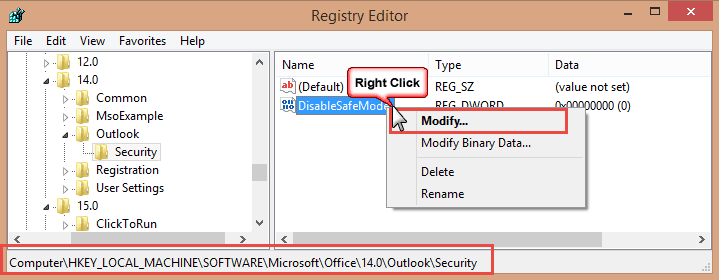
- Open the Registry editor by pressing Windows key + R. Type regedit in the Open: field. Then click Ok.
- Browse to
HKEY_LOCAL_MACHINE\Software\Microsoft\Office\14.0\Outlook\Security\ - If any key in the path is missing, you'll need to create it. Right click on the last key, choose New, then Key and type the key name.
- Right click on Security key and choose New, and then DWORD Value.
- Type DisableSafeMode, and then press Enter.
- Right-click on DisableSafeMode, and then click Modify.
- In the Value data box, type 1, and then click OK.

- If you have 64bit Windows and 32-bit Office, also add DisableSafeMode, Value: 1 to this key:
HKEY_LOCAL_MACHINE\SOFTWARE\Wow6432Node\Microsoft\Office\14.0\Outlook\Security\ - Restart Outlook or reboot the computer.
If you don't want to edit the registry, you can use this reg file: DisableSafeMode.reg DisableSafeMode.reg for Outlook 32 bit on Windows 64-bit
Video Tutorial: How to use a .reg file
Uninstall KB3114409
To uninstall updates:
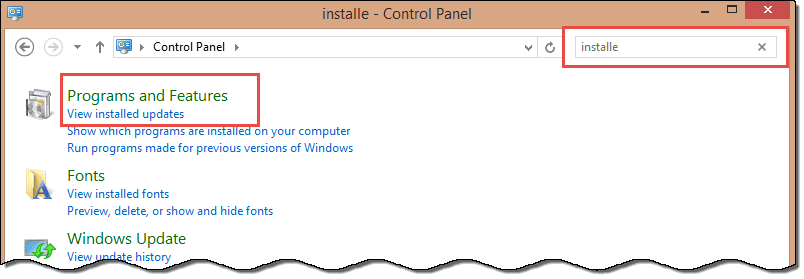
- Open Control Panel
- Begin typing Installed Updates in the Search Control Panel field at the top right.
- Click on View Installed Updates on the left
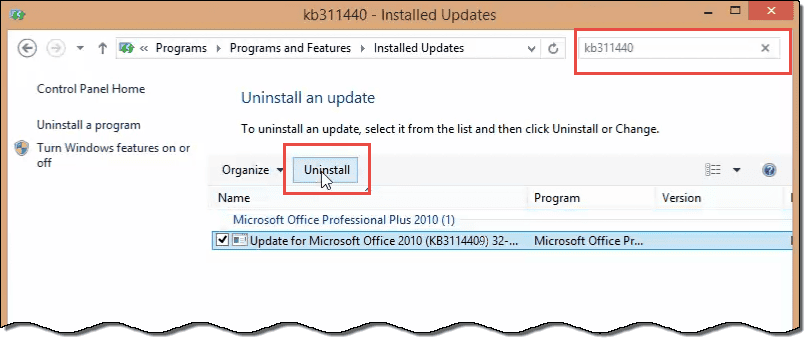
- Begin typing KB3114409 in the Search Updates field in the top right
- Select it and click Uninstall in the bar above
Outlook 2007 or 2003
The original reason this article was written in 2011 was caused by an issue with the search service. Outlook 2003 and 2007 are affected by this problem.
Solution: Repair your Office installation and run scanpst on the data file.
The problem is caused, in part, by the 'Windows Search' service. This service provides Outlook's Instant Search and Window's file search features. For a quick fix, you can stop or disable the Windows Search service.
To do this, open the Administration Tools folder in the Control panel and double click on Services. Look for Windows Search in the list. Double click it, then click Stop and Apply. You can also right-click on Windows Search and choose Stop. The next time you use Instant Search or Windows Search, the service will restart. To disable the service for a longer period, select Disable in the dropdown and click the Stop button, then Apply.
Please note: when you disable the search service, Windows File Search and Outlook's Instant Search won't work. Stop the Search service only so you can use Outlook in "normal" mode until you have time to repair it.
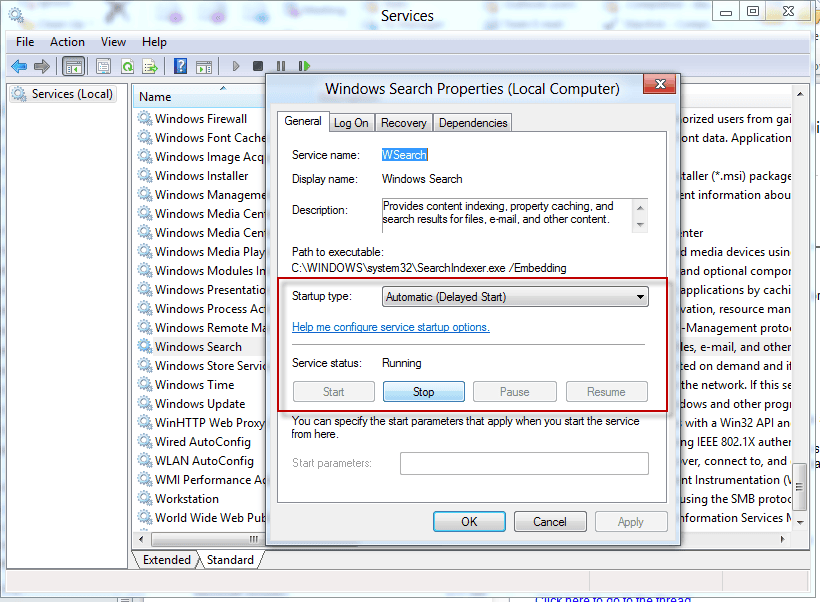
In Windows 7, you can type Services in the Start menu's search command or in all versions, type Services.msc in the Run command.

Ron Shurie says
Diane,
I see you on these forums a lot and an having an issue that appears to have no history. Outlook 2019 is stuck in a repair loop which finds no issue with the .PST but continues to say it has a problem at every launch. Outlook will not run. I have tried everything (new profile, uninstall/reinstall, clean registry, etc.) and am now to the point where only killing the trigger will stop the issue. Where is that trigger? Registry key? I hate to call MS for a fix. . .
Thanks,
Ron
Bohdan Buczynski says
I have an interesting problem with Outlook 365. This problem started about 8 months ago and not matter what I tried, the results was the same. I've attached some screen captures that shows the dialog windows that come up. Which to me makes no sense at all. I say this because there are no other windows or programs open, my PC is running an i7 with 128GB of RAM, and 1TB HD for a system drive. I've reinstalled Office 365 with Outlook several times, but alas, that did not help. When trying to use the safe mode option, outlook does startup, but I get a repair notification and then it shuts down. I checked with Microsoft but found no solution, just a good luck with your problem. You will need to preform a total clean installation of Windows. I am hoping someone has a solution because I really don't want to do a clean install of Win 10.
Paul says
After 2 months of Outlook 2016 prompting to start in Safe Mode, then crashing (not responding), I tried the simplest thing ever and it worked.
Control Panel, Internet Options, Advanced, Reset (and delete).
Bingo. After 2 months of banging my head on my desk, Outlook is stable.
Diane Poremsky says
Thanks for the update! Any idea what settings changed?
Megan says
I have tried to install the hotfix, and have also tried to uninstall the KB3114560 update. Each time, my computer gives me the message "An unknown error occurred. The update was not uninstalled". Has anyone run into that problem? I haven't been able to find a solution anywhere.
Tamsyn says
Thank you, the KB3114560 update worked like a charm.
Alliant says
Thank you very much for the info. I removed the update and Outlook in no longer in safe mode. Much appreciated. It is sad that Microsoft does not have a fix for this yet?
Diane Poremsky says
They released a hotfix in December and https://support.microsoft.com/en-us/kb/3114570 this week.
Joe Adams says
Diane, this registry fix worked for me. Thanks very much for your help in getting rid of this pesky little problem.
Brett says
This worked perfect for me--THANKS!
Joe V. says
The Registry key has been fixing this issue for my staff members. We did not publish the KB that has been causing it either. Thank you for this article!
MAnderson says
Installing this update KB3114560 fixed my problem.
richard says
The updated patch worked for me BUT one of the subfolders i'd created for email filtered off from Inbox with a Rule has completely gone, including all the emails within. This is obviously most alarming! Do you have any suggestions, please?Thanks in advance
Shashikant Birla says
Thanks for the valuable information, it resolved the issue. But when I update windows again, I'm getting same issue "outlook opens in safe mode". So, now what should I do to resolve this issue.
John says
Thank you so much for the registry fix. This was driving me nuts.
George says
Hello all. For those who have had the issue with Outlook opening in Safe Mode, we found the issue. Microsoft released a hotfix that was corrupt – hotfix for KB3114409. This hotfix only affects machines with Office 2010 installed, anyone running Office 2013, and specifically OUTLOOK 2013, should not have the issue. They since have pulled it from their update servers – but we do need to remove from affected machines. To do so, please follow these steps:
- Click Start – Control Panel – Programs and Features
- Click “View Installed Updates” on left
- In the search bar on the top of the “Installed Updates” page, search for *KB3114409 (keep the asterisk in the search criteria)
- When you find the update, click “uninstall”
- Reboot when finished
Diane Poremsky says
You no longer need to uninstall it - they released an update to the update or you can set the reg key.
https://support.microsoft.com/en-us/kb/3114560
Machmud says
Thank you very much.
Geoff says
Bam!
William says
Just to say thank you very much for your help in solving an infuriating problem.
James says
Your my hero! Thanks for helping.
Joel says
THANK YOU!
Mr P says
This fix R.O.C.K.S! Works like a charm and keeps on working. Thanks much
Mr B says
Hi
I was a bit confused by this article since it refers to a hotfix, uninstalling an update and a reg tweak, so I thought I'd try the KB3114560 hotfix first.
Thankfully it works fine and resolved this most annoying safe mode issue. :-)
I do wonder how all the supposed "productivity improvements" that are apparently included with new Microsoft s/w features are undone at a stroke when these types of "fixes" are released without proper regression testing, and cause several hours of frustrating searching for solutions and fruitless diagnostic & repair work.
That said, I knew once I saw the mention of Slipstick in some search results that I'd have some useful information, having known it as a high quality and most valuable resource since inception (Sue Mosher days). :-)
Diane Poremsky says
The hotfix is new and came out a week or so after the bad update. I should rewrite the article tho - and remove the uninstall instructions now. Both the reg fix and the hotfix do more or less the same thing but with the correct configuration. There are a few people who uninstall the update and it's reinstalled - they definitely need the hotfix.
S. Schmidt says
Thank you so much for the advice. I was baffled by the "safe mode" default that suddenly appeared. The registry edit worked perfectly.
Rob Ramey says
Thank you, Diane
I never had the offending KB installed so the corrective KB from MS was worthless. Editing the registry following your instructions worked. I guess it was too much for MS to package into its own update.
Henry says
Excellent help. Creating the two registry entries solved the problem.
Wasa says
When will they send out the patch to repair this themselves?
Diane Poremsky says
It should be available now - if windows update didn't send it out, you can download and install it.
https://support.microsoft.com/en-us/kb/3114560
Gerard Kiekens says
Thanks Diane,
No-one here knew the solution. The registry tweak worked perfectly. Had to make new key values first btw, since neither security nor DisableSafeMode existed, but after adding them on a W10 64 bit machine with office 2010 32 bit the problem of safe mode disappeared.
Greetings from The Netherlands
Phil Genova says
I uninstalled the Update KB3114409, but it keeps re-installing it. Any way to stop this from being re-installed. Having trouble updating the registry.
Diane Poremsky says
Install this update: https://support.microsoft.com/en-us/kb/3114560 - that should solve it.
Kara says
Thanks so much for this helpful info! I've been wondering why my Outlook has been so slow and annoying lately. Thanks again!
RC says
As of Dec 16, 2015 - KB3114560 was released to fix this.
https://support.microsoft.com/en-us/kb/3114560
Ben says
Thank you so much! You saved me a lot of time. Happy holidays!
Monte says
OMG - Thanks so much for this! One day my Outlook works fine, then the next is the stupid safe mode. It's been driving me nuts!!
PBRC says
Thank you so much. No one else at work was having this issue so I felt like I was going a tad insane. :)
Arwen says
Thank you so much, Diane! An easy solution to something that was driving me nuts.
Kirsten says
THANK YOU THANK YOU THANK YOU, I I was going crazy
Dave says
Diane, you rock! Outlook 2010 was driving me crazy!! I uninstalled the update you recommended and now all is well with the world again. Thank you!
shimon dazanashvily says
dude , you are number one #1 .
registry tweaking work form me.
no one else have the solution for this issue.
thank you
walt says
Thanks so much! I had wrestled with the problem quite a while using outlook help ...i.e., no help. The internet search found your update removal.
Harry says
Thank you so very very much, Diane Poremsky! Mega kudos!! Too bad yours wasn't the top response in my list of searches over the past week. None of the other posts offered solutions that worked and when yours mentioned that it applied to a problem that began around December 8th or 9th, my hopes were raised. And as soon as I uninstalled KB3114409, voila, my Outlook 2010 was fixed!
I am curious/disappointed as to why Microsoft did not send out a follow up update to correct this once they became aware of the problem.
I will certainly be exploring Diane Poremsky's other work as she scored big time on relieving me of this irriatating problem I've been wrestling with. Thanks again, Diane!
Ray says
Thanks for the info. I couldn't figure out what happened. Thought it was me. Did a search and found your helpful post. It worked and I'm grateful. Merry Christmas and a Prosperous New Year to you and your family. I was going crazy. Now I will be be more sane for my wife.
Brenda says
Thank you for taking the time to post this! You are a genius!!!
ibtasaam says
thank you very much. Uninstalling the update worked fine for me.
Brent says
Wow, That was awesome. Fixed it. Wouldn't ever been able to figure that out
CB says
Thank you very much, changing the registry worked like a charm. Your assistance is greatly appreciated.
cory says
I follow the instruction, it works. No more safe mode, thanks.
Alam says
The update KB3114409 was installed on 12/13/2015 and not even turned the outlook in safe mode but also outlook had became unable to update the status of email after being sent so some times the same message might have been sent multiple times, after removing KB3114409 it was all fixed!
Anonymous says
Thank you for the solution.
Euf says
Thank you for the tip... it saved me a lot time trying to figure out how to disable the safe mode.
Coach says
Worked like a charm!! Thanks!!
Long time Microsoft Supporter says
Was about to give up and install another email program. Most valuable professional indeed. wow, that helps!
Amelia says
thank you so super very much!!! it's been driving me insane the past week, not being able to search and such!
LIsa says
Changing registry keys worked! Thanks!
Frustrated User says
OMG!! It actually worked. Been pulling my hair out, Thanks VERY much for the clear and concise solution. Much appreciated.
Jorge says
Thanks ! Great solution, had started considering dumping Outlook.
Frank says
I have uninstalled KB3114409 and then Outlook works as it should, but at the end of the day when i shut down it goes out and installs the outlook up date and so when i restart my computer i have to uninstall KB3114409. Why is this and how can i stop it.
Diane Poremsky says
Try setting the key - then it won't matter if it gets reinstalled.
Oh, or you can hide the update.
Geri says
So simple. Thanks! I took the easy way out and used the link.
paul says
You rock!!!!!!!!
Boyan Biandov says
Life saver! Thank you. It's incredible that after two decades of pushing defective updates this is still happening now and then and it isn't just Microsoft. Remember the Apple iOS update in November.... LOL
danny says
thank you, I was about to lose my mind on all these fixes that did not work
Jim says
Smart people rock!
Joe says
Uninstalled update and its working fine! Thank you very much.
Lolis says
OMG!! This was super easy to follow, thank God the problem was not related to a virus, I didn't want to have to explain that to my boss.. again.. lol
Krista D says
FYI - The registry edit solution did not work for me, and that update has not been removed. Every time I reboot my PC, the update installs (yes, I have unchecked the update too) and I go back into "safe mode"
Diane Poremsky says
Go into Windows update and check for updates, right click on it and hide it.
Crystal says
This worked great for me.... BUT every night KB automatically updates and is there the next morning. What can I do to not have to uninstall every day?
Diane Poremsky says
After uninstalling and rebooting, you need to check for updates then hide it. (I'll update the instructions.)
Simon says
Unfortunately I upgraded to Windows 10 last week just before I noticed that Outlook was stuck in "safe mode" so now I cannot uninstall KB3114409 as it doesn't exist! The Windows 7 updates don't show after the upgrade to W10.
I even tried to edit the registry according the instructions here but the fields mentioned do not exist in my registry!
Any ideas of how to fix it?
Thanks
Diane Poremsky says
if the reg keys in the path don't exist, you need to create them. Or use the ready to use reg file i provided.
Left Hand Luke says
Two days of tearing my hair out. Solved in 5 minutes after coming on here.
Have now decided to name my next child Diane.
Tough luck if it's a boy...
Diane Poremsky says
Poor kid. lol
leeann says
It tells me I don't have permission to create a new key...
Diane Poremsky says
IT sounds like your account doesn't have admin permissions. Is this a home or work computer?
Misha says
Thank you so f'n much, omg this thing was a f'n nightmare, made it frustrating searching and viewing emails. Thank youuuuuu!!!@!@!!!!!!!!!!!!!
Ross says
Thank you Diane!!!!!!! I estimate that the Microsoft coder and/or team that made this error caused 5.4 MILLION HOURS of wasted time. The responsible ones should be punished.
Bob Evans says
Thank you very much for this. Removing that KB did the trick for me.
Pauline says
I have tried but once I get to 14.0 , Outlook - there is no "security" tab? Help please !!
Diane Poremsky says
If the path doesn't exist, you need to create it - right click on 14.0, choose new > key - work your way down the path.
Pauline says
Hi, I get an error message if I right click - it says cannot create new key etc....?
Diane Poremsky says
is this a corporate computer? It sounds like its locked down for changes, which is common at corporations. Oh, are you signed in with a user account that doesn't have admin rights? That will cause this problem on home computer.
Pauline says
Yes its a company pc - I have just signed in as admin and unistalled the KB update and yessss its worked ! Thanks very much for the help :)
Pauline says
I get an error message if I try to create it - i.e. cannot create key, error while opening 14.0
Diane Poremsky says
It sounds like your windows account doesn't have the permissions needed to edit the registry - the account needs administrator permissions.
Jonathan says
This was super helpful. Thank you for your work on this. Worked perfectly.
Carole says
Yes, it was an easy fix following the instructions!
Jody says
Changing settings in the registry worked perfect! Very helpful info - Thank you!!
Maristo says
Great. Thxs
Ivan says
Thanks man!
Sue Lease says
Another thankful person! I had lost my Evernote clipper and have been searching every day for a solution. Evernote was trying to help too. I chose the option to uninstall KB3114409 - the directions were perfect and it was easy!
Thank you!!!!!!!!
Tamara says
Thank you, very much, I spend so much tome with Microsoft Specialist and they did not know how to fix this
thank you it worked says
thank you it worked
Vickie Kennedy says
Your fix worked on outlook 2010 for me, but now icloud doesn't work. I enabled the add-in, but no luck. I use icloud for my contacts and calendar. Any idea how to fix this issue?
Diane Poremsky says
Any error messages? Did you try signing out of iCloud app (in notification tray) and signing back in?
Chris says
Thank you soo much I love you
David says
Hi, I am running windows 10 and outlook 2010. same problem but I don't appear to have had the KB3114409 update,,,
Diane Poremsky says
Did you set the registry key? That would be easier than trying to uninstall all of the other Office updates that were installed last week.
Luke says
I unistalled the update under view uninstalled updates for 2015/12/08, worked great
Courtney says
I was losing my mind. Thank you!
Tom S says
I'd like to add my thanks to the long list. The "safe mode" appeared mysteriously and I wasted plenty of time trying to determine what I had done to cause the problem. Who'd have thought that Microsoft did it and hasn't bothered to undo it. Yikes!
Meb Merali says
The fix suggested by Microsoft did not work on my PC.
Cant get rid of the safe mode.
Diane Poremsky says
Did you set the registry key? The other option is to uninstall all of the other Office updates that were installed last week.
Tony says
Thank you!
Rizan says
Thanks a million. The solution worked like a charm!!!
Philippe says
Excellent. worked great for me. Thanks a lot.
Forwarded it to my IT department.
Gabs says
Diane, I'm running Outlook 2010. I uninstalled KB3114409 successfully and Outlook is no longer running in safe mode. However, since then, every time I do Send/Receive using my MS Outlook account, I get an error message that says:
"! Task ‘MyName@outlook.com’ reported error (0x8004102A): ‘Error with Send/Receive’." What does this mean please, and is it related to the KB3114409 update issue? Thanks.
Diane Poremsky says
Was your account migrated to the new server? What account type (POP, IMAP, Outlook connector, Exchange) is it? If it was migrated, the outlook connector no longer works and you need to remove it from your profile and use auto account setup to add it back. More details: https://www.slipstick.com/outlook/outlookcom/outlook-com-migration-status/
Gabs says
Hi Diane, I'm on a home computer - I don't have a server. I think it's a MS Exchange account (the one that MS gives you now instead of a Hotmail account). Account Settings say 'MAPI' but I think I installed Outlook connector a while back (so I could synchronize with my Windows phone). Does this sound right to you? Sorry, I'm not that up on all this stuff. If you can tell me where I can find this information, I can look it up and tell you more precisely. BTW, I have another email account (POP) and I don't get this error message with that one. Thanks.
Diane Poremsky says
Ok... if the account was migrated to the new server, you need to remove it from Outlook and uninstall the connector - the connector will no longer work. Then use auto account setup to add the account back to your profile.
Gabs says
Diane, I just went into my Outlook account and did a Send/Receive and I'm no longer receiving the error message! It either fixed itself mysteriously or MS has fixed it. Either way, looks like I don't need to do anything (at least for now). But, just in case, can you please tell me (1) How to uninstall the connector, and (2) Where do I find the Auto Account Setup? Thanks again!
Diane Poremsky says
I have instructions here- https://www.slipstick.com/outlook/outlookcom/outlook-com-migration-status/ - to add the account to outlook after migration and to remove the connector.
Gabs says
So lucky to find this site - thank you Diane!!!!!!!!!!
Jimmy says
The Safe Mode fix described above worked for me. Thanks very much.
Sys Admin says
Worked perfectly. How stupid of Microsoft.
Kalyan says
Thank dear
Damon says
I had this problem in Office 2010. Your fix solved it 100%. Thanks a million for a fix that works!!!!!!!!!!!!
Karen says
Thank you SO MUCH!!! You would think that if Microsoft knew that they caused this problem they would send out a solution. Thank you for your very clear and easy solution!!
Mark says
I've unisntalled it and it now works fine
But
It keeps reinstalling the update every night,
Will a permanent fix be available any time soon?
Diane Poremsky says
it was pulled so it shouldn't keep reinstalling. Go into windows updates and check for updates then right click on it and choose hide. That should stop it from reinstalling.
Jackie L. says
Thank you so much....seems to have worked for me also!!
Bill Liu says
Worked a treat!
Tracy Molitor says
Windows update says that KB3114409 was successfully installed on 12/9/15. When I go to the installed update list, it is not there to uninstall. It is also not in the hidden updates. I am stuck in safe mode, I am going to try the edit registry method although that is the last thing I want to do. If it was installed.. and I believe it was because since 12//9/15 I am stuck in safe mode and I hate it
Diane Poremsky says
did you search for the kb# (or partial number) ?
Robert says
I am not sure if my comment go through or not. I am writing to ask you to help some of us with how to add the reg file(s) you so kindly made for us to our computer. I do not see any instruction on that. That would be a great help. Thank you so much for this helpful write-up on the safe-mode issue!!
Diane Poremsky says
I added a video tutorial here - https://youtu.be/nWfwVyWZvvk
Robert says
Thank you for this write-up on the issue with the safe mode of Outlook! However, I would like to know how to copy and insert the reg file that you so kindly posted here. I am not sure what to do? That is not clear to me how to add it. Many thanks for your help!
Diane Poremsky says
download it and if your web browser saves it with a txt extension, change the extension to reg then double click to run it. You'll probably be asked to ok a dialog a few times - click ok or yes as needed. Then restart outlook.
If you aren't showing file extensions - the icon for a reg file has greenish boxes over a white paper icon, txt is a lined paper icon. If you see the lined paper, you need to show extensions. If you use windows 8 or 10, tick the box to show file extensions on the View tab in Windows Explorer.
Robert says
Thank you so much for your instructions and it is so easy to do it! Hopefully, I did do it right. We will see! Appreciate your help very much!
Bill C says
Dear Diane:
You, madam, are someone who Santa will treat very well this year! Thank you so very much!!!
Signed,
No longer frustrated by stupid, pointless updates being shoved down my throat
DaveT says
For me it seems it was the "update" to the patch that was causing the issue. The update to it was supposed to (I believe) remove it. After uninstalling the update it's back to normal.
Joe says
Thank you for this excellent fix. One question though. How can I stop SBS deploying the patch again.
Diane Poremsky says
I'm assuming it is doing it thru WSUS? You need to remove it from WSUS (or mark it 'not approved').
Adrian says
thanks so much, I have no idea & have fixed thanks to your info
Duncan Brown says
Thanks heaps, I am one happy Kiwi :-) Excellent instructions, especially as I had to create two "security" keys which were missing. Cheers :-)
Luciano says
Thank you! I wish this would come up first in searches on the problem!
Don M says
I have a 64 bit system and run Outlook 2010 in Windows 10 (home edition)
I have uninstalled KB3114409 restarted computer but it still opens in safe mode and obviously with no preview window which I must manually select if I want it.
Can someone please help I'm pulling my hair out over this !!!!
Diane Poremsky says
Did you download and run the reg key file? Then restart Outlook.
Irfan says
you have been a life saver.... Thanks a million.......
Rodwell Smith says
Whew! Thank you. I almost thought what to do if Outlook crashed totally. It already stopped starting my Business Contact Manager and safe mode was startling. Thanks again for your help. Let me know if there is a fix for BCM. I keep installing it but Outlook no longer recognize its presence.
Diane Poremsky says
IS BCM addin enabled in File, Options, Addins?
Danny Zane says
thank you thank you thank you!! I uninstalled the offending update and Outlook came back in normal mode!... but you gotta wonder why Microsoft would send out such a grief causing update???
Diane Poremsky says
It was mis-configured. The update adds the ability for administrators to prevent outlook from using Safe mode but it didn't set the proper registry keys.
Penny says
Hi, I dont have KB3114409 but I do have KB13114404 and I have the same issues. I'm guessing that I've installed an update that has caused this but need to know which one.
Diane Poremsky says
Try uninstalling all of the office updates that were installed or set the registry key.
Andreas Weigend says
THANK YOU
Pierino says
Thank you so much, that sorted me out. Microsoft, what are you thinking !
Andy says
Many thanks for publishing this.
Chris says
Awesome! Uninstalling the update worked like a champ. Thanks.
Anu says
Thank you!!!
Claudio says
It works Thanks
Claudio says
Thank you so much!!!!!!!! it worked:)
Sue Duffy says
Thank you so much - right on point and it fixed my problem in Outlook 2010, Windows 10.
Dee says
Thanks! - Easily unistalled the update that was causing the problem and now all working again!
Karen says
Thank you!!!
JoeB says
Thank you for this fix - it didn't make mine start in safe mode but disabled my customisations and the iCloud Plug-in - Now deleted and all working as I like
Steve says
KB3114409 update is not showing in my updates for W10. Outlook Safe Mode is still only option. Any help/ideas? Really don't want to have to do Registry Key change.
Diane Poremsky says
I recommend setting the registry keys - use the ready to use reg files if you don't like editing the registry.
Eileen says
Thank You!!!!!!!!!! This has been driving me crazy. I uninstalled the update and we're back to 'normal'!
Pedro says
Thank you so much!
You saved my day!
Regards
Steve says
I don't have the 14.0 Subfolder in "HKEY_LOCAL_MACHINESoftwareMicrosoftOffice14.0OutlookSecurity" or in the "....Wow6432NodeMicrosoftOffice14.0OutlookSecurity" How can I fix this issue? I have deleted the update already. Office continues to open in Safe Mode. Help, thanks!
Diane Poremsky says
If the keys in the path don't exist, you need to add them. Or use the reg file I made available. (You can open it in notepad to see what it contains.)
Ryan says
Thank you very much. Fixed it!! Good ole Microsoft.
Kristin says
THANK YOU!!!!!!
The Best instructions ever!
Richard says
Thank you very much. The instructions were easy to understand and implement, and most of all IT WORKED!!!!! My problem occurred after a major Windows 10 Update a few days ago.
JeeBee says
You save my friday !
Will says
This was really helpful. Thank you very much.
Gary says
just want to say how grateful I am for this post - I've been trying everything to do with index search over last 2 days and had got increasingly frustrated. this solved it no problem! thank you very much
S.Velmurugan says
Thanks. uninstalling patch outlook is working fine.
Chris says
Thank you so much for this. Uninstalling KB3114409 worked perfectly. Figures that Microsoft has not provided an update. This is not a small problem from the number of people who have posted to this thread. Thanks again and happy holidays!
i says
How do I uninstall kb3114409? What are the steps?
Diane Poremsky says
Open Control Panel (it should be on the start menu or use Search to find it), then find Programs & Features (use Search or icon view).
Click on View Installed Updates on the left.
Type KB3114409 in the Search Updates field. Select it and click Uninstall.
John K says
It is always a little nervewracking following advice from a random website from a Google search, but uninstalling the update worked perfectly. I figured I could always re-install it if needed. Thanks for the advice and taking care of something MS should be doing.
Jason says
Thanks a lot! I just installed the update and it's working fine. you saved me from the huge inconvenience.
Han Lim says
I deleted the update and it is working now .. thank you. I am surprised that Microsoft didn't correct the problem immediately.
Dana says
We uninstalled the program and it worked. Thanks!
sean says
This does not work. I entered the key and multiple clients still open in safe mode. Maybe this doesn't work on domains or exchange accounts.
Diane Poremsky says
Did you restart outlook or reboot? If the key doesn't work, you'll need to uninstall the update to fix it.
TJ says
Thank you so much for sharing the information on this issue of Outlook 2010 only starting in SAFE mode. Saved me research time and allowed me to help my co-workers. (Thankfully my system updated AFTER Microsoft pulled the offending file.)
Kelechi says
Thanks for the info. I could not sort out the issue using the Regedit.... but the uninstall worked. Thanks!
Tony says
Thanks
Alan says
Thank you SO much. This was driving me crazy! Your advice is much appreciated.
KCB says
Thank you SO much!! Worked perfectly!! I had been so frustrated!
Say says
Thanks! Easy to follow instructions for a dweeb like me.
James says
You are amazing! Thanks so much for sharing! The reason for this was hell to find before this article.
Tracy says
Thank you for this! I uninstalled the update & it works perfectly now. I appreciate you finding a fix and so quickly!!
Robert Richardson says
Hours with MS could not resolve the problem, use the reg file for office 32 on 64 system, BINGO normal Outlook. Many thanks Robert
dpp says
nice - uninstalling the patch worked-thanks
Jeroen says
Thanks, removing this update really helped, it showed to me that the add in for indexing also has been a problem but in safe-mode couldn't make any adjustments. But after removing the update this has been gone alright and everything working well.
Diane Poremsky says
Addins are disabled in Safe mode too.
Wayne says
Fixed my problem. Thanks for providing the info so quickly after the patch was released.
Berry says
Awesome, thank you!
Matteo Mora says
Thanks for this great solution. Create those registry keys solved the issue.
Jean Nadeau says
I removed update KB3114409 from my computer and my problem was instantly resolved. Thank you for this information. However, I am angry at Microsoft for issuing this update without testing if further and not advising the public of the problem afterwards.
Gary Wilson says
Removing KB3114409 resolved the problem instantly for me also. Thanks.
Karim AbdelBasset says
Thank you, but unfortunately that did not work either. I've been searching online for over a week now and I still can't get it to work. I tried disabling all add on, repairing, start windows with all drivers disabled, uninstall and reinstall, create new outlook file, create new user on PC, removing latest updates, and formatting PC but for some reason, it works until updates are made to windows. after that, only safe mode works.
Diane Poremsky says
What version of Windows and Outlook do you use?
John L says
After deleting the update now I can't drag and drop attachmnets and my itunes no longer syncs with my iphone
Diane Poremsky says
Any error messages? Is the icloud or iTunes addin enabled in Outlook?