Question: When a company's name changes, is there an easy way to change all of the contacts for that company?
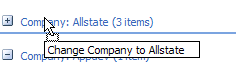
Yes! Create a group by view and drag contacts between groups. This technique works with any Outlook item for many Outlook fields, including Private and Company but won't work on fields that aren't editable. You can use it to add Categories but not remove them.
- Make sure at least one item has the new field value.
- Create a new view or edit one of the existing group by views to group by the field you want to change
- Apply the view.
- Select one or more items from the other groups and drag them to the new group and drop.

Leave a Reply